1. Коопсуздук маалыматы
Сураныч, чогултуу жана колдонуу алдында бардык нускамаларды кунт коюп окуп чыгыңыз. Бул колдонмону келечектеги маалымат үчүн сактаңыз.
- Ensure not to exceed the maximum weight capacity of 300 фунтАшыкча жүктөө зыянга же жаракатка алып келиши мүмкүн.
- Adjust the chair according to the user's height and follow the assembly instructions precisely for safe use.
- Балдарды чогултуу жайынан алыс кармаңыз. Майда бөлүктөр муунуп калуу коркунучун жаратышы мүмкүн.
- Regularly check all bolts and screws to ensure they are tightened. Re-tighten if necessary.
- Стулга турбаңыз.
- Отургучту кеңсе же стол отургучу катары гана максаттуу колдонулушу үчүн колдонуңуз.

Image: SGS BIFMA certified gas lift, indicating compliance with safety and durability standards.
2. Пакеттин мазмуну
Монтаждоону баштоодон мурун бардык компоненттер бар экендигин текшериңиз. Эгерде кандайдыр бир бөлүктөрү жок же бузулуп калса, кардарларды колдоо менен байланышыңыз.
- Backrest Assembly (1)
- Отуруучу жаздык (1)
- баштык (1)
- Колтуктар (2)
- Газ көтөргүч цилиндр (1)
- Star Base (1)
- Дөңгөлөктөр (5)
- Механизм плитасы (1)
- Hardware Kit (Screws, Washers, Allen Wrench) (1)
- Колдонуучунун колдонмосу (1)
3. Монтаждоо боюнча нускамалар
Assembly typically takes 10-15 minutes. Follow these steps carefully.
- Дөңгөлөктөрдү базага тиркөө: Insert the five casters into the holes at the end of each leg of the star base until they click securely into place.
- Газ лифтин киргизүү: Газ көтөргүч цилиндрди жылдызчанын негизинин борбордук тешигине коюңуз.
- Механизмдин пластинасын отургучка бекитүү: Align the mechanism plate with the pre-drilled holes on the underside of the seat cushion. Ensure the lever is on the right side when facing the front of the seat. Secure with screws from the hardware kit using the provided Allen wrench.

Сүрөт: асты view of the chair's mechanism plate, which attaches to the seat and controls adjustments.
- Колтук таянычтарын отургучка бекитүү: Колтук таянычтарын атайын бурамалар менен отургуч жаздыкчасынын капталдарына бекитиңиз. Алардын бекем бекитилгенин текшериңиз.
- Аркасын отургучка бекитүү: Align the backrest with the mounting points on the seat cushion and armrests. Secure with screws.
- Баш тирөөчтү бекитүү: Insert the headrest into the top of the backrest until it is securely in place.
- Отургучту газ лифтине туташтырыңыз: Carefully place the assembled seat and backrest onto the gas lift cylinder, ensuring it is centered and fully seated.

Сүрөт: алдыңкы жана арткы view of the fully assembled Flysky Ergonomic Office Desk Chair.
4. Иштөө нускамалары
The Flysky Ergonomic Office Desk Chair offers multiple adjustments for personalized comfort.
4.1 Adjusting Chair Height
- To raise the seat: While standing, pull the lever located under the right side of the seat upwards. The seat will rise. Release the lever at the desired height.
- To lower the seat: While seated, pull the lever located under the right side of the seat upwards. The seat will lower. Release the lever at the desired height.

Image: Close-up of the height adjustment lever located beneath the seat.
4.2 Adjusting Recline and Tilt Tension
- Recline Function (90°-120°): Push the same lever used for height adjustment inwards to lock the backrest in an upright position (90° work mode). Pull the lever outwards to unlock the recline function, allowing the backrest to tilt back (up to 120° rest/sleep mode).
- Эңкейүү чыңалуусу: Rotate the round knob located under the front-center of the seat. Turn clockwise to increase tilt tension (making it harder to recline) or counter-clockwise to decrease tension (making it easier to recline).

Image: Diagram illustrating the tilt and rocking function, showing the height lock lever and tilt tension knob.
4.3 Adjusting Headrest
- Бийиктигин тууралоо: Gently pull the headrest up or push it down to adjust its vertical position (up to 3.2 inches).
- Бурчту тууралоо: Rotate the headrest forward or backward (up to 90°) to find the optimal angle for neck support.
Сүрөт: деталдуу view of the adjustable headrest, showing lift, down, forward, backward, and rotation capabilities.
4.4 Adjusting Lumbar Support
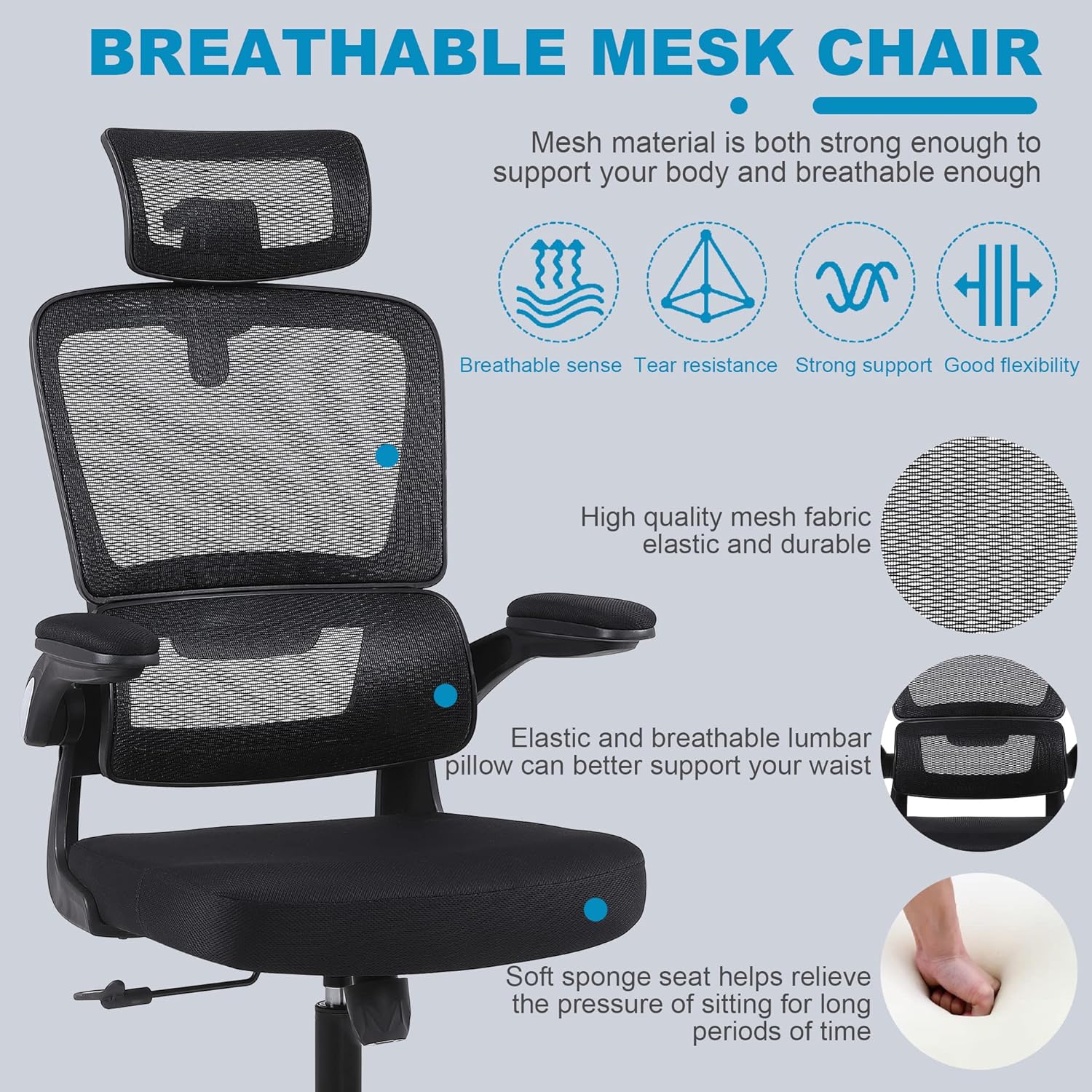
- The chair features a 3D self-adaptive elastic lumbar pillow designed to conform to your lower back. No manual adjustment is typically required for its position, as it flexes with your posture.

Сүрөт: бүттүview of ergonomic design, highlighting headrest, back support, lumbar support, and hip support.
4.5 Using Flip-Up Armrests
- To flip up the armrests: Gently lift the armrests upwards until they lock into a vertical position. This allows the chair to be pushed closer to a desk or stored more compactly.
- To lower the armrests: Pull the armrests downwards until they return to their horizontal position.

Image: Illustration of the flip-up armrest feature, showing the armrest in both down and up positions.
5. Техникалык тейлөө
Proper maintenance will extend the life and appearance of your chair.
- Тазалоо: Жарнама менен тазалаңызamp cloth. For mesh areas, use a soft brush or vacuum cleaner to remove dust and debris. Avoid harsh chemicals or abrasive cleaners.
- Текшерүү: Periodically check all screws and bolts for tightness. Re-tighten as needed to prevent loosening and ensure stability.
- Кастерге кам көрүү: Жылмакай тоголонушун камсыз кылуу үчүн дөңгөлөктөрдү чачтан жана таштандылардан таза кармаңыз.

Image: Close-up of the breathable mesh fabric used for the chair's backrest and headrest.
6. Кыйынчылыктарды
Жалпы маселелер жана алардын чечимдери үчүн бул бөлүмдү караңыз.
| Маселе | Мүмкүн себеп | Чечим |
|---|---|---|
| Стул солкулдап же өзүн туруксуз сезет | Бурамалар бошоп калган же тегиз эмес чогултулган. | Check and tighten all screws, especially those connecting the seat, backrest, and mechanism plate. Ensure casters are fully inserted. |
| Кресло бийиктигин тууралабайт | Gas lift lever not engaged correctly or gas lift cylinder malfunction. | Ensure the lever is fully pulled up. If the issue persists, the gas lift cylinder may need replacement. Contact customer support. |
| Дөңгөлөктөр тегиз жылбайт | Дөңгөлөктөргө же бузулган дөңгөлөктөргө илинип калган урандылар. | Remove any hair or debris from the caster wheels. If damaged, casters can be replaced. |
| Арткы таянгыч жөлөнбөйт же бекитилбейт | Recline lever not engaged or tilt tension too high. | Pull the recline lever outwards to unlock. Adjust the tilt tension knob counter-clockwise to reduce tension. |
7. Техникалык шарттар
Key technical specifications for the Flysky Ergonomic Office Desk Chair Model S5016.
| Өзгөчөлүк | Деталь |
|---|---|
| Модель аты | S5016 |
| Бренд | Flysky |
| Түс | Mesh Black |
| Продукциянын өлчөмдөрү (D x W x Y) | 28" Т x 22" Т x 42" Б (Бийиктигин жөнгө салууга болот) |
| Максималдуу салмак боюнча сунуш | 300 фунт |
| Элемент Салмагы | 20 фунт |
| Артка стили | Mesh Back |
| Өзгөчөлүктөр | Adjustable Height, Arm Rest (Flip-Up), Ergonomic, Head Support, Rolling, Lumbar Support |
| Жаткан позициясынын саны | >=2 (90°-120°) |
| Материалды толтуруу | Тор |
| Эмерек базасы кыймылы | Айлануучу |

Image: Diagram showing the key dimensions of the Flysky Ergonomic Office Desk Chair.

Image: Illustration of the chair's sturdy base, highlighting its 300 lbs weight capacity.
8. Кепилдик жана колдоо
For warranty information, technical support, or to inquire about replacement parts, please contact Flysky customer service. Refer to the contact information provided with your purchase or visit the official Flysky webсайт.
We are committed to assisting you with any questions or concerns regarding your product.


