1. Киришүү
Thank you for choosing the Gembird USB-C Gigabit Network Adapter with 3-Port USB 3.1 Hub. This device is designed to expand the connectivity of your USB-C enabled laptop, tablet, or computer, providing both high-speed Gigabit Ethernet and additional USB 3.1 ports. This manual provides essential information for setting up, operating, and maintaining your device.
2. Продукциянын өзгөчөлүктөрү
- USB-C туташуусу: Connects to your host device via a reversible USB-C port.
- Гигабит Ethernet порту: Provides a stable and fast wired network connection up to 1000 Mbps.
- 3-Port USB 3.1 Hub: Adds three USB 3.1 ports for connecting peripherals such as external hard drives, flash drives, keyboards, and mice.
- Жогорку ылдамдыктагы маалыматтарды өткөрүп берүү: USB 3.1 ports support data transfer rates up to 5 Gbps.
- Plug and Play: No driver installation required for most modern operating systems.
3. Пакеттин мазмуну
Please ensure the following items are included in your package:
- Gembird USB-C Gigabit Network Adapter with 3-Port USB 3.1 Hub (Model A-CMU3-LAN-01)
4. Продукт бүтүп калдыview
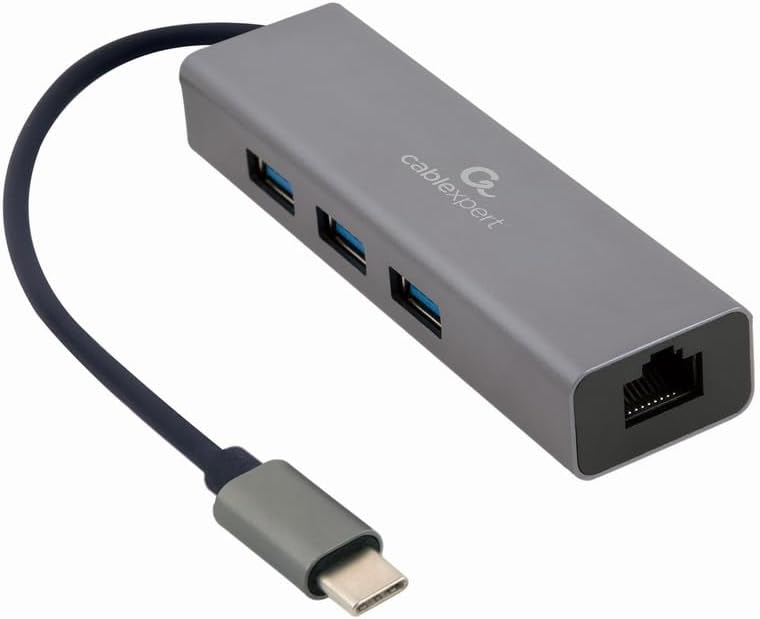
1-сүрөт: Фронт view of the Gembird USB-C Gigabit Network Adapter, showing the USB-C cable, three USB 3.1 ports, and the RJ45 Gigabit Ethernet port.

2-сүрөт: Retail packaging for the Gembird USB-C Gigabit Network Adapter, highlighting key features like USB Type-C, USB 3.1 x 3, RJ45, Gigabit, 1000 Mbps, and Plug & Play.
5. Орнотуу
Follow these steps to set up your Gembird USB-C Gigabit Network Adapter:
- Хост түзмөккө туташуу: Plug the USB-C connector of the adapter into an available USB-C port on your laptop, tablet, or computer.
- Тармакка туташуу: Insert an Ethernet cable (RJ45) from your router or modem into the Gigabit Ethernet port on the adapter.
- USB перифериялык түзүлүштөрдү туташтыруу: Plug your USB devices (e.g., flash drives, external hard drives, mouse, keyboard) into the three available USB 3.1 ports on the adapter.
- Драйверди орнотуу: The adapter is typically plug-and-play. Your operating system (Windows, macOS, Linux, Chrome OS) should automatically detect and install the necessary drivers. If prompted, allow the system to install drivers.
6. Иштөө нускамалары
Once connected, the adapter functions automatically:
- Тармакка кирүү: Your host device should now have a wired network connection. You can verify this in your operating system's network settings.
- USB Device Access: Connected USB peripherals will be recognized by your host device and function as if directly connected.
7. Кыйынчылыктарды
Эгер көйгөйлөргө туш болсоңуз, төмөнкү жалпы көйгөйлөрдү жана чечимдерди караңыз:
- Тармак туташуусу жок:
- Ethernet кабелинин адаптерге да, роутерге/модемге да бекем туташтырылганын текшериңиз.
- Роутериңиздин/модемиңиздин туура иштешин текшериңиз.
- Хост түзмөгүңүздөгү тармак жөндөөлөрүн текшериңиз.
- Try connecting the adapter to a different USB-C port on your host device.
- USB түзмөктөрү таанылбайт:
- Ensure USB devices are properly plugged into the adapter's USB 3.1 ports.
- Try connecting the USB device directly to your host computer to confirm it is functional.
- Some high-power USB devices may require an external power source if your host device's USB-C port does not provide sufficient power (this adapter does not have a dedicated power input).
- Жай тармак ылдамдыгы:
- Ensure your Ethernet cable is rated for Gigabit speeds (Cat5e or higher).
- Verify your internet service provider's speed and your router's capabilities.
- Ensure your host device's USB-C port supports USB 3.0/3.1 speeds.
8. Техникалык шарттар
| Модель номери | A-CMU3-LAN-01 |
| Аппараттык интерфейс | USB-C (Host), USB 3.1 (Hub), RJ45 (Ethernet) |
| Жалпы USB порттору | 3 3.1 (USB XNUMX) |
| Ethernet порттору | 1 (Gigabit RJ45) |
| Маалыматтарды өткөрүү ылдамдыгы (USB) | Up to 5 Gbps (USB 3.1) |
| Data Transfer Rate (Ethernet) | 10/100/1000 Мбит/сек |
| Продукциянын өлчөмдөрү | 10 x 2 x 2.7 дюйм |
| Элемент Салмагы | 2.46 унция |
9. Техникалык тейлөө
To ensure the longevity and optimal performance of your adapter:
- Тазалоо: Use a soft, dry cloth to clean the exterior of the device. Avoid liquid cleaners or solvents.
- Сактагыч: Колдонулбаган учурда адаптерди салкын, кургак жерде, күндүн түз тийген нурларынан жана өтө жогорку температурадан алыс сактаңыз.
- Колдонуу: Avoid dropping or subjecting the device to strong impacts. Do not attempt to disassemble the adapter.
10. Кепилдик жана колдоо
This Gembird product comes with a заводдук кемчиликтерге каршы эки жылдык кепилдик. Кепилдик дооматтары үчүн сатып алганыңыздын далилин сактап коюңуз.
For technical support or warranty inquiries, please contact your retailer or visit the official Gembird webбайланыш маалыматы үчүн сайт.


