1. Киришүү
The Contixo E9 Smart Floodlight Security Camera is designed to provide comprehensive outdoor surveillance with advanced features. This manual will guide you through the installation, setup, and operation of your new security camera, ensuring optimal performance and security for your property.
Негизги өзгөчөлүктөрү:
- 2.5K (3MP) Full HD Video: High-resolution live streaming and recording.
- Adjustable Bright Floodlight: Up to 1000 Lumens for enhanced visibility and deterrence.
- Colored & Infrared Night Vision: Clear surveillance even in low-light conditions.
- Эки тараптуу аудио: Коноктор менен алыстан байланышыңыз же баскынчыларды токтотуңуз.
- PIR кыймылды аныктоо: Accurate detection with customizable sensitivity.
- Сирен сигналы: Deter unwanted activity with an audible alarm.
- IP65 аба ырайы: Ар кандай аба ырайынын шарттарында сыртта колдонуу үчүн бышык дизайн.
- Cloud/SD Card Storage: Flexible options for video footagд сактоо.
- Smart App Control: Manage settings and view feeds via the Xodo Smart App.
- Үн жардамчысы интеграциясы: Amazon Alexa жана Google Assistant менен шайкеш келет.
2. Кутуда эмне бар
Сураныч, пакетиңиздин мазмунун текшериңиз, бардык буюмдар бар жана жакшы абалда.
- 1x Contixo E9 Smart Floodlight Security Camera
- 1x Колдонуучунун колдонмосу (бул документ)
- 4x орнотуу бурамалары
- 1x USB кабели
- 1x Power адаптер
3. Орнотуу жана орнотуу
Follow these steps to install and set up your Contixo E9 camera.
3.1 Алдын ала орнотуу текшерүү тизмеси
- Ensure you have a 2.4GHz Wi-Fi network available at the installation location. The camera does not support 5GHz Wi-Fi.
- Identify a suitable outdoor location with access to a power outlet. The camera requires a wired power connection and is not battery-operated.
- жүктөп алыңыз Xodo Smart App смартфонуңуздун колдонмолор дүкөнүнөн (iOS же Android).
3.2 Физикалык орнотуу
- Монтаждоо ордун тандаңыз: Каалаган жерди тандаңыз viewing angle and is within reach of a power outlet. The camera is IP65 weatherproof, suitable for outdoor environments.
- Камераны орнотуу: Use the provided screws to securely mount the camera to a wall or suitable surface. Ensure the mounting is stable.
- Туташуу кубаты: Plug the USB cable into the camera and connect the power adapter to a nearby electrical outlet. The camera will power on.

Image: The Contixo E9 camera showing its USB power cable and plug adapter, highlighting the easy DIY installation process. A power socket is required for operation.
3.3 Колдонмону орнотуу жана жупташтыруу
- Open Xodo Smart App: Launch the Xodo Smart App on your smartphone. If you are a new user, register an account.
- Түзмөк кошуу: Tap the "+" icon or "Add Device" to begin the pairing process. Select "Security Camera" or "Smart Floodlight Camera" from the device list.
- Экрандагы көрсөтмөлөрдү аткарыңыз: The app will guide you through connecting the camera to your 2.4GHz Wi-Fi network. This typically involves scanning a QR code displayed on your phone with the camera lens.
- Камераңызды атаңыз: Once connected, assign a name to your camera (e.g., "Front Yard Camera," "Back Door Floodlight").

Image: A smartphone screen showing the Xodo Smart App, illustrating the various controls available for the camera, including live view, dimming, siren activation, and real-time notifications.
4. Иштөө нускамалары
Learn how to use the various functions of your Contixo E9 camera.
4.1 Live View жана Жаздыруу
- Түз эфирге кирүү: Open the Xodo Smart App and select your camera to view the live 2.5K HD video stream.
- Manual Recording/Snapshots: Use the controls within the app to manually record video or take still images from the live feed.
- Ойнотуу: Жазылган footage from the cloud storage (subscription required) or a locally inserted Micro SD card (not included).

Image: The Contixo E9 camera mounted on a building, with a smartphone showing its live 2.5K Full HD video feed, demonstrating real-time monitoring.
4.2 Эки тараптуу аудио
Камерада эки тараптуу байланыш үчүн орнотулган микрофон жана динамик бар.
- Initiate Talk: Ал эми viewing the live feed, tap the microphone icon in the app to speak through the camera's speaker.
- Угуу: The camera's microphone will pick up audio from its surroundings, allowing you to hear what's happening.
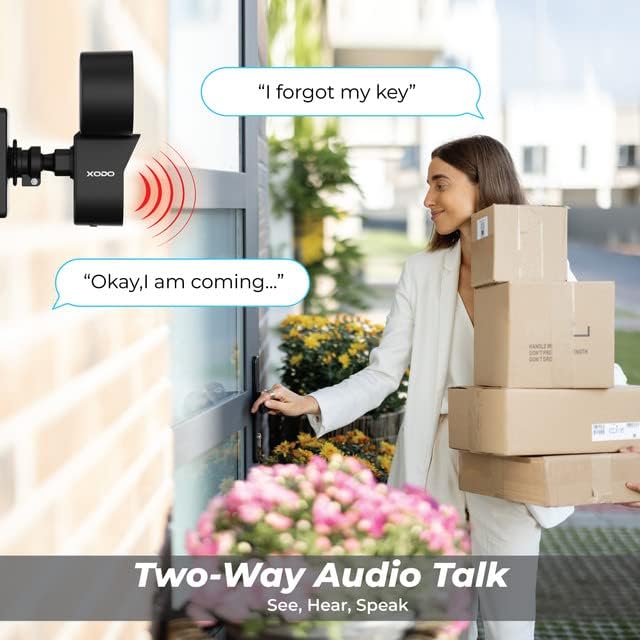
Image: A visual representation of the two-way audio feature, showing a user communicating with a delivery person via the camera.
4.3 Кыймылды аныктоо жана эскертүүлөр
The E9 camera uses PIR motion detection to identify activity and send alerts.
- Иштетүү/Өчүрүү: Adjust motion detection settings within the Xodo Smart App.
- Сезимталдуулук: Customize the PIR sensitivity to reduce false alarms (e.g., from passing cars or small animals).
- Эскертмелер: Кыймыл аныкталганда смартфонуңузга заматта push эскертмелерин алыңыз.
- Сирен сигналы: Activate the built-in siren manually or set it to trigger automatically upon motion detection via the app.

Image: The Contixo E9 camera detecting a figure at night, with icons indicating flashlight alarm, siren alert, and motion detection notifications, highlighting its security capabilities.
4.4 Night Vision and Floodlight Control
The E9 camera offers versatile night vision options and an adjustable floodlight.
- Colored Night Vision: The floodlight can illuminate the area to provide full-color video at night.
- Инфракызыл түнкү көрүнүш: For discreet monitoring, the camera can use infrared LEDs for black and white night vision without the floodlight.
- Прожектордун жарыктыгы: Adjust the floodlight brightness (800lm-1000lm) and schedule its operation through the Xodo Smart App.

Image: Comparison of Smart Mode, Color Light Mode, and Infrared Mode for night vision, illustrating the camera's ability to provide clear footagар кандай жарык шарттарында e.
4.5 Smart Assistant интеграциясы
Integrate your Contixo E9 camera with Amazon Alexa or Google Assistant for voice control.
- Connect Accounts: Link your Xodo Smart account to your Alexa or Google Home app.
- Үн буйруктары: Use commands like "Alexa, show me the backyard" or "Hey Google, show the front door camera" to view your live feed on compatible smart displays.

Image: A user interacting with a smart assistant to view the camera feed, highlighting compatibility with Amazon Alexa and Google Assistant.
5. Техникалык тейлөө
Туура тейлөө камераңыздын узак мөөнөттүү жана оптималдуу иштешин камсыз кылат.
- Тазалоо: Periodically clean the camera lens and floodlight cover with a soft, damp чаңды жана калдыктарды тазалоо үчүн кездеме. Катуу химиялык заттарды колдонбоңуз.
- Программалык камсыздоонун жаңыртуулары: Regularly check the Xodo Smart App for available firmware updates. Updates often include performance improvements and security enhancements.
- Кубат туташуу: Электр кабелинин бекем туташып турганын жана бузулбаганын текшериңиз.
6. Кыйынчылыктарды
If you encounter issues with your Contixo E9 camera, refer to the following common solutions.
| Көйгөй | Мүмкүн чечим |
|---|---|
| Камера Wi-Fi'га туташпай жатат. |
|
| Жандуу эмес view же жаздыруу. |
|
| Motion detection is too sensitive/not sensitive enough. |
|
| Эки тараптуу аудио так эмес же иштебей жатат. |
|
If these solutions do not resolve your issue, please contact Contixo customer support.
7. Техникалык шарттар
| Өзгөчөлүк | Деталь |
|---|---|
| Модель аты | E9 |
| Video Resolution | 2.5K (3MP), 2304 pixels |
| Байланыш | Wired Power, Wi-Fi (2.4GHz only) |
| Түнкү көрүнүш | Colored & Infrared Night Vision |
| Прожектордун жарыктыгы | 800lm-1000lm (Adjustable) |
| Аудио | 2-Way Audio (Microphone & Speaker) |
| Motion Detection | PIR Кыймыл сенсору |
| Сактагыч параметрлери | Cloud Storage (subscription), Micro SD Card (not included) |
| Аба ырайына каршы рейтинг | IP65 |
| Шайкеш түзмөктөр | Смартфон (iOS/Android), Amazon Alexa, Google Жардамчысы |
| Power Source | Электр зымдары |
| Элементтин өлчөмдөрү | 7.1 x 4.7 x 5.5 дюйм |
| Элемент Салмагы | 1.4 фунт |
8. Кепилдик жана колдоо
8.1 Кепилдик маалыматы
Contixo products are covered by a limited warranty. For specific details regarding your product's warranty period and terms, please refer to the warranty card included in your product packaging or visit the official Contixo webсайт.
8.2 Кардарларды колдоо
If you require further assistance, technical support, or have questions not covered in this manual, please contact Contixo customer support:
- Онлайн колдоо: зыярат кылыңыз Contixo Store on Amazon же алардын кызмат адамы webКөп берилүүчү суроолор жана колдоо булактары үчүн сайт.
- Байланыш маалыматы: Refer to your product packaging or the Contixo webакыркы байланыш маалыматтары үчүн сайт (телефон, электрондук почта).


