1. Introduction and Overview
The COROS APEX 2 Pro is an advanced outdoor GPS watch engineered for durability and precision. It combines robust construction with comprehensive tracking features, making it an ideal companion for various outdoor activities and rigorous training. This manual provides essential information on setting up, operating, maintaining, and troubleshooting your device.
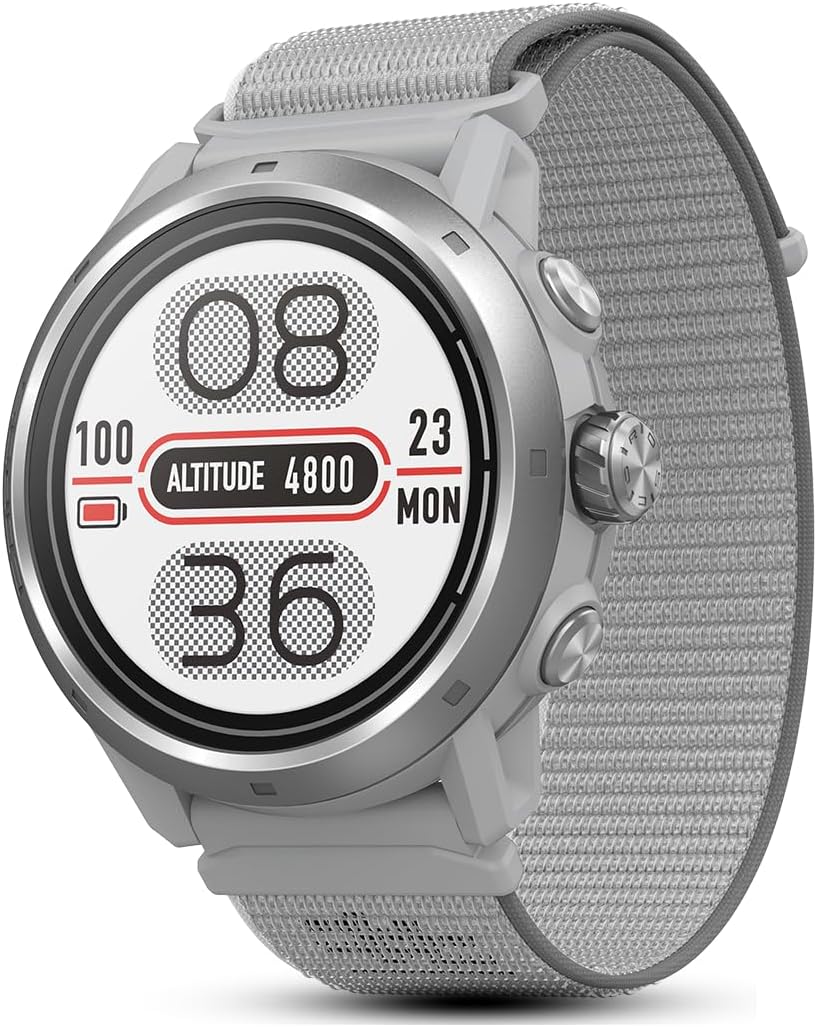
Сүрөт 1: Алдыңкы view of the COROS APEX 2 Pro GPS Watch.
Негизги өзгөчөлүктөрү:
- Узартылган батареянын иштөө мөөнөтү: Up to 30 days of regular use or 75 hours in full GPS tracking mode.
- Superior GPS Accuracy: Dual-frequency GPS and all-satellite GNSS chipset for precise data.
- On-Wrist Navigation: Downloadable global Landscape and regional Topo maps.
- Advanced Training Solutions: Insights on training load, recovery, and workout building.
- Жүрөктүн кагышын так көзөмөлдөө: New 5-LED optical heart rate sensor with 4 photodetectors.
- Туруктуу дизайн: Sapphire glass screen and grade 5 titanium alloy bezel for enhanced protection.
- Wide Activity Support: Includes Run, Bike, Swim, Ski, Mountain Climb, Strength, and more.
2. Орнотуу жана алгачкы колдонуу
Follow these steps to set up your COROS APEX 2 Pro watch for the first time:
- Саатты заряддоо: Кубаттоочу кабелди саатка жана USB кубат булагына туташтырыңыз. Биринчи жолу колдонуудан мурун саат толук заряддалганын текшериңиз.
- Download the COROS App: Install the official COROS app on your smartphone from your device's app store.
- Смартфон менен жупташуу: Open the COROS app, create an account or log in, and follow the on-screen instructions to pair your watch via Bluetooth.
- Баштапкы конфигурация: The app will guide you through setting up personal information, time zone, and initial preferences.
- Микропрограмманы жаңыртуу: Check for and install any available firmware updates through the COROS app to ensure optimal performance and access to the latest features.

Figure 2: The COROS APEX 2 Pro product packaging.
3. Operating Your COROS APEX 2 Pro
3.1. Battery Life Management
The APEX 2 Pro offers extended battery performance. To maximize battery life, ensure regular software updates and manage GPS modes according to your activity needs. The watch takes less than 2 hours to go from zero to full charge.

Figure 3: Battery life comparison between APEX 2 and APEX 2 Pro models.
3.2. GPS Accuracy and Navigation
The watch features a 50% higher performance antenna and an All-Satellite GNSS chipset, receiving signals from all five major satellite systems for highly precise data. The APEX 2 Pro also includes dual-frequency technology for enhanced accuracy.

Figure 4: Internal components related to GPS accuracy in COROS watches.
Utilize the downloadable global Landscape and regional Topo maps for on-wrist navigation. You can sync and follow routes created in the COROS app directly on your watch.

Figure 5: On-wrist navigation using global offline maps.
3.3. Heart Rate Мониторинг
The new optical heart rate sensor features a 5-LED system with 4 photodetectors, providing advanced data accuracy for both daily tracking and activity monitoring.

Figure 6: Heart rate monitoring in action.
3.4. Activity Modes and Training Solutions
The COROS APEX 2 Pro supports a wide range of activity modes including Run, Bike, Swim, Ski, Mountain Climb, and Strength. Settings can be easily adjusted via the COROS app or directly on the watch.
Leverage advanced training solutions like training load trend, recovery timer, and workout builder to transform your data into actionable insights. The COROS app and Training Hub provide comprehensive tools for personalized training.

Figure 7: Creating training plans in the COROS Training Hub.

Figure 8: Tracking recovery and sleep quality with the COROS app.
3.5. Узактыгы жана дизайн
The watch is built with a sapphire glass screen and a grade 5 titanium alloy bezel, providing robust protection for the internal electronic components. The 1.3-inch Always-On Memory LCD Touch Sapphire Screen and PVD-coated bezel are scratch-resistant.

Figure 9: Design features emphasizing durability.
The APEX 2 Pro is 5 ATM water resistant, suitable for open water activities and capable of withstanding pressures up to a depth of 50m. It is also temperature resistant, operating in temperatures ranging from -20°C to 50°C.

Figure 10: Water resistance of the COROS APEX 2 Pro.

Figure 11: Temperature resistance from -20°C to 50°C.
3.6. Расмий продукт Video
Video 1: Official COROS APEX 2/2 Pro overview, showcasing features and use in various outdoor environments.
4. Техникалык тейлөө
Proper maintenance ensures the longevity and optimal performance of your COROS APEX 2 Pro watch:
- Тазалоо: Саатты жана боону жумшак менен дайыма тазалап, гamp кездеме. Катуу химиялык заттардан же абразивдүү материалдардан алыс болуңуз.
- Заряддоо: Use only the provided charging cable. Avoid exposing the charging contacts to excessive moisture or dirt.
- Программалык камсыздоо жаңыртуулары: Periodically check for and install firmware updates via the COROS app to benefit from performance improvements and new features.
- Сактагыч: Саатты көпкө чейин колдонбогон учурда, салкын, кургак жерде сактаңыз.
5. Кыйынчылыктарды
If you encounter issues with your COROS APEX 2 Pro, consider the following common solutions:
- Күйгүзүлбөйт: Ensure the watch is fully charged. If it still doesn't turn on, try a soft reset by holding down the digital dial and back button simultaneously for 15 seconds.
- GPS сигналынын көйгөйлөрү: Ачык жерде экениңизди тактаңыз view of the sky. Syncing with the COROS app before an activity can help update satellite data.
- Bluetooth туташуу көйгөйлөрү: Ensure Bluetooth is enabled on your phone and watch. Try unpairing and re-pairing the device in the COROS app. Restarting both devices can also resolve connectivity issues.
- Жүрөктүн кагышынын так эместиги: Ensure the watch is worn snugly on your wrist, about one finger-width above the wrist bone. Clean the optical sensor regularly.
- Батареянын бат түгөнүп калышы: Reduce the frequency of GPS recording (e.g., from Every Second to Smart Recording), turn off unnecessary notifications, or reduce screen brightness.
For more detailed troubleshooting or persistent issues, refer to the official user guide or contact COROS customer support.
6. Техникалык шарттар
| Өзгөчөлүк | Деталь |
|---|---|
| Бренд | КОРОС |
| Модель номери | W521 |
| Продукциянын өлчөмдөрү | 5 x 5 x 5 дюйм |
| Элемент Салмагы | 1.87 унция (53 грамм) |
| Screen Size | 1.3 дюйм |
| Дисплей түрү | Always-On Memory LCD Touch Sapphire Screen |
| Беттик материал | Grade 5 Titanium Alloy with PVD Coating |
| Суу каршылык | 5 банкомат (50 метр) |
| Батареянын иштөө мөөнөтү (үзгүлтүксүз колдонуу) | 30 күн |
| Батареянын иштөө мөөнөтү (толук GPS) | 75 саат |
| GPS | Built-in GPS, Dual-Freq, All-Satellite GNSS |
| Жүрөктүн кагышынын сенсору | New optical heart rate sensor (5-LED system, 4 photodetectors) |
| Эстутум сактоо сыйымдуулугу | 32 ГБ |
| Операция системасы | Self-developed embedded operating system |
| Байланыш технологиясы | Bluetooth |
7. Кутуда эмне бар
Upon opening your COROS APEX 2 Pro package, you should find the following items:
- COROS APEX 2 Pro Watch
- Көрүү тобу
- Заряддоо кабели
- Synopsis / Quick Start Guide
- Next-generation optical heart rate sensor (integrated)
- Free global offline landscape and topographical maps (downloadable)

Figure 12: Contents typically found in the COROS APEX 2 Pro packaging.
8. Кепилдик жана колдоо
For detailed warranty information and customer support, please refer to the official COROS website or the comprehensive user guide provided in PDF format.
Расмий колдонуучу колдонмосу (PDF): Бул жерден жүктөп алыңыз
For further assistance, you may contact COROS customer support directly through their official channels.


