REAL-EL X-770 көчмө динамик колдонуучусунун колдонмосу
Модел: EL121600004
1. Киришүү
Thank you for choosing the REAL-EL X-770 Portable Speaker. This manual provides essential information for the safe and efficient operation of your device. Please read it thoroughly before use and retain it for future reference.
2. Коопсуздук маалыматы
Түзмөгүңүздүн коопсуз иштешин камсыз кылуу жана ага зыян келтирбөө үчүн, төмөнкү сактык чараларын сактаңыз:
- Динамикти сууга, нымдуулукка же экстремалдык температурага дуушар кылбаңыз.
- Спикерди түшүрүүдөн же катуу таасирлерге дуушар кылуудан качыңыз.
- Динамикти өз алдынча ажыратууга, оңдоого же өзгөртүүгө аракет кылбаңыз. Жардам алуу үчүн квалификациялуу тейлөө кызматкерлерине кайрылыңыз.
- Динамикти жылуулук булактарынан, тике күн нурларынан жана күйүүчү материалдардан алыс кармаңыз.
- Түзмөктү кубаттоо үчүн көрсөтүлгөн кубаттоочу кабелди жана кубат адаптерин (эгер кошулган болсо) гана колдонуңуз.
- Үндүн катуу деңгээлинде узакка созулган угуу угуунун бузулушуна алып келиши мүмкүн.
3. Пакеттин мазмуну
Кутучаны кылдаттык менен ачып, бардык буюмдардын бар экенин текшериңиз:
- REAL-EL X-770 Portable Speaker Unit
- Charging Cable (USB-A to USB-C, or similar, specific type not provided)
- Колдонуучунун Колдонмосу (бул документ)
Note: The product data mentioned "Camera Body" as an included component. This is likely an error. The actual included components for a portable speaker typically include the speaker unit and a charging cable.
4. Продукт бүтүп калдыview
Familiarize yourself with the main components of your REAL-EL X-770 Portable Speaker:
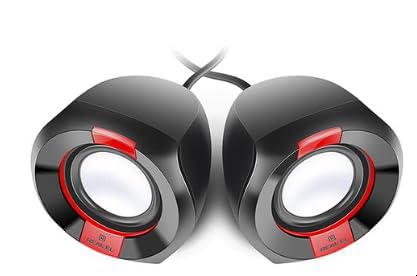
Сүрөт 1: Алдыңкы view of the REAL-EL X-770 Portable Speaker. This image displays the speaker's compact design, the main speaker grille, and typical control buttons for power, volume, and playback.
- Кубат баскычы: Динамикти күйгүзүү/өчүрүү үчүн басып кармап туруңуз.
- Үнүн жогорулатуу/Кийинки трек баскычы: Үнүн жогорулатуу үчүн кыска басыңыз, кийинки трекке узакка басыңыз.
- Үндү азайтуу/Мурунку трек баскычы: Үндү азайтуу үчүн кыска басыңыз, мурунку трек үчүн көпкө басыңыз.
- Ойнотуу/тындыруу баскычы: Аудиону ойнотуу же тындыруу үчүн басыңыз.
- Режим баскычы: Press to switch between input modes (e.g., Bluetooth, HDMI, AUX).
- Заряддоо порту: Заряддоо кабелин туташтыруу үчүн.
- HDMI порту: For audio input from compatible devices.
5. Орнотуу
5.1 Динамикти заряддоо
- Заряддоо кабелин динамиктин заряддоо портуна туташтырыңыз.
- Connect the other end of the charging cable to a USB power adapter (not included) or a powered USB port.
- Динамик зарядталып жатканын көрсөтүү үчүн заряддоо индикатору күйөт (түсү ар кандай болушу мүмкүн).
- Once fully charged, the indicator light may change color or turn off. Disconnect the speaker from the charger.
5.2 Күйгүзүү/өчүрүү
- To power ON: Press and hold the Кубат баскычы for approximately 3 seconds. An indicator light will turn on, and you may hear an audible prompt.
- To power OFF: Press and hold the Кубат баскычы for approximately 3 seconds. The indicator light will turn off, and you may hear an audible prompt.
6. Динамикти иштетүү
6.1 Bluetooth жупташтыруу
- Ensure the speaker is powered ON and in Bluetooth pairing mode (usually indicated by a flashing blue LED). If not, press the Режим баскычы until Bluetooth mode is active.
- Мобилдик түзмөгүңүздө (смартфон, планшет, компьютер) Bluetooth'ду күйгүзүп, жеткиликтүү түзмөктөрдү издеңиз.
- Select "REAL-EL X-770" from the list of found devices.
- Once paired, the speaker will emit a confirmation sound, and the Bluetooth indicator light will stop flashing and remain solid.
- Эми сиз түзмөгүңүздөн аудиону динамик аркылуу ойной аласыз.
6.2 HDMI Audio Input
The REAL-EL X-770 supports audio input via HDMI. This allows connection to devices such as TVs, gaming consoles, or media players that output audio through HDMI.
- Connect an HDMI cable (not included) from the audio output port of your source device to the HDMI input port on the REAL-EL X-770 speaker.
- Power on both the speaker and the source device.
- басыңыз Режим баскычы on the speaker until the HDMI input mode is selected.
- Ensure the audio output settings on your source device are configured to send audio via HDMI.
- Adjust the volume on both the speaker and the source device as needed.
6.3 Үндү башкаруу
- To increase volume: Short press the Үндү жогорулатуу/Кийинки трек баскычы.
- To decrease volume: Short press the Көлөмдү төмөндөтүү/Мурунку трек баскычы.
6.4 Ойноону башкаруу
- To play/pause: Press the Ойнотуу/тындыруу баскычы.
- To skip to the next track: Long press the Үндү жогорулатуу/Кийинки трек баскычы.
- To go to the previous track: Long press the Көлөмдү төмөндөтүү/Мурунку трек баскычы.
7. Техникалык тейлөө
7.1 Тазалоо
- Динамиктин сыртын жумшак, кургак, мамыксыз чүпүрөк менен сүртүңүз.
- Абразивдүү тазалоочу каражаттарды, спиртти, бензолду же башка химиялык эриткичтерди колдонбоңуз, анткени алар бетке зыян келтириши мүмкүн.
- Ар кандай тешиктерге ным кирүүдөн сактаңыз.
7.2 Сактоо
- Узак мөөнөткө колдонулбаганда, динамикти салкын, кургак жерде, тике күн нурунан жана экстремалдык температурадан алыс сактаңыз.
- It is recommended to charge the speaker at least once every three months to maintain battery health.
8. Кыйынчылыктарды
| Көйгөй | Мүмкүн себеп | Чечим |
|---|---|---|
| Динамик күйбөйт. | Батарея түгөнүп калды. | Динамикти толук заряддаңыз. |
| Динамиктен үн чыкпайт. | Volume is too low or muted. Incorrect input mode selected. Device not paired (Bluetooth). | Increase volume on both speaker and source device. Ensure correct input mode (Bluetooth/HDMI). Re-pair Bluetooth device. |
| Bluetooth аркылуу жупташтыруу мүмкүн эмес. | Динамик жупташтыруу режиминде эмес. Түзмөк өтө алыс. Интерференция. | Ensure speaker is in Bluetooth pairing mode. Move devices closer. Turn off other Bluetooth devices. |
| HDMI audio not working. | Incorrect mode. Cable issue. Source device settings. | Ensure speaker is in HDMI mode. Check HDMI cable connection. Verify source device audio output settings. |
9. Техникалык шарттар
| Өзгөчөлүк | Деталь |
|---|---|
| Бренд | РЕАЛ-ЭЛ |
| Модель аты | X-770 |
| Модель номери | EL121600004 |
| Байланыш технологиясы | HDMI, Bluetooth (assumed for portable speaker) |
| Продукциянын өлчөмдөрү | 25.4 x 5.08 x 6.86 см |
| Элемент Салмагы | 5.29 килограмм |
| Түс | көп түстүү |
| Батареялар камтылган | Жок |
| Батареялар талап кылынат | Жок |
Note: While the product data indicates no batteries are included or required, portable speakers typically feature an internal rechargeable battery for wireless operation. This specification might refer to the absence of user-replaceable or external batteries. The speaker is designed to be charged via its charging port. Specifications are subject to change without prior notice. For the most up-to-date information, please refer to the manufacturer's official webсайт.
10. Кепилдик жана колдоо
The REAL-EL X-770 Portable Speaker comes with a manufacturer's warranty. Please refer to the warranty card included with your purchase or visit the official REAL-EL webдеталдуу кепилдик шарттары жана шарттары үчүн сайт.
For technical support, service inquiries, or further assistance, please contact REAL-EL customer service through their official channels. Contact information can typically be found on the product packaging or the manufacturer's webсайт.


