1. Киришүү
This manual provides essential information for the safe and correct operation of your Vonyx VMM100 4-Channel DJ Mixer. Please read this manual thoroughly before using the device to ensure optimal performance and to prevent damage. Keep this manual for future reference.
2. Коопсуздук нускамалары
- электр менен жабдууну камсыз кылуу voltage түзмөк үчүн көрсөтүлгөн талаптарга дал келет.
- Do not expose the device to rain or moisture to avoid electric shock.
- Аппаратты жылуулук булактарынын жанына же тике күн нуруна коюудан алыс болуңуз.
- в ачпагылаasing; ичинде колдонуучу тейлей турган тетиктер жок. Бардык тейлөө иштерин квалификациялуу адистерге тапшырыңыз.
- Disconnect the power adapter during thunderstorms or when not in use for extended periods.
- Аппаратты балдардан алыс кармаңыз.
3. Продукциянын өзгөчөлүктөрү
- Compact 4-channel analog mixer.
- Зымсыз аудио агымы үчүн Bluetooth байланышы.
- Integrated USB MP3 player with digital display.
- Adjustable delay effect with dedicated volume control.
- Effect send/return on channels 1 and 2.
- High and low tone controls for each channel.
- USB power supply (5V) for mobile use, compatible with power banks.
- Channels 1 and 2 feature +48V phantom power for condenser microphones.
- LED VU meter and peak indicators for signal monitoring.
- Includes USB power adapter and USB cable.
4. Пакеттин мазмуну
Таңгактан чыгарганда бардык буюмдардын бар экенин текшериңиз:
- Vonyx VMM100 4-Channel DJ Mixer
- USB кубат адаптери
- USB кабели
- Колдонуучунун Колдонмосу (бул документ)
5. Башкаруу элементтери жана функциялар
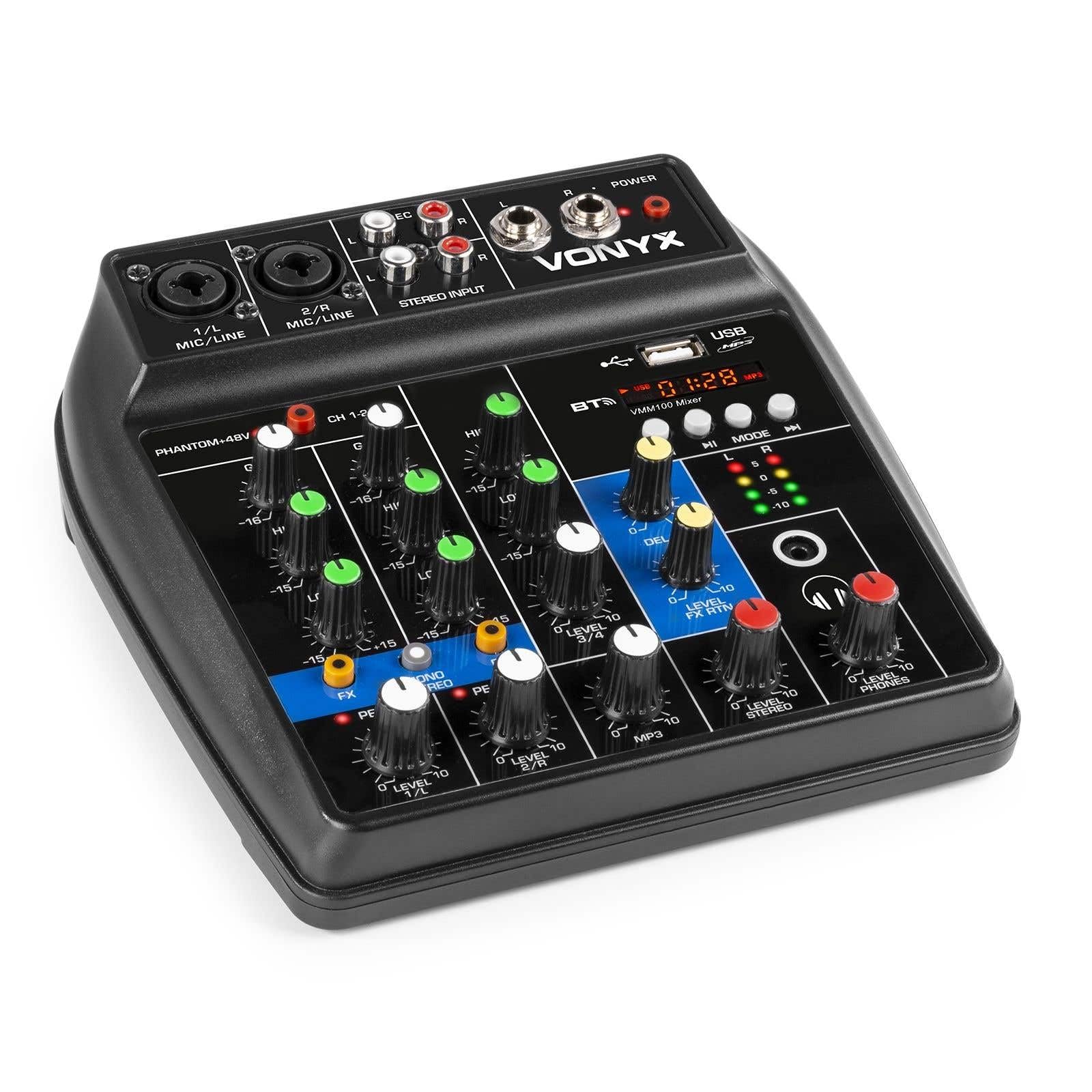
1-сүрөт: Жалпысынан view of the Vonyx VMM100 mixer, highlighting the layout of all controls, inputs, and outputs.

2-сүрөт: Close-up of the mixer's control panel, showing individual channel controls, EQ, gain, and effect knobs.
5.1 Input Channels (1 & 2)
- Combi XLR / 6.3mm Jack: Connect microphones (XLR) or line-level instruments (6.3mm jack).
- Фантом +48V которгучу: Activates phantom power for condenser microphones on channels 1 and 2.
- GAIN баскычы: Adjusts the input sensitivity for the connected device.
- Жогорку баскыч: Adjusts the high-frequency (treble) level for the channel.
- LOW баскычы: Adjusts the low-frequency (bass) level for the channel.
- FX баскычы: Controls the amount of delay effect applied to the channel.
- PEAK LED: Illuminates when the input signal is too high, indicating potential clipping. Adjust GAIN to prevent this.
- LEVEL баскычы: Adjusts the overall output level of the channel.
5.2 Stereo Input (Channel 3)
- RCA киргизүүлөрү (сол/оң): Connect external stereo audio sources such as CD players or other line-level devices.
- LEVEL баскычы: Adjusts the output level of the stereo input.
5.3 MP3/Bluetooth Channel (Channel 4)

3-сүрөт: USB port with a USB drive, demonstrating media playback capability.

4-сүрөт: Bluetooth and USB player section, showing the display and control buttons.
- USB порт: MP3 ойнотуу үчүн USB флеш-дискти салыңыз.
- Дисплей: Shows track information, playback time, and mode.
- Control Buttons (Play/Pause, Skip, Mode): Navigate tracks and switch between USB and Bluetooth modes.
- Bluetooth (BT) Indicator: Lights up when Bluetooth is active and paired.
- LEVEL баскычы: Adjusts the output level of the MP3/Bluetooth channel.
5.4 Башкы бөлүм
- КЕЧИКТИРҮҮ баскычы: Adjusts the overall intensity of the delay effect.
- LEVEL FX RTN баскычы: Controls the return level of the delay effect.
- LEVEL STEREO баскычы: Master volume control for the main stereo output.
- ДЕҢгээл ТЕЛЕФОНДАР баскычы: Гарнитуранын чыгышынын үнүн тууралайт.
- VU Meter (LED): Displays the main output level.
- Main Output (6.3mm Jack L/R): Менен туташат ampкөтөргүчтөр же кубаттуу динамиктер.
- Record Output (RCA L/R): Connects to recording devices.
- Кулакчындын чыгышы (6.3 мм уяча): Connects stereo headphones.
- POWER LED: Indicates when the mixer is powered on.
5.5 Киргизилген кубат

5-сүрөт: Side view of the mixer, illustrating the 5V DC USB power input port.
- 5V DC USB Input: Connect the provided USB power adapter or a compatible USB power source (e.g., power bank) to power the mixer.
6. Орнотуу
6.1 Кубат туташтыруу
- Connect the supplied USB cable to the 5V DC USB input on the mixer.
- Connect the other end of the USB cable to the provided USB power adapter.
- Plug the USB power adapter into a suitable wall outlet. The POWER LED on the mixer will illuminate.
6.2 Аудио булактарын туташтыруу
- Microphones/Line Instruments: Connect microphones via XLR or line-level instruments via 6.3mm jack to channels 1 and 2. If using condenser microphones, activate the +48V phantom power switch.
- Stereo Line Devices: Connect devices like CD players to the RCA inputs of channel 3.
- USB Drive: MP3 камтыган USB флэш-дискти салыңыз files into the USB port on channel 4.
6.3 Чыгууларды туташтыруу
- Негизги чыгышы: Connect the 6.3mm jack main outputs (L/R) to your ampкөтөргүч, кубаттоочу динамиктер же PA системасы.
- Наушник: Connect your headphones to the 6.3mm headphone jack.
- Жаздыруучу түзмөк: Connect the RCA record outputs (L/R) to an external recording device if desired.
7. Иштөө нускамалары
7.1 Негизги аралаштыруу
- Ensure all LEVEL and GAIN knobs are set to their minimum positions before powering on.
- Power on the mixer and any connected audio equipment.
- Gradually increase the GAIN knob for each active input channel until the PEAK LED flashes only occasionally during the loudest parts of the signal.
- Adjust the HIGH and LOW EQ knobs for each channel to shape the tone as desired.
- Use the individual LEVEL knobs to balance the volume of each channel.
- Adjust the main STEREO LEVEL knob to control the overall output volume. Monitor the VU meter to avoid clipping.
- Adjust the PHONES LEVEL knob for comfortable headphone monitoring.
7.2 Bluetooth операциясы
- Press the MODE button on the MP3/Bluetooth channel until the display shows "BT" or the Bluetooth indicator flashes.
- On your smartphone, tablet, or PC, search for Bluetooth devices and select "Vonyx VMM100".
- Once paired, the Bluetooth indicator will glow steadily. You can now stream audio wirelessly to the mixer.
- Use the playback controls on the mixer or your device to manage audio.
7.3 USB MP3 ойнотуу
- MP3 камтыган USB флэш-дискти салыңыз fileUSB портуна киргизиңиз.
- Press the MODE button on the MP3/Bluetooth channel until the display shows track information.
- Use the playback controls (Play/Pause, Skip) to navigate and play tracks.
7.4 Эффекттерди колдонуу
- Turn the FX knob on channels 1 and 2 to send a portion of that channel's signal to the internal delay effect.
- Adjust the main DELAY knob to control the overall intensity and characteristics of the delay.
- Use the LEVEL FX RTN knob to control how much of the processed effect signal is mixed back into the main output.
8. Жаздыруу
The VMM100 mixer allows for easy recording of your mix. Connect the RCA record outputs (L/R) to the input of a suitable recording device (e.g., computer audio interface, dedicated recorder). Ensure your recording software or device is configured to receive audio from the connected inputs. The signal sent to the record output is a stereo mix of all active channels, post-fader.
9. Техникалык тейлөө
- Тазалоо: Use a soft, dry cloth to clean the exterior of the mixer. Do not use abrasive cleaners or solvents.
- Сактагыч: Миксерди күн нурунан жана экстремалдык температурадан алыс салкын, кургак жерде сактаңыз.
- Колдонуу: Avoid dropping or subjecting the mixer to strong impacts.
10. Кыйынчылыктарды
| Көйгөй | Мүмкүн себеп | Чечим |
|---|---|---|
| Күч жок | Кубат адаптери туташкан эмес же туура эмес. | Check power connections. Try a different USB port or adapter. |
| Үн чыгышы жок | Incorrect cable connections; volume knobs too low; incorrect input selection. | Verify all audio cables are securely connected. Increase channel LEVEL and STEREO LEVEL knobs. Ensure correct input mode (e.g., USB/BT). |
| Бурмаланган үн | Input GAIN too high; output level too high. | Reduce GAIN for the affected channel until the PEAK LED stops flashing excessively. Lower STEREO LEVEL. |
| Bluetooth жупташкан жок | Mixer not in Bluetooth mode; device too far; previously paired device connected. | Ensure mixer is in BT mode. Move device closer. Disconnect from other Bluetooth devices. |
| USB ойнотуу иштебей жатат | USB диск туура эмес форматталган; колдоого алынбайт file type; mixer not in USB mode. | Ensure USB drive is FAT32 formatted and contains MP3 files. Press MODE to select USB. |
11. Техникалык шарттар
- Киргизүүлөр:
- Channels 1 & 2: Combi XLR / 6.3mm Jack (Line or Microphone)
- Channel 3: RCA (Stereo)
- Channel 4: Bluetooth or USB MP3 Player
- Чыгуулары:
- Main: 6.3mm Jack (Stereo)
- Record: RCA (Stereo)
- Headphone: 6.3mm Jack
- Жыштык диапазону: 20 Гц - 20 000 Гц
- Мадам: 2-band (High, Low) per channel
- Phantom Power: +48V (Channels 1 & 2)
- Connection Voltage: 5V DC (USB аркылуу)
- Өлчөмдөрү (L x W x Y): 18 x 19.5 x 5.8 см (7.09 x 7.68 x 2.28 дюйм)
- Салмагы: 0.5 кг (1.1 фунт)
- Материал: Нейлон
12. Кепилдик жана колдоо
Vonyx products are designed and manufactured to the highest quality standards. In the unlikely event of a problem with your product, please contact your retailer for warranty service. Please retain your proof of purchase. For technical support or further inquiries, refer to the official Vonyx webсайтка же кардарларды тейлөө бөлүмүнө кайрылыңыз.


