Introduction
Thank you for choosing the Steelplay Slimpack 2.4GHz Wireless Controller. This manual provides detailed instructions for the proper setup, operation, and maintenance of your controller. Designed for compatibility with PlayStation 4, PlayStation 3, and PC, this controller features dual vibration feedback and four programmable rear paddles for an enhanced gaming experience.
Пакеттин мазмуну
- Steelplay Slimpack 2.4GHz Wireless Controller
- 2.4GHz USB кабылдагычы
- USB заряддоо кабели
- Колдонуучунун Колдонмосу (бул документ)
Controller Layout
Familiarize yourself with the buttons and features of your Steelplay Slimpack Wireless Controller.
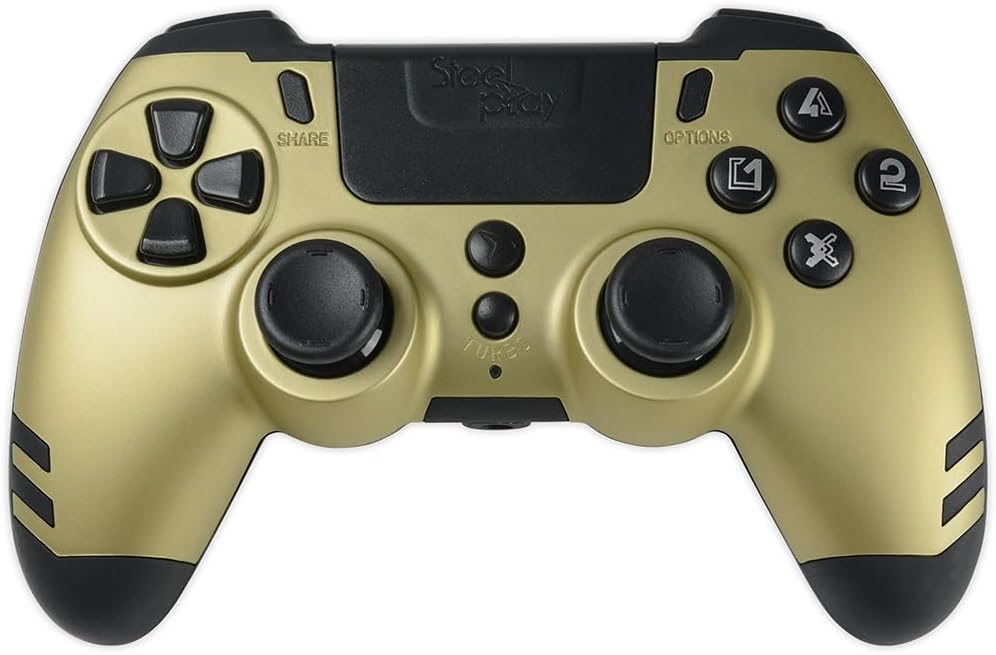
1-сүрөт: Жогорудан төмөн view of the Steelplay Slimpack Wireless Controller. This image displays the layout of the directional pad, action buttons (triangle, circle, cross, square), dual analog sticks, SHARE and OPTIONS buttons, and the central touchpad area.
- Багыттоочу такта (D-Pad): Так багыт киргизүү үчүн.
- Аракет баскычтары (Үч бурчтук, Тегерек, Крест, Төрт бурчтук): Primary input buttons.
- Сол/оң аналогдук таякчалар: Кыймылды жана камераны башкаруу үчүн.
- БӨЛҮШҮҮ баскычы: Access sharing features (PS4).
- ПАРАМЕТРЛЕР баскычы: Оюн ичиндеги менюларга же системанын параметрлерине кирүү.
- PS баскычы: Power on/off the controller, access system menu.
- L1/R1 баскычтары: Ийин баскычтары.
- L2/R2 триггерлери: Аналогдук триггерлер.
- Rear Paddles (P1, P2, P3, P4): Four programmable buttons located on the back of the controller.
- TURBO баскычы: Тандалган баскычтар үчүн турбо функциясын иштетет.
Жайгашуу
1. Контроллерди заряддоо
- Connect the small end of the USB charging cable to the charging port on the controller.
- Connect the large end of the USB charging cable to a USB port on your console (PS4/PS3) or PC, or a compatible USB wall adapter (not included).
- The LED indicator on the controller will slowly flash while charging and turn off when fully charged.
- Толук кубаттоо адатта болжол менен 2-3 саатты талап кылат.
2. Connecting to PS4/PS3/PC (2.4GHz Wireless)
The controller connects wirelessly via the included 2.4GHz USB receiver.
- Insert the 2.4GHz USB receiver into an available USB port on your PlayStation 4, PlayStation 3, or PC.
- басыңыз PS баскычы on the controller to power it on.
- The controller will automatically attempt to pair with the USB receiver. The LED indicator will flash rapidly during pairing and remain solid when successfully connected.
- If the controller does not connect, ensure the receiver is properly inserted and try pressing the PS button again.
Иштөө нускамалары
Негизги башкаруу элементтери
Once connected, the controller functions similarly to standard PS4/PS3/PC controllers. Refer to your game's instructions for specific button mappings.
Кош термелүү пикири
Контроллерде оюн учурунда тактилдик кайтарым байланышты камсыз кылган кош титирөө моторлору бар, бул ойноого тереңирээк кирүүгө жардам берет. Бул функция оюн тарабынан колдоого алынганда автоматтык түрдө иштетилет.
Programming Rear Paddles
The four rear paddles (P1, P2, P3, P4) can be programmed to replicate other buttons on the controller, allowing for quick access to frequently used commands without repositioning your fingers.

2-сүрөт: Бурчтуу view of the Steelplay Slimpack Wireless Controller. This image shows the ergonomic design of the grips and the placement of the four programmable rear paddles on the underside of the controller.
- Программалоо режимине кирүү: басып, кармап туруңуз TURBO баскычы жана SHARE баскычы simultaneously for 3 seconds. The LED indicator will start flashing rapidly to indicate programming mode.
- Select Paddle: Press the rear paddle (P1, P2, P3, or P4) you wish to program. The LED indicator will flash slowly.
- Assign Button: Press the button on the front of the controller (e.g., X, O, Triangle, Square, L1, R1, L2, R2, D-Pad directions, Left/Right Stick clicks) that you want the paddle to emulate.
- Программалоо режиминен чыгуу: басыңыз TURBO баскычы again. The LED indicator will return to solid, indicating the paddle is programmed and programming mode is exited.
- Repeat for other paddles as desired.
- To clear a programmed paddle, enter programming mode, select the paddle, and then press the TURBO button without assigning another button.
Турбо функциясы
The Turbo function allows a button to be repeatedly pressed automatically as long as it is held down.
- Турбону иштетүү: басып, кармап туруңуз TURBO баскычы, then press the desired action button (e.g., X, O, Triangle, Square, L1, R1, L2, R2). The button will now have turbo functionality.
- Турбо режимин өчүрүү: To remove turbo from a button, press and hold the TURBO баскычы again, then press the same action button.
Техникалык тейлөө
- Тазалоо: Контроллерди тазалоо үчүн жумшак, кургак чүпүрөктү колдонуңуз. Катуу химиялык заттарды же абразивдүү материалдарды колдонбоңуз.
- Сактагыч: Контроллерди түз күн нурунан жана экстремалдык температурадан алыс салкын, кургак жерде сактаңыз.
- Батареяга кам көрүү: To prolong battery life, avoid fully discharging the controller frequently. Charge it regularly.
- Таасирден качуу: Башкаргычты түшүрүп албаңыз же катуу соккуга дуушар кылбаңыз, анткени бул ички компоненттерге зыян келтириши мүмкүн.
Проблемаларды чечүү
| Көйгөй | Мүмкүн себеп | Чечим |
|---|---|---|
| Контроллер күйбөйт. | Батарея аз. | Берилген USB кабелин колдонуп контроллерди заряддаңыз. |
| Контроллер зымсыз туташпайт. | USB receiver not properly inserted or not recognized. Controller not paired. | Ensure the 2.4GHz USB receiver is fully inserted into a working USB port. Press the PS button on the controller to initiate pairing. Try a different USB port. |
| Киргизүү кечигип жатат же байланыш үзүлүп калды. | Interference from other wireless devices. Controller too far from receiver. Low battery. | Move closer to the USB receiver. Ensure no major obstructions. Charge the controller. Minimize other 2.4GHz wireless devices nearby. |
| Баскычтар же аналогдук таякчалар жооп бербейт. | Software glitch. Physical damage. | Try resetting the controller (if a reset button is available, typically a small pinhole on the back). If the issue persists, contact customer support. |
Техникалык шарттар
- Модель номери: JVAMUL00154
- Байланыш: 2.4GHz Зымсыз
- Шайкештик: PlayStation 4, PlayStation 3, ЖК
- Өзгөчөлүктөрү: Dual Vibration Feedback, 4 Programmable Rear Paddles, Turbo Function
- Кубат булагы: Камтылган кайра заряддалуучу батарея
- Пакеттин өлчөмдөрү: 20.4 x 18.2 x 7.8 см
- Элемент Салмагы: 360 г
Кепилдик жана колдоо
For warranty information or technical support, please refer to the documentation provided with your purchase or visit the official Steelplay webсайт. Кепилдик дооматтар үчүн сатып алганыңыздын далилин сактаңыз.


