1. Киришүү
This manual provides essential information for the installation, operation, and maintenance of your ASUS ROG Strix GeForce RTX 4080 OC Edition Gaming Graphics Card. Designed with NVIDIA's Ada Lovelace architecture, this graphics card delivers advanced performance for gaming and creative applications. Please read this manual thoroughly before installation and use to ensure optimal performance and safety.
2. Коопсуздук маалыматы
- Компоненттерди орнотуудан же алып салуудан мурун ар дайым компьютериңизден электр кубатын ажыратыңыз.
- Компоненттерге электростатикалык разряддын (ESD) зыянын болтурбоо үчүн антистатикалык билек боону тагыңыз же жерге туташтырылган металл нерсеге тез-тез тийип туруңуз.
- Сезимтал компоненттерге тийбеш үчүн графикалык картаны четинен кармаңыз.
- Ашыкча ысып кетүүнүн алдын алуу үчүн компьютериңиздин корпусунун ичинде туура желдетүүнү камсыз кылыңыз.
- Графикалык картаны нымдуулукка же экстремалдык температурага дуушар кылбаңыз.
- Refer to your power supply unit (PSU) manual to ensure it meets the power requirements for this graphics card.
3. Пакеттин мазмуну
Пакетиңизде бардык буюмдар бар экенин текшериңиз:
- ROG-STRIX-RTX4080-O16G-GAMING Graphics card
- Коллекция картасы
- ROG Velcro Hook & Loop
- Ылдамдык орнотуу колдонмосу
- Адаптер кабели
- ROG Graphics card holder
- Рахмат картасы

4. Орнотуу жана орнотуу
4.1 Физикалык орнотуу
- Компьютериңизди өчүрүп, бардык кабелдерди ажыратыңыз.
- Компьютериңиздин корпусун ачыңыз.
- Locate an available PCI Express 4.0 x16 slot on your motherboard.
- Remove the necessary expansion slot covers from your computer case.
- Графикалык картаны PCIe уячасы менен кылдаттык менен тегиздеп, ал бекем орнотулганга чейин бекем басыңыз.
- Графикалык картаны бурамалар менен корпуска бекитиңиз.
- Connect the required power cables from your power supply unit (PSU) to the graphics card's power connectors. This model typically requires multiple 8-pin PCIe power connectors.
- Компьютериңиздин корпусун жабыңыз.

4.2 Драйверди орнотуу
- Connect your display to one of the graphics card's output ports (HDMI 2.1a or DisplayPort 1.4a).
- Компьютериңизди күйгүзүңүз.
- Download the latest NVIDIA drivers for your GeForce RTX 4080 from the official NVIDIA webсайт (www.nvidia.com/drivers).
- Драйверди орнотууну аяктоо үчүн экрандагы нускамаларды аткарыңыз.

4.3 Software Installation (GPU Tweak III)
For advanced monitoring and customization, install the ASUS GPU Tweak III software:
- Download GPU Tweak III from the official ASUS support webсайт.
- Install the software and follow the prompts.
- GPU Tweak III allows for intuitive performance tweaking, thermal controls, and system monitoring.
5. Графикалык картаңызды иштетүү
5.1 Негизги өзгөчөлүктөр жана технологиялар
- NVIDIA Ada Lovelace Architecture: Provides up to 2x performance and power efficiency compared to previous generations.
- 4-муундагы тензор өзөктөрү: Delivers up to 2X AI performance for tasks like DLSS.
- 3-муундагы RT өзөктөрү: Offers up to 2X ray tracing performance for realistic lighting and shadows.
- Аксиалдык технология күйөрмандары: Redesigned with larger blades for 23% more airflow, ensuring efficient cooling.
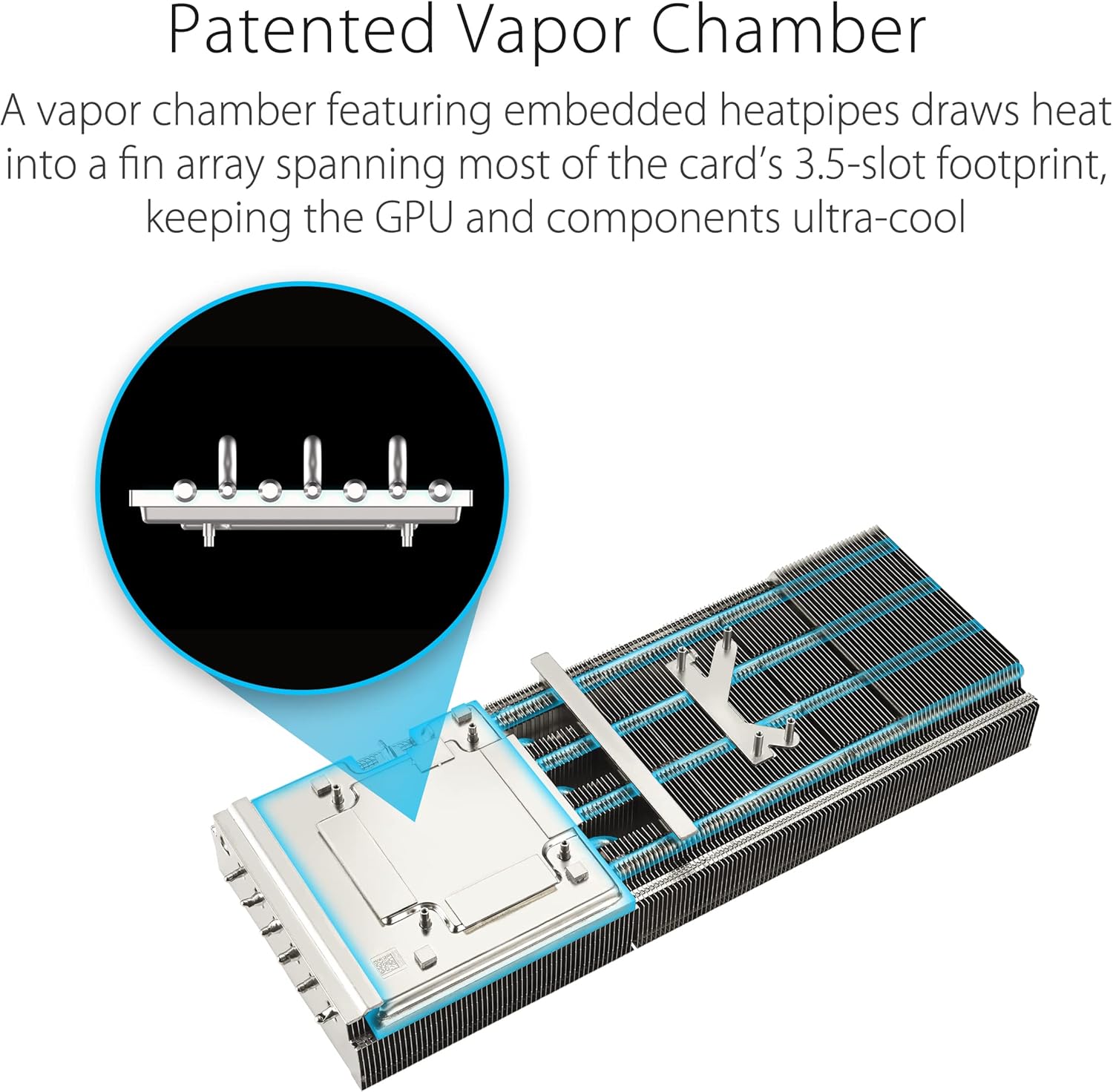
- Patented Vapor Chamber: Features a milled heatspreader for enhanced heat transfer and lower GPU temperatures.
- 3.5-Slot Design: A massive fin array optimized for airflow from the three Axial-tech fans.
- Diecast Shroud, Frame, and Backplate: Adds rigidity and includes vents to maximize airflow and heat dissipation.
- Санариптик кубаттуулукту башкаруу: High-current power stages and 15K capacitors ensure stable power delivery for maximum performance.


5.2 Performance (P) Mode and Quiet (Q) Mode
Your graphics card features a dual BIOS switch, allowing you to select between two operating modes:
- Performance (P) Mode: Prioritizes maximum clock speeds and fan performance for the highest possible frame rates. Fan noise may be more noticeable in this mode.
- Quiet (Q) Mode: Optimizes fan curves for quieter operation, potentially at slightly reduced clock speeds. Ideal for users who prioritize low noise levels.
To switch modes, ensure your computer is powered off, then locate the switch on the side of the graphics card and toggle it to your desired setting. Restart your computer for the changes to take effect.

5.3 Расмий продукт Videos
Үчүн расмий продукт видеосун көрүңүзview of the ASUS ROG Strix GeForce RTX 4080:
Learn more about ASUS NVIDIA Power AI features:
6. Техникалык тейлөө
- Тазалоо: Periodically clean the fans and heatsink with compressed air to remove dust buildup, which can impede cooling performance. Ensure the computer is powered off and unplugged before cleaning.
- Драйвер жаңыртуулары: Regularly check the official NVIDIA website for the latest graphics drivers. Keeping your drivers updated ensures optimal performance, stability, and access to new features.
- Программалык камсыздоо жаңыртуулары: Keep your GPU Tweak III software updated for the best experience and access to the latest features and optimizations.
7. Кыйынчылыктарды
- Дисплей чыгышы жок:
- Ensure the monitor cable is securely connected to the graphics card and the monitor.
- Графикалык карта PCIe уячасына толугу менен орнотулганын текшериңиз.
- Check that all power cables are correctly connected to the graphics card.
- Мүмкүн болсо, башка дисплей кабели же монитор менен сынап көрүңүз.
- Системанын туруксуздугу же бузулушу:
- Графикалык драйверлериңиз жаңыртылганын текшериңиз.
- Check for proper ventilation and ensure the card is not overheating. Monitor temperatures using GPU Tweak III.
- Verify your PSU meets the minimum power requirements for the graphics card.
- Оюндарда/тиркемелерде начар көрсөткүч:
- Графикалык драйверлериңиз жаңыртылганын текшериңиз.
- Оюндагы орнотууларды текшерүү; зарыл болсо, токтомдун же графиканын сапатын төмөндөтүү.
- Confirm the graphics card is operating in Performance (P) Mode if desired.
- Monitor GPU utilization and temperatures to identify potential bottlenecks or thermal throttling.
8. Техникалык шарттар
| Өзгөчөлүк | Деталь |
|---|---|
| Графикалык сопроцессор | NVIDIA GeForce RTX 4080 |
| Бренд | ASUS |
| Сериялар | ROG-STRIX-RTX4080-O16G-GAMING |
| Элемент моделинин номери | ROG-STRIX-RTX4080-O16G-GAMING |
| Графикалык картанын RAM өлчөмү | 16 ГБ GDDR6X |
| Memory Speed | 4000 MHz (Effective) |
| GPU саат ылдамдыгы | Up to 2.66 GHz (Boost) |
| Max Screen Resolution | 7680x4320 |
| Видео чыгаруу интерфейси | 3x DisplayPort 1.4a, 2x HDMI 2.1a |
| Элемент Салмагы | 5.5 фунт |
| Продукциянын өлчөмдөрү (LxWxH) | 14.1 x 5.9 x 2.8 дюйм |
9. Кепилдик жана колдоо
Your ASUS ROG Strix GeForce RTX 4080 OC Edition Gaming Graphics Card comes with a manufacturer's warranty. Please refer to the warranty card included in your package for specific terms and conditions, including warranty duration and coverage details.
For technical support, driver downloads, and further product information, please visit the official ASUS support webсайт:
You may also contact ASUS customer service directly for assistance.


