1. Киришүү
The Celly HIVE Wired Gaming Mouse (Model: SPMOUSE) is designed for gaming enthusiasts, offering a comfortable and responsive experience. Its ergonomic and honeycomb design promotes heat dissipation and prevents hand slippage during extended use. Key features include silent click buttons, adjustable DPI, and dynamic rainbow LED lighting to enhance your gaming environment.
2. Коопсуздук маалыматы
- Аппаратты суудан жана башка суюктуктардан алыс кармаңыз.
- Avoid exposing the mouse to extreme temperatures or direct sunlight.
- Do not attempt to disassemble or repair the mouse yourself. This may void the warranty and cause damage.
- Тазалоо үчүн жумшак, кургак чүпүрөк колдонуңуз. Күчтүү химиялык заттардан алыс болуңуз.
- Колдонуу учурунда USB кабелинин кысылып же бузулуп калбагандыгын текшериңиз.
3. Пакеттин мазмуну
Сураныч, пакетте төмөнкү нерселерди текшериңиз:
- Celly HIVE Wired Gaming Mouse (SPMOUSE)
- Көрсөтмө (бул документ)
4. Орнотуу
The Celly HIVE Wired Gaming Mouse is designed for simple plug-and-play functionality. No additional drivers or software installation is required for basic operation.
- Чычканды туташтыруу: Locate an available USB-A port on your computer (PC or laptop).
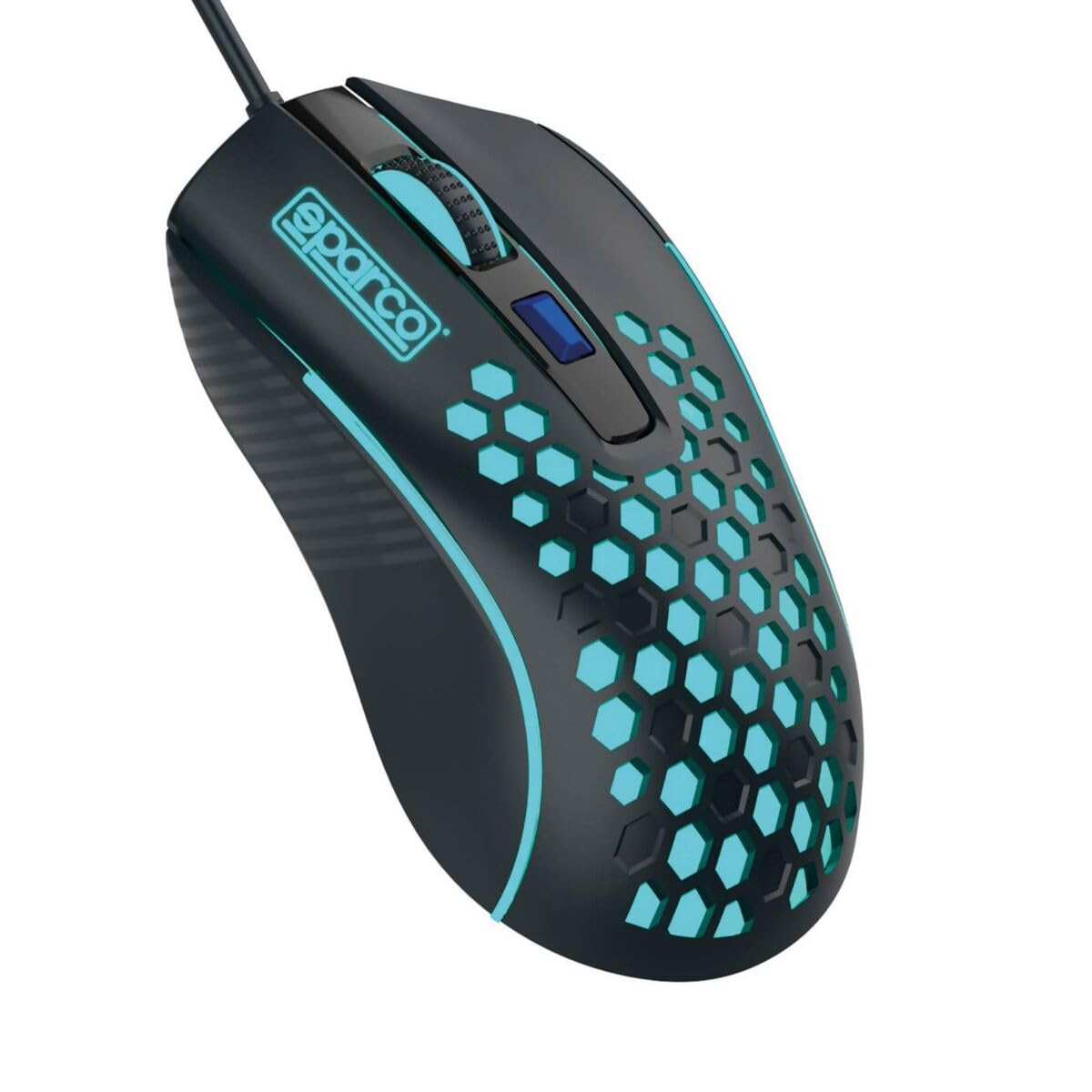
Image: The Celly HIVE wired gaming mouse, showing its ergonomic shape and the integrated USB-A cable.
- Плагин: Insert the USB-A connector of the mouse cable into the USB-A port on your computer.
- Автоматтык таануу: Your operating system will automatically detect and configure the mouse. The rainbow LED lights will illuminate, indicating the mouse is ready for use.
5. Иштөө нускамалары
5.1 Негизги функциялар
- Сол чыкылдатуу: Объекттерди тандоо үчүн негизги баскыч, ачуу fileс, жана программалык камсыздоо менен өз ара аракеттенүү.
- Оң чыкылдатуу: Контексттик менюларга жана кошумча параметрлерге кирүү үчүн кошумча баскыч.
- Жылдыруу дөңгөлөгү: Документтерди жылдыруу үчүн өйдө же ылдый жылыңыз жана web барактар. Жылдыруу дөңгөлөк басыла турган орто баскыч катары да иштейт.
5.2 Жөнгө салынуучу DPI
The mouse features an adjustable DPI (Dots Per Inch) setting, allowing you to change the cursor sensitivity to suit your preferences or game requirements.
- DPI баскычы: A dedicated button is located below the scroll wheel. Press this button to cycle through different DPI settings. Each press will change the sensitivity, allowing you to find the optimal speed for your tasks.
5.3 Silent Click Buttons
The left and right mouse buttons are designed for silent clicking, reducing noise and allowing for a more focused and undisturbed user experience, especially in quiet environments.
5.4 Rainbow LED Lighting
The Celly HIVE mouse is equipped with dynamic rainbow LED lights that cycle through various colors during use. This feature provides an aesthetic enhancement to your setup and creates an immersive atmosphere for gaming.
6. Техникалык тейлөө
6.1 Тазалоо
- Тазалоодон мурун чычкан компьютериңизден ажыратылганын текшериңиз.
- Бир аз жумшак, түксүз кездемени колдонуңуз dampчычкандын бетин сүртүү үчүн суу же жумшак тазалоо эритмеси менен иштетилген.
- Do not use abrasive cleaners, solvents, or aerosol sprays, as these can damage the surface or internal components.
- For hard-to-reach areas, such as around buttons or the scroll wheel, use a cotton swab or compressed air.
6.2 Сактоо
When not in use, store the mouse in a clean, dry place away from direct sunlight and extreme temperatures to prolong its lifespan.
7. Кыйынчылыктарды
| Көйгөй | Мүмкүн себеп | Чечим |
|---|---|---|
| Чычкан жооп бербей жатат | Loose USB connection, faulty USB port, operating system issue. |
|
| Курсордун кыймылы туура эмес же жай | Dirty optical sensor, incorrect DPI setting, unsuitable mouse pad surface. |
|
| LED жарыктары иштебейт | Power issue, mouse not properly connected. |
|
8. Техникалык шарттар
| Бренд | Селли |
| Модель аты | SP Mouse |
| Модель номери | SPMOUSE |
| Өндүрүүчү | bsc spa |
| Продукциянын өлчөмдөрү | 50 x 50 x 28 см; 150 грамм |
| ASIN | B0BLM5V246 |
| Түс | Rainbow colors |
| Байланыш технологиясы | USB |
| Өзгөчөлүктөр | LED lighting, Ergonomic design, Silent click |
| Кыймылды аныктоо технологиясы | Оптикалык |
| баскычтардын саны | 3 |
| Колдун багыты | Туура |
| Сунушталган Колдонуулар | Оюндар |
| Шайкеш түзмөктөр | Персоналдык компьютер, ноутбук |
9. Кепилдик жана колдоо
The Celly HIVE Wired Gaming Mouse comes with a standard manufacturer's warranty. For detailed information regarding warranty terms, duration, and how to claim support, please refer to the warranty card included with your purchase or visit the official Celly webсайт.
For technical support or further assistance, please contact Celly customer service through their official channels.


