1. Киришүү
Thank you for choosing the White Shark GK-2022 SHINOBI Mechanical Keyboard. This compact 61-key keyboard is designed for optimal performance and durability, featuring OUTEMU Red mechanical switches and vibrant RGB backlighting. This manual provides detailed instructions for setup, operation, maintenance, and troubleshooting to ensure you get the most out of your new keyboard.
2. Пакеттин мазмуну
Сураныч, пакетте төмөнкү нерселерди текшериңиз:
- White Shark GK-2022 SHINOBI Mechanical Keyboard
- USB-A - USB-C кабели (1.8 м)
- Колдонуучунун Колдонмосу (бул документ)
3. Продукт бүтүп калдыview
The White Shark GK-2022 SHINOBI is a 61-key compact mechanical keyboard, ideal for users seeking a minimalist design without compromising on functionality. It features durable mechanical switches and customizable backlighting.

3.1-сүрөт: Жогорку view of the White Shark GK-2022 SHINOBI keyboard, showcasing анын компакттуу 61 баскычтуу жайгашуусу жана жандуу RGB арткы жарыгы.

3.2-сүрөт: Бурчтуу view of the keyboard, highlighting its ergonomic profile жана баскычтоптун дизайны.
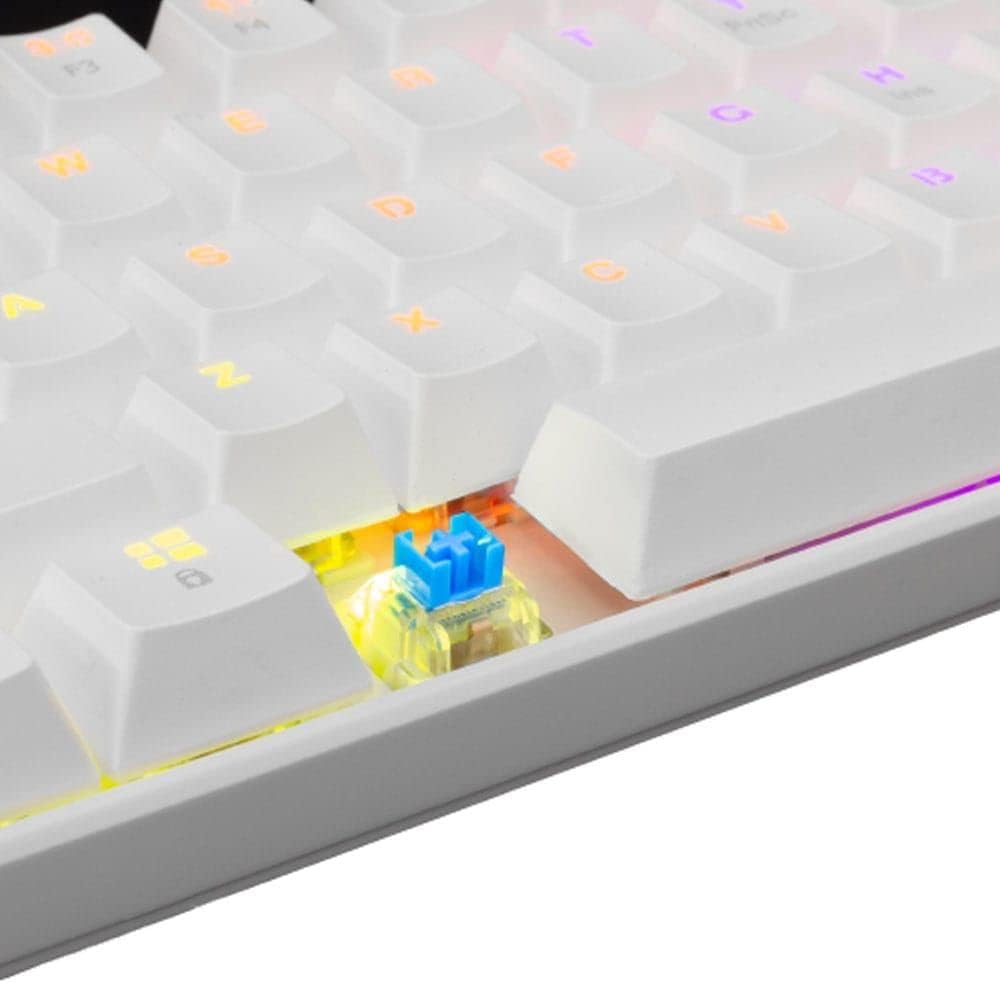
Сүрөт 3.3: Жакын пландан view of an OUTEMU Red mechanical switch, known for its linear and quiet operation.
4. Орнотуу
Follow these steps to set up your White Shark GK-2022 SHINOBI keyboard:
- Unpack the keyboard and the USB cable from the box.
- Баскычтоптогу USB-C портун табыңыз.
- Insert the USB-C end of the cable into the keyboard's port.
- Connect the USB-A end of the cable to an available USB 2.0 port on your computer (PC, Laptop, etc.).
- Баскычтоп "plug and play" режиминде иштейт жана аны операциялык системаңыз автоматтык түрдө таанышы керек. Адатта, кошумча драйверлердин кереги жок.

Figure 4.1: Connecting the USB-C cable to the keyboard's port for power and data transmission.
5. Иштөө нускамалары
5.1 Негизги операция
Once connected, the keyboard is ready for immediate use. Type as you would on any standard keyboard.
5.2 Function Keys and Shortcuts
Due to its compact 61-key layout, many standard functions are accessed via a combination of the Function (Fn) key and other keys. Refer to the keycaps for specific Fn layer markings.
- Fn + [Ачкыч]: Access secondary functions printed on the keycaps (e.g., F1-F12, multimedia controls, navigation keys).
- Арткы жарыкты башкаруу: The keyboard features single-color backlighting. Use Fn key combinations to cycle through lighting modes or adjust brightness. Specific combinations are usually marked on the keys (e.g., Fn + \ for lighting modes, Fn + arrow keys for brightness/speed).
5.3 Арбактарга каршы
The GK-2022 SHINOBI supports full 61-key anti-ghosting, ensuring that every key press is registered accurately, even during rapid, simultaneous keystrokes, which is beneficial for gaming and fast typing.
6. Техникалык тейлөө
Туура тейлөө клавиатураңыздын иштөө мөөнөтүн узартат:
- Тазалоо: Use a soft, dry cloth to wipe the surface of the keyboard. For deeper cleaning, you may use compressed air to remove dust and debris from between the keycaps.
- төгүлүүлөр: In case of liquid spills, immediately unplug the keyboard from your computer. Turn it upside down to drain any liquid and allow it to dry completely before reconnecting. Do not use a hairdryer as excessive heat can damage components.
- Сактагыч: Store the keyboard in a cool, dry place away from direct sunlight and extreme temperatures.
7. Кыйынчылыктарды
Эгерде сиз клавиатураңызда көйгөйлөргө туш болсоңуз, төмөнкү чечимдерди колдонуп көрүңүз:
- Баскычтоп жооп бербей жатат:
- USB кабели клавиатурага жана компьютерге бекем туташып турганын текшериңиз.
- Баскычтопту компьютериңиздин башка USB портуна туташтырууга аракет кылыңыз.
- Компьютериңизди өчүрүп күйгүзүңүз.
- Көйгөй клавиатурада же тутумуңузда экенин аныктоо үчүн баскычтопту башка компьютерде сынап көрүңүз.
- Ачкычтар катталбайт же эки жолу терилбейт:
- Клавиатуранын капкагынын астында кандайдыр бир таштанды же бөтөн нерселер бар-жогун текшериңиз.
- Баскыч капкагын которгучка туура орнотулганын текшериңиз.
- Арткы жарык иштебейт:
- Клавиатуранын туура кубатталганын текшериңиз.
- Fn баскыч айкалыштарын колдонуп, жарыктандыруу режимдерин айланып өтүп көрүңүз.
- Жарыктык жөндөөлөрүн тууралаңыз.
If the problem persists after trying these steps, please contact White Shark customer support.
8. Техникалык шарттар
| Өзгөчөлүк | Description |
|---|---|
| Модел | GK-2022 SHINOBI |
| Бренд | Ак акула |
| Ачкычтардын саны | 61 |
| Которуу түрү | Mechanical - OUTEMU (Red) |
| Ачкыч басымы | 60 г +/- 15 г |
| Anti-Ghosting | 61 keys (Full Anti-Ghosting) |
| Түс | Ак |
| Интерфейс | USB 2.0 |
| Кабелдин узундугу | 1.8 метр |
| Шайкеш түзмөктөр | PC, Laptop, Tablet, Smartphone (via USB) |
| Сунушталган Колдонуулар | Gaming, Office Work, Multimedia Editing |
| Баскычтоптун арткы жарыгы | Single Color (RGB effects) |
| Материал | Пластик |
| Элемент Салмагы | 556 г |
| Пакеттин өлчөмдөрү | 31 x 13 x 5 см |
9. Кепилдик жана колдоо
White Shark products are manufactured to the highest quality standards. For information regarding warranty coverage, technical support, or service inquiries, please refer to the warranty card included with your product or visit the official White Shark webсайт. Кепилдик дооматтары үчүн сатып алганыңыздын далилин сактап коюңуз.
For further assistance, you may contact White Shark customer support through their official channels.


