1. Киришүү
This manual provides essential instructions for the setup, operation, maintenance, and troubleshooting of your White Shark GK-2102 LEGIONNAIRE-X RGB USB Keyboard. Please read this manual thoroughly before using the product to ensure proper functionality and longevity.

Сүрөт 1.1: Жогорку view of the White Shark GK-2102 LEGIONNAIRE-X RGB USB Keyboard, showcasinанын толук жайгашуусу жана RGB жарыктандыруусу.
2. Орнотуу
Follow these steps to connect your White Shark GK-2102 LEGIONNAIRE-X RGB USB Keyboard to your computer.
- Баскычтопту таңгактан чыгаруу: Баскычтопту жана анын USB кабелин таңгактан этияттык менен алып чыгыңыз.
- USB кабелин туташтыруу: Insert the USB connector of the keyboard into an available USB port on your computer.

Image 2.1: Close-up of the USB connector, which is used to connect the keyboard to a computer.
- Драйверди орнотуу: Баскычтоп "plug-and-play" режиминде иштейт. Операциялык системаңыз керектүү драйверлерди автоматтык түрдө аныктап, орнотушу керек. Адатта, кошумча программалык камсыздоону орнотуунун кажети жок.
- Баскычтоп буттарын тууралоо: For ergonomic comfort, you may extend the adjustable feet located on the underside of the keyboard.

Сүрөт 2.2: View of the adjustable feet on the keyboard's underside, allowing users to modify the typing angle.
3. Иштөө нускамалары
The White Shark GK-2102 LEGIONNAIRE-X is a standard USB keyboard with RGB lighting features. Below are general operating guidelines.
3.1 Негизги баскычтоп функциялары
The keyboard functions as a standard QWERTY layout device. All keys perform their indicated character or function when pressed. Special function keys (F1-F12) may require the 'Fn' key to be held down simultaneously for their secondary functions, depending on your operating system and specific keyboard model configuration.
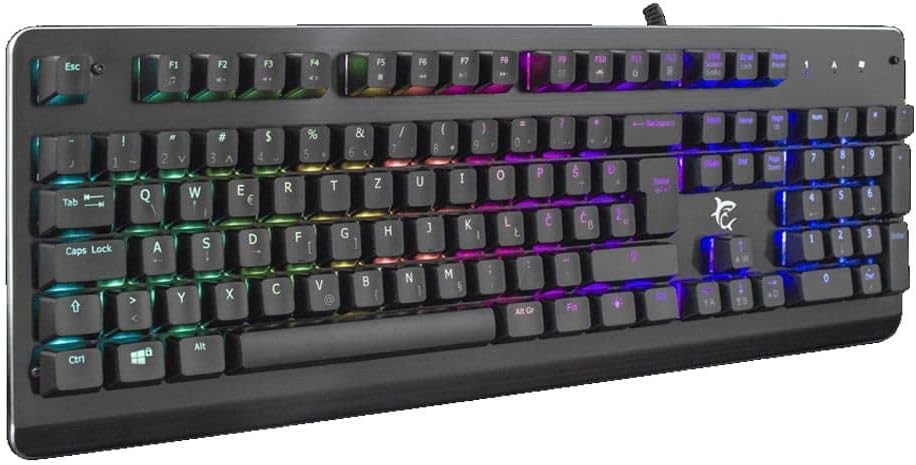
Сүрөт 3.1: Бурчтуу view of the keyboard, highlighting the key layout and illuminated RGB backlighting.
3.2 RGB жарыкты башкаруу
This keyboard features RGB lighting. Specific key combinations, often involving the 'Fn' key and other designated keys (e.g., arrow keys, Ins, Home, PgUp, Del, End, PgDn), are typically used to cycle through lighting modes, adjust brightness, or change colors. Refer to the quick start guide or manufacturer's website for detailed RGB control commands specific to this model.
4. Техникалык тейлөө
Туура тейлөө клавиатураңыздын узак иштөөсүн жана иштешин камсыз кылат.
- Тазалоо: Disconnect the keyboard from your computer before cleaning. Use a soft, dry cloth to wipe the surface. For stubborn dirt, a slightly damp cloth with mild soap can be used, ensuring no liquid enters the keyboard. Compressed air can be used to remove dust and debris from between the keys.
- Суюктуктардан алыс болуңуз: Do not spill liquids on the keyboard. Liquid damage can cause permanent malfunction.
- Сактагыч: Клавиатураны узак убакыт бою колдонбогондо, күндүн тике тийген нурунан жана экстремалдык температурадан алыс, салкын, кургак жерде сактаңыз.
5. Кыйынчылыктарды
Эгерде сиз клавиатураңызда көйгөйлөргө туш болсоңуз, төмөнкү чечимдерди колдонуп көрүңүз:
- Баскычтоп жооп бербейт:
- USB кабели клавиатурага жана компьютерге бекем туташып турганын текшериңиз.
- Баскычтопту компьютериңиздин башка USB портуна туташтырууга аракет кылыңыз.
- Көйгөй клавиатурада же компьютердин портунда/драйверлеринде экенин аныктоо үчүн клавиатураны башка компьютерде сынап көрүңүз.
- Компьютериңизди өчүрүп күйгүзүңүз.
- Ачкычтар иштебейт:
- Баскычтоптун капкактарынын астында кандайдыр бир физикалык тоскоолдуктар бар-жогун текшериңиз.
- Тейлөө бөлүмүндө сүрөттөлгөндөй баскычтопту тазалаңыз.
- RGB жарыгы иштебейт/туура эмес:
- Баскычтоп туура туташып жана кубат алып жатканын текшериңиз.
- Refer to the manufacturer's specific instructions for RGB control key combinations.
6. Техникалык шарттар
Below are the technical specifications for the White Shark GK-2102 LEGIONNAIRE-X RGB USB Keyboard:

Сүрөт 6.1: Side profile of the keyboard, illustrating its physical dimensions and keycap height.
| Өзгөчөлүк | Деталь |
|---|---|
| Бренд | Ак акула |
| Модел | GK-2102 LEGIONNAIRE-X |
| Байланыш | USB |
| Продукциянын өлчөмдөрү | 50 x 50 x 28 см |
| Салмагы | 1.06 кг |
| Материал | Пластик |
| Өзгөчөлүктөр | RGB жарыктандыруу |
| Батареялар талап кылынат | Жок |
7. Кепилдик маалыматы
For detailed warranty information regarding your White Shark GK-2102 LEGIONNAIRE-X RGB USB Keyboard, please refer to the warranty card included with your product or visit the official White Shark webсайт. Кепилдиктин шарттары аймакка жана сатуучуга жараша өзгөрүшү мүмкүн.
8. Колдоо
If you require further assistance or have questions not covered in this manual, please contact White Shark customer support through their official website or the contact information provided with your purchase. Please have your product model (GK-2102 LEGIONNAIRE-X) and purchase details ready when contacting support.


