Introduction
Thank you for choosing the Havit Gaming Mouse MS955. This optical gaming mouse features a USB interface, adjustable DPI settings, and RGB backlighting, designed to enhance your gaming experience. This manual provides essential information for setting up, operating, and maintaining your mouse.
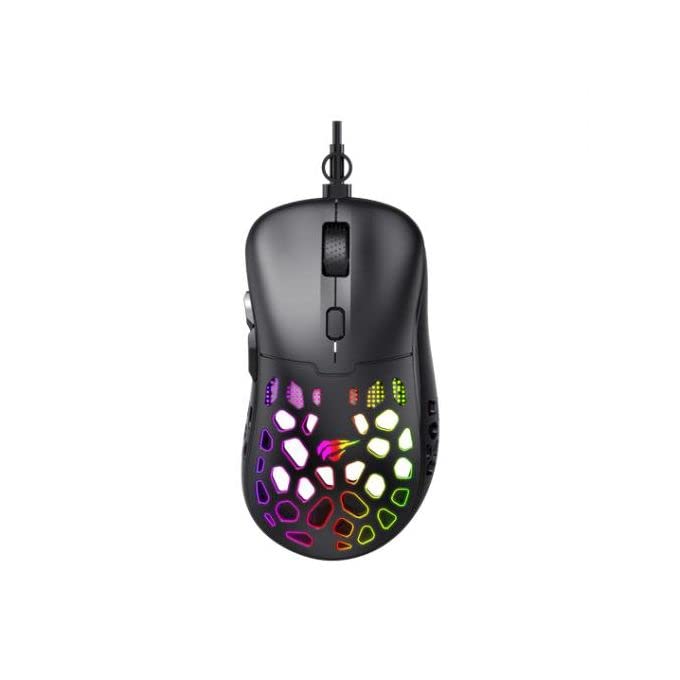
Сүрөт: жогорудан төмөнгө view of the Havit Gaming Mouse MS955, showcasing its ergonomic design and vibrant RGB lighting through the honeycomb shell.
Жайгашуу
- Чычканды таңгактан чыгаруу: Carefully remove the Havit Gaming Mouse MS955 from its packaging.
- Компьютерге туташуу: Locate an available USB port on your computer. Insert the USB connector of the mouse into the USB port.
- Драйверди орнотуу: The mouse is plug-and-play. Your operating system (Windows XP, Windows 7, Linux, etc.) will automatically detect and install the necessary drivers. No additional software installation is typically required for basic functionality.
- Сыноо функциясы: Once connected, move the mouse and click the buttons to ensure it is working correctly.
Иштөө нускамалары
The Havit Gaming Mouse MS955 features 6 programmable buttons and adjustable DPI settings for precise control.

Сүрөт: каптал view of the Havit Gaming Mouse MS955, highlighting the left-side buttons and scroll wheel.
- Сол чыкылдатуу баскычы: Тандоо жана өз ара аракеттенүү үчүн негизги баскыч.
- Оң баскычты чыкылдатуу: Secondary button for context menus and alternative actions.
- Жылдыруу дөңгөлөгү: Документтерди жылдыруу үчүн колдонулат жана web барактар. Ал ошондой эле чыкылдатылуучу ортоңку баскыч катары иштейт.
- DPI жөндөө баскычы: Located behind the scroll wheel. Press this button to cycle through different DPI sensitivity levels (800-1200-2400-3200 DPI). Each press changes the sensitivity, allowing you to adapt to various gaming or work scenarios.
- Каптал баскычтары: Two buttons are located on the left side of the mouse. These are typically used for 'forward' and 'backward' navigation in web browsers or can be programmed for in-game actions.
RGB жарыктандыруу
The Havit Gaming Mouse MS955 features an integrated RGB backlight system. The lighting effects are typically automatic and may change with DPI settings or cycle through various colors. There are no dedicated buttons for controlling the RGB lighting directly on the mouse.
Техникалык тейлөө
- Тазалоо: To clean the mouse, disconnect it from your computer. Use a soft, dry cloth to wipe the surface. For stubborn dirt, a slightly damp cloth can be used, ensuring no liquid enters the mouse. Do not use harsh chemicals or abrasive cleaners.
- Сактагыч: Чычканды экстремалдык температурадан жана тике күн нурунан алыс, таза, кургак чөйрөдө сактаңыз.
- Кабельге кам көрүү: USB кабелин зыянга учуратпоо үчүн өтө ийилип же бурулбаңыз.
Проблемаларды чечүү
- Чычкан жооп бербейт:
- USB кабели компьютериңиздеги иштеген USB портуна бекем сайылганын текшериңиз.
- Чычканды башка USB портуна сайып көрүңүз.
- Компьютериңизди өчүрүп күйгүзүңүз.
- DPI өзгөрбөйт:
- Press the DPI button firmly. Ensure you are pressing the correct button.
- The mouse cycles through fixed DPI settings; there is no visual indicator other than cursor speed change.
- RGB жарыктары иштебейт:
- Чычкандын компьютериңизге туура туташканын текшериңиз.
- The RGB lighting is automatic; if the mouse is functioning otherwise, the lighting should also be active.
Техникалык шарттар
| Өзгөчөлүк | Деталь |
|---|---|
| Бренд | Хавит |
| Модел | MS955 |
| Interface Type | USB |
| Өлчөмдөр | 115.2 x 63 x 37.6 мм |
| Ачкычтардын саны | 6 |
| Чипсет | NST5311 |
| DPI токтому | 800-1200-2400-3200 DPI |
| Operating Voltage | 5V |
| Негизги өмүр | 3,000,000 XNUMX чыкылдатуу |
| Кабелдин узундугу | 1.5 м |
| Кыймылды аныктоо | Оптикалык |
| Колдун багыты | Туура |
| Сунушталган колдонуу | Оюндар |
| Операциялык системалар | Linux, Windows 7, Windows XP |
| Түс | Кара |
Кепилдик жана колдоо
For warranty information or technical support, please refer to the documentation included with your purchase or visit the official Havit webсайт. Кепилдик дооматтар үчүн сатып алганыңыздын далилин сактаңыз.


