1. Киришүү
Thank you for choosing the ENDORFY Signum 300 Air ATX PC Case. This manual provides essential information for the proper assembly, operation, and maintenance of your new PC case. Please read these instructions carefully before beginning the installation process to ensure optimal performance and longevity of your system.
Негизги өзгөчөлүктөрү:
- Оптимизацияланган аба агымы: Features a mesh front panel and support for up to eight fans, including four pre-installed ENDORFY Stratus 120 PWM fans, ensuring efficient cooling.
- Чаңдан коргоо: Equipped with removable magnetic dust filters for easy cleaning and protection against dust accumulation.
- Температуралуу айнек каптал панели: A durable tempered glass side panel provides a clear view сиздин ички компоненттериңиздин.
- Кең ички: Accommodates GPUs up to 325mm in length, CPU coolers up to 161mm in height, and liquid cooling radiators up to 360mm (front) or 240mm (top).
- Сактоо параметрлери: Supports two 3.5-inch hard drives and up to four 2.5-inch drives.
2. Пакеттин мазмуну
Пакетте бардык компоненттер бар экенин текшериңиз:
- ENDORFY Signum 300 Air PC Case
- 4x ENDORFY Stratus 120 PWM Fans (pre-installed)
- Аксессуарлар кутучасы (буроолор, кабелдик байланыштар, бекиткичтер ж.б.)
- Колдонуучунун Колдонмосу (бул документ)

2.1-сүрөт: жарылды view showing all components included with the ENDORFY Signum 300 Air case, including the chassis, panels, fans, and accessory box.
3. Component Overview
Familiarize yourself with the various parts of your ENDORFY Signum 300 Air PC case.

3.1-сүрөт: Жалпысынан view of the ENDORFY Signum 300 Air PC case, showcasing торчолуу алдыңкы панель жана чыңалган айнек каптал панель.

3.2-сүрөт: Фронт view of the case, highlighting the hexagonal mesh design for optimal airflow.

3.3-сүрөт: Close-up of the top I/O panel, featuring USB 3.0 ports, audio jacks, and power/reset buttons.
4. Орнотуу жана орнотуу
4.1. Даярдоо
- Жумуш ордуңуздун таза, жакшы жарыктандырылганын текшериңиз.
- Gather necessary tools: Phillips head screwdriver, cable ties (some included).
- Компоненттерди иштетүүдөн мурун жерге туташтырылган металл объектиге тийүү менен статикалык электр энергиясын чыгарыңыз.
4.2. Ишти ачуу
- Корпусту тегиз, туруктуу бетке коюңуз.
- Carefully remove the four thumb screws securing the tempered glass side panel.
- Gently lift and remove the tempered glass panel, setting it aside on a soft, non-abrasive surface to prevent scratches.
- Remove the solid metal side panel by unscrewing its two thumb screws and sliding it backward.
4.3. Motherboard орнотуу
- Киргизүү/чыгаруу калканчын корпустун арткы тешигине орнотуңуз.
- Align your motherboard with the pre-installed standoffs. Ensure the motherboard type (Mini ATX, ATX) is compatible.
- Аксессуар кутучасынан тиешелүү бурамалар менен энелик тактаны бекитиңиз.
4.4. Электр менен камсыздоо блогун (PSU) орнотуу
- Кубат блогун корпустун арткы жагындагы атайын бөлүмгө коюңуз.
- Ensure the PSU fan faces downwards (if there's a filtered vent) or upwards, depending on your cooling preference.
- Кубат блогун аксессуарлар кутучасынан бурамалар менен бекитиңиз.
4.5. Сактоочу дискти орнотуу
The case supports both 3.5-inch HDDs and 2.5-inch SSDs.
- 3.5 дюймдук катуу дисктер: Install into the drive cage located beneath the PSU shroud. Slide the drive into the tray and secure it.
- 2.5 дюймдук SSD дисктер: Mount SSDs to the dedicated brackets behind the motherboard tray or on top of the PSU shroud. Secure with screws.
4.6. Графикалык картаны (GPU) орнотуу
- Керектүү PCIe уячасынын капкактарын корпустун арткы бөлүгүнөн алып салыңыз.
- GPUңызды энелик платадагы тиешелүү PCIe уячасына салыңыз.
- Secure the GPU with screws. The case supports GPUs up to 325mm in length.
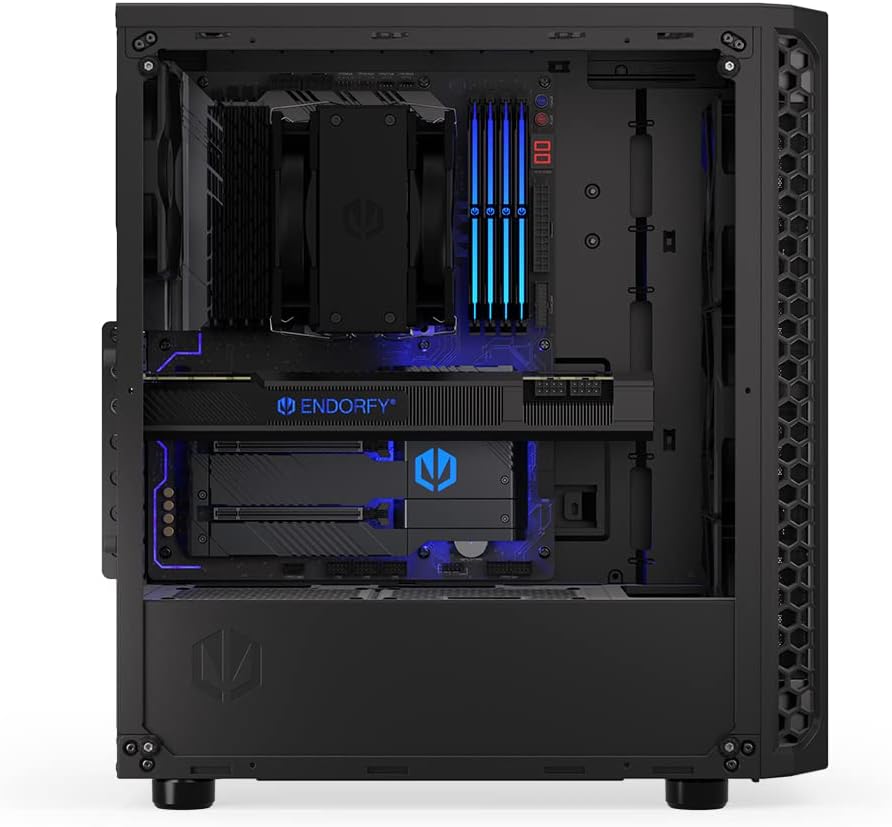
4.1-сүрөт: Ички view мисал келтирип ample space for installing a long graphics processing unit (GPU).
4.7. Fan and Cooling Installation
The Signum 300 Air comes with four pre-installed Stratus 120 PWM fans. Additional fans or liquid cooling radiators can be installed.
- Алдыңкы: Supports up to 3x 120mm or 2x 140mm fans, or a 240/360mm radiator.
- Жогорку: 2x 120мм же 2x 140мм күйөрмандарды же 240мм радиаторду колдойт.
- Арткы: Supports 1x 120mm fan (one pre-installed).

4.2-сүрөт: Illustration of the pre-installed fans and potential locations for additional cooling components within the case.
4.8. Кабелдик башкаруу
Кабельдерди багыттоо жана бекитүү үчүн энелик плата лотоктун артындагы кесилген жерлерди жана байлаган жерлерди колдонуңуз. Бул аба агымын жана эстетиканы жакшыртат.

4.3-сүрөт: View from the rear side, demonstrating the space and routing options for effective cable management.
5. Операция
5.1. Күйгүзүү
Once all components are installed and cables are connected, press the power button on the top I/O panel to start your system.
5.2. Аба агымын эске алуу
The Signum 300 Air is designed for optimal airflow. Ensure that the front mesh panel is unobstructed to allow for maximum air intake. The pre-installed PWM fans adjust their speed based on system temperature, providing a balance between cooling performance and noise levels.

5.1-сүрөт: Visual representation of the optimal airflow design, illustrating how air moves through the case for efficient cooling.
6. Техникалык тейлөө
6.1. Чаң чыпкасын тазалоо
The Signum 300 Air features removable magnetic dust filters on the top, front, and bottom. Regular cleaning is crucial for maintaining optimal airflow and preventing dust buildup inside your PC.
- Gently pull off the magnetic dust filters.
- Clean the filters using a soft brush, vacuum cleaner, or by rinsing them with water. Ensure they are completely dry before reattaching.
- Reattach the filters to their respective positions.
6.2. Жалпы тазалоо
- жумшак колдонуу, damp cloth to wipe down the exterior surfaces of the case. Avoid harsh chemicals.
- Чыңалган айнек панелдер үчүн тактардын пайда болушун болтурбоо үчүн айнек тазалагычты жана микрофибра кездемени колдонуңуз.
- Periodically use compressed air to clear dust from internal components and fan blades.
7. Кыйынчылыктарды
7.1. No Power After Assembly
- Check all power connections: PSU to wall outlet, PSU to motherboard (24-pin and CPU 8-pin), and GPU power cables.
- Ensure the front panel power switch cable is correctly connected to the motherboard's front panel header.
- PSU которгучу 'ON' абалында экенин текшериңиз.
7.2. Ашыкча ызы-чуу
- Identify the source of the noise (fans, HDD, etc.).
- Бардык желдеткичтер коопсуз орнотулганын жана кабелдик тоскоолдуктар болбогонун текшериңиз.
- Check if fan speeds are set appropriately in your motherboard's BIOS/UEFI or operating system software.
7.3. Overheating Components
- Verify that all case fans are spinning and oriented correctly for optimal airflow (intake at front, exhaust at rear/top).
- Clean any clogged dust filters.
- CPU муздаткычы жана GPU күйөрмандары туура иштеп жатканын текшериңиз.
8. Техникалык шарттар
| Өзгөчөлүк | Спецификация |
|---|---|
| Модель аты | Signum 300 Air |
| Элемент моделинин номери | EY2A005 |
| Бренд | ENDORFY |
| Иштин түрү | Ара Tower |
| Motherboard шайкештиги | Mini ATX, ATX |
| Материал | Металл, чыңдалган айнек |
| Түс | Кара |
| Продукциянын өлчөмдөрү (LxWxH) | 8.5 x 17.6 x 16.26 дюйм |
| Элемент Салмагы | 11.55 фунт |
| GPU тазалоо | 325 мм чейин |
| CPU муздаткычтын бийиктиги | 161 мм чейин |
| Радиатордук колдоо (алдыңкы) | 240мм / 360мм |
| Радиатор колдоо (жогорку) | 240мм |
| Алдын ала орнотулган күйөрмандар | 4x Stratus 120 PWM Fans |
| Fan Size | 120 миллиметр |
| Drive Bays (3.5") | 2 |
| Drive Bays (2.5") | 4ге чейин |
| USB 3.0 порттору | 2 |
9. Кепилдик жана колдоо
9.1. Кепилдик маалыматы
ENDORFY products are manufactured to high-quality standards. For specific warranty terms and conditions, please refer to the warranty card included with your product or visit the official ENDORFY webсайт. Кепилдик дооматтар үчүн сатып алганыңыздын далилин сактаңыз.
9.2. Техникалык колдоо
If you encounter any issues or have questions regarding your ENDORFY Signum 300 Air PC case, please contact ENDORFY customer support through their official website. Provide your product model number (EY2A005) and a detailed description of the issue for efficient assistance.


