1. Киришүү
This manual provides essential information for the safe and effective operation of your PENTAX KF APS-C DSLR Camera. The PENTAX KF is a compact digital single-lens reflex camera designed for advanced photographic practice, featuring a dust and weather-resistant construction and an vari-angle LCD monitor. Please read this manual thoroughly before using the camera and keep it in a safe place for future reference.
2. Коопсуздук маалыматы
- Do not disassemble or modify the camera. This may cause electric shock or malfunction.
- Keep the camera away from water and moisture to prevent electric shock or fire.
- Use only the specified battery and charger. Incorrect usage may lead to overheating, fire, or explosion.
- Камераны өтө жогорку температурага, түз күн нуруна же жогорку нымдуулукка дуушар кылбаңыз.
- Do not look at the sun or strong light sources through the viewfinder or lens, as this can cause permanent eye damage.
- Балдар жетпеген жерде сактаңыз.
3. Пакеттин мазмуну
Төмөндө тизмеленген нерселердин баары камераңыздын топтомуна камтылганын текшериңиз:
- PENTAX KF Camera Body
- USB кабели
- Литий-иондук батарейка
- Батарея заряддагыч
- Боо
- Software (CD-ROM)
- AC адаптер
- USB адаптер
- Eecup
- Hot Shoe Cover
- Body Mount Cap
4. Камера бүткөнview
Familiarize yourself with the various parts of your PENTAX KF camera.

Сүрөт 4.1: Алдыңкы View of PENTAX KF Camera Body. This image displays the front of the PENTAX KF camera body, highlighting the lens mount, grip, and the PENTAX logo. The SR (Shake Reduction) indicator is also visible.

4.2-сүрөт: Арткы View of PENTAX KF Camera with LCD Display Active. This image shows the back of the camera with the vari-angle LCD screen displaying shooting information such as shutter speed, aperture, ISO, and white balance settings. The viewfinder and control buttons are also visible.

4.3-сүрөт: Жогорку View of PENTAX KF Camera. This image illustrates the top panel of the camera, featuring the mode dial, power switch, shutter button, hot shoe, and Wi-Fi/Fx2 button.
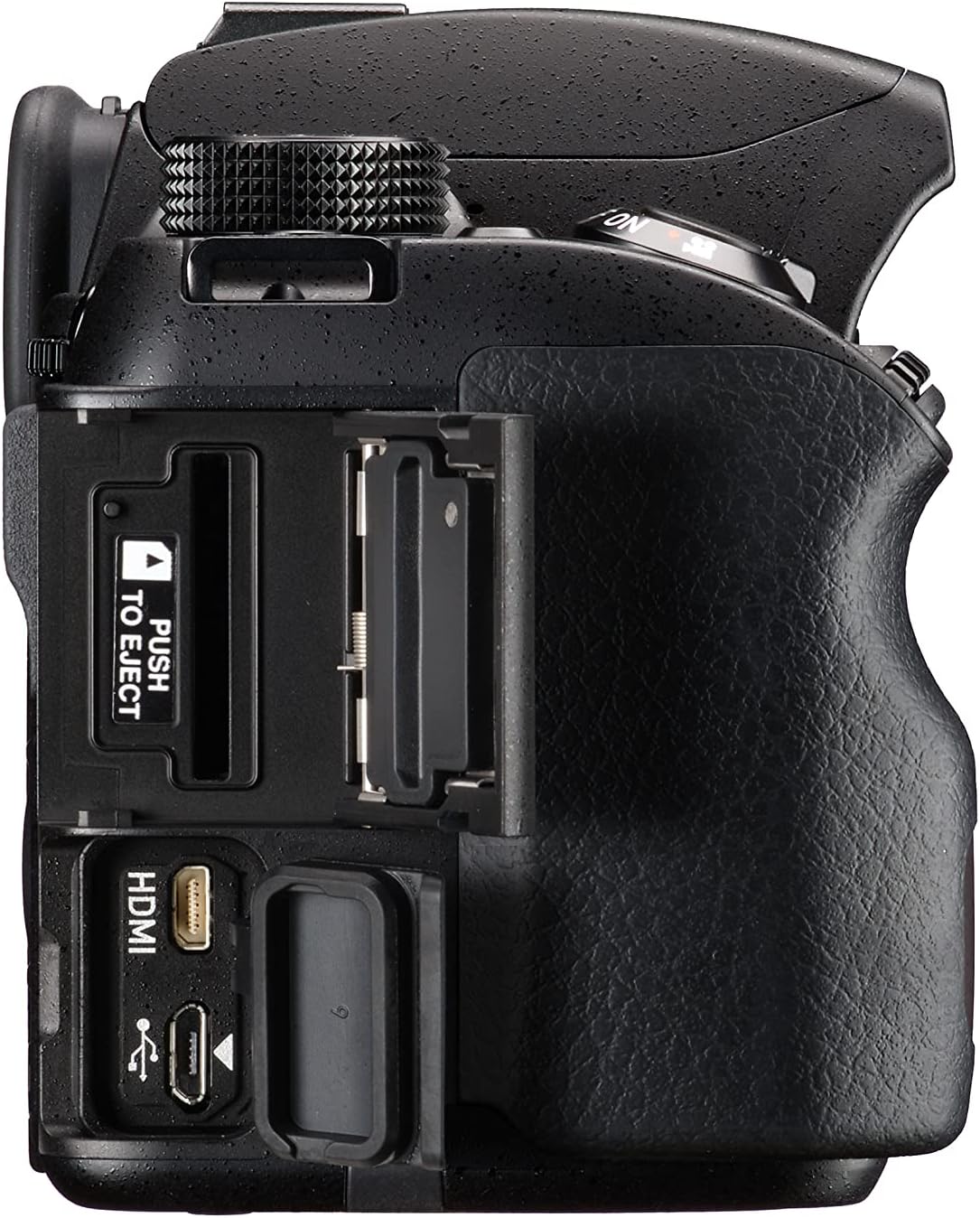
4.4-сүрөт: Оң жак View of PENTAX KF Camera. This image shows the right side of the camera, revealing the HDMI and USB ports, along with the memory card slot.
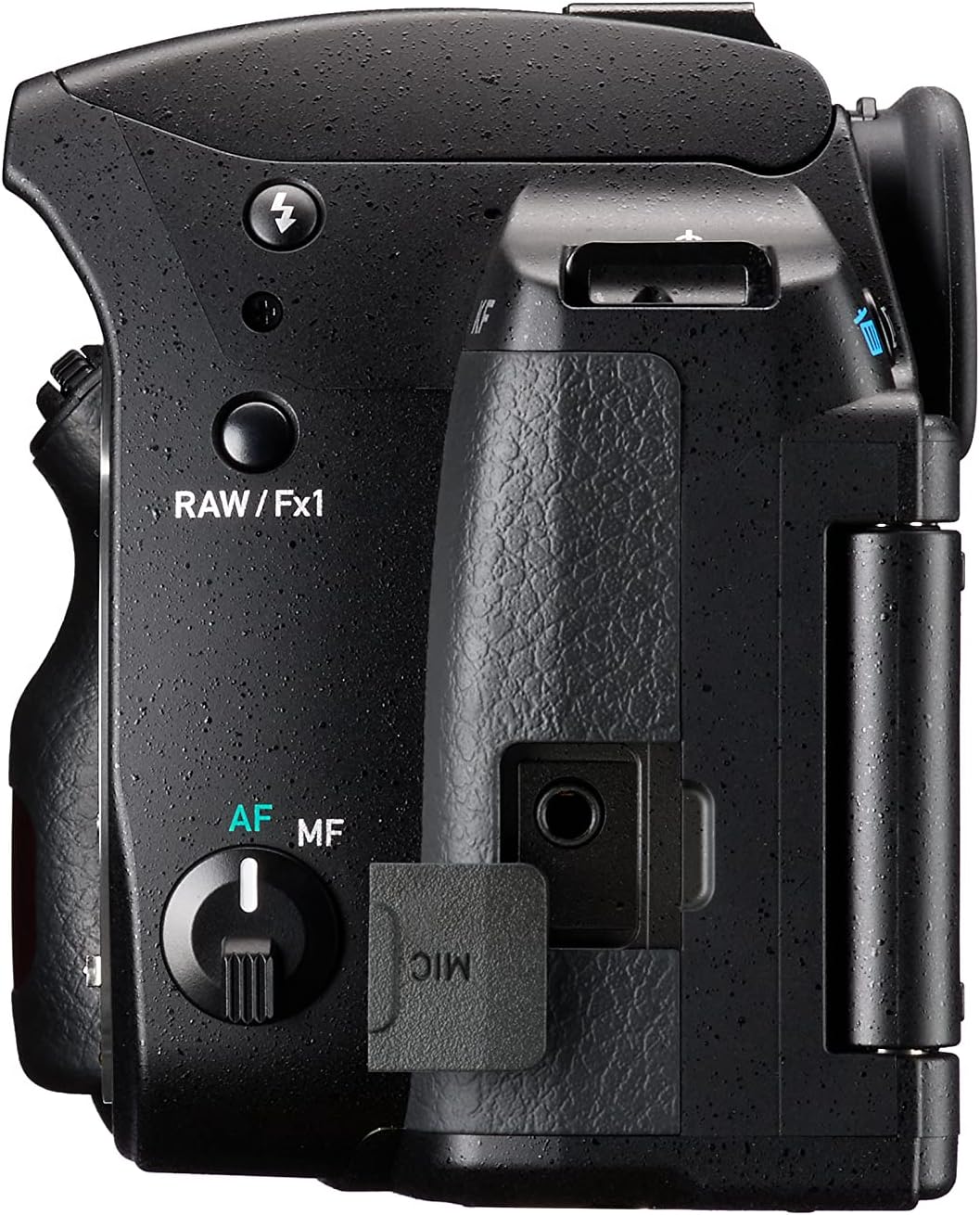
4.5-сүрөт: Сол тарап View of PENTAX KF Camera. This image displays the left side of the camera, featuring the microphone input port and the RAW/Fx1 button.

Figure 4.6: Optical Viewfinder Diagram. This diagram illustrates the internal structure of the optical viewfinder, providing a clear view теманын.

Figure 4.7: Vari-Angle LCD Screen. This image demonstrates the flexibility of the vari-angle LCD monitor, allowing for diverse shooting angles.
5. Орнотуу
5.1. Батареяны заряддоо жана салуу
- Insert the battery into the charger and connect the charger to a power outlet. The charging indicator will illuminate.
- Once charging is complete, the indicator will change. Disconnect the charger.
- Камеранын ылдый жагындагы батарея уясынын капкагын ачыңыз.
- Insert the charged battery into the compartment, ensuring correct orientation. Close the cover securely.
5.2. Эстутум картасын салуу
- Камеранын капталындагы эстутум картасынын уячасынын капкагын ачыңыз.
- Insert an SD card into the slot with the label facing the front of the camera until it clicks into place.
- Эстутум картасынын уячасынын капкагын жабыңыз.
5.3. Объективди бекитүү
- Remove the body mount cap from the camera and the rear cap from the lens.
- Линзадагы кызыл индекс белгисин камеранын линза бекиткичиндеги кызыл индекс белгиси менен тегиздеңиз.
- Линзаны саат жебеси боюнча, ал ордунан чыккыча айлантыңыз.
5.4. Баштапкы орнотуулар (күн/убакыт)
Upon first power-on or after battery replacement, you may need to set the date, time, and language. Follow the on-screen prompts to configure these settings.
6. Камераны иштетүү
6.1. Күйгүзүү/өчүрүү
Камераны күйгүзүү үчүн, жапкыч баскычынын айланасында жайгашкан кубат которгучун "КҮЙҮК" абалына буруңуз. Өчүрүү үчүн аны "ӨЧҮК" абалына буруңуз.
6.2. Негизги атуу режимдери
Камеранын үстүндөгү режимди терүү ар кандай тартуу режимдерин тандоого мүмкүндүк берет:
- АВТО: Жөнөкөй "көрсөтүп, атуу" операциясы үчүн толук автоматтык режим.
- P (AE программасы): Камера оптималдуу экспозиция үчүн диафрагманы жана жабуунун ылдамдыгын орнотот.
- Av (Aperture-Priority AE): Сиз диафрагманы орнотосуз, камера жабуу ылдамдыгын орнотот.
- Tv (Shutter-Priority AE): Сиз жабуунун ылдамдыгын, камера диафрагманы орнотот.
- M (кол): Сиз диафрагманы да, жапкыч ылдамдыгын да орнотуңуз.
- SCN (Сахна режимдери): Pre-set modes for specific scenes (e.g., Portrait, Landscape).
6.3. Фокустоо
The PENTAX KF features SAFOX X autofocus system with 11 points, including 9 cross-type sensors.
- Автофокус (AF): Set the AF/MF switch on the lens or camera body to AF. Press the shutter button halfway to focus.
- Кол менен Фокус (MF): Set the AF/MF switch to MF. Rotate the focusing ring on the lens to adjust focus manually.
6.4. Сүрөткө тартуу
- Режим тергичин колдонуп, каалаган тартуу режимин тандаңыз.
- Кадрыңыз аркылуу кадрыңыз viewтапкыч же ЖК экранында.
- Фокустоо үчүн жапкычты жарымга чейин басыңыз.
- Сүрөттү тартуу үчүн жапкычты толугу менен басыңыз.
7. Өркүндөтүлгөн функциялар
7.1. Pixel Shift Resolution System
The Pixel Shift Resolution System captures four images of the same scene by shifting the image sensor by a single pixel for each image, then synthesizes them into a single composite image. This results in super-high-resolution images with finer details and more accurate colors. The system also includes a motion correction function to compensate for slight movement during capture.

Figure 7.1: Pixel Shift Resolution. This image demonstrates the enhanced detail captured using the Pixel Shift Resolution system.
7.2. Astrotracer Function
When paired with the optional O-GPS1 GPS unit, the PENTAX KF's Astrotracer function simplifies astronomical photography. It tracks celestial bodies by synchronizing the image sensor's movement with the Earth's rotation, allowing for sharp, streak-free images of stars and other astronomical objects even during long exposures, without the need for an equatorial mount.

Figure 7.2: Astrotracer Function. This image illustrates the Astrotracer feature, showing the camera with an optional GPS unit for astronomical tracking.
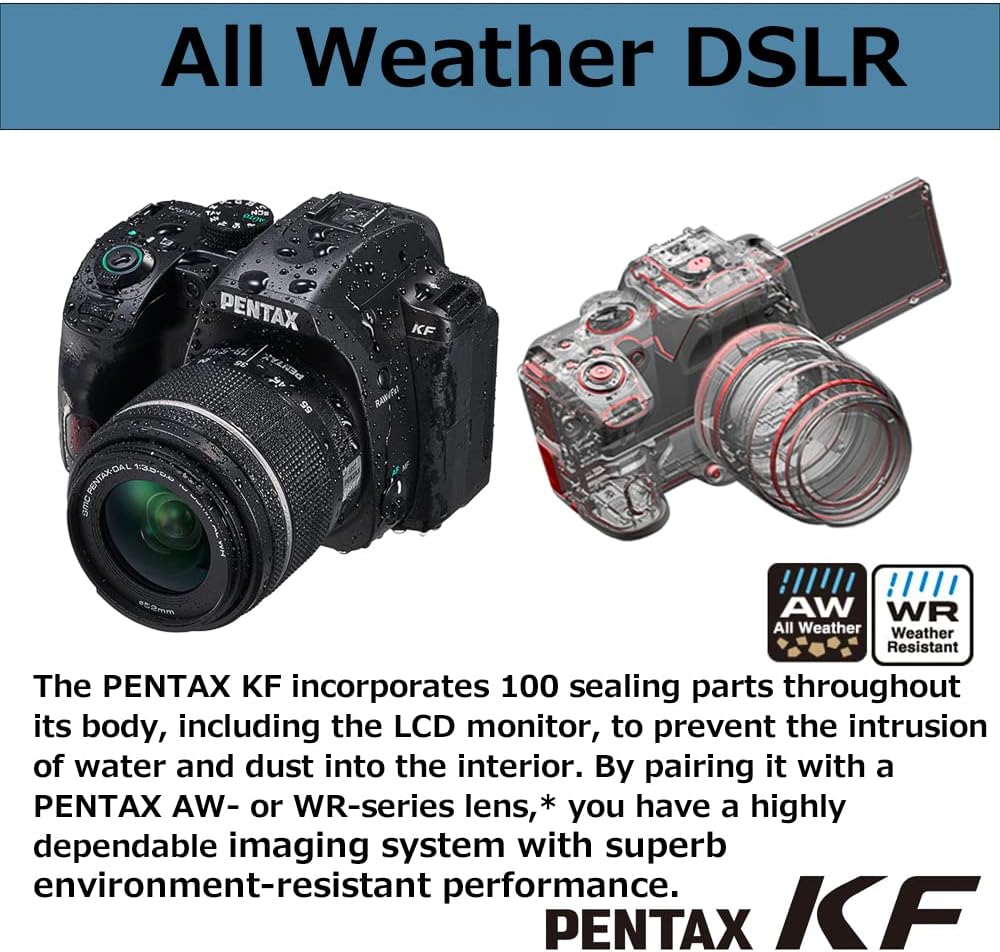
Figure 7.3: Astrophotography Example. Мурункуample of a Milky Way photograph captured using the camera's capabilities.
7.3. Dust and Weather-Resistant Construction
The PENTAX KF features a robust construction with 100 sealing parts throughout its body, including the LCD monitor. This design prevents the intrusion of water and dust, making it suitable for outdoor photography in challenging conditions. When paired with a PENTAX AW- or WR-series lens, the camera forms a highly dependable, environment-resistant imaging system.

Figure 7.4: Weather-Resistant Design. This image highlights the camera's weather-sealed construction, showing water droplets on the body.
7.4. Wi-Fi байланышы
The integrated Wi-Fi module allows for wireless connection to a smartphone or tablet using the dedicated Image Sync application. This enables remote control of the camera, live view display, and transfer of images to your smart device.

Figure 7.5: Image Sync Application. A screenshot of the Image Sync app interface, demonstrating remote camera control and image transfer.
7.5. AA Filter Simulator
The PENTAX KF features an APS-C CMOS sensor without an anti-aliasing (AA) filter, prioritizing image sharpness. To mitigate moiré patterns and false colors that can occur without an AA filter, the camera incorporates an AA filter simulator. This function applies microscopic vibrations to the image sensor during exposure, effectively providing the same level of moiré reduction as an optical AA filter.
8. Техникалык тейлөө
8.1. Камераны тазалоо
- Камеранын корпусу: Жумшак, кургак чүпүрөк менен сүртүңүз. Кежир кир үчүн, чүпүрөктү жеңил колдонуңуз dampened with water and then wipe dry.
- Объектив: Чаңды тазалоо үчүн линза щеткасын колдонуңуз, андан кийин линзаны тазалоочу чүпүрөк жана линзаны тазалоочу эритме менен акырын сүртүңүз.
- Сүрөт сенсору: If dust appears on images, use the camera's sensor cleaning function or consult a service center.
- ЖК монитор: Gently wipe with a soft, dry cloth. Avoid pressing hard.
8.2. Сактоо
- Store the camera in a cool, dry, and well-ventilated place, away from direct sunlight and high humidity.
- Камера узак убакыт бою колдонулбаса, батареяны алып салыңыз.
- Use desiccant to prevent mold growth, especially in humid environments.
9. Кыйынчылыктарды
| Көйгөй | Мүмкүн себеп | Чечим |
|---|---|---|
| Камера күйбөйт. | Батарея түгөнүп калган же туура эмес салынган. | Батареяны толук заряддап, анын туура салынганын текшериңиз. |
| Сүрөткө тартуу мүмкүн эмес. | Memory card is full, locked, or not inserted. Lens cap is on. | Insert a new/unlocked card, remove lens cap. Check card status. |
| Сүрөттөр бүдөмүк. | Туура эмес фокус, камеранын солкулдашы же кир линза. | Ensure proper focus, use a faster shutter speed or tripod, clean the lens. |
| ЖК экран бош. | Camera is off, battery depleted, or display mode is off. | Power on camera, charge battery, press INFO/DISPLAY button. |
| Wi-Fi туташуусу ишке ашпай калды. | Incorrect settings, distance too far, or interference. | Check Wi-Fi settings, move closer to the device, avoid interference. |
10. Техникалык шарттар
| Өзгөчөлүк | Деталь |
|---|---|
| Бренд | Pentax |
| Модель аты | Pentax KF |
| Натыйжалуу чечим | 24.24 мегапиксел |
| Сенсор түрү | APS-C CMOS (without AA filter) |
| ISO сезгичтиги | 100ден 102400га чейин |
| Image Stabilization | Sensor-shift type (SR mechanism) |
| LCD экран | 3-inch Vari-angle LCD |
| Автофокус системасы | SAFOX X (11 points, 9 cross-type) |
| Үзгүлтүксүз атуу ылдамдыгы | Секундасына 5 кадрга чейин |
| Video Resolution | 1080p |
| Байланыш | Wi-Fi |
| Аба ырайына каршылык | Dust and weather-resistant construction |
| Батарея түрү | Литий-ион |
| Өлчөмдөрү (L x W x Y) | 21.1 x 16.5 x 13.1 см (болжолдуу таңгак өлчөмдөрү) |
| Салмагы | 1.23 Kilograms (approximate package weight) |
11. Кепилдик жана колдоо
11.1. Өндүрүүчүнүн Кепилдиги
The PENTAX KF camera comes with a 1 жылдык өндүрүүчүнүн кепилдиги. Please retain your proof of purchase for warranty claims. The warranty covers defects in materials and workmanship under normal use. It does not cover damage caused by misuse, accidents, unauthorized repairs, or normal wear and tear.
11.2. Кардарларды колдоо кызматы
For technical assistance, service, or further inquiries, please visit the official Pentax support webсайтка же кардарларды тейлөөгө кайрылыңыз.


