1. Киришүү
This manual provides detailed instructions for the setup, operation, maintenance, and troubleshooting of your Joso D3 Wireless Mobile Gaming Controller. Please read this manual thoroughly before using the product to ensure proper functionality and to maximize your gaming experience.
2. Пакеттин мазмуну
- 2 x Joso D3 Mobile Game Controllers (1 Black, 1 Gray)
- 2 x USB-C заряддоо кабелдери
- 2 x User Manuals
3. Орнотуу
3.1 Контроллерди заряддоо
Before initial use, fully charge the controller using the provided USB-C charging cable. Connect the USB-C end to the controller's charging port and the USB-A end to a compatible power source (e.g., computer USB port, wall adapter). The charging time is approximately 2-3 hours.

Image: This image illustrates the working time, charging time, and battery capacity of the Joso D3 controller. It shows a working time of 15-18 hours, a charging time of 2-3 hours, and a 400mAh battery capacity.
3.2 Attaching Your Mobile Device
The Joso D3 controller features a telescopic holder designed to securely fit mobile phones between 5.0 and 6.9 inches in length. Gently extend the controller's sides and place your smartphone into the holder. Ensure the device is centered and stable. Эскертүү: This controller is not compatible with iPads or other tablets.
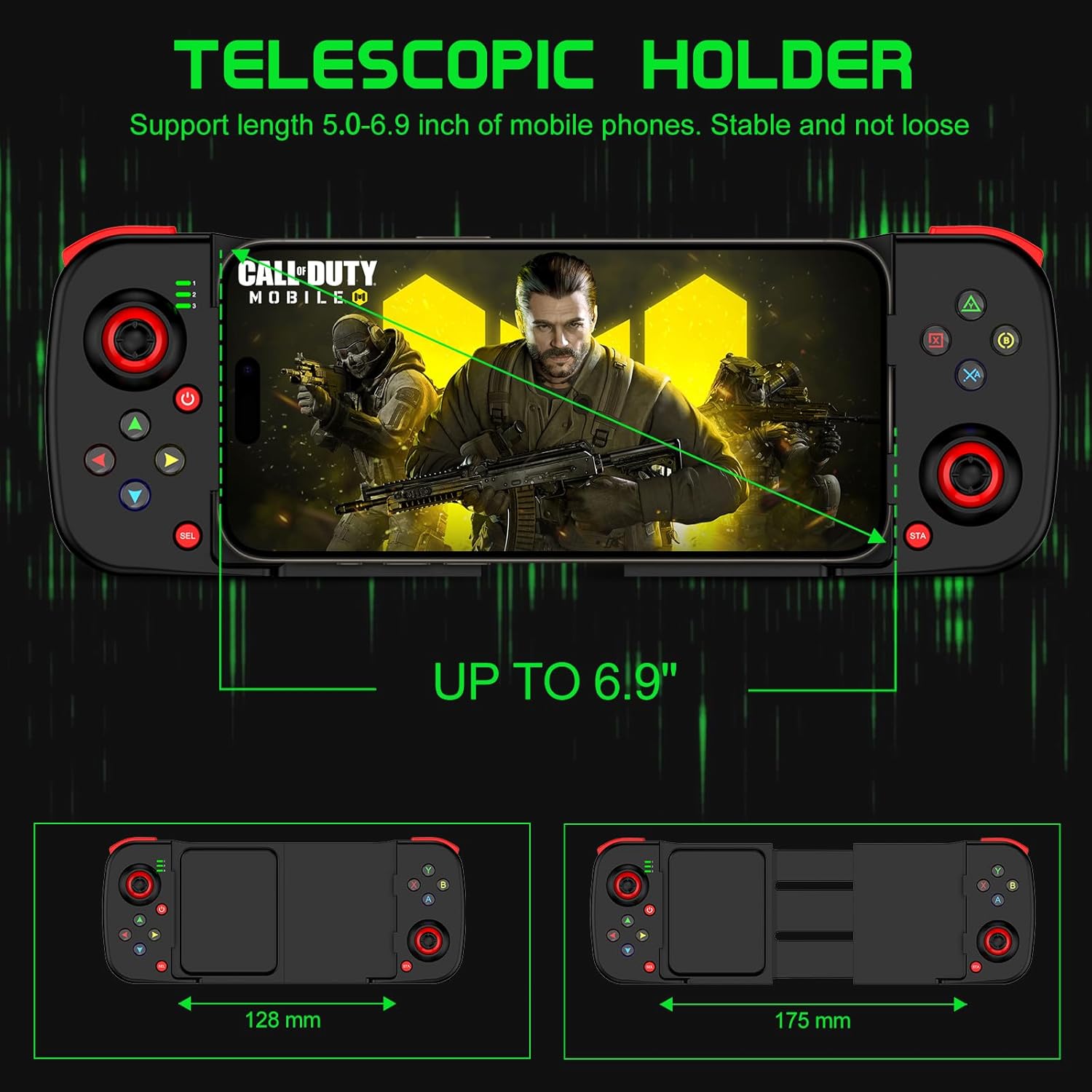
Image: This image demonstrates the telescopic holder of the Joso D3 controller, supporting mobile phones from 5.0 to 6.9 inches. It also shows the controller's dimensions, with a minimum width of 128mm and an extended width of 175mm.
3.3 Bluetooth жупташтыруу
Follow these steps to pair your Joso D3 controller with your device:
- Ensure the controller is powered off before initiating the Bluetooth pairing connection.
- To boot the controller into the desired mode, hold down one of the following buttons, then press the 'Home' button:
- B + Home: For DUALSHOCK 4 Wireless Controller mode (typically for iOS).
- X + Home: For D3 mode (general Android compatibility).
- RB + Home: For Xbox Wireless Controller mode (for Android or PC).
- On your iPhone, Android device, or PC, navigate to the Bluetooth settings and select the Joso D3 controller from the list of available devices to connect.

Image: This image displays the universal compatibility of the Joso D3 controller with iPhone, Android, and PC. It also provides visual instructions for Bluetooth pairing using specific button combinations (B+Home, X+Home, RB+Home) for different device types.
4. Иштөө нускамалары
4.1 Controller Layout
Familiarize yourself with the buttons and joysticks on your Joso D3 controller:
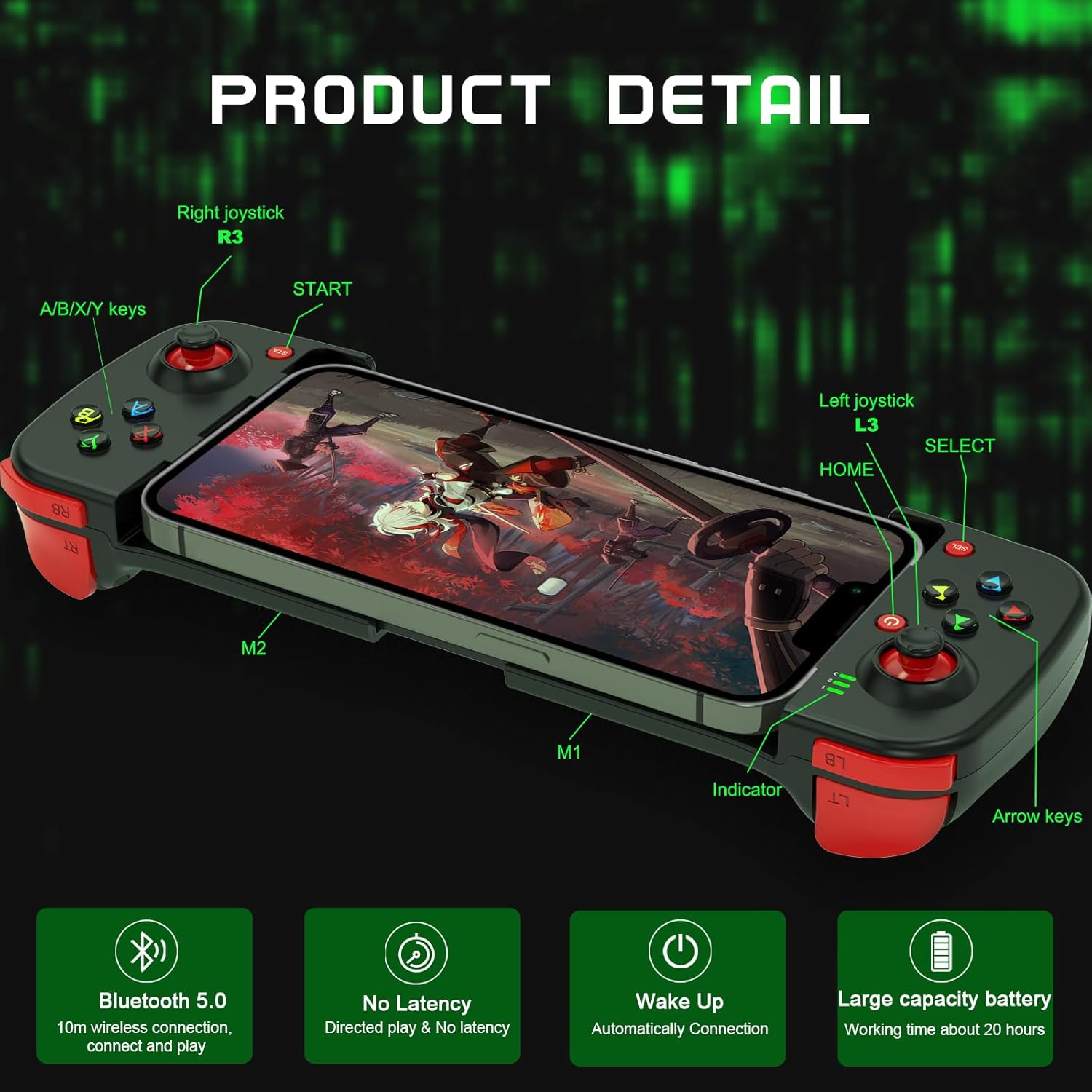
Сүрөт: Бул сүрөт кеңири маалымат берет view of the Joso D3 controller, labeling key components such as the Right joystick (R3), A/B/X/Y keys, START button, Left joystick (L3), HOME button, SELECT button, Indicator light, Arrow keys, and the M1/M2 back buttons.
- Left Joystick (L3): Кыймылды жана камераны башкаруу үчүн.
- Оң жактагы джойстик (R3): Камераны башкаруу жана мээлөө үчүн.
- A/B/X/Y баскычтары: Аракет баскычтары, функциялары оюнга жараша өзгөрүп турат.
- Directional Pad (Arrow Keys): Так багыт киргизүү үчүн.
- L1/L2 (LB/LT) & R1/R2 (RB/RT) Triggers/Bumpers: Оюндагы ар кандай аракеттер үчүн ийин баскычтары.
- START/SELECT (Menu/View) Баскычтар: For pausing, accessing menus, or specific game functions.
- Үй баскычы: To power on/off and for pairing.
- M1/M2 баскычтары: Customizable back buttons.
4.2 Advanced Gaming Features
The Joso D3 controller is designed to enhance your mobile gaming with several advanced features:
- Six Fingers Operation: The ergonomic design and button placement allow for simultaneous aiming, shooting, moving, and switching angles, providing a competitive edge.
- 360° High Precision 3D Rocker: Experience highly accurate positioning and smooth movement control in your games.

Image: This image highlights the
Тектеш документтер - D3
 |
Joso D3 Wireless Game Controller User Manual Joso D3 Wireless Game Controller үчүн комплекстүү колдонуучу колдонмосу, орнотууну, iOS жана Android үчүн туташуу режимдерин, макро жазууну, кубаттын абалын жана көйгөйлөрдү аныктоону камтыйт. |
 |
Joso D6/D7 зымсыз оюн контроллери Колдонуучунун колдонмосу Joso D6 жана D7 Wireless Game Controllers үчүн комплекстүү колдонуучу колдонмосу, пакеттин мазмунун, жабдыктардын шайкештигин, түзмөктүн түзүлүшүн, iOS, Android жана PC үчүн туташуу көрсөтмөлөрүн, баскычтардын айкалыштарын жана көйгөйлөрдү аныктоону камтыйт. |
 |
Joso D6 Controller Мүчүлүштүктөрдү аныктоо жана PS Remote Play Guide Joso D6 мобилдик оюн контроллери менен жалпы көйгөйлөрдү чечүү боюнча комплекстүү колдонмо, анын ичинде орнотуулар, баскычтардын иштеши жана PS Remote Play'ди колдонуу. Микропрограмманы кантип жаңыртып, контроллеруңузду үзгүлтүксүз ойноо үчүн туташтырууну үйрөнүңүз. |
 |
PS Remote Play шайкештиги үчүн геймпадды жаңыртуу үйрөткүчү Shooting Plus V3 тиркемесин колдонуп, PS Remote Play үчүн геймпадыңызды жаңыртуу боюнча кадам-кадам нускама. Алыстан ойноо үчүн контроллеруңузду PS4 жана PS5 консолдоруна кантип туташтырууну үйрөнүңүз. |
 |
Joso AX200 Keyboard and Mouse Adapter User Manual | Setup & Customization Guide User manual for the Joso AX200 Keyboard and Mouse Adapter, detailing hardware requirements, setup for PC and Nintendo Switch, equipment layout, key mapping, and customization options via the Geekvice app. |
 |
JOSO PG-9083S Wireless Game Controller User Manual JOSO PG-9083S зымсыз оюн контроллери үчүн колдонуучу колдонмосу, пакеттин мазмунун, жабдык талаптарын, iOS, Android жана PC үчүн туташуу ыкмаларын, кубаттын абалын жана көйгөйлөрдү чечүү. |