1. Киришүү
This manual provides essential information for the assembly, operation, and maintenance of your LDARC FF2 93mm FPV Racing Drone Frame Kit. Please read these instructions carefully before beginning assembly to ensure proper setup and safe use. This frame kit is designed for enthusiasts looking to build a compact and agile FPV drone for indoor or outdoor flight.
2. Продукт бүтүп калдыview
The LDARC FF2 is a lightweight and durable frame kit specifically designed for 2-inch propellers, offering a wheelbase of 93mm. It features a robust carbon fiber main body combined with injection-molded propeller guards, providing both protection and structural integrity. This design ensures exceptional durability and performance for a micro FPV racing drone.
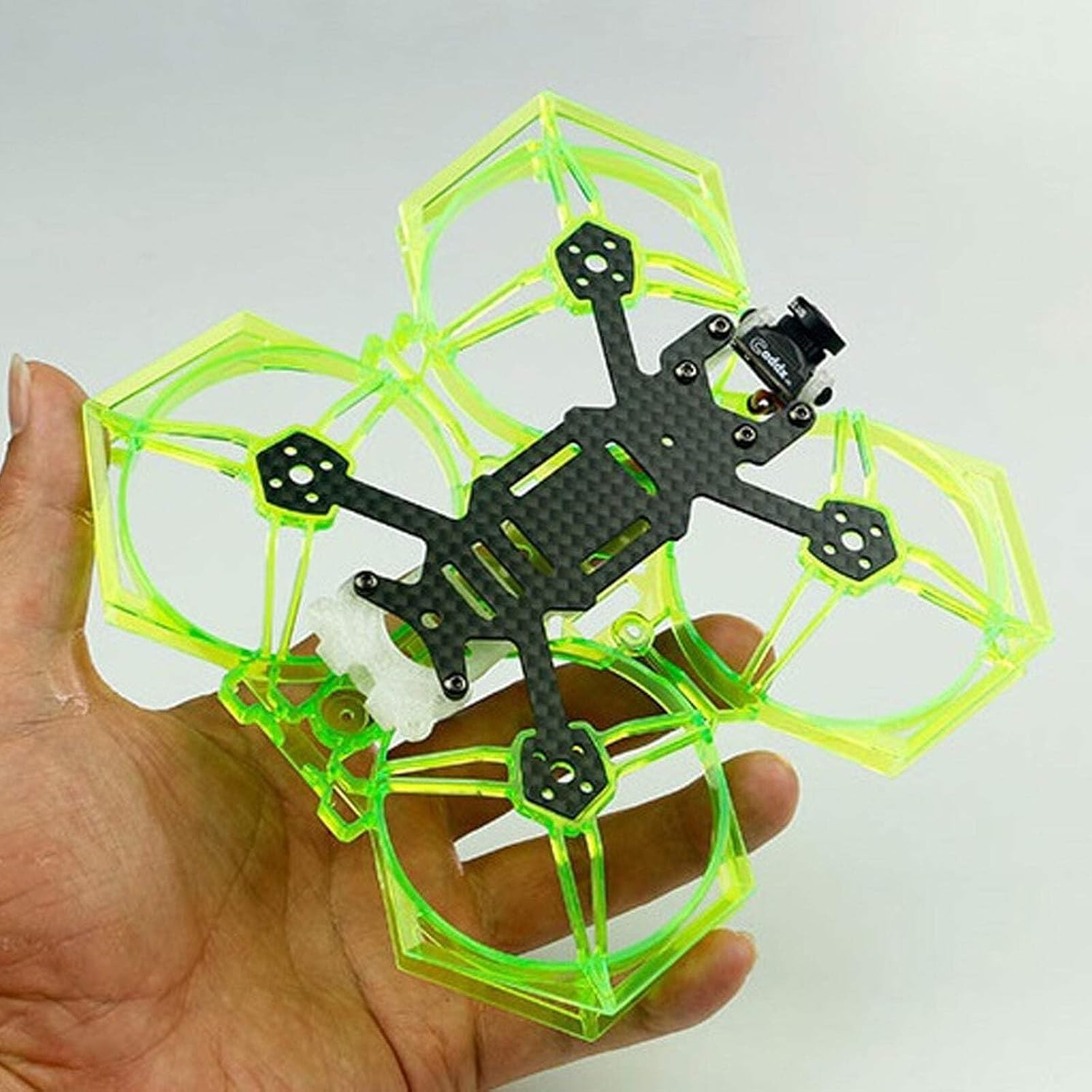
This image displays the LDARC FF2 93mm FPV Racing Drone Frame Kit held in a hand, providing a sense of its compact size. The central frame is made of black carbon fiber, with four arms extending outwards. Surrounding the propeller areas are translucent neon green injection-molded propeller guards, designed to protect the propellers and provide durability. A small FPV camera is visible mounted at the front of the carbon fiber frame.
3. Орнотуу жана чогултуу
The LDARC FF2 frame kit requires assembly and integration of various electronic components (not included). Follow these general steps for construction:
- Рамка монтажы: Securely attach the carbon fiber frame components and the injection-molded propeller guards using the provided hardware. Ensure all screws are tightened appropriately to prevent vibration.
- Мотор орнотуу: Mount your chosen brushless motors to the frame arms. The motor mounting pattern is 9mm. Ensure motor wires are routed cleanly and securely.
- Flight Controller (FC) Mounting: Install your flight controller onto the designated mounting area. The FC mounting pattern is 25.5mm x 25.5mm. Use vibration-damping standoffs if recommended by your FC manufacturer.
- Камераны орнотуу: Mount your FPV camera. The frame provides a camera spacing of 14mm. Adjust the camera angle as desired for optimal flight view.
- Receiver and VTX Installation: Integrate your radio receiver and video transmitter (VTX) into the frame, ensuring they are securely mounted and wires are managed to avoid interference with propellers or other components.
- Propeller Attachment: Once all electronics are installed and tested, attach the 2-inch propellers to the motors. Ensure propellers are oriented correctly for the motor rotation direction.
Always refer to the specific instructions for your individual electronic components (motors, FC, camera, etc.) for detailed wiring and configuration.
4. Иштетүү боюнча нускамалар
Once your LDARC FF2 drone is fully assembled and configured, adhere to the following operating guidelines:
- Учуу алдындагы текшерүүлөр: Before each flight, inspect the frame for any damage, ensure all screws are tight, and check that propellers are securely attached and free from cracks. Verify battery charge and radio link.
- Коопсуз чөйрө: Operate your drone in open areas, away from people, animals, and obstacles. Be aware of local regulations regarding drone flight.
- Батарея башкаруу: Use appropriate LiPo batteries for your setup. Monitor battery voltage during flight and land before voltage drops too low to prevent damage.
- Учууну башкаруу: Familiarize yourself with your flight controller's settings and practice in a simulator if you are new to FPV flying.
5. Техникалык тейлөө
Regular maintenance will extend the lifespan of your LDARC FF2 frame kit:
- Учуудан кийинки текшерүү: After every flight, visually inspect the carbon fiber frame and propeller guards for any signs of stress, cracks, or damage.
- Аппараттык камсыздоону текшерүү: Periodically check all screws and fasteners for tightness. Vibrations during flight can cause them to loosen over time.
- Тазалоо: Keep the frame clean from dirt, dust, and debris. Use a soft brush or compressed air. Avoid using harsh chemicals that could damage the materials.
- Пропеллерди алмаштыруу: Replace bent, chipped, or cracked propellers immediately to maintain flight performance and prevent further damage.
6. Кыйынчылыктарды
This section addresses common issues related to the frame kit:
- Ашыкча титирөө: Check for loose screws on the frame or motors. Inspect propellers for damage or imbalance. Ensure the flight controller is securely mounted.
- Damaged Propeller Guards: If propeller guards are cracked or broken, they should be replaced to maintain protection and structural integrity.
- Бош компоненттер: If any electronic components become loose, re-secure them using appropriate mounting methods (screws, zip ties, double-sided tape).
- Frame Cracks: In the event of a crash, thoroughly inspect the carbon fiber frame for any cracks. Even small cracks can compromise structural integrity and should be addressed by replacing the affected part.
7. Техникалык шарттар
| Wheelbase | 93мм |
| Frame Weight | 26.7г |
| Propeller Size Compatibility | 2 дюйм |
| Flight Controller Mounting | 25.5мм x 25.5мм |
| Мотор монтаждоо | 9мм |
| Camera Spacing | 14мм |
| Bottom Plate Thickness | 2мм |
| Материал | Carbon Fiber (frame), Injection Molded (propeller guards) |
| Модел | FF2 |
| Бренд | LDARC |
8. Кепилдик жана колдоо
For specific warranty information regarding your LDARC FF2 93mm FPV Racing Drone Frame Kit, please refer to the retailer where the product was purchased or consult the official LDARC website. Support for assembly and troubleshooting of integrated electronic components should be sought from the respective manufacturers of those parts. For general inquiries about the frame kit, please contact LDARC customer service through their official channels.


