Introduction
This manual provides essential information for the proper installation, operation, and maintenance of your ORICO 2.5-inch USB-C to SATA III Hard Drive Enclosure. This enclosure is designed to convert a 2.5-inch SATA SSD or HDD (7mm/9.5mm thickness) into a portable external storage device. It supports a maximum capacity of 6TB and features UASP accelerated transmission protocol for efficient data transfer.
Коопсуздук маалыматы
- Аппаратты сууга, нымдуулукка же экстремалдык температурага тийгизбеңиз.
- Аппаратты түшүрүүдөн же катуу таасирлерден сактаныңыз.
- Do not attempt to disassemble or modify the enclosure, as this may void the warranty and cause damage.
- Use only the provided USB cable or a compatible cable to ensure proper functionality and prevent damage.
- Аппаратты күчтүү магнит талаасынан алыс кармаңыз.
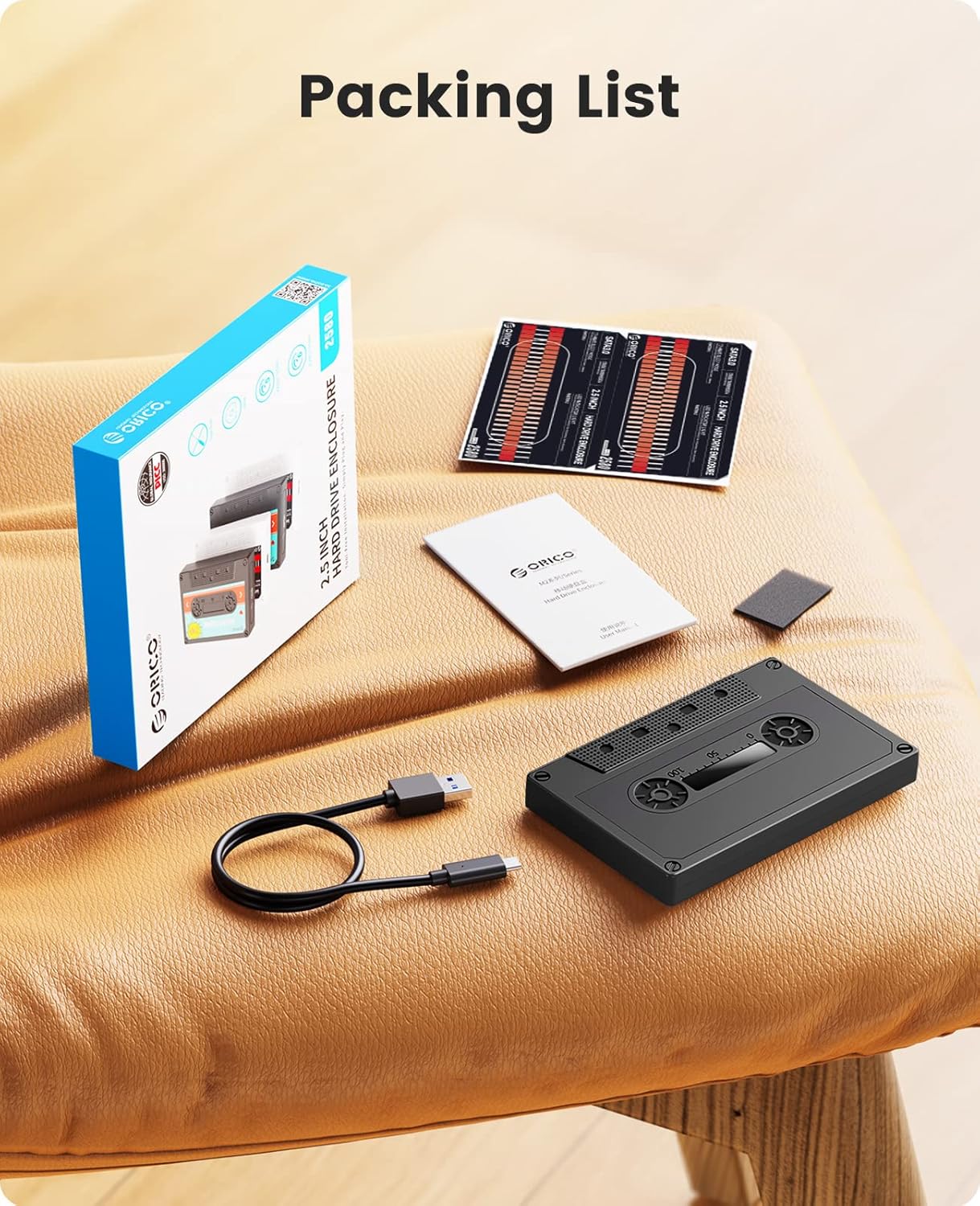
Кутуда эмне бар
- ORICO 2.5-inch Hard Drive Enclosure (Model: 2580 Type-C)
- USB-C - USB-A маалымат кабели
- User Manual
- DIY Vintage Tape Stickers
- Shockproof Sponge Pad
Жайгашуу
Follow these steps to install your 2.5-inch SATA SSD or HDD into the enclosure:
- Корпусун ачыңыз: Gently slide the top cover of the enclosure off to reveal the internal tray.
- Apply Shockproof Sponge: Peel off the adhesive backing from the included shockproof sponge pad and carefully place it inside the enclosure's tray. This helps secure the drive and absorb shocks.
- Дискти орнотуу: Align your 2.5-inch SATA SSD or HDD with the SATA connector inside the enclosure. Gently push the drive into the connector until it is firmly seated. Ensure the drive is snug against the sponge pad.
- Корпусун жабуу: Slide the top cover back onto the enclosure until it clicks securely into place.
- Apply DIY Stickers (Optional): If desired, peel and apply the vintage tape stickers to the enclosure for a personalized look.


Video: Installation and How to Use with DIY Sticker
Иштеп жатат
- Түзмөккө туташуу: Use the provided USB-C to USB-A cable to connect the enclosure to your computer (PC, Mac, Linux), laptop, PS4, PS5, Xbox, router, or smart TV. The enclosure features a USB-C port.
- LED көрсөткүчү: A blue LED indicator light on the enclosure will illuminate when connected and blink during data transfer, indicating activity.
- Автоматтык уйку режими: The enclosure is equipped with a 10-minute auto-sleep mode. If there is no operation for 10 minutes, the drive will enter sleep mode to conserve power and extend drive lifespan.
- Маалыматтарды өткөрүү: The enclosure supports USB 3.0 with a maximum transfer rate of 6Gbps and UASP (USB Attached SCSI Protocol) for improved performance, especially with SSDs.
- Drive форматтоо: For new hard drives, you may need to format the drive before use. Refer to the video below for instructions on how to format a hard drive on Windows, Mac, or Linux systems.


Video: How to format Hard Drive when operating Windows/Mac/Linux
Техникалык тейлөө
- Keep the enclosure clean by wiping it with a soft, dry cloth. Avoid using liquid cleaners.
- Store the enclosure in a cool, dry place away from direct sunlight and dust when not in use.
- Жоготууга жол бербөө үчүн маанилүү маалыматтардын камдык көчүрмөсүн үзгүлтүксүз сактап туруңуз.
Проблемаларды чечүү
- Диск таанылган жок:
- Ensure the hard drive is correctly installed and fully seated in the SATA connector.
- Корпусту компьютериңиздеги башка USB портуна туташтырып көрүңүз.
- Verify that the USB cable is securely connected to both the enclosure and the host device.
- For new drives, check Disk Management (Windows) or Disk Utility (Mac) to see if the drive needs to be initialized or formatted.
- Slow Transfer Speed:
- Ensure you are using a USB 3.0 port on your computer for optimal speed.
- Check if your operating system and drivers support UASP.
- Көптөгөн майда которуулардан качыңыз fileбир эле учурда, анткени бул жалпы ылдамдыкты төмөндөтүшү мүмкүн.
- LED индикатору күйбөйт:
- Confirm the enclosure is properly connected to a powered USB port.
- Check if the internal hard drive is correctly installed.
Техникалык шарттар
| Бренд | ORICO |
| Модель номери | Type-C Black (2580 Type-C) |
| Материал | ABS пластик |
| Шайкеш келген дисктер | 2.5-inch SATA HDD/SSD (7mm & 9.5mm thickness) |
| Max Capacity | 6TB |
| Интерфейс | USB-C to SATA III |
| Маалыматтарды өткөрүү ылдамдыгы | Up to 6Gbps (USB 3.0 with UASP) |
| Шайкеш системалар | Mac OS, Linux, Windows |
| Шайкеш түзмөктөр | Laptop, PS4, PS5, Router, TV, Xbox, Phone with OTG |
| Продукциянын өлчөмдөрү | 5.12"L x 3.15"W x 0.59"H (130мм x 80мм x 15мм) |
| Элемент Салмагы | 3.53 унция (100 грамм) |
Кепилдик жана колдоо
ORICO products typically come with a standard manufacturer's warranty. Please refer to the warranty card included in your product packaging or visit the official ORICO website for detailed warranty terms and conditions. For technical support, troubleshooting assistance, or any product-related inquiries, please contact ORICO customer service through their official channels.


