1. Киришүү
The ALLPOWERS S1500 Portable Power Station is a versatile and high-capacity solar generator designed to provide reliable power for a wide range of applications, from outdoor adventures like camping and RV travel to emergency home backup during power outages. This manual provides essential information on the setup, operation, maintenance, and troubleshooting of your S1500 power station.

Figure 1: ALLPOWERS S1500 Portable Power Station overview.
2. Кутуда эмне бар
Upon unboxing your ALLPOWERS S1500, please ensure all the following components are present:
- ALLPOWERS S1500 Portable Power Station (1500W/1092Wh)
- AC заряддоо адаптери
- Welcome Guide (User Manual)
3. Продукт бүтүп калдыview
The S1500 is equipped with multiple ports to meet diverse power needs simultaneously.
3.1. Порттор жана индикаторлор
- 4 AC розеткалары: 1500W rated power (3000W peak) for household appliances.
- 3 USB-A порттору: Смартфондорду, планшеттерди жана башка USB түзмөктөрүн кубаттоо үчүн.
- 1 USB-C Port (PD 100W): Fast charging for laptops and compatible devices.
- 2 DC Ports (13V/5.5A): Туруктуу ток менен иштеген түзмөктөр үчүн.
- 1 Car Outlet (12V/10A): Автоунаа техникасы үчүн.
- LCD дисплей: Батареянын деңгээлин, кириш/чыгыш ват көрсөтөтtage, жана калган иштөө убактысы.
- LED жарыктары: Integrated lights for illumination in low-light conditions.

2-сүрөт: Детальдуу view of the 11 output ports on the S1500.

Figure 3: Close-up of the LCD display showing battery status and power information.
4. Орнотуу жана баштапкы заряддоо
Before first use, it is recommended to fully charge the ALLPOWERS S1500.
- Таңылганын ачуу: Remove the power station and all accessories from the packaging.
- Жайгашкан жери: Place the power station on a flat, stable surface in a well-ventilated area, away from direct sunlight or heat sources.
- Initial Charge (AC): Connect the included AC charging adapter to the input port on the power station and then plug it into a standard wall outlet. The LCD display will indicate charging status.
- Толук заряд: The unit is fully charged when the battery indicator on the LCD display shows 100%. This typically takes about 3 hours with combined AC and PD 100W USB-C input.
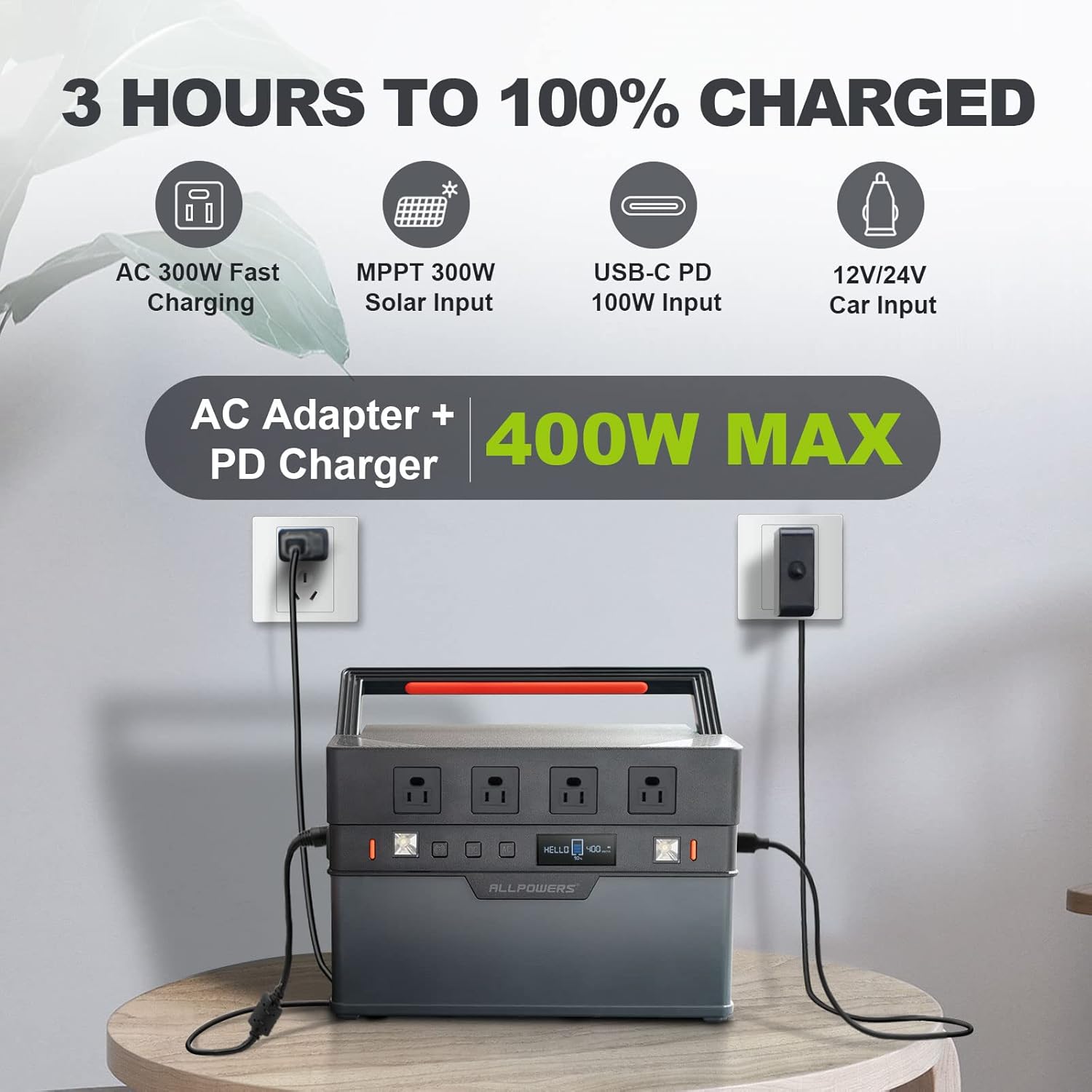
Figure 4: S1500 being charged using both AC adapter and PD USB-C input for fast charging.
5. Иштөө нускамалары
The ALLPOWERS S1500 offers various output options for different devices.
5.1. Күйгүзүү/өчүрүү
- To turn on the power station, press and hold the main power button until the LCD screen illuminates.
- To turn off, press and hold the main power button again until the LCD screen turns off.
5.2. AC Чыгуусу
- Press the "AC" button to enable or disable the AC outlets. The AC indicator on the display will light up when active.
- Plug your AC-powered devices into the 4 AC outlets. Ensure the total wattage 1500 Вт (же 3000 Вт чокудан) ашпайт.
5.3. DC and USB Output
- Press the "DC" button to enable or disable the DC and Car outlets. The DC indicator will light up when active.
- Plug your DC-powered devices or car appliances into the respective ports.
- USB-A and USB-C ports are typically always active when the unit is on.
5.4. Жарык диоддору
- Press the dedicated LED light button to cycle through different lighting modes (e.g., low, high, SOS).

Figure 5: S1500 with its integrated LED lights activated.
5.5. APP алыстан башкаруу пульту
The ALLPOWERS S1500 can be controlled via a mobile application for convenient remote operation.
- Download the "ALLPOWERS" app from your smartphone's app store.
- Enable Bluetooth on your power station by long-pressing the Bluetooth button.
- Open the app and follow the on-screen instructions to connect to your S1500.
- Through the app, you can monitor battery status, control AC/DC output, and manage LED lights.

Figure 6: Controlling the S1500 power station remotely using the ALLPOWERS mobile application.
6. Заряддоо ыкмалары
The ALLPOWERS S1500 supports multiple charging methods:
6.1. Кондиционердин дубал розеткасын кубаттоо
- Connect the AC charging adapter to the power station's input port and then to a standard wall outlet.
- The unit supports 300W AC input for rapid charging.
6.2. USB-C PD 100W Charging
- Use a compatible USB-C PD 100W charger and cable to connect to the USB-C input port.
- This method can be used independently or in conjunction with AC charging for even faster recharge times (0-100% in 3 hours).
6.3. Күн батареясын кубаттоо
- Connect compatible solar panels (up to 300W with MPPT optimization) to the power station's solar input port.
- Оптималдуу кубаттоо натыйжалуулугу үчүн күн батареялары түз күн нуруна коюлганын текшериңиз.
6.4. Car Outlet Charging
- Connect the power station to your vehicle's 12V/24V car outlet using the appropriate cable.
- This method is ideal for charging while on the go.
7. Техникалык тейлөө жана сактоо
Proper maintenance ensures the longevity and optimal performance of your ALLPOWERS S1500.
- Тазалоо: Use a dry, soft cloth to wipe the exterior of the power station. Avoid using harsh chemicals or abrasive materials.
- Сактагыч: Store the unit in a cool, dry place, away from direct sunlight, moisture, and corrosive substances.
- Батареяга кам көрүү: For prolonged storage, charge the battery to 50-80% every 3-6 months to maintain battery health. Avoid completely depleting the battery for extended periods.
- Температура: Operate and store the unit within the recommended temperature range (-4°F to 140°F / -20°C to 60°C). Best working temperature is around 77°F (25°C).

7-сүрөт: Ички view of the S1500 battery cells, highlighting the robust BMS technology for safety and longevity.
8. Кыйынчылыктарды
If you encounter issues with your ALLPOWERS S1500, refer to the following common problems and solutions:
| Көйгөй | Мүмкүн себеп | Чечим |
|---|---|---|
| Түзмөк күйбөй жатат | Battery fully depleted; Power button not pressed long enough. | Түзмөктү дароо кубаттаңыз; Кубат баскычын 3-5 секунд басып туруңуз. |
| AC чыгаруу иштебейт | AC output disabled; Overload protection activated. | Press the "AC" button to enable; Reduce the connected load. |
| Күн аркылуу жай кубаттоо | Күн нурунун жетишсиздиги; Панелдердин бурчу оптималдуу эмес; Шайкеш келбеген панелдер. | Ensure direct sunlight; Adjust panel angle; Verify panel compatibility and wattage. |
| Күйөрмандар ызы-чуу | Normal operation during high load/charging; Resonating with case. | This is normal for cooling; Ensure unit is on a stable surface. |
9. Техникалык шарттар
| Өзгөчөлүк | Деталь |
|---|---|
| Модель аты | AP-SS-008 |
| Кубаттуулугу | 1092Wh |
| AC Output | 1500 Вт (баалуу), 3000 Вт (чоку) |
| AC Voltage | 110 вольт |
| USB-A чыгаруу | 3 ports, 5V/2.4A |
| USB-C чыгышы | 1 port, PD 100W |
| DC Output | 2 ports, 13V/5.5A |
| Car Outlet | 1 port, 12V/10A |
| AC киргизүү | 300W макс |
| Күн киргизүү | 300W Max (MPPT) |
| Recharge Time (0-100%) | Approx. 3 hours (AC + USB-C PD) |
| Батарея түрү | Lithium-ion (implied from 3.7V, 1000+ cycles) |
| Жашоо циклдери | Capacity remains 80% over 1000+ cycles |
| Салмагы | 22.05 фунт (10 кг) |
| Өлчөмдөрү (L x W x Y) | 12.6" x 8.7" x 7.5" |
| Иштөө температурасы | -4°F – 140°F (-20°C – 60°C) |
| Кепилдик | 5 жыл |
10. Кепилдик жана колдоо
ALLPOWERS provides an exclusive 5-year warranty for the S1500 Portable Power Station, ensuring a guaranteed, worry-free experience.
- Кепилдик мөөнөтү: Сатып алынган күндөн тартып 5 жыл.
- Кардарларды тейлөө: For any inquiries, technical support, or warranty claims, please contact ALLPOWERS customer service. Refer to the contact information provided in your Welcome Guide or visit the official ALLPOWERS webсайт.




