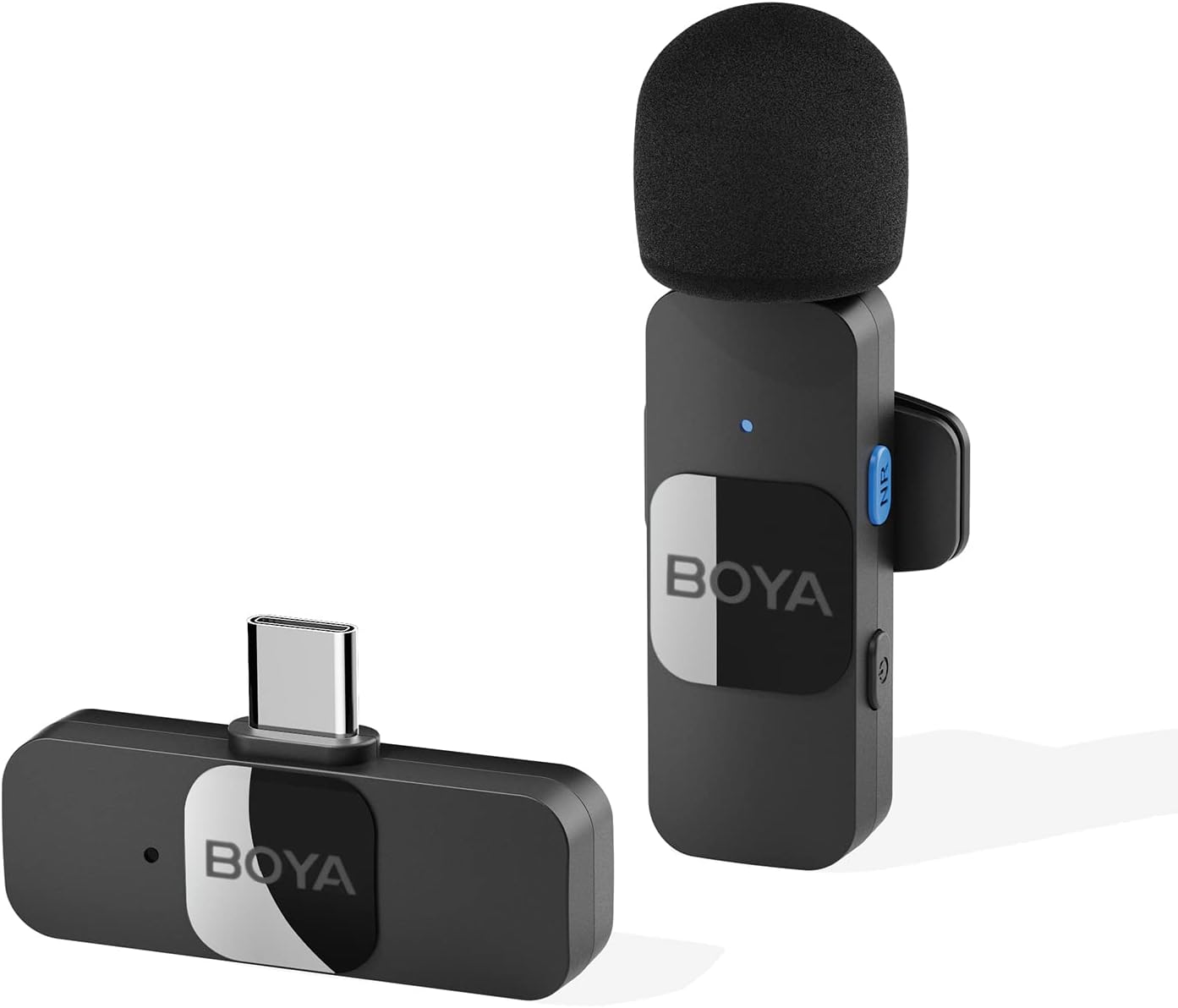
Thank you for choosing the BOYA BY-V10 Wireless Lavalier Microphone. This innovative microphone system is designed to provide high-quality audio for your video recording, live streaming, podcasting, and online conferencing needs. Its compact design, easy setup, and advanced features make it an excellent tool for content creators and professionals alike.
2. Кутуда эмне бар
BY-V10-TX Transmitter ×1
BY-V10-RX Receiver ×1
USB-C заряддоо кабели ×1
Foam Windscreen ×1
Figure 1: BOYA BY-V10 Wireless Lavalier Microphone system, showing the transmitter with a foam windscreen and the USB-C receiver.
3. Орнотуу колдонмосу
3.1 Алгачкы заряддоо
Before first use, ensure both the transmitter and receiver are fully charged. Connect the provided USB-C charging cable to the charging ports on both units and a power source. A full charge takes approximately two hours, providing up to 9 hours of operation time.
Figure 2: The BOYA BY-V10 offers a long battery life, with a 95mAh capacity providing up to 9 hours of usage after a 2-hour charge.
3.2 Автоматтык туташуу
Plug the BY-V10-RX receiver directly into the USB-C port of your smartphone, tablet, or laptop.
Turn on the BY-V10-TX transmitter. The units will automatically pair within seconds.
Маанилүү эскертүү: For Android devices, ensure the USB OTG (On-The-Go) setting is enabled in your device's settings for proper microphone recognition.
Figure 3: The BY-V10 is widely compatible with Type-C smartphone devices and iOS system devices, including the iPhone 15 series.
4. Иштөө нускамалары
4.1 Микрофонду жайгаштыруу
The BY-V10 transmitter can be handheld or clipped onto your shirt using its rotatable back clip. For optimal sound capture, position the microphone approximately 6-8 inches from your mouth.
4.2 ызы-чууну жокко чыгаруу
The microphone features advanced noise reduction technology. To activate or deactivate noise cancellation, press the dedicated NR (Noise Reduction) button on the transmitter. This feature helps to minimize background noise for clearer audio, especially in noisy environments.
Figure 4: Enhance voice clarity with the one-click noise cancellation feature, activated by the NR button on the transmitter.
4.3 Omnidirectional Sound Pickup
Equipped with an omnidirectional pickup microphone, the BY-V10 captures 360-degree sound with precision. This ensures that no audio detail is missed, regardless of the surrounding environment or the direction of the sound source.
4.4 Зымсыз берүү
The system operates on a 2.4G signal, providing stable and low-latency audio transmission. It supports a wireless range of up to 164 feet (50 meters) in open environments without obstacles or interference, allowing for flexible recording distances.
Figure 5: Experience reliable audio transmission up to 164 feet (50 meters) in open, unobstructed environments.
4.5 Бир убакта заряддоо
The receiver allows you to charge your device simultaneously while recording, ensuring uninterrupted long recording sessions for live streaming or course recording.
5. Техникалык тейлөө
Keep the microphone and receiver clean and free from dust. Use a soft, dry cloth for cleaning.
Түзмөктөрдү салкын, кургак жерде, күндүн нуру түз тийбеген жана өтө жогорку температурадан алыс сактаңыз.
Ensure the foam windscreen is securely attached to the transmitter to prevent loss and provide optimal wind noise reduction. Replacement windscreens can be acquired if needed.
Түзмөктөрдү түшүрүп алуудан же катуу соккуга кабылтуудан алыс болуңуз.
6. Кыйынчылыктарды
Көйгөй
Мүмкүн себеп
Чечим
Microphone not connecting/pairing.
USB OTG not enabled (Android). Бирдиктер күйгүзүлгөн эмес. Батарея аз.
Enable USB OTG in your device settings. Ensure both transmitter and receiver are turned on. Эки түзмөктү тең толук заряддаңыз.
Poor sound quality/excessive background noise.
Noise cancellation off. Microphone too far from source. Айлана-чөйрөнүн кийлигишүүсү.
Press the NR button to activate noise cancellation. Ensure microphone is within optimal range (6-8 inches). Move to a less noisy environment if possible.
Батареянын иштөө мөөнөтү кыска.
Incomplete charging. Frequent use of power-intensive features.
Ensure units are charged for the full 2 hours. Minimize continuous use of noise cancellation if not critical.
7. Техникалык шарттар
Өзгөчөлүк
Спецификация
Модель номери
BY-V10
Микрофон форма фактору
Lavalier
Полярдык үлгү
Көп багыттуу
Байланыш технологиясы
зымсыз 2.4GHz
Туташтыргыч түрү
USB Type-C
Шайкеш түзмөктөр
Smartphone, Laptop, Tablet
Аудио сезгичтиги
42 дБ
Ызы-чуунун катышы
78 дБ
Жыштык диапазону
20Гц-16кГц
Элемент Салмагы
5.3 унция (150 грамм)
Продукциянын өлчөмдөрү
4.72 x 3.15 x 1.18 дюйм
Power Source
Батарея менен иштейт (3 литий-иондук батарейка талап кылынат)
8. Кепилдик жана колдоо
For detailed warranty information and further support, please refer to the official Instructions for Use (IFU) PDF document provided by BOYA.
BOYA BOYAMIC 2.4GHz Wireless Microphone System User Manual Comprehensive user manual for the BOYA BOYAMIC 2.4GHz dual-channel wireless microphone system. Covers features, setup, operation, troubleshooting, and specifications for vlogging, live streaming, and mobile journalism.
BOYA BY-V зымсыз микрофон системасы боюнча суроо-жооптор BOYA BY-V зымсыз микрофон системасы боюнча ар тараптуу суроо-жооп колдонмосу, анда орнотуу, туташуу, аудио көйгөйлөрү жана ар кандай мобилдик түзмөктөрдү колдонуу боюнча кеңештер камтылган.
BOYA mini 2: Жаңыртылган Super Mini зымсыз микрофон колдонуучусунун колдонмосу BOYA mini 2 үчүн кеңири колдонуучу колдонмосу, жасалма интеллект менен ызы-чууну азайтуу, батареянын узак иштөө мөөнөтү жана смартфондор, планшеттер жана камералар үчүн ар тараптуу шайкештикти камтыган жаңыртылган супер-мини зымсыз микрофон системасы. Орнотуу, функциялар, мүнөздөмөлөр жана көйгөйлөрдү чечүү жөнүндө билип алыңыз.