1. Продукт бүтүп калдыview
The ANCEL MT700 is a comprehensive diagnostic tool designed for motorcycles, offering full system diagnostics and various special functions, including oil service reset. It features a 7-inch touchscreen and runs on a stable Android system, providing a user-friendly interface.
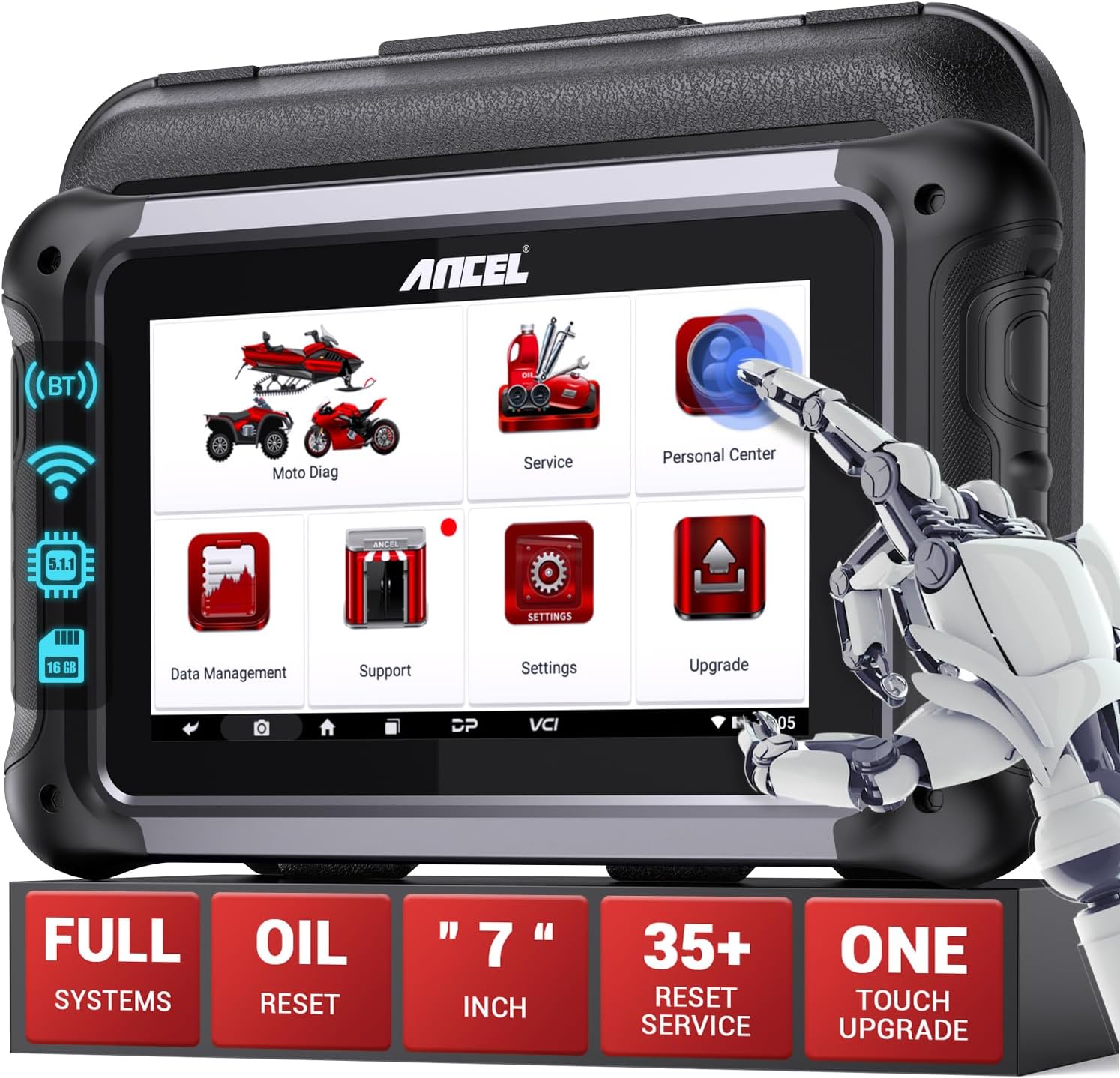
Image 1.1: The ANCEL MT700 diagnostic tool, displaying its main menu with options for Moto Diag, Service, Personal Center, Data Management, Support, Settings, and Upgrade. The device features a large touchscreen and physical buttons.
This device is compatible with a wide range of motorcycle brands, including Aprilia, Benelli, BMW, Ducati, KTM, Piaggio, Triumph, BRP, Harley Davidson, Indian, Polaris, Victory, Honda, Kawasaki, Suzuki, and Yamaha, as well as scooters, snowmobiles, and ATVs. It comes equipped with 9 adapter cables to ensure broad compatibility with different vehicle interfaces.
2. Негизги өзгөчөлүктөрү
- Толук системалык диагностика: Safely and controllably communicates with control modules to diagnose motorcycle data.
- Data Stream Display: Provides real-time data such as engine coolant temperature, vehicle speed, intake air temperature, engine speed, throttle position, injection duration, ignition point, and throttle sensor voltage.
- Май кызматын баштапкы абалга келтирүү: Allows for resetting the oil service light after maintenance, which does not automatically turn off.
- Кеңири шайкештик: Supports electronic control systems of dominant vehicle models from Asia, America, and Europe.
- Атайын функциялар: Includes Read DTC, Clear DTC, Read Data Stream, and other specialized functions.
- Колдонуучуга ыңгайлуу интерфейс: Designed with a 7-inch capacitive touchscreen and an intuitive Android-based interface for simple operation.
- One-Touch Upgrade: Integrated WiFi mode enables one-touch download of applications and diagnostic functions.
- Powerful Database & Guidance: Equipped with a robust database and instructional videos to assist users.
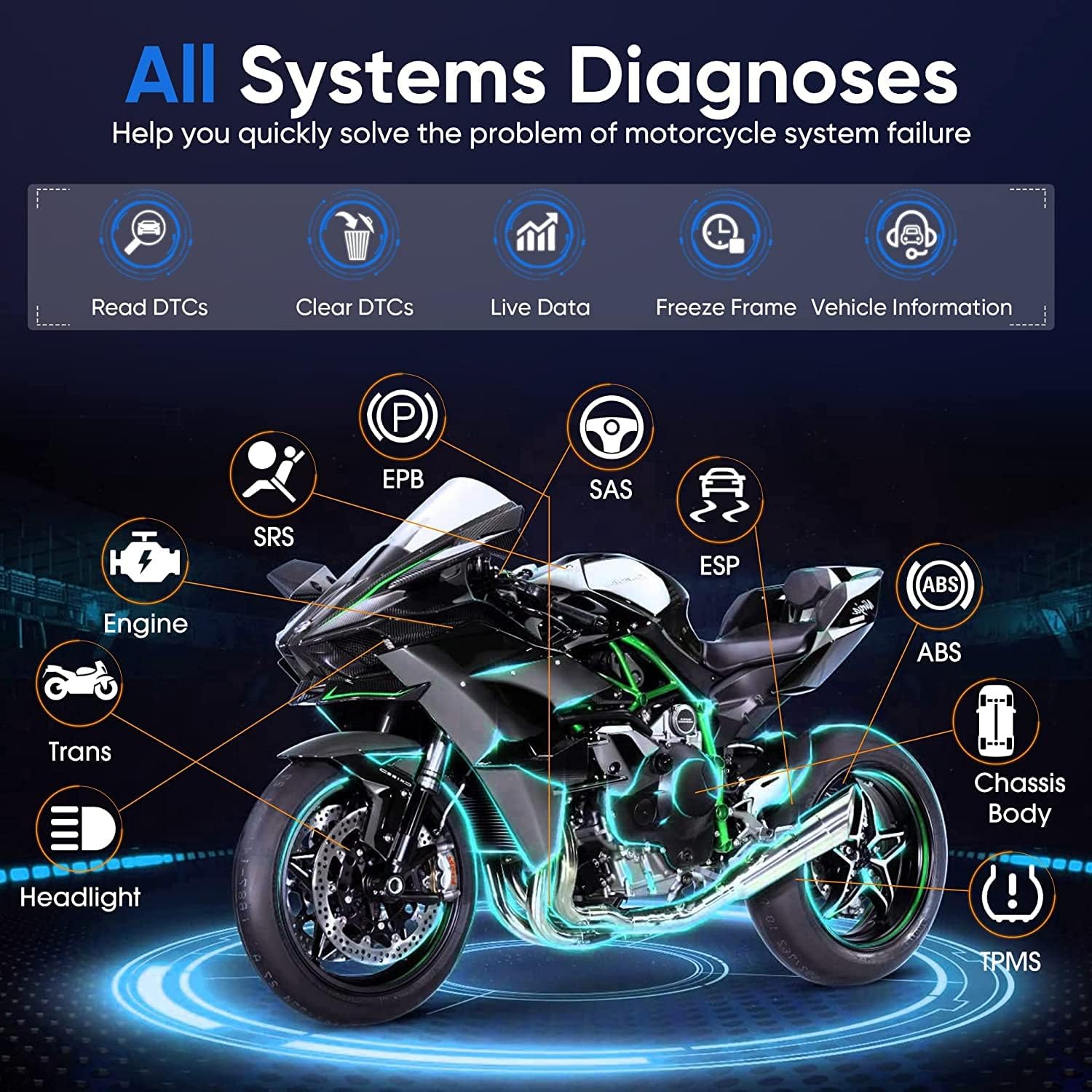
Image 2.1: An illustration detailing the comprehensive system diagnostic capabilities of the ANCEL MT700, including Engine, ABS, SRS, EPB, SAS, ESP, Trans, Headlight, Chassis Body, and TPMS.

Image 2.2: A visual representation of the advanced functions offered by the ANCEL MT700, including Auto VIN & Scan, Oil/Service Reset, TPS, ECU Reset, ABS Bleed, Idle Speed Adjustment, A/F Value Reset, Instrument Coding, Throttle Handle Reset, EOL Mode, Clear Computer Memory, CO Adjustment, Tire Pressure Monitoring System, Control Module Programming, and Transmission Memory Reset.
3. Орнотуу жана туташуу
- Күйгүзүү: Ensure the MT700 device is sufficiently charged or connected to a power source.
- Унаа даярдоо: Ensure the motorcycle's ignition is turned off before connecting the diagnostic tool.
- Мотоциклге туташуу: Locate the diagnostic port on your motorcycle. Select the appropriate adapter cable from the 9 provided cables based on your motorcycle's interface. Connect one end of the adapter cable to the MT700 and the other end to the motorcycle's diagnostic port.
- От алдырууну күйгүзүү: Once connected, turn the motorcycle's ignition to the ON position (do not start the engine unless instructed by the diagnostic procedure).
- Түзмөктү инициализациялоо: The MT700 will power on and begin initializing. Follow any on-screen prompts to select your vehicle make and model.
- Software Update (Recommended): If this is the first use or if updates are available, connect the device to a Wi-Fi network and perform a one-touch update to ensure you have the latest software and diagnostic functions.

Image 3.1: The ANCEL MT700 supports a wide array of motorcycles and other vehicles, including Road Motorcycles, Enduro Motorcycles, Side-by-sides, 3-Wheel Scooters, Snowmobiles, ATVs, and UTVs.
4. Иштөө нускамалары
4.1. Performing Diagnostics
From the main menu, select "Moto Diag". The system will automatically identify the vehicle or prompt you to manually select the make, model, and year.
- Read DTC: To read diagnostic trouble codes, select this option. The device will display any active or pending fault codes.
- DTC тазалоо: After addressing any issues, select this option to clear the stored trouble codes. Ensure the underlying problem is resolved before clearing codes to prevent recurrence.
- Маалымат агымын окуу: Бул функция сизге мүмкүнчүлүк берет view real-time operational data from various sensors and modules. This is useful for monitoring engine performance and identifying anomalies.
4.2. Oil Service Reset
When the motorcycle reaches a certain mileage, a service light may appear on the dashboard, indicating that maintenance is due. After performing the necessary maintenance, use the MT700 to reset this light.
- From the main menu, select "Service".
- Navigate to the "Oil Service Reset" or similar option.
- Follow the on-screen instructions to complete the reset procedure. This typically involves confirming the action.
4.3. Атайын функциялар
The MT700 offers various special functions beyond standard diagnostics. These may include:
- ECU кайра орнотуу
- ABS кан агуусу
- Бош жүргөндө ылдамдыкты жөндөө
- A/F Value Reset
- Instrument Coding
- Throttle Handle Reset
- Tire Pressure Monitoring System (TPMS) functions
- Control Module Programming
- Transmission Memory Reset
Refer to the on-device database or specific vehicle service manuals for detailed instructions on using these advanced functions for your particular motorcycle model.
5. Техникалык тейлөө жана кам көрүү
- Тазалоо: Аппаратты тазалоо үчүн жумшак, кургак чүпүрөктү колдонуңуз. Абразивдүү тазалагычтарды же эриткичтерди колдонуудан алыс болуңуз.
- Сактагыч: Store the MT700 in its protective case in a cool, dry place when not in use.
- Программалык камсыздоо жаңыртуулары: Regularly check for and install software updates via Wi-Fi to ensure optimal performance and access to the latest vehicle data and functions.
- Батареяга кам көрүү: If the device has an internal battery, ensure it is charged periodically, even when not in regular use, to maintain battery health.
6. Кыйынчылыктарды
| Көйгөй | Мүмкүн себеп | Чечим |
|---|---|---|
| Түзмөк күйбөйт. | Low battery; Loose connection. | Charge the device; Check all cable connections. |
| Унаага туташуу мүмкүн эмес. | Incorrect adapter cable; Ignition off; Faulty diagnostic port. | Ensure correct adapter is used; Turn ignition ON; Check vehicle's diagnostic port. |
| Диагностикалык функция иштебей жатат. | Outdated software; Vehicle not supported; Incorrect procedure. | Perform software update; Verify vehicle compatibility; Review иштетүү нускамалары. |
| Oil service light not resetting. | Incorrect reset procedure; Vehicle specific requirements. | Ensure all steps for oil reset are followed; Consult vehicle's service manual for specific requirements. |
7. Техникалык шарттар
- Модел: MT700
- Бренд: ANCEL
- Экрандын өлчөмү: 7 дюйм
- Операция системасы: Android негизинде
- Кубат булагы: Electric cable (and internal battery, if applicable)
- Өлчөмдөрү (L x W x Y): 39 x 12.5 x 30 см
- Элемент Салмагы: 4.16 килограмм
- Батарея: 1 Литий металлы (кошулган)
8. Кепилдик жана техникалык колдоо
ANCEL is committed to providing high-quality products and support. For any technical assistance or inquiries regarding your MT700 diagnostic tool, please refer to the following:
- Алыстан техникалык колдоо: The device supports remote technical assistance, allowing ANCEL's technical engineers to provide ad-hoc support by controlling the tablet device via TeamViewпрограммалык камсыздоо.
- Бир чыкылдатуу менен пикир билдирүү: Utilize the one-click feedback feature on the device to report issues or provide suggestions directly to ANCEL.
- Программалык камсыздоо жаңыртуулары: Regular software updates are provided to enhance functionality and compatibility. Ensure your device is connected to Wi-Fi for easy updates.
- Онлайн ресурстар: A powerful database and numerous instructional videos are available to help users operate the device effectively.

Image 8.1: The ANCEL MT700 offers remote technical support, enabling users to receive assistance from OBDPROG's technical engineers by allowing them to control the device via TeamViewпрограммалык камсыздоо.

Image 8.2: The ANCEL MT700's top configuration highlights features such as Data Management, File Management, Data Playback, Uninstall Model, Workshop, Picture Viewer, 7" Touch Screen, Android 5.1.1, One-Click Upgrade, One-Click Feedback, Wi-Fi Network, and Remote Tech Support.


