1. Киришүү
This user manual provides comprehensive instructions for the installation, operation, and maintenance of the BSTUOKEY WiFi Access Control Keypad (Model: CF1-EM-Wifi). This device is designed to offer secure and convenient access control through multiple methods including fingerprint, RFID card, password, and mobile application. Its robust IP66 waterproof design makes it suitable for various indoor and outdoor applications.
2. Продукт бүтүп калдыview
The BSTUOKEY WiFi Access Control Keypad is a versatile security device featuring a touch-sensitive keypad with backlight, a fingerprint sensor, and an RFID card reader. It integrates with the TUYA mobile application for remote management and monitoring. The unit is designed for durability with an IP66 waterproof rating.

Сүрөт 2.1: Алдыңкы view of the BSTUOKEY WiFi Access Control Keypad, showing the numeric touch keypad, fingerprint sensor, and indicator light.

Figure 2.2: Close-up of the keypad highlighting the indicator light, touch keyboard, card area, and fingerprint area with backlit keys for visibility in low light.
Негизги өзгөчөлүктөрү:
- Бир нече кирүү режимдери: Supports password, RFID card (125Khz EM Card), fingerprint, and mobile APP (TUYA App) unlocking.
- Жогорку колдонуучу кубаттуулугу: Accommodates up to 1000 users, including 100 fingerprint users.
- Зымсыз туташуу: Integrated WiFi for remote control and management via smartphone (2.4 GHz network required).
- Туруктуу дизайн: IP66 waterproof rating, suitable for outdoor installation.
- Арткы жарык баскычтары: Touch-sensitive keypad with backlight for easy operation in low-light conditions.
- Wiegand интерфейси: Supports Wiegand 26/34 input and output for integration with external access control boards.
- Окуяларды каттоо: Ability to check door opening records via the mobile application.

Figure 2.3: Visual summary of key features: 2.4G WiFi network, Mobile APP Access, 1000 user capacity, 100 Fingerprint user, and IP66 waterproof rating.
3. Пакеттин мазмуну
Upon opening the package, verify that all items listed below are present and in good condition.

Figure 3.1: The access control keypad shown alongside 10 RFID card stickers, which are included as a gift.
- WiFi Access Control Keypad Unit
- Монтаждоо бурамалар жана дубал сайгычтар
- User Manual
- 10 x 125Khz RFID EM Cards
4. Техникалык шарттар
| Өзгөчөлүк | Спецификация |
|---|---|
| Модель номери | CF1-EM-Wifi |
| Бренд | BSTUOKEY |
| Колдонуучунун кубаттуулугу | 1000 (100 Fingerprint Users) |
| Карта түрү | 125Khz RFID EM Card |
| Operating Voltage | 12V DC |
| Суу өткөрбөйт рейтинги | IP66 |
| Байланыш | 2.4 ГГц WiFi |
| Материал | ABS Case, Plastic |
| Өлчөмдөр | 105 мм x 72 мм x 24 мм (болжол менен 5 x 3.66 x 2.13 дюйм) |
| Салмагы | 9.1 унция (0.26 килограмм) |

Figure 4.1: Product dimensions, showing the keypad's height, width, and depth.
5. Орнотуу жана орнотуу
5.1 Электр өткөргүч схемасы
The access control keypad requires connection to a 12V DC power supply and an electric lock. Additional components like an exit button may also be integrated. Please note that the power supply, electric locks, and exit button are not included in the package and must be purchased separately.

Figure 5.1: Detailed wiring diagram showing connections for power supply, various electric locks (gate, strike, bolt, magnetic), and an exit button.
| Wire Color | Функция |
|---|---|
| Кызыл | DC + (Power Input) |
| Кара | GND (жер) |
| Көк | Relay NO (Normally Open) |
| Кызгылт көк | Реле Common |
| Ачык күрөң | Relay NC (Normally Closed) |
| Сары | OPEN (Exit Button Input) |
| Жашыл | Data 0 (Wiegand Output) |
| Ак | Data 1 (Wiegand Output) |
| Боз | Сигнал чыгаруу |
| Күрөң | Contact Input (Door Sensor) |

5.2-сүрөт: Артка view of the keypad with labeled wires for connection.
5.2 Физикалык орнотуу
- Монтаждоо ордун даярдоо: Choose a suitable location near the door, ensuring it is within range of your 2.4 GHz WiFi network.
- Бургулоо тешиктери: Use the provided mounting template (if available, otherwise refer to dimensions in Specifications) to mark and drill holes for mounting screws and wiring.
- Зымдарды туташтыруу: Route the necessary wires through the wall and connect them according to the wiring diagram (Figure 5.1 and Table 5.1). Ensure all connections are secure and insulated.
- Баскычтопту орнотуу: Берилген бурамалар менен баскычтопту дубалга бекитиңиз.
- Күйгүзүү: Connect the 12V DC power supply to the system. The keypad should power on and indicate readiness.
6. Иштөө нускамалары
6.1 Баштапкы орнотуу жана колдонмо туташуу
The BSTUOKEY keypad integrates with the TUYA Smart or Smartlife mobile application for advanced features and remote management. Ensure your smartphone is connected to a 2.4 GHz WiFi network during the initial pairing process.
- Колдонмону жүктөп алуу: Download the "TUYA Smart" or "Smartlife" app from your smartphone's app store (iOS App Store or Google Play Store).
- Катталуу/Кирүү: Колдонмону ачып, жаңы аккаунт түзүңүз же бар аккаунтка кириңиз.
- Түзмөк кошуу: In the app, select "Add Device" or the "+" icon. Follow the on-screen prompts to add a new access control device.
- Жупташтыруу режими: On the keypad, enter the pairing mode (refer to the specific sequence in the included paper manual, typically by pressing a combination of keys or holding a key). The keypad's indicator light will typically flash to indicate pairing mode.
- Түзмөктү туташтыруу: Confirm the device in the app. The app will guide you through connecting the keypad to your WiFi network.
- Ырастоо: Once successfully connected, the app will confirm the pairing, and the keypad's indicator light will change to a steady green.
Video 6.1: Demonstrates the process of adding the access control keypad to the mobile application and setting up various access methods.
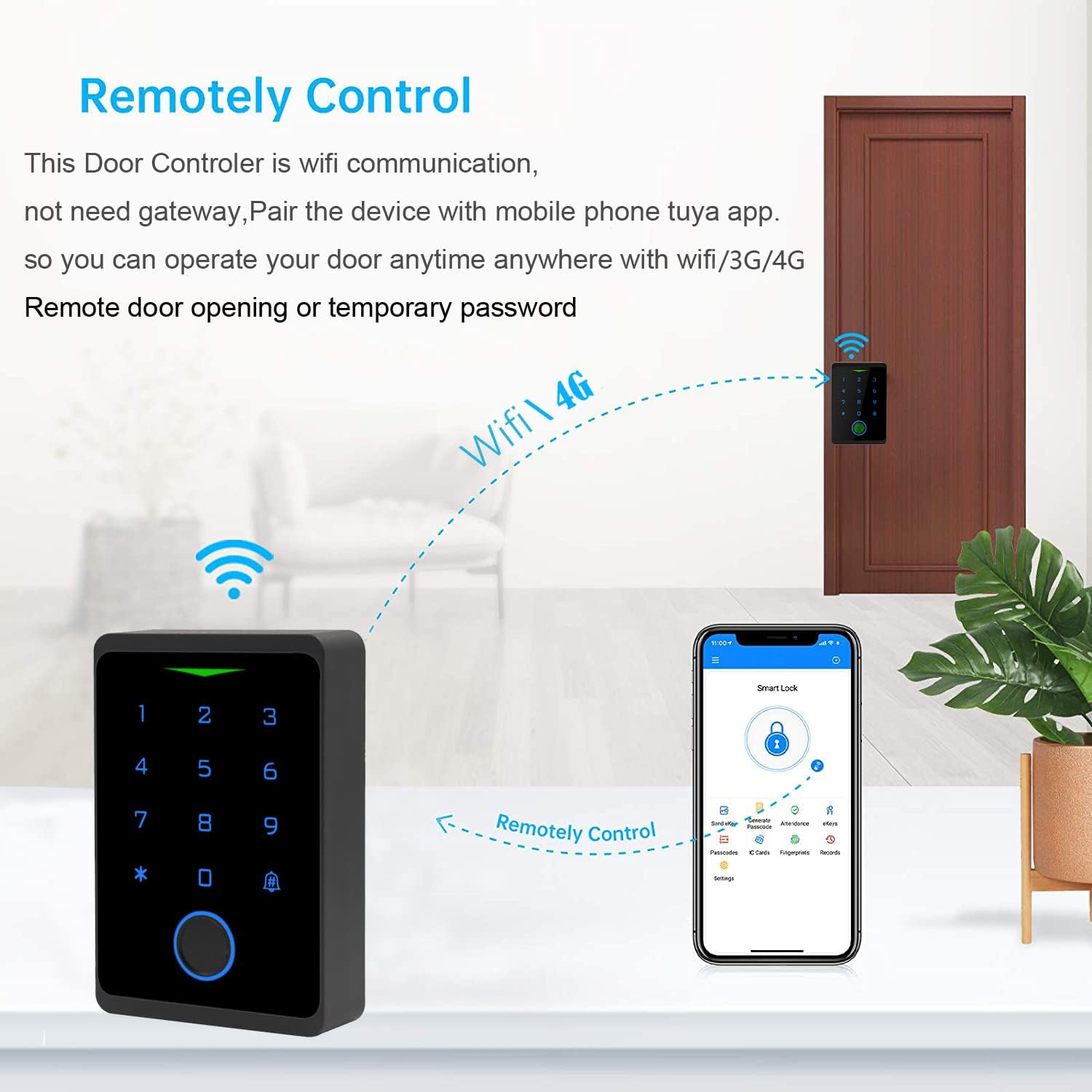
Figure 6.2: Illustration showing the keypad being remotely controlled via the mobile application over WiFi/3G/4G networks.
6.2 Managing Users and Access Methods
The mobile application allows for easy management of users and their respective access credentials.
6.2.1 Манжа издерин кошуу
- In the app, navigate to the device settings and select "Fingerprint Management".
- Tap "Add Fingerprint" and follow the on-screen instructions to register a new fingerprint by repeatedly placing and lifting the finger on the keypad's sensor until registration is complete.
6.2.2 Сырсөздөрдү орнотуу
- From the app's device settings, select "Password Management".
- Choose to set a public password or a private password for specific users. Enter the desired password and confirm.
6.2.3 Adding RFID Cards
- In the app, go to "Card Management".
- Select "Add Card" and then present the 125Khz RFID EM card to the keypad's card reading area until it is successfully registered.
6.3 Эшиктин кулпусун ачуу
The keypad supports multiple methods for unlocking the door:
- Сырсөздү ачуу: Enter your registered password on the keypad and press the '#' key.
- RFID Card Unlock: Present a registered RFID card to the card reading area on the keypad.
- Манжа ачуу: Манжа изинин сенсоруна катталган манжаңызды коюңуз.
- Mobile APP Unlock: Open the TUYA Smart app, select the device, and tap the unlock icon. This can be done remotely via WiFi/3G/4G/5G networks.

Figure 6.3: Illustration of the four unlocking methods: password, RFID card, fingerprint, and Tuya APP.
7. Техникалык тейлөө
- Тазалоо: Клавиатуранын бетин жумшак, d менен сүртүңүзamp кездеме. Абразивдүү тазалагычтардан же эриткичтерден алыс болуңуз, алар жасалгага же электрондук компоненттерге зыян келтирет.
- Программалык камсыздоонун жаңыртуулары: Regularly check the TUYA Smart app for any available firmware updates for your device to ensure optimal performance and security.
- Батареяны текшерүү (эгер бар болсо): Although the main unit is powered by 12V DC, if any connected components (e.g., wireless sensors) use batteries, ensure they are checked and replaced as needed.
- Суу өткөрбөс бүтүндүгү: Periodically inspect the installation area for any signs of water ingress or damage to the seals, especially for outdoor installations. Despite its IP66 rating, proper installation is crucial for long-term durability.
8. Кыйынчылыктарды
| Көйгөй | Мүмкүн себеп | Чечим |
|---|---|---|
| Keypad not powering on. | Электр менен камсыздоо жок же зымдар туура эмес туташтырылган. | Check 12V DC power connection and verify wiring according to the diagram. |
| WiFi'га туташа албай жатат. | Incorrect WiFi password, 5GHz network, or out of range. | Ensure correct WiFi password, connect to a 2.4 GHz network, and move the keypad closer to the router. |
| Манжа изи таанылган жок. | Finger not placed correctly, dirty sensor, or fingerprint not registered. | Ensure finger is clean and covers the sensor completely. Re-register fingerprint if necessary. |
| RFID card not working. | Card not registered or incorrect card type. | Ensure the card is a 125Khz EM card and is properly registered in the app. |
| Эшик кулпусу ачылбайт. | Incorrect code/fingerprint/card, lock malfunction, or wiring issue. | Verify credentials. Check connections to the electric lock. Test the lock independently if possible. |
9. Кепилдик жана колдоо
For warranty information and technical support, please refer to the documentation provided with your purchase or contact BSTUOKEY customer service directly. Keep your purchase receipt as proof of purchase for warranty claims.
Өндүрүүчү: BSTUOKEY
Модел: CF1-EM-Wifi
Биринчи жеткиликтүү болгон күнү: 27-сентябрь, 2021-жыл


