1. Киришүү
Сатып алганыңыз үчүн рахматasing the Leadfan Double Din Car Stereo. This manual provides detailed instructions for installation, operation, and maintenance of your new car stereo system. Please read this manual thoroughly before use to ensure proper functionality and safety.
Кутуда эмне бар:
- Эки кабаттуу динамиктүү унаа стерео блогу
- Алыстан башкаруу
- Электр зымдары
- Камера
- Колдонуучунун Колдонмосу (бул документ)

Figure 1.1: Leadfan Double Din Car Stereo and its components, including the main unit, remote control, and backup camera.
2. Коопсуздук маалыматы
Always prioritize safety. Improper installation or operation can lead to accidents, injury, or damage to the device or vehicle.
- Аппаратты айдоодон алаксыта тургандай иштетпеңиз.
- Кыска туташуулардын же электрдик коркунучтардын алдын алуу үчүн бардык зымдар туура туташтырылганын текшериңиз.
- Эгер кандайдыр бир кадамдарга ишене албасаңыз, орнотуу үчүн адиске кайрылыңыз.
- Түзмөктү суудан жана ашыкча ысыктан алыс кармаңыз.
- Агрегатты ажыратууга же өзгөртүүгө аракет кылбаңыз. Бул кепилдикти жокко чыгарат.
3. Орнотуу боюнча колдонмо
3.1 Электр зымдары боюнча нускамалар
Зымдардын туура туташуусу үчүн төмөнкү диаграмманы караңыз. Бардык туташуулардын бекем жана изоляцияланганын текшериңиз.

Figure 3.1: Main wiring harness connections for the car stereo. Connect ACC to ignition switch, GND to ground, ANT to radio antenna, ILLUMINATION to illuminate, KEY1/KEY2 for steering wheel control, REVERSE for reversing camera, and BRAKE for parking brake cable. Speaker wires are also detailed.
3.2 Камдык камераны орнотуу
The included backup camera enhances parking safety. Follow these steps for installation:
- Арткы камераны унааңыздын арткы жагына бекем орнотуңуз.
- Камеранын видео чыгышын (сары RCA) унаанын стереосундагы "CAMIN" киргизүүсүнө туташтырыңыз.
- Connect the camera's power cable (red wire) to the vehicle's reversing lamp power (+).
- Камеранын жерге туташтыруучу зымын (кара) ылайыктуу жерге туташтыруучу чекитке туташтырыңыз.
- Connect the pink wire from the stereo's wiring harness to the reversing lamp power (+) to trigger the camera display when reverse gear is engaged.

Figure 3.2: Diagram illustrating the connections for the backup camera, including video signal and power connections to the vehicle's reverse light circuit.
3.3 Агрегатты монтаждоо
This double din radio is a universal standard size. Ensure your vehicle's mounting slots match the dimensions: 173(L) x 98(W) x 65(H)mm / 6.81(L) x 3.86(W) x 2.56(H)in. Secure the unit using appropriate mounting brackets (not included, typically part of vehicle-specific installation kits).
4. Баштапкы орнотуу
4.1 Кубат күйгүзүлдү
After successful installation, turn on your vehicle's ignition. The car stereo should power on automatically. If not, check your wiring connections.
4.2 Негизги орнотуулар
Upon first use, you may need to set the time, date, and language. Navigate through the settings menu on the touchscreen to adjust these preferences.
5. Иштөө нускамалары
5.1 Жалпы операция
The 7-inch HD capacitive touchscreen allows for intuitive control. Use the physical buttons on the left side for quick access to common functions like volume and mode selection.

Figure 5.1: The responsive 7-inch HD touchscreen for easy navigation and control.
5.2 Радио функциясы
Access the FM radio function from the main menu. You can scan for stations, save presets, and adjust settings for optimal reception.
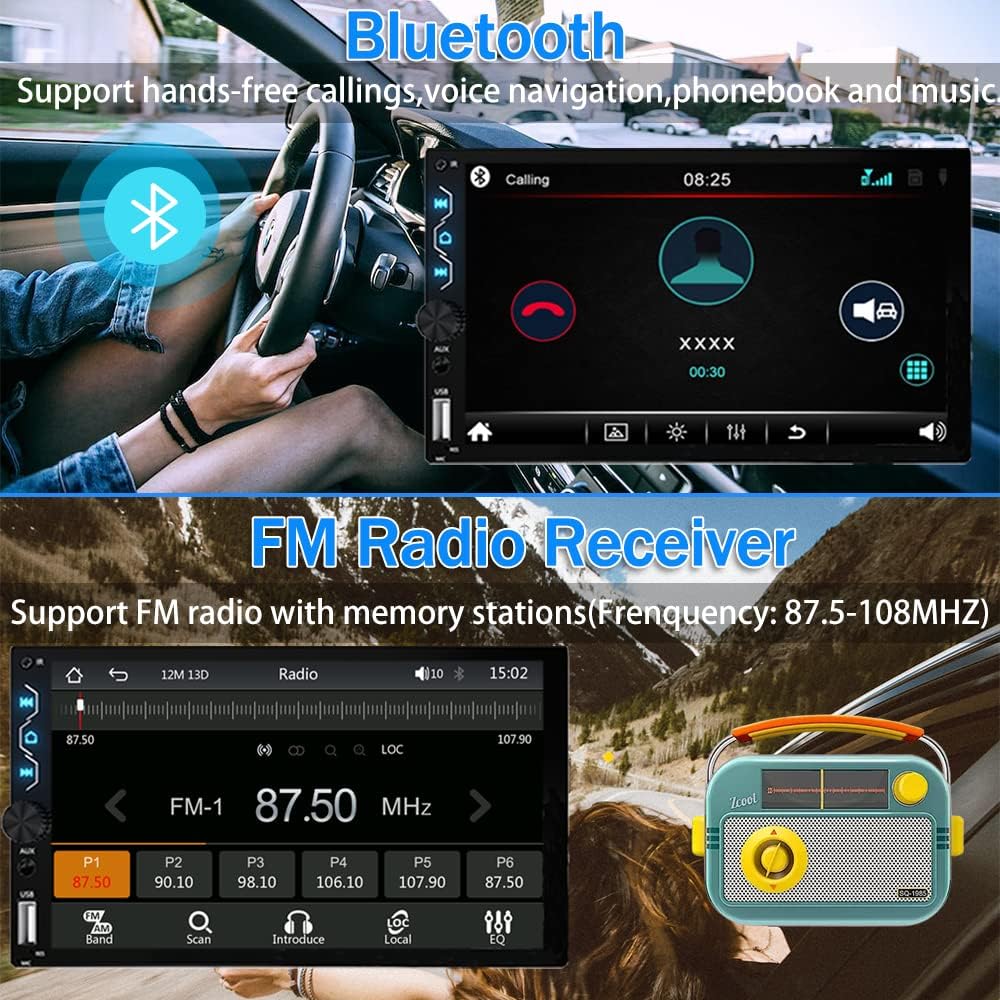
Figure 5.2: The FM Radio interface, showing frequency display and preset buttons.

5.3-сүрөт: Детальдуу view of the FM Radio interface, including frequency range and station presets.
5.3 Bluetooth байланышы
The built-in Bluetooth 5.1 allows for hands-free calling and wireless audio streaming. To connect, simply enable Bluetooth on your mobile device and search for "CarKit" (or similar name) from the stereo's Bluetooth menu. Enter the PIN (default is 0000) if prompted.
5.4-сүрөт: Bluetooth интерфейси колсуз чалуу функциясын көрсөтөт.

Figure 5.5: Bluetooth 5.1 pairing screen, demonstrating phone contact synchronization and audio streaming capabilities.
Video 5.1: Demonstration of Bluetooth connectivity and basic functions.
5.4 Смартфонду интеграциялоо (CarPlay, Android Auto, Mirror Link)
Connect your smartphone via USB to access Apple CarPlay or Android Auto for navigation, calls, messages, and music. The Mirror Link function allows you to display your phone's screen directly on the stereo.

Figure 5.6: Apple CarPlay and Android Auto interfaces displayed on the car stereo.

Figure 5.7: ашыкview of Apple CarPlay and Android Auto features, including reverse camera, FM radio, touchscreen, GPS navigation, voice control, and more.

Figure 5.8: Apple CarPlay voice control functionality, allowing hands-free commands for calls, music, and navigation.

Figure 5.9: Apple CarPlay displaying GPS navigation on the car stereo screen.

Figure 5.10: Apple CarPlay interface for music playback with excellent sound quality.

Figure 5.11: Android Auto voice control functionality, enabling hands-free commands for various tasks.

Figure 5.12: Android Auto displaying GPS navigation on the car stereo screen.

Figure 5.13: Android Auto interface for music playback with excellent sound quality.
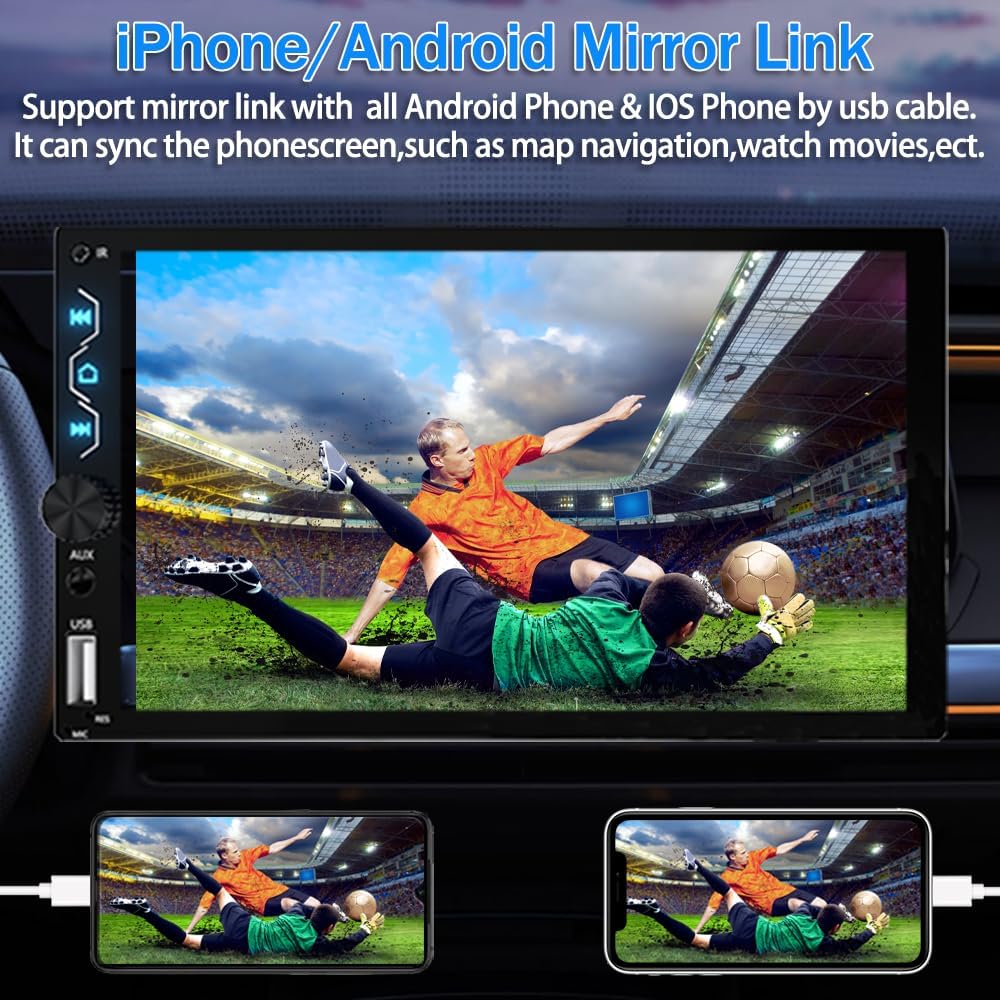
Figure 5.14: Mirror Link function displaying a smartphone screen on the car stereo.

Figure 5.15: Detailed explanation of the MirrorLink function, allowing full smartphone content synchronization via USB.
5.5 Үн жөндөөлөрү (эквалайзер)
Adjust the audio output to your preference using the built-in equalizer (EQ). You can select from preset modes (Jazz, Classic, Rock, Pop, Soft, User) or customize the 10-band EQ settings manually.
Figure 5.16: The EQ settings interface, showing adjustable frequency bands and preset options.
Video 5.2: Tutorial on how to set EQ and sound settings.
5.6 Customization (Startup Logo, Wallpaper)
Personalize your car stereo by setting a custom startup logo or wallpaper. The best resolution for pictures is 1024x600. Create a folder named "LOGO" on a U disk and place your desired images inside. Insert the U disk into the radio, then navigate to Logo Settings to select your custom image.

Figure 5.17: Setting a customized boot logo for the car stereo.

Figure 5.18: Setting a customized wallpaper for the car stereo interface.
Video 5.3: Instructions on how to set a customized startup logo.
5.7 Камдык камеранын иштеши
When the vehicle is shifted into reverse gear, the 7-inch touchscreen will automatically display the rear view from the backup camera, enhancing safety during parking and reversing maneuvers.

Figure 5.19: Display of the backup camera view унаанын стерео экранында.

Figure 5.20: The HD backup camera automatically activates when reversing, providing a clear view.
5.8 Рулду башкаруу
The unit supports original steering wheel control functions. This allows you to conveniently switch songs, adjust volume, and manage calls without taking your hands off the steering wheel.
Figure 5.21: Steering Wheel Control setup screen, showing options for button mapping.

Figure 5.22: Control the stereo using your vehicle's existing steering wheel buttons for convenience and safety.
5.9 External Device Connections (RCA)
The stereo features rich RCA expansion interfaces, allowing connection to various external devices such as a front camera, amplifier, subwoofer, or additional external displays. Note that only the rear camera is included; other accessories must be purchased separately.

5.23-сүрөт: Арткы view of the stereo showing various RCA ports for connecting external audio and video components.
6. Кыйынчылыктарды
If you encounter issues with your Leadfan car stereo, refer to the following common problems and solutions:
| Көйгөй | Мүмкүн себеп | Чечим |
|---|---|---|
| Күч жок | Туура эмес зымдар, күйүп кеткен сактагыч, бош туташуу. | Check power and ground wires. Inspect vehicle's fuse box and stereo's fuse. Ensure all connections are secure. |
| Үн жок | Speaker wires incorrectly connected, volume too low, mute activated, incorrect audio source. | Verify speaker wiring. Increase volume. Check if mute is on. Select correct audio source. |
| Bluetooth туташпай жатат | Device not in pairing mode, incorrect PIN, interference. | Ensure Bluetooth is enabled on both devices and in pairing mode. Re-enter PIN. Try pairing in a different location. |
| CarPlay/Android Auto иштебейт | Faulty USB cable, phone not compatible, app not installed/updated. | Use original or certified USB cable. Ensure phone OS and apps are updated. Restart phone and stereo. |
| Камдык камера көрүнбөйт | Incorrect camera wiring, reverse trigger wire not connected. | Check camera power and video connections. Ensure pink reverse trigger wire is connected to the vehicle's reverse light signal. |
7. Техникалык шарттар
| Өзгөчөлүк | Деталь |
|---|---|
| Модель номери | X5 |
| Screen Size | 7 дюйм |
| Дисплей түрү | Full HD Capacitive Touchscreen |
| Байланыш | Bluetooth 5.1, USB, AUX |
| Смартфон интеграциясы | Wired Apple CarPlay, Wired Android Auto, Mirror Link |
| Аудио чыгаруу режими | Стерео |
| Көлөмдүү үн каналынын конфигурациясы | 5.1 |
| Ватtage | 240 ватт |
| Продукциянын өлчөмдөрү | 7.01 x 2.56 x 3.94 дюйм (173 x 98 x 65 мм) |
| Элемент Салмагы | 1.94 фунт |
| Видеону коддоону колдоо | MP4, AVI, FLV, MKV, RMVB, MPEG, WMV9, VC, ASF, TS, QT |
8. Техникалык тейлөө
Унаа стереоңуздун узак иштөөсүн жана оптималдуу иштешин камсыз кылуу үчүн, төмөнкү тейлөө көрсөтмөлөрүн аткарыңыз:
- Экранды тазалоо: Сенсордук экранды акырын сүртүү үчүн жумшак, түксүз чүпүрөктү колдонуңуз. өжөр тактар үчүн, бир аз гampчүпүрөккө суу же экранды тазалоочу каражат. Абразивдүү материалдардан же катуу химиялык заттардан алыс болуңуз.
- Жалпы тазалоо: Агрегатты чаңдан жана таштандыдан алыс кармаңыз. Желдетүүчү тешиктерди жана баскычтардын жаракаларын тазалоо үчүн жумшак щетка же кысылган абаны колдонуңуз.
- Температура: Аппаратты өтө ысык жана муздак температурага узак убакыт бою тийгизүүдөн сактаңыз.
- Байланыштары: Бардык зымдардын туташууларынын бекемдигин камсыз кылуу үчүн мезгил-мезгили менен текшерип туруңуз.
9. Кепилдик жана колдоо
Leadfan provides comprehensive support for your car stereo:
- Кепилдик: 12 months after-sales support.
- Акчаны кайтаруу кепилдиги: 30 days money back service.
- Техникалык колдоо: 24 hours after-sales technical support is available to assist with installation and operation issues.
For any questions or assistance, please contact Leadfan customer service by clicking "sold by Leadfan" and then "ask a question" on the product page.


