Introduction
This manual provides detailed instructions for the UGREEN USB C SD 4.0 Card Reader, designed for high-speed data transfer between various memory cards and compatible devices. This 2-in-1 card reader supports the latest SD 4.0 UHS-II standards, offering significantly faster data streaming for professionals and everyday users.
Негизги өзгөчөлүктөрү
- SD 4.0 312MB/s High Speed: Supports the latest SD 4.0 UHS-II memory cards for data transfer speeds up to 312MB/s, three times faster than ordinary UHS-I card readers.
- SD/TF 2-in-1 Card Reader: Equipped with a UHS-II SD slot and a UHS-II TF (Micro SD) slot.
- Read & Write 2 Cards Simultaneously: Enables synchronous transfer and copying of files between two cards efficiently.
- Plug and Play: Driver-free operation for most laptops, tablets, and smartphones (iPhone 16/15 Pro/Pro Max, Android with OTG).
- Акыркыга чейин курулган: Features a sturdy aluminum alloy case for heat dissipation and a durable braided cable.
Орнотуу колдонмосу
Картаны окууну туташтыруу
Insert the USB-C connector of the UGREEN card reader into a compatible USB-C port on your device. The braided cable ensures durability and flexibility.

Figure 1: UGREEN USB C SD 4.0 Card Reader connected to a tablet, demonstrating its compact design and ease of use for quick data transfer.
Эстутум карталарын салуу
Identify the correct slot for your memory card. The larger slot is for standard SD cards, and the smaller slot is for Micro SD (TF) cards. Gently push the card into the slot until it clicks into place, ensuring the metal contacts are facing the correct direction (typically towards the center of the device).

Figure 2: Proper insertion of an SD card into the UGREEN card reader. The card should click securely into place.

Figure 3: The spring-loaded mechanism allows for easy and secure insertion and removal of Micro SD cards, preventing accidental dislodgement.
Иштөө нускамалары
Штепсель менен ойнотуу функциясы
The UGREEN SD 4.0 Card Reader is designed for plug-and-play operation. No additional drivers are required for most operating systems. Simply connect the reader and insert your memory cards to begin accessing your data. For Android phones, ensure OTG functionality is supported and enabled in your device settings.

Figure 4: The card reader enables seamless two-way data transmission, allowing instant photo and video sharing between cameras and smartphones without complex setup.
Simultaneous Read & Write
The card reader supports reading from and writing to both SD and Micro SD cards simultaneously. This feature allows for efficient data transfer and copying between the two cards, eliminating the need to repeatedly plug and unplug cards.
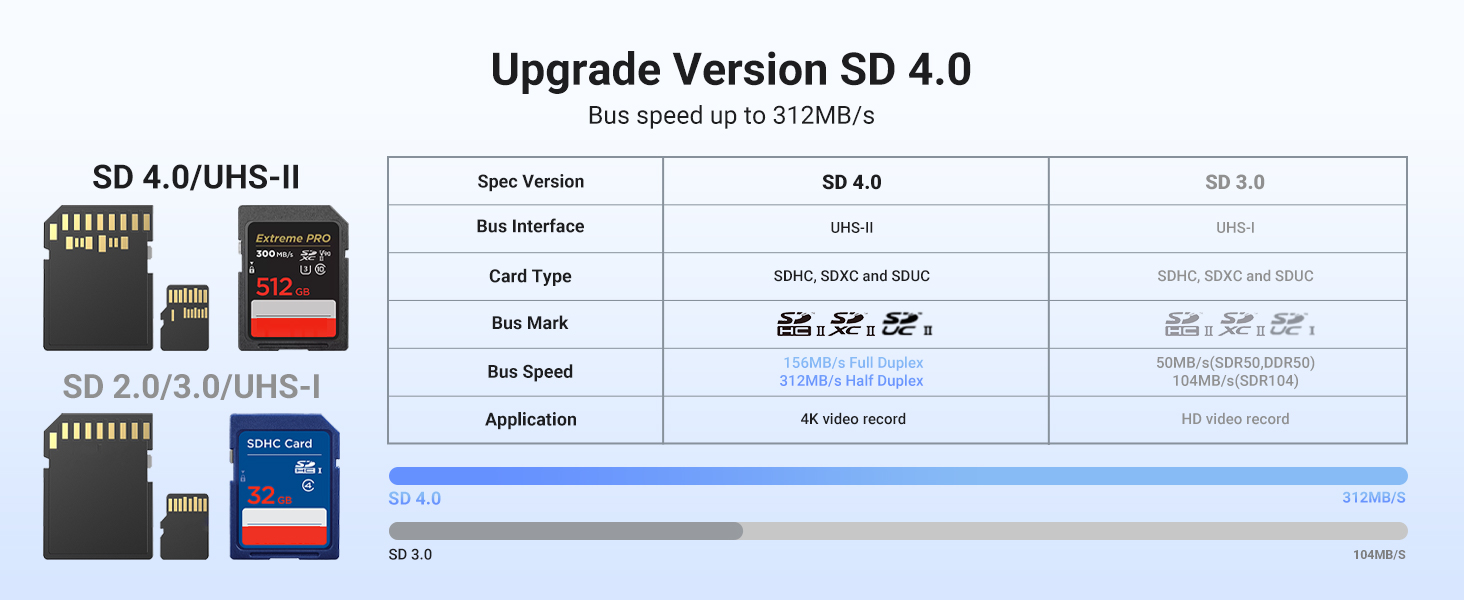
Figure 5: The card reader's ability to read and write to both SD and TF cards concurrently significantly improves workflow efficiency.
Шайкештик
Supported Memory Card Types
- SD оюгу: SD, SDHC, SDXC, UHS-II, UHS-I, MMC, RS-MMC
- Micro SD (TF) Slot: Micro SD, Micro SDHC, Micro SDXC, UHS-II, UHS-I

Figure 6: The card reader supports a wide range of memory card formats, including standard SD, Micro SD, and their high-capacity variants.
Compatible Devices & Operating Systems
- Түзмөктөр: Laptops, Tablets, Smartphones (including iPhone 16/15 Pro/Pro Max, and Android phones with OTG support).
- Операциялык системалар: Windows, MacOS, Linux, ChromeOS, iPad OS, Android.
Техникалык тейлөө
To ensure the longevity and optimal performance of your UGREEN USB C SD 4.0 Card Reader, follow these maintenance guidelines:
- Карта окугучту таза жана чаңдан жана таштандылардан таза кармаңыз. Тазалоо үчүн жумшак, кургак чүпүрөк колдонуңуз.
- Аппаратты экстремалдык температурага, тике күн нуруна же жогорку нымдуулукка дуушар кылуудан алыс болуңуз.
- When not in use, disconnect the card reader from your device and store it in a safe, dry place to prevent damage to the connectors or cable.
- Do not force memory cards into the slots. If a card does not insert easily, check its orientation and the correct slot.
Проблемаларды чечүү
Карта таанылган жок
- Ensure the memory card is fully and correctly inserted into the appropriate slot. A gentle click indicates proper seating.
- Verify the card reader is securely connected to your device's USB-C port.
- Try connecting the USB-C connector in the opposite orientation. Some devices or adapters may be sensitive to plug orientation, which can affect detection or speed.
- Test with a different memory card or a different USB-C port/device to isolate whether the issue lies with the card, the reader, or the host device.
- Компьютериңизди же смартфонуңузду өчүрүп күйгүзүңүз.
Жай өткөрүү ылдамдыгы
- Ensure you are using UHS-II compatible memory cards to achieve the maximum advertised speed of 312MB/s. Older UHS-I cards will operate at their respective maximum speeds (e.g., 104MB/s).
- Verify your device's USB-C port supports USB 3.0 (5 Gigabits Per Second) or higher for optimal performance. Connecting to a USB 2.0 port will result in significantly lower speeds.
- Avoid running multiple data-intensive tasks simultaneously on your device during large file которуулар.
- Алюминий эритмеси casing helps dissipate heat, but prolonged heavy use in a confined space might still affect performance. Ensure adequate ventilation.
Техникалык шарттар
| Өзгөчөлүк | Деталь |
|---|---|
| Бренд | UGREEN |
| Модель аты | sd card adapter |
| Байланыш технологиясы | USB түрү C |
| Аппараттык интерфейс | USB 3.0 түрү C |
| Маалыматтарды өткөрүү ылдамдыгы | 5 Gigabits Per Second (up to 312MB/s for SD 4.0 UHS-II) |
| Медиа түрү колдоого алынат | SD, Micro SD, SDHC, SDXC, microSDXC, UHS-I, UHS-II, MMC, RS-MMC |
| Шайкеш түзмөктөр | Mac/Android (Laptops, Tablets, Smartphones) |
| Операция системасы | Windows, MacOS, Linux, ChromeOS, iPad OS, Android |
| Өзгөчө өзгөчөлүк | Plug & Play |
| Түс | Deep Gray |
| Материал | Алюминий эритмеси Casing, Braided Cable |
Кепилдик жана колдоо
Бул UGREEN продуктусу төмөнкүлөр менен камтылган 24 Months Warranty Service provided by UGREEN. For warranty claims, technical support, or any inquiries regarding your product, please contact UGREEN customer service through their official webпродукт сатылып алынган сайт же сатуучу.