1. Киришүү
This manual provides essential information for the installation, operation, and maintenance of your XFX Radeon RX 7900 XT Gaming Graphics Card. Please read these instructions carefully before proceeding with installation to ensure proper functionality and to prevent damage to your system components.
2. Продукт бүтүп калдыview
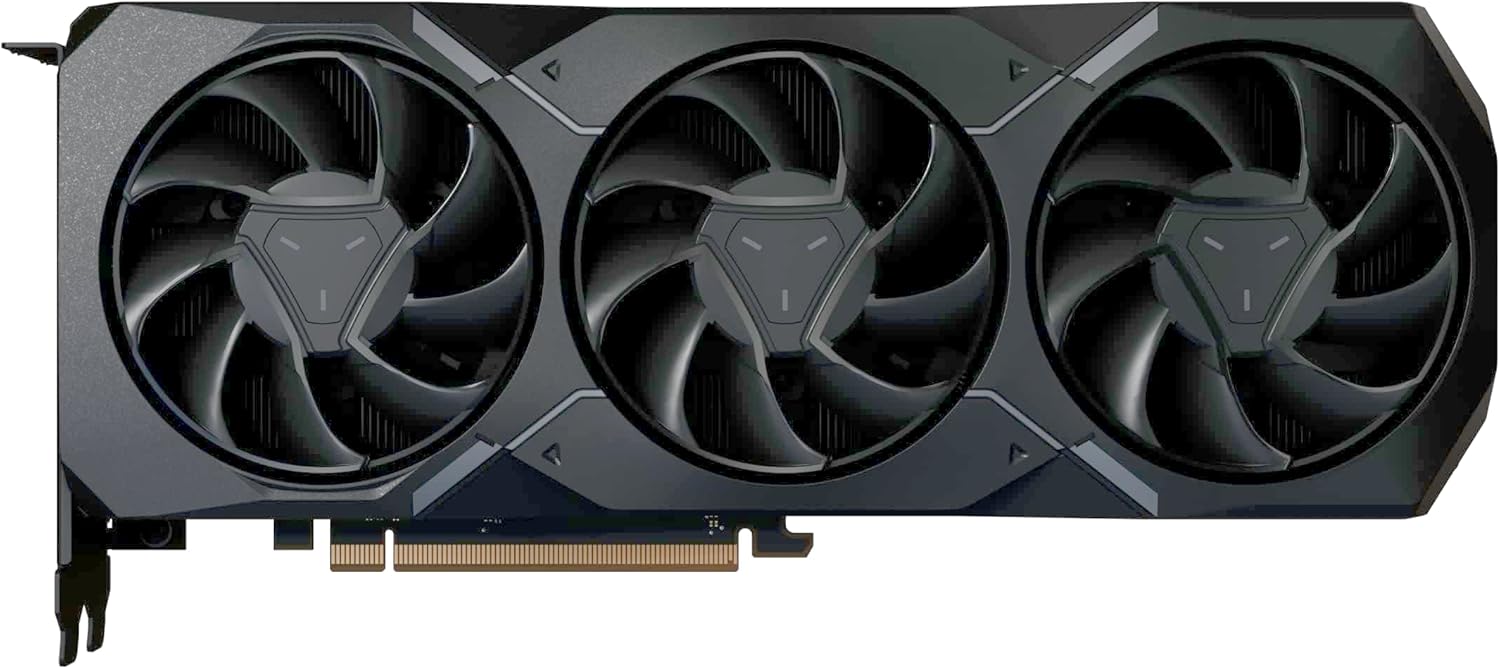
The XFX Radeon RX 7900 XT Gaming Graphics Card is designed for high-performance computing and gaming. It features the AMD RDNA 3 architecture, 20GB GDDR6 memory, and an AMD Triple Fan Cooling Solution to deliver efficient and powerful graphics processing.

Figure 1: XFX Radeon RX 7900 XT Graphics Card and Retail Packaging.

2-сүрөт: Бурчтуу view графикалык картанын, шоуasing its triple fan design.
3. Орнотуу жана орнотуу
3.1 Системалык талаптар
- Бир x16 графикалык уячасы бар PCI Express стандартына шайкеш келген энелик плата.
- Minimum 750W power supply unit (PSU) recommended.
- Операциялык система: Windows 10/11 64-бит же Linux 64-бит.
- At least 8GB of system memory (16GB recommended).
- Internet connection for driver download.
3.2 Физикалык орнотуу
- Системаңызды даярдаңыз: Компьютериңизди өчүрүп, бардык кабелдерди ажыратыңыз. Компьютериңиздин корпусун ачыңыз.
- PCIe уячасын табыңыз: Энелик платаңыздагы PCI Express x16 уячасын аныктаңыз. Уячаны жаап калышы мүмкүн болгон кеңейтүү уячасынын капкактарын алып салыңыз.
- Графикалык картаны салыңыз: Carefully align the graphics card with the PCIe slot. Press down firmly and evenly until the card is fully seated in the slot. Secure the card with the screw or latch mechanism on your case.
- Электр кабелдерин туташтыруу: Connect the required PCIe power connectors from your power supply to the graphics card. The XFX Radeon RX 7900 XT typically requires two 8-pin PCIe power connectors. Ensure they are securely connected.

3-сүрөт: Жогорку view of the graphics card, highlighting the power input connectors.
- Ишти жаап, кайра туташтыруу: Close your computer case and reconnect all external cables (monitor, keyboard, mouse, power).
3.3 Драйверди орнотуу
- Күйгүзүү: Компьютериңизди күйгүзүңүз.
- Драйверлерди жүктөп алыңыз: Расмий AMD веб-сайтына өтүңүз webсайт (www.amd.com/en/support) and download the latest drivers for your Radeon RX 7900 XT graphics card.
- Драйверлерди орнотуу: Жүктөлүп алынган драйвер орнотуучуну иштетиңиз жана экрандагы көрсөтмөлөрдү аткарыңыз. Орнотуудан кийин системаны өчүрүп күйгүзүү талап кылынышы мүмкүн.
4. Операция
4.1 Дисплейлерди туташтыруу
The XFX Radeon RX 7900 XT supports multiple display outputs. Connect your monitor(s) to the available DisplayPort or HDMI ports on the graphics card. Ensure your display cables are securely connected to both the graphics card and your monitor.
4-сүрөт: Каптал view of the graphics card, illustrating the various display output ports.
4.2 Программанын конфигурациясы
After driver installation, you can access the AMD Software: Adrenalin Edition. This software allows you to optimize game settings, monitor performance, update drivers, and customize various graphics card features for an enhanced user experience.
5. Техникалык тейлөө
Үзгүлтүксүз техникалык тейлөө графикалык картаңыздын узак мөөнөттүү жана оптималдуу иштешин камсыз кылууга жардам берет.
- Чаңды тазалоо: Periodically clean dust from the graphics card's fans and heatsink using compressed air. Ensure the system is powered off and unplugged before cleaning.
- Күйөрмандарга кам көрүү: The AMD Triple Fan Cooling Solution is designed for efficient heat dissipation. Avoid obstructing the airflow around the card.
- Драйвер жаңыртуулары: Keep your graphics drivers updated by regularly checking the AMD support webакыркы версиялар үчүн сайт.
6. Кыйынчылыктарды
Эгер графикалык картаңызда көйгөйлөргө туш болсоңуз, төмөнкү жалпы көйгөйлөрдү чечүү кадамдарын караңыз:
- Дисплей чыгышы жок:
- Ensure all power cables are securely connected to the graphics card.
- Verify that the monitor cable is properly connected to both the graphics card and the monitor.
- Монитор туура киргизүү булагына коюлганын текшериңиз.
- Try connecting to a different display port or using a different cable.
- Performance Issues/Low Frame Rates:
- Сизде эң акыркы графикалык драйверлер орнотулганын текшериңиз.
- Оюндагы графикалык орнотууларды текшерүү; зарыл болсо, орнотууларды азайтуу.
- Ал ысып кетпеши үчүн GPU температурасына көз салыңыз.
- Verify that your power supply unit meets the minimum wattagэ талап.
- Системанын туруксуздугу/бузуулар:
- Иштөө тутумуңуз жаңыртылганын текшериңиз.
- Check for any conflicting software or background applications.
- Эгерде ашыкча саат болсо, демейки жөндөөлөргө кайтыңыз.
For further assistance, please refer to the XFX support webсайтка же кардарларды тейлөөгө кайрылыңыз.
7. Техникалык шарттар
| Өзгөчөлүк | Спецификация |
|---|---|
| Чипсет | AMD Radeon RX 7900 XT |
| Эс | 20 ГБ GDDR6 |
| Memory Speed | 20 ГГц |
| Саатты күчөтүү | 2400 МГц чейин |
| Оюн сааты | 2000 МГц чейин |
| Эсептөө бирдиктери | 84 |
| Stream Processors | 5376 |
| Муздатуу чечими | AMD Triple Fan |
| Продукциянын өлчөмдөрү (LxWxH) | 10.88 x 4.43 x 2.02 дюйм |
| Элемент Салмагы | 4.18 фунт |
| Видео чыгаруу интерфейси | DisplayPort, HDMI |
8. Кепилдик жана колдоо
XFX products are covered by a limited warranty. For detailed warranty information, product registration, and technical support, please visit the official XFX webсайтка же кардарларды тейлөө бөлүмүнө кайрылыңыз. Кепилдик дооматтар үчүн сатып алганыңыздын далилин сактаңыз.
XFX Support: www.xfxforce.com/support


