Introduction
This manual provides instructions for the HCDZ Replacement Remote Control, designed for seamless operation with Fenda F&D A180X and T60X 2.1 Multimedia Speakers. This remote requires no programming and is ready for use once batteries are installed.
Жайгашуу
Батарея орнотуу
Алыстан башкаруу пульту эки AAA батарейкасын талап кылат (кошулмага кирбейт). Аларды орнотуу үчүн төмөнкү кадамдарды аткарыңыз:
- Пульттун артындагы батарея отсегин табыңыз.
- Батарея бөлүмүнүн капкагын ачуу үчүн ылдый же жебе менен көрсөтүлгөн багытта жылдырыңыз.
- Оң (+) жана терс (-) терминалдары бөлүмдүн ичиндеги белгилер менен туура дал келишин камсыз кылып, эки AAA батарейкасын салыңыз.
- Батарея бөлүкчөсүнүн капкагын бекем чыккыча ордуна жылдырыңыз.
Эскертүү: Do not mix new batteries with old ones. Ensure batteries are inserted correctly to prevent damage.
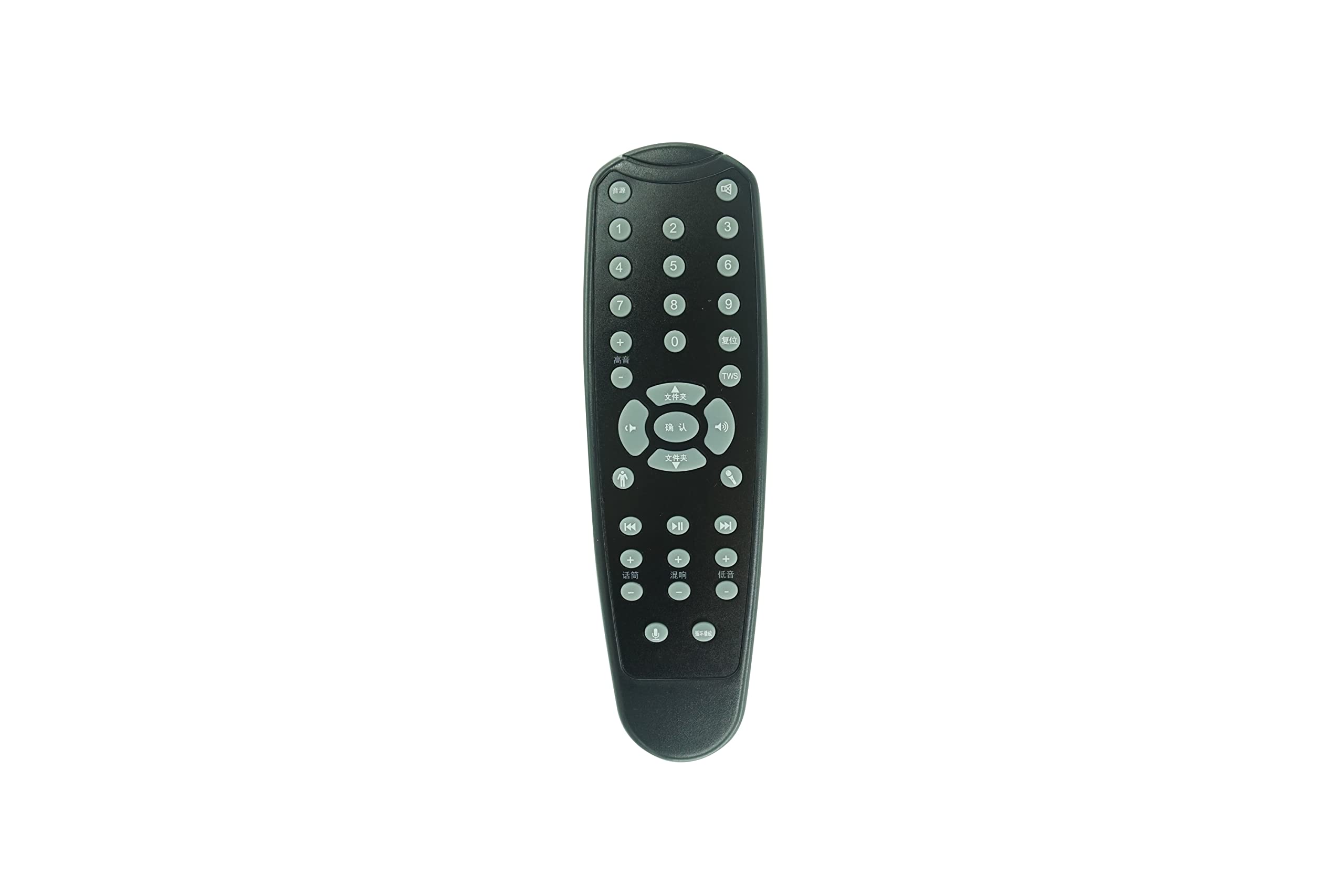
Image: The HCDZ Replacement Remote Control. This image shows the front of the remote, typically where buttons are located. The battery compartment is on the reverse side.
Операция
Негизги функциялар
This remote control is designed to work immediately with your Fenda F&D A180X or T60X 2.1 Multimedia Speakers without any programming. Simply point the remote towards the speaker's infrared (IR) sensor and press the desired button.
- Кубат баскычы: Turns the speaker system on or off.
- Үнүн жогорулатуу/төмөндөтүү: Аудионун үнүн тууралайт.
- Mode/Input: Switches between different audio input sources (e.g., Bluetooth, AUX, USB, SD card).
- Ойнотуу/тындыруу: Медианы ойнотууну көзөмөлдөйт.
- Мурунку/Кийинки трек: Медиа тректер аркылуу багыт алат.
- Үнсүз: Аудио чыгыштын үнүн басат.
Эскертүү: The specific functions available depend on the original remote's layout and the capabilities of your Fenda F&D speaker model. Refer to your speaker's original manual for detailed button functions.
Техникалык тейлөө
Proper care ensures the longevity of your remote control:
- Тазалоо: Пультту тазалоо үчүн жумшак, кургак чүпүрөктү колдонуңуз. Суюк тазалоочу каражаттарды же абразивдүү материалдарды колдонбоңуз.
- Сактагыч: Store the remote in a cool, dry place. Avoid exposing it to direct sunlight, extreme heat, or high humidity, as this may cause malfunction or damage.
- Батареяга кам көрүү: If the remote will not be used for an extended period, remove the batteries to prevent leakage and corrosion, which can damage the device.
- Колдонуу: Пультту түшүрүп албоодон же катуу соккуга кабылбоодон алыс болуңуз.
Проблемаларды чечүү
Эгерде сиз алыстан башкаруу пультуңуз менен көйгөйлөргө туш болсоңуз, төмөнкү чечимдерди колдонуп көрүңүз:
- Алыстан башкаруу жооп бербейт:
- Батареяларды текшерүү: Ensure batteries are correctly installed with the correct polarity (+/-).
- Батареяларды алмаштыруу: If the batteries are old or depleted, replace them with two fresh AAA batteries.
- Батарея терминалдарын текшерүү: Ensure the battery terminals inside the compartment are clean and making proper contact with the batteries.
- Алыстан башкаруу диапазонунун көйгөйлөрү:
- Жакыныраак жылдыруу: Ensure you are within the effective range of the speaker's IR sensor.
- Тоскоолдуктарды алып салуу: Make sure there are no objects blocking the line of sight between the remote control and the speaker's IR sensor.
- Интерференцияны болтурбоо: Do not expose the remote sensor to direct sunlight or strong lighting apparatuses, as this can interfere with the IR signal.
- Speaker Not Responding to Commands:
- Динамик күчү: Verify that your Fenda F&D speaker system is plugged in and turned on.
- Speaker IR Sensor: Ensure the IR sensor on your speaker is not covered or obstructed.
Техникалык шарттар
| Бренд | HCDZ |
| Model (Remote) | Алыстан башкарууну алмаштыруу |
| Шайкеш түзмөктөр | Fenda F&D A180X, T60X 2.1 Multimedia Speakers |
| Байланыш технологиясы | Инфракызыл (IR) |
| Power Source | 2 x AAA Батареялар (киргизилген эмес) |
| Программалоо талап кылынат | Жок |
| Түс | Кара |
| Макс колдоого алынган түзмөктөр | 1 |
| Controller Type | Control Button |
Кепилдик жана колдоо
Кепилдик маалымат
This HCDZ Replacement Remote Control comes with a 90 күндүк кепилдик сатып алынган күндөн тартып. Бул кепилдик өндүрүш кемчиликтерин камтыйт. Бул туура эмес колдонуудан, кырсыктардан, уруксатсыз өзгөртүүлөрдөн же кадимки эскирүүдөн келип чыккан зыянды камтыбайт.
Кардарларды колдоо
For technical assistance, warranty claims, or further inquiries, please contact your retailer or the HCDZ customer service department through the platform where the product was purchased.


