1. Киришүү
Сатып алганыңыз үчүн рахматasing the MEIKEE Solar Light, Model AC-TYR032-2700K. This manual provides detailed instructions for the safe and efficient installation, operation, and maintenance of your solar light. Please read this manual thoroughly before use and retain it for future reference.
2. Продукт бүтүп калдыview
The MEIKEE Solar Light is a versatile lighting solution designed for both outdoor and indoor use. It features a high-efficiency solar panel, a powerful 5000 mAh battery, 76 super bright LEDs, and multiple operating modes controlled by an intelligent remote. Its adjustable color temperature and motion sensor capabilities make it suitable for various applications.
Негизги өзгөчөлүктөрү:
- Кош кубаттоо ыкмалары: Solar panel charging and USB-C charging for continuous power.
- Жөнгө салынуучу түс температурасы: Offers Warm White (2500K), Natural White (4000K), and Cool White (6500K) options.
- Multiple Detection Modes: Three distinct motion detection modes for varied lighting needs.
- Light Control & Forced Lighting: Automatic dusk-to-dawn operation and timed lighting options.
- Акылдуу алыстан башкаруу: Omnidirectional 360-degree remote with a 12m range for easy mode, brightness, and color temperature adjustments.
- Кең нур бурчу: 270° beam angle with 4 adjustable light sheets for broad illumination.
- Туруктуу дизайн: IP54 protection class for outdoor resilience.
- Узун узартуу кабели: 5m cable for flexible solar panel placement.
Продукт компоненттери:
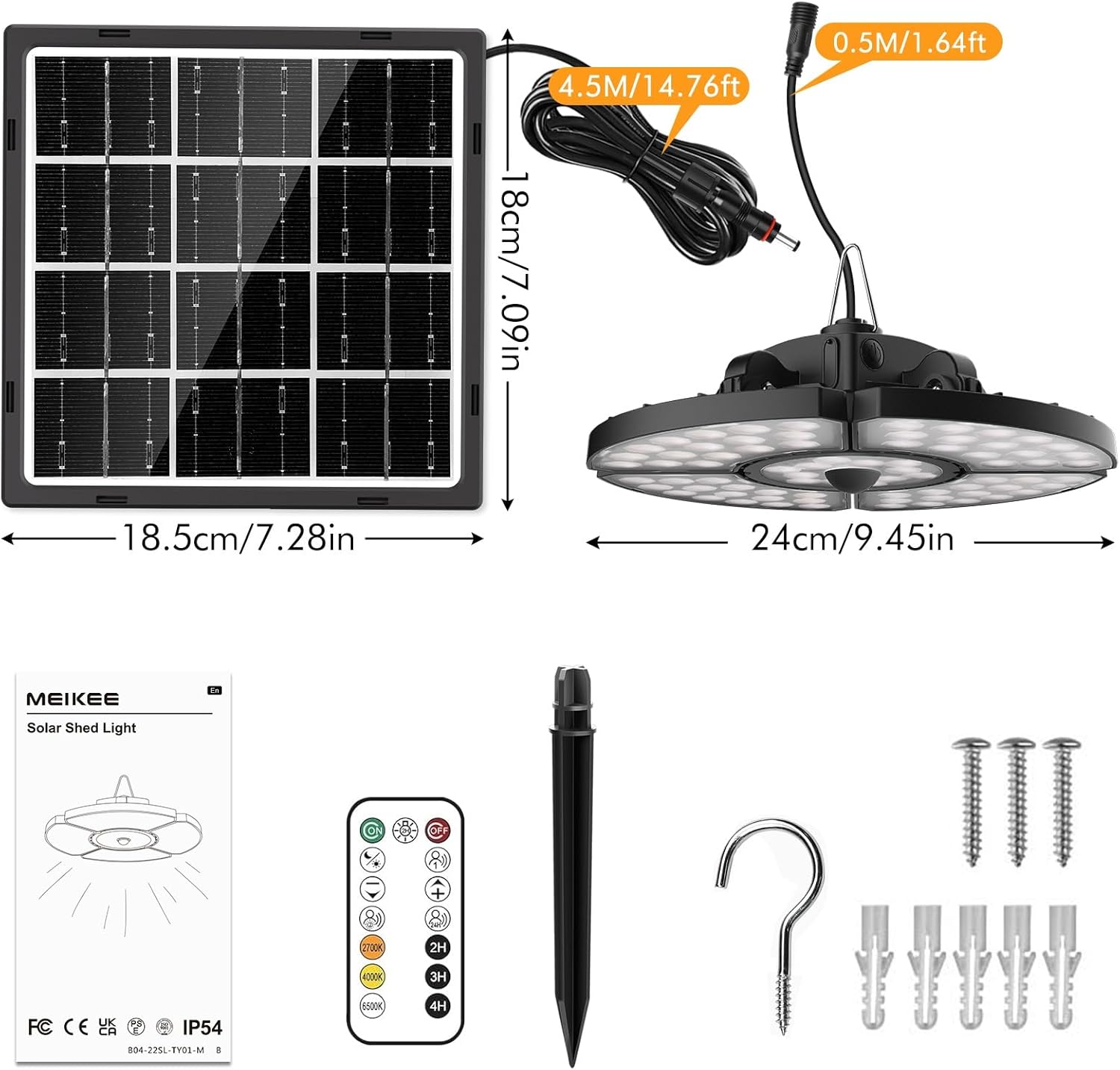
Сүрөт: Бүттүview of the MEIKEE Solar Light components, including the solar panel, light fixture, remote control, and mounting accessories. Dimensions are also indicated.
- Solar Spotlight (Main Light Fixture)
- Solar Panel with 5m Extension Cable
- Алыстан башкаруу
- Accessory Pack (Screws, Wall Plugs, Ground Stake, Hook)
- User Manual
3. Техникалык шарттар
| Модель номери | AC-TYR032-2700K |
| Күн панели | 6 В / 4 Вт |
| Батарея сыйымдуулугу | 5000 мАч |
| Кубаттоо убактысы (күн энергиясы менен) | 6-8 hours (full sunlight) |
| Discharge Time (Full Energy) | 6-12 саат |
| Светодиоддор | 76 Супер жаркыраган LED |
| Beam Angle | 270° |
| Түс температурасы | 2500K (жылуу ак), 4000K (табигый ак), 6500K (муздак ак) |
| Коргоо классы | IP54 |
| Узартуу кабелинин узундугу | 5 метр |
| Иштөө температурасы | -25°Cден +40°Cге чейин |
| Product Dimensions (Light) | 24L x 24W x 8H см |
| Продукт Салмагы | 1.24 кг |
| Материал | Aluminium, Polycarbonate |
4. Коопсуздук нускамалары
Төмөнкү коопсуздук чараларын сактаңыз, зыян же буюмдун бузулушуна жол бербөө үчүн:
- Do not look directly into the LED light when it is illuminated, as this may cause eye strain or damage.
- Ensure the solar panel is installed in a location that receives direct sunlight for most of the day to maximize charging efficiency.
- Keep the product away from open flames or high temperatures to prevent battery damage or explosion.
- Do not attempt to disassemble, repair, or modify the product. Contact qualified personnel for service.
- Балдар жетпеген жерде сактаңыз.
- Продукцияны жана анын батарейкасын жергиликтүү эрежелерге ылайык таштаңыз.
- Ensure all connections are secure and waterproof, especially for outdoor installations.
5. Орнотуу боюнча колдонмо
The MEIKEE Solar Light is designed for easy installation. The 5-meter extension cable allows for flexible placement of the solar panel and the light fixture.
Орнотуу ордун тандоо:
- Күн панели: Select a location that receives at least 6-8 hours of direct sunlight daily. Avoid shaded areas from trees, buildings, or other obstructions.
- Жарык арматура: The light can be hung in sheds, gazebos, porches, garages, barns, chicken coops, storage rooms, carports, basements, backyards, gardens, or any other desired location. Ensure it is protected from direct heavy rain if installed indoors or in a semi-enclosed space.
Монтаждоо кадамдары:
- Даярдоо куралдары: You will need a drill, screwdriver, and pencil.
- Күн панелин орнотуу:
- Position the solar panel in your chosen sunny location.
- Mark the drilling points using the solar panel bracket as a template.
- Drill holes, insert wall plugs (if mounting on masonry), and secure the solar panel bracket with screws.
- Adjust the angle of the solar panel to face the sun directly for optimal charging.
- Жарык берүүчү аспапты орнотуу:
- Choose a suitable spot for the light fixture.
- Use the provided hook or screws to hang or mount the light.
- Ensure the light is securely fastened.
- Connect the Solar Panel to the Light:
- Connect the 5-meter extension cable from the solar panel to the input port on the light fixture.
- Ensure the connection is firm and the waterproof interface is properly sealed.

Сүрөт: Illustrates the separate design of the solar panel and light, highlighting solar charging and the USB charging port on the light fixture.
After installation, allow the solar panel to charge the light for at least 6-8 hours in direct sunlight before first use.
6. Операция
Your MEIKEE Solar Light can be operated and customized using the included remote control.
6.1 Жарыкты заряддоо
- Күн кубаты: The primary charging method. Ensure the solar panel is exposed to direct sunlight. The light will automatically charge during the day.
- USB-C заряддоо: In periods of low sunlight or extended indoor use, the light can be charged via a USB-C cable (not included). Connect a standard USB-C charger to the charging port on the light fixture.
6.2 Алыстан башкаруу функциялары

Сүрөт: Depicts the omnidirectional remote control and its effective range of up to 12 meters.
The remote control allows you to switch modes, adjust brightness, and change color temperature from a distance of up to 12 meters.
- Күйгүзүү/өчүрүү: басыңыз КҮЙГҮЗҮҮ/ӨЧҮРҮҮ баскычы.
- Режим тандоо: Use the dedicated mode buttons (Mode 1, Mode 2, Mode 3, Light Control Mode, Forced Lighting 2H Mode) to cycle through lighting behaviors.
- Жарыктыкты жөндөө: колдонуу + жана - buttons to increase or decrease light intensity.
- Түс температурасын жөндөө: колдонуу 2500K (Жылуу ак), 4000K (Natural White), and 6500K (Cool White) buttons to select your desired light color.
- Таймер функциясы: Set the light to turn off automatically after 2H, 3H, or 4H using the respective timer buttons.
6.3 Жарык режимдери

Сүрөт: Visual representation of the five distinct operating modes, showing light behavior during day and night, with and without motion detection.
- Mode 1 (Motion Detection - Full Brightness): At night, the light turns on at 100% brightness for 30 seconds when motion is detected, then turns off when motion ceases.
- Mode 2 (Motion Detection - Dim to Bright): At night, the light stays at 30% brightness. When motion is detected, it brightens to 100% for 30 seconds, then returns to 30% brightness.
- Mode 3 (24-Hour Motion Detection): The light operates similarly to Mode 1 but detects motion and illuminates at 100% brightness for 30 seconds at any time of day or night.
- Жарыкты башкаруу режими: Automatically turns on at 50% brightness at dusk and turns off at dawn.
- Forced Lighting 2H Mode: The light stays on at 85% brightness for 2 hours, regardless of day or night.
6.4 Color Temperature Settings
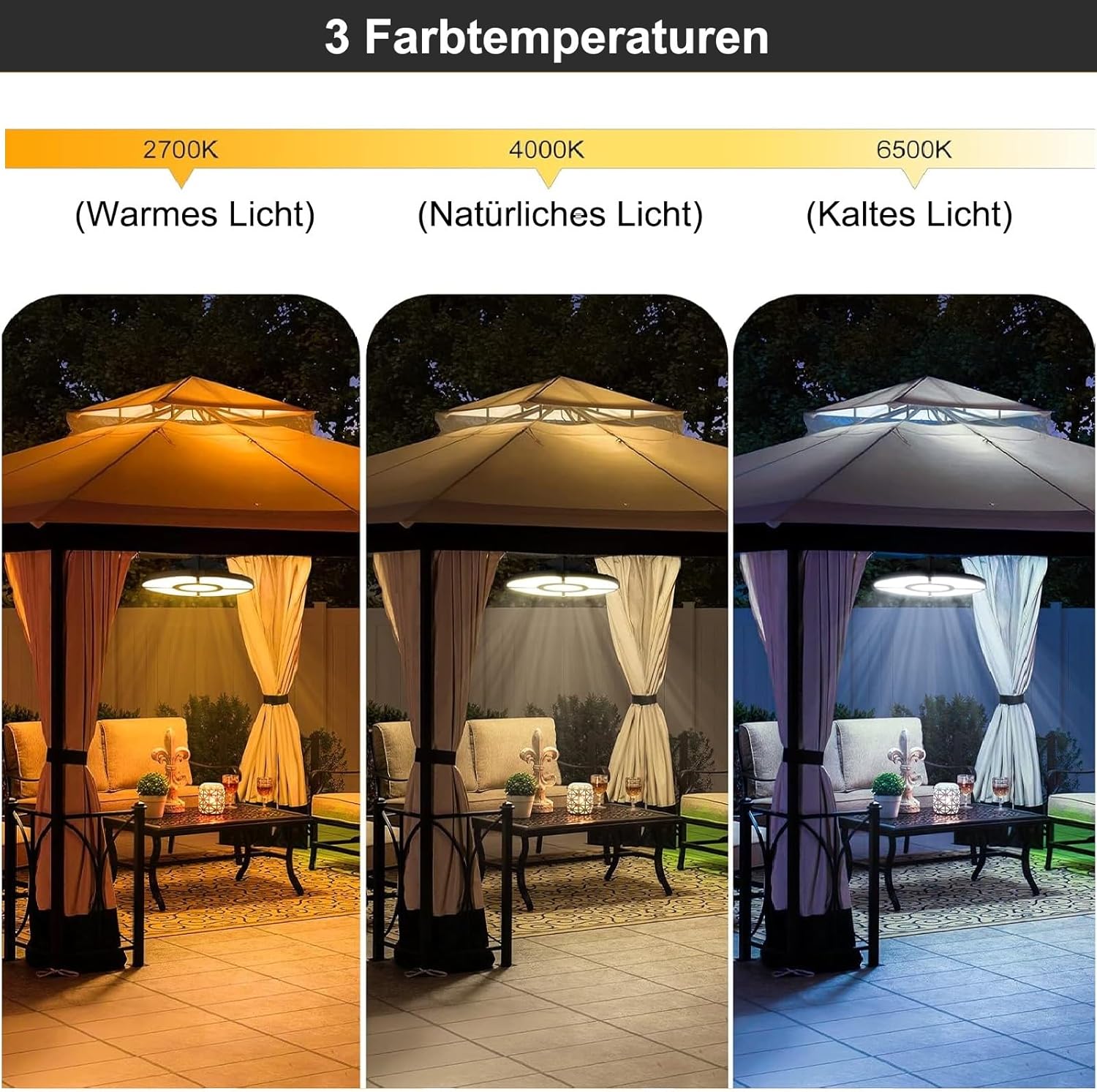
Сүрөт: Demonstrates the three available color temperatures: Warm Light (2700K), Natural Light (4000K), and Cold Light (6500K), as seen in a gazebo setting.
The MEIKEE Solar Light offers three distinct color temperatures to suit different preferences and environments:
- Жылуу ак (2500K): Provides a cozy, inviting ambiance.
- Табигый ак (4000K): A balanced, neutral light suitable for general illumination.
- Муздак ак (6500K): Bright, crisp light ideal for task lighting or enhanced visibility.
Select the desired color temperature using the corresponding buttons on the remote control.
7. Техникалык тейлөө
Regular maintenance ensures optimal performance and extends the lifespan of your MEIKEE Solar Light.
- Таза күн панели: Мезгил-мезгили менен күн панелин жумшак, гamp чаңды, кирди, жалбырактарды же карды кетирүү үчүн кездеме. Таза панель күн нурун максималдуу сиңирүүнү жана заряддоонун натыйжалуулугун камсыз кылат.
- Байланыштарды текшерүү: Ensure all cable connections, especially the waterproof interface between the solar panel and the light, remain secure and free from corrosion.
- Зыянды текшерүү: Regularly check the light fixture, solar panel, and cables for any signs of physical damage. If damage is found, discontinue use and contact customer support.
- Батареяга кам көрүү: While the battery is designed for longevity, extreme temperatures can affect its performance. Avoid prolonged exposure to temperatures outside the recommended operating range (-25°C to +40°C).
8. Кыйынчылыктарды
If you encounter issues with your MEIKEE Solar Light, refer to the following common problems and solutions:
| Көйгөй | Мүмкүн себеп | Чечим |
|---|---|---|
| Түнкүсүн жарык күйбөйт. |
|
|
| Жарыктын узактыгы күтүлгөндөн кыскараак. |
|
|
| Кыймыл сенсору иштебей жатат. |
|
|
| Алыстан башкаруу жооп бербей жатат. |
|
|
9. Кепилдик жана Кардарларды колдоо
MEIKEE products are manufactured to high-quality standards. For warranty information, please refer to the warranty card included with your product or contact MEIKEE customer support.
If you have any questions, require technical assistance, or experience issues not covered in this manual, please contact MEIKEE customer support through the retailer where you purchased the product or visit the official MEIKEE webбайланыш маалыматы үчүн сайт.
Please have your model number (AC-TYR032-2700K) and purchase date ready when contacting support.


