1. Киришүү
The Zgrmbo F500 Digital Wall Clock is designed for clear visibility and ease of use, featuring large 4-inch digits suitable for various environments such as living rooms, classrooms, garages, and bedrooms. This manual provides detailed instructions for setting up, operating, and maintaining your clock, ensuring optimal performance and longevity.

Фронт view of the Zgrmbo F500 Digital Wall Clock, showing its large, clear digital display.
2. Пакеттин мазмуну
Пакетте бардык буюмдар бар экенин текшериңиз:
- 1 x Zgrmbo F500 Digital Wall Clock
- 1 x CR2302 батареясы (алдын ала орнотулган же өзүнчө)
- 1 х USB кабелинин
- 1 x User Manual
- 2 x Wall Nails
- 1 x Ruler (for wall mounting assistance)
Эскертүү: The CR2302 battery is for memory backup only and does not power the clock. It retains settings during power outagже розеткадан суурулганда.
3. Орнотуу
3.1 Саатты иштетүү
- Берилген USB кубат кабелин сааттын кубат киргизүү портуна туташтырыңыз.
- Plug the other end of the USB cable into a compatible USB power adapter (not included), a laptop, computer, or power bank.
- The clock display will illuminate upon successful power connection.
3.2 Батареяны орнотуу (Эстутумдун камдык көчүрмөсү)
- Сааттын артындагы батарея отсегин табыңыз.
- If not already installed, insert the CR2302 coin cell battery into the compartment, ensuring correct polarity (+ side up).
- Close the battery compartment securely. This battery ensures that your time and alarm settings are retained in case of a power interruption.
4. Иштөө нускамалары

An illustration of the Zgrmbo F500 Digital Clock, detailing its dimensions and icons representing features.
4.1 Убакытты жана датаны орнотуу
The clock typically has buttons on the side or back for setting. Refer to the labels next to the buttons (e.g., SET, UP, DOWN, MODE).
- басыңыз SET or РЕЖИМ button to enter time setting mode. The hour digits will likely flash.
- колдонуу + (ЖОГОРУ) жана - (DOWN) buttons to adjust the hour.
- Басыңыз SET or РЕЖИМ again to move to minute setting, then adjust minutes using +/-.
- Басууну улантыңыз SET or РЕЖИМ жылды, айды жана күндү орнотуу аркылуу айланып өтүү.
- Бардык орнотуулар аяктагандан кийин, басыңыз SET or РЕЖИМ one last time, or wait a few seconds for the clock to exit setting mode automatically.
4.2 Жарыктыкты жөндөө

Visual representation of custom brightness levels and the automatic brightness mode.
- Custom Brightness: басыңыз ЖАРЫК button repeatedly to cycle through different brightness levels (e.g., 100%, 80%, 60%, 20%, 0%).
- Automatic Dimming Mode: көпкө басыңыз ЖАРЫК button. Then, use the + or - buttons to toggle the automatic dimming mode ON or OFF. When ON, the clock will adjust brightness automatically based on the time of day:
- 07:00 - 19:00: 100% жарыктык
- 19:00 - 23:00: 60% жарыктык
- 23:00 - 07:00: 25% жарыктык
4.3 Сигнал орнотуулары
The clock supports one alarm with three operating modes.
- басыңыз АЛАРМ button to enter alarm setting mode. The alarm time digits will flash.
- колдонуу + жана - каалаган ойготкуч саатын жана мүнөтүн коюу үчүн баскычтар.
- Басыңыз АЛАРМ again to select the alarm operating mode:
- 1-5: Alarm sounds Monday to Friday only.
- 1-6: Alarm sounds Monday to Saturday only.
- 1-7: Күн сайын ойготкуч ызы-чуу болуп турат.
- Басыңыз АЛАРМ one last time or wait for the clock to exit setting mode.
- To turn the alarm ON or OFF, short press the АЛАРМ баскычын орнотуу режиминин сыртында басыңыз. Дисплейде ойготкуч сүрөтчөсү пайда болот/жок болот.
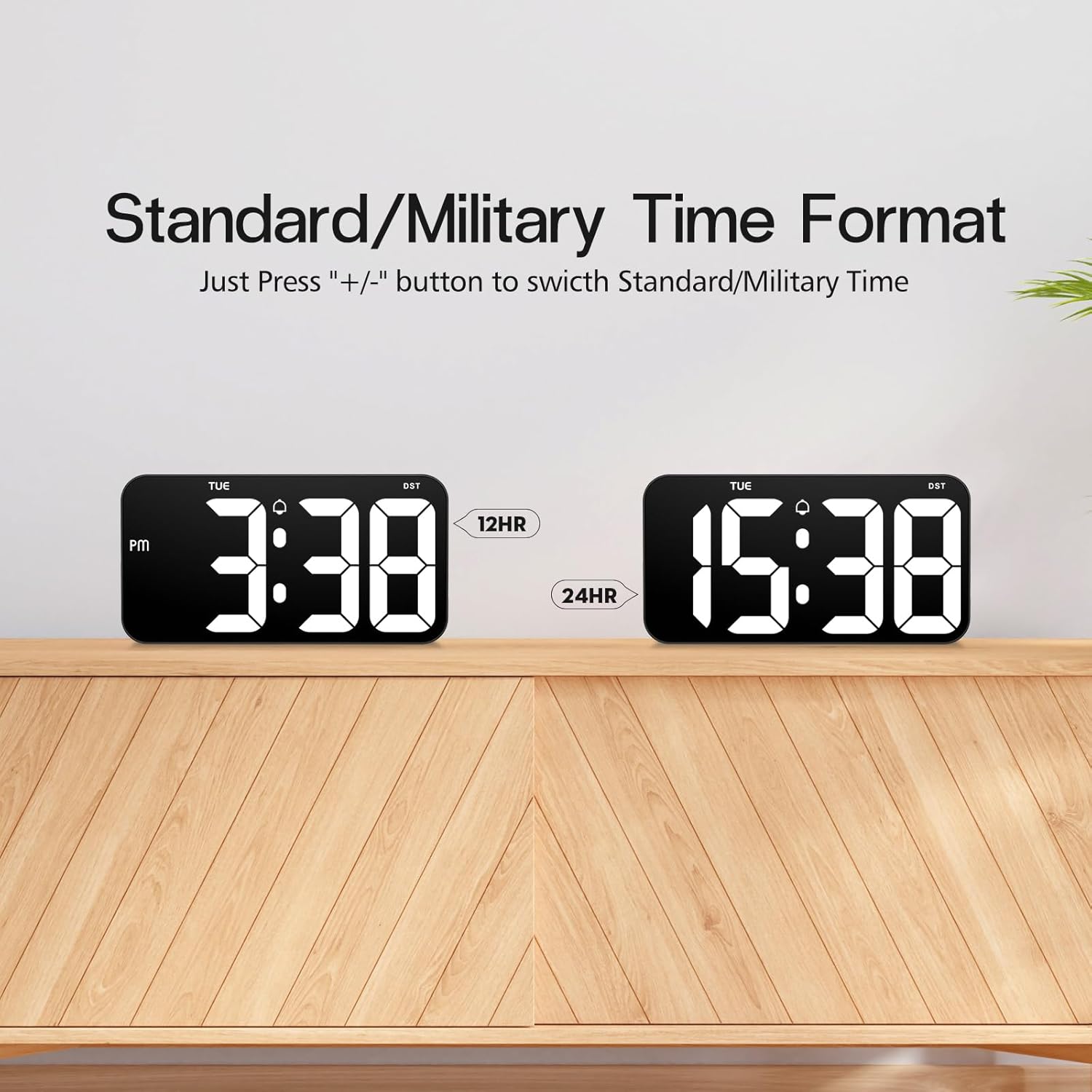
4.4 Time Format (12/24 Hour)

Comparison of the 12-hour (Standard) and 24-hour (Military) time formats.
To switch between Standard (12-hour with AM/PM indicator) and Military (24-hour) time formats, simply press the + or - button when the clock is displaying the time normally (not in setting mode).
4.5 Daylight Saving Time (DST) Function

Illustration of the Daylight Saving Time (DST) function.
The clock supports a Daylight Saving Time (DST) function. Typically, a dedicated DST button or a combination of buttons is used to activate or deactivate this feature, which adjusts the time by one hour forward or backward. Consult the specific button labels on your clock for this function.
4.6 Power Failure Memory

Illustration demonstrating the power failure memory feature.
Thanks to the built-in CR2302 coin cell battery, the Zgrmbo F500 clock retains all its settings (time, date, alarm, etc.) even during a power outage or when unplugged. You will not need to reset the clock once power is restored.
4.7 Дисплей параметрлери
- Flashing Center Dots: көпкө басыңыз + button to turn on or off the flashing colon (:) between the hour and minute digits.
- Alternating Time/Date Display: көпкө басыңыз - button to enable or disable the alternating display of time and date. When enabled, the clock will switch between showing the current time and the current date.
5. Орнотуу
Деталдаштырылган view of the back of the Zgrmbo F500 Digital Clock, highlighting mounting and stand features.
5.1 Дубалга орнотуу
The clock features a double wall-hung hole design for secure mounting.
- Дубалга каалаган жерди аныктаңыз.
- Use the provided ruler to mark the positions for the two wall nails, ensuring they are level and spaced correctly to align with the hanging holes on the back of the clock.
- Carefully insert the two wall nails into the marked positions.
- Align the clock's hanging holes with the nails and gently slide the clock down to secure it on the wall.
- Utilize the hidden cable winder support on the back of the clock to manage any excess power cable, ensuring a neat appearance.
5.2 Үстөлдү жайгаштыруу
For desk or tabletop use, the clock is equipped with two hidden, stable standing brackets.
- Locate the two hidden feet on the back of the clock.
- Gently pull out and unfold these feet until they lock into position, providing a stable angle for the clock to stand on a flat surface.
- Place the clock on your desk, nightstand, or TV counter.
- The hidden cable winder can also be used to keep the power cable tidy when placed on a surface.
6. Техникалык тейлөө
- Тазалоо: Саатты тазалоо үчүн, дисплейди акырын сүртүп,asing менен жумшак, кургак же бир аз damp cloth. Avoid using abrasive cleaners, solvents, or chemical sprays, as these may damage the surface.
- Батареяны алмаштыруу: If the clock fails to retain settings during a power outage, the CR2302 memory backup battery may need replacement. Follow the instructions in Section 3.2 to replace the battery.
- Сактагыч: If storing the clock for an extended period, disconnect it from power and consider removing the CR2302 battery to prevent potential leakage. Store in a cool, dry place.
7. Кыйынчылыктарды
| Көйгөй | Мүмкүн себеп | Чечим |
|---|---|---|
| Сааттын дисплейи өчүк же жыпылыктап турат. | No power, loose connection, faulty cable/adapter. | USB кабелинин бекем туташтырылганын текшериңиз. Башка USB портун же кубат адаптерин колдонуп көрүңүз. |
| Clock does not retain settings after power loss. | CR2302 memory battery is dead or not installed correctly. | Replace the CR2302 battery. Ensure it is inserted with correct polarity. |
| Ойготкуч угулбайт. | Alarm is not activated, alarm volume is too low (if adjustable), incorrect alarm time/mode. | Ensure the alarm icon is displayed. Re-check alarm time and operating mode settings. |
| Дисплей өтө жарык же өтө күңүрт. | Brightness setting is incorrect, auto-dimming mode is active. | басыңыз ЖАРЫК button to adjust brightness. Long press ЖАРЫК to toggle auto-dimming mode. |
| Убакыт так эмес. | Time was set incorrectly. | Re-set the time following instructions in Section 4.1. |
8. Техникалык шарттар
| Өзгөчөлүк | Деталь |
|---|---|
| Бренд | Zgrmbo |
| Модель номери | F500 |
| Түс | Кара/Ак |
| Өлчөмдөрү (L x W x Y) | 26.04 x 3.81 x 13.46 см (10.25 x 1.5 x 5.3 дюйм) |
| Салмагы | 426 грамм (0.94 фунт) |
| Материал | Акрилонитрил бутадиен стирол (ABS) |
| Дисплей түрү | Digital LED |
| Цифранын өлчөмү | 4 дюйм (10.2 см) |
| Power Source | USB кабель (электр) |
| Өзгөчөлүктөр | Large Display, Auto-Dimming, Custom Brightness, Alarm, Time Memory, 12/24H Format, DST Function, Wall Mountable, Desk Stand |
9. Кепилдик жана колдоо
Zgrmbo provides an 18 айлык кепилдик for the F500 Digital Wall Clock, covering manufacturing defects and malfunctions under normal use. Additionally, a 45 күндүк кайтаруу саясаты сиздин жан дүйнөңүздүн тынчтыгы үчүн сунушталат.
For any questions, technical assistance, warranty claims, or support, please do not hesitate to contact Zgrmbo customer service through the Amazon platform where you purchased the product. Please provide your order number and a detailed description of the issue to facilitate a quick resolution.


