1. Киришүү
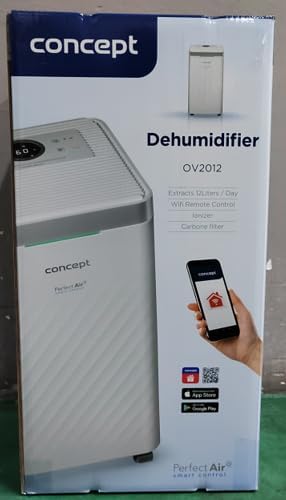
The Concept OV2012 is a versatile appliance designed to improve indoor air quality by combining dehumidification with air purification. This device effectively reduces excess humidity, which can contribute to mold growth and discomfort, while simultaneously filtering airborne pollutants. It features a triple filtration system, intuitive touch controls, and smart app connectivity for convenient operation.

Сүрөт 1: Алдыңкы view of the Concept OV2012 Dehumidifier.
2. Коопсуздук маалыматы
Сураныч, шайманды колдонуудан мурун бардык коопсуздук нускамаларын кылдат окуп чыгыңыз. Бул нускамаларды аткарбоо электр шокуна, өрткө же олуттуу жаракатка алып келиши мүмкүн.
- электр менен жабдууну камсыз кылуу voltage шаймандагы рейтинг белгисине дал келет.
- Электр шнурунун же сайгычтын бузулушу менен аппаратты иштетпеңиз.
- Keep the appliance away from water and other liquids. Do not immerse it.
- Аба кирүүчү же чыгуучу жерлерди жаап албаңыз. Аба агымы туура болушу үчүн аппараттын айланасында жетиштүү мейкиндикти камсыз кылыңыз.
- Unplug the unit before cleaning, maintenance, or when not in use for extended periods.
- Бул шайман физикалык, сенсордук же акыл-эс жөндөмү начар же тажрыйбасы жана билими жок адамдар (анын ичинде балдар) тарабынан колдонууга арналбайт, эгерде аларга көзөмөлсүз же көрсөтмө болбосо.
- Do not use the appliance in areas where flammable gases or vapors are present.
3. Продукциянын компоненттери
Familiarize yourself with the main parts of your Concept OV2012 dehumidifier.
- Башкаруу панели: Touch-sensitive interface for setting modes and functions.
- Аба чыгаруу: Where processed air is released.
- Аба кириш/фильтр капкагы: Located at the rear, provides access to the air filters.
- Суу багы: Collects condensed water.
- Үзгүлтүксүз дренаждык розетка: Port for attaching a hose for continuous water drainage.
- 360° Rolling Wheels: Агрегаттын оңой кыймылы үчүн.

2-сүрөт: Арткы view of the dehumidifier, showing air intake and water tank.
4. Башкаруу панели жана дисплей
The OV2012 features an intuitive touch control panel with a digital display and LED indicators.
3-сүрөт: Детальдуу view сенсордук башкаруу панелинин.
- Кубат баскычы: Агрегатты күйгүзөт же өчүрөт.
- Режим тандоо: Cycles through operating modes (Automatic, Continuous, Laundry Drying, Fan).
- Humidity Slider/Buttons: Керектүү нымдуулук деңгээлин тууралайт.
- Таймер баскычы: Sets the delayed on/off time (up to 24 hours).
- желдеткич ылдамдыгы: Adjusts fan speed (usually two levels).
- Ионизатор баскычы: Ионизатор функциясын иштетет же өчүрөт.
- LED нымдуулук көрсөткүчү: Changes color based on current room humidity:
- Кызыл: High humidity (RH > 70%)
- Жашыл: Satisfactory humidity (70% ≥ RH ≥ 50%)
- Көк: Low humidity (RH < 50%)
5. Баштапкы орнотуу
- Пакеттен чыгаруу: Кургаткычты анын таңгагынан кылдаттык менен алып салыңыз. Келечекте сактоо же ташуу үчүн таңгактарды сактаңыз.
- Жайгашкан жери: Place the unit on a firm, level surface. Ensure there is at least 20 cm of clear space around all sides for optimal airflow. The 360° rolling wheels allow for easy positioning.
- Кубат туташуу: Электр шнурын жерге туташтырылган электр розеткасына сайыңыз.
- Суу багы: Суу куюлган резервуар шайманга туура орнотулганын текшериңиз.
6. Иштөө режимдери
The OV2012 offers four distinct operating modes to suit various needs:
- Автоматтык режим: The dehumidifier automatically maintains the humidity level you select. The unit will cycle on and off to achieve and sustain the target humidity.
- Үзгүлтүксүз иштөө: Ideal for long-term drying of very wet areas. In this mode, the unit runs continuously regardless of the ambient humidity. It is recommended to use the continuous drainage hose in this mode.
- Кир кургатуу режими: Accelerates the drying of laundry and helps prevent moisture buildup in the room, reducing the risk of mold.
- Fan Mode (Air Purification without Dehumidification): In this mode, the compressor is off, and only the fan and filtration system operate to purify the air without removing moisture.
Using the Concept Home Mobile Application
The OV2012 can be controlled remotely via the Concept Home mobile application, available for iOS and Android devices. This app allows you to:
- Аппаратты күйгүзүңүз же өчүрүңүз.
- Select desired operating modes.
- Check the current air status in the room.
- Create a precise operating schedule for the dehumidifier.

Figure 4: The Concept Home mobile application for remote control.
7. Суу дренаж
Суу резервуарынын дренажы
When the 2.2-liter water tank is full, the unit will automatically shut off, and an indicator light will illuminate. Carefully remove the water tank, empty it, and reinsert it securely to resume operation.
Үзгүлтүксүз дренаж
For continuous operation without needing to empty the water tank, attach the included hose to the continuous drainage outlet. Direct the hose to a suitable drain, ensuring it is sloped downwards for proper water flow. This allows the unit to operate uninterrupted.
8. Техникалык тейлөө жана тазалоо
Үзгүлтүксүз тейлөө сиздин нымдагычыңыздын оптималдуу иштешин жана узак иштөөсүн камсыздайт.
Чыпка тутуму
The OV2012 features a triple filter system:
- Чаң чыпкасы: Captures coarse impurities like dust particles, hair, fur, and pollen. This filter should be cleaned regularly.
- Активдештирилген көмүр чыпкасы: Absorbs toxic, suffocating, and foul-smelling gases and vapors, such as formaldehyde, benzene, and cigarette smoke. This filter requires periodic replacement (Optional accessory: Carbon filter - 42394390).
- Ионизатор: Refreshes and purifies the air by increasing negatively charged ions, neutralizing odors and absorbing positively charged particles, viruses, and bacteria.
To clean the dust filter, remove the rear filter cover, gently remove the filter, and clean it with a vacuum cleaner or rinse it with water. Ensure it is completely dry before reinserting. Replace the activated carbon filter as recommended by the manufacturer or when you notice a decrease in odor removal effectiveness.

Figure 5: Illustration of the triple filtration system.
Суу резервуарын тазалоо
Periodically clean the water tank with mild detergent and warm water to prevent mold and bacterial growth. Rinse thoroughly and dry before reinserting.
Сырткы тазалоо
Агрегаттын сыртын жумшак менен сүртүңүз, гamp кездеме. Абразивдүү тазалагычтарды же эриткичтерди колдонбоңуз.
9. Көйгөйлөрдү чечүү боюнча колдонмо
Эгерде сизде нымдандыргычта көйгөйлөр пайда болсо, төмөнкү жалпы көйгөйлөрдү жана чечимдерди караңыз:
| Көйгөй | Мүмкүн себеп | Чечим |
|---|---|---|
| Түзмөк күйбөйт | No power supply; Water tank full or incorrectly inserted. | Check power cord connection; Empty and reinsert water tank correctly. |
| Нымсыздандыруу жок | Room temperature too low; Air filters clogged; Humidity setting too high. | Ensure room temperature is above 5°C; Clean or replace filters; Lower the desired humidity setting. |
| Бирдиги ызы -чуу | Агрегат түз жерде эмес; Аба чыпкасы бүтүп калган. | Place unit on a flat, stable surface; Clean or replace air filters. |
| Water tank full indicator remains on after emptying | Water tank not fully inserted; Sensor malfunction. | Push the water tank firmly into place; If problem persists, contact customer support. |
Бул чечимдерди колдонуу аракетинен кийин көйгөй чечилбесе, кардарларды колдоо кызматына кайрылыңыз.
10. Техникалык шарттар
| Өзгөчөлүк | Спецификация |
|---|---|
| Модель номери | OV2012 |
| Dehumidification Performance (max) | 12 liters/day (at 30°C, 80% RH) |
| Суу резервуарынын көлөмү | 2.2 литр |
| Энергияны керектөө | 210 W (Note: Product description also mentions 245W, refer to product label for exact value) |
| Ызы-чуу деңгээли | ≤ 45 дБ |
| Өлчөмдөрү (W x D x H) | 250 x 250 x 460 мм (25 x 25 x 46 см) |
| Элемент Салмагы | 10.82 кг |
| Кабелдин узундугу | 1.8 м |
| Иштөө режимдери | 4 (Automatic, Continuous, Laundry Drying, Fan) |
| Чыпка тутуму | Dust filter, Activated Carbon filter, Ionizer |
| Control | Touch control, Mobile App (Concept Home) |
| Өзгөчөлүктөр | Automatic Shut-off, Timer, 360° wheels, LED Humidity Indicator |

Сүрөт 6: Продукциянын өлчөмдөрү.
11. Кепилдик жана Кардарларды колдоо
For warranty information, please refer to the warranty card included with your product or contact your local Concept distributor. For technical support, spare parts, or service inquiries, please contact Concept customer service. Contact details may be found on the product packaging or the official Concept webсайт.
Example contact information from product packaging (may vary by region):
- CZ: Zavolejte nám +420 465 471 400, www.my-concept.cz
- SK: Zavolajte nám +421 326 583 465, www.my-concept.sk
- PL: Zadzwoń do nas +48 71 339 04 44, www.my-concept.pl


