1. Коопсуздук маалыматы
Бул продуктуну колдонуудан мурун бардык коопсуздук эскертүүлөрүн жана көрсөтмөлөрүн кунт коюп окуп чыгыңыз. Бул көрсөтмөлөрдү аткарбоо электр тогуна урунууга, өрткө жана/же олуттуу жаракат алууга алып келиши мүмкүн.
- Аппаратты ажыратпаңыз же өзгөртпөңүз.
- Аппаратты экстремалдык температурага же түз күн нуруна узак убакытка калтырбаңыз.
- Айдоодон мурун аппарат туулгаңызга бекем орнотулганын текшериңиз.
- Жол коопсуздугун ар дайым биринчи орунга коюңуз. Түзмөктү сизди алаксытып, унаа айдагандан алыстата тургандай жол менен иштетпеңиз.
- Аппаратты балдардан алыс кармаңыз.
- For better waterproof effect, keep the speaker ports facing downwards for 1-2 hours after use in rainy conditions.
2. Пакеттин мазмуну
Пакетиңизде бардык буюмдар бар экенин текшериңиз:

Image: Contents of the FODSPORTS M1S-AIR package, showing two intercom units, speaker sets, microphone options (boom and button), USB-C charging cables, mounting clips, adhesive pads, and a user manual.
- M1S-AIR Bluetooth Intercom Unit (2x)
- Helmet Speakers (2x sets)
- Boom Microphone (2x)
- Button Microphone (2x)
- Монтаждоо кронштейни (2x)
- Adhesive Pads (various)
- USB-C Charging Cable (2x)
- Колдонуучунун Колдонмосу (бул документ)
3. Продукт бүтүп калдыview
The FODSPORTS M1S-AIR is a Bluetooth 5.0 helmet communication system designed for motorcycle riders. It features two-way intercom, music sharing, FM radio, and CVC noise reduction.

Image: A pair of FODSPORTS M1S-AIR intercom units, highlighting their sleek design and primary control buttons. The units are silver and black with blue LED accents.
3.1. Unit Features
- Bluetooth 5.0 technology for stable connections.
- Two-way intercom communication.
- Music sharing capability.
- Three distinct music sound effects.
- CVC noise reduction for clear audio.
- Камтылган FM радио.
- USB-C заряддоо порту.
- Glove-friendly buttons for easy operation.

Image: A rider in a helmet and gloves interacting with the M1S-AIR unit, illustrating the ease of use with motorcycle gloves.
3.2. Порттор жана индикаторлор

Сүрөт: деталдуу view of the M1S-AIR unit's side, showing the USB-C charging port and an illuminated display indicating battery status. Icons for charging, music, phone calls, standby, and intercom are visible.
- USB-C порту: Аппаратты заряддоо үчүн.
- Speaker/Mic Port: Каска динамиктерин жана микрофонду туташтырат.
- LED көрсөткүчү: Түзмөктүн абалын көрсөтөт (мисалы, жупташтыруу, туташуу, кубаттоо).
4. Орнотуу жана орнотуу
Follow these steps to install the M1S-AIR unit onto your helmet.

Image: A step-by-step visual guide demonstrating the installation process of the M1S-AIR unit. It shows attaching the adhesive pad to the mounting clip, securing the clip to the helmet, and sliding the intercom unit into the clip.
- Монтаждоо ордун тандоо: Select a flat surface on the left side of your helmet.
- Орнотуу клипсин бекитүү:
- Жабышкак орнотуу: Clean the helmet surface. Peel off the protective film from the adhesive pad and firmly press the mounting clip onto the helmet. Hold for 30 seconds.
- Clamp Тоо: If your helmet allows, use the clamp mount by sliding it between the helmet shell and padding. Tighten the screws.
- Динамиктерди орнотуу: Динамиктерди туулганын кулак чөнтөктөрүнүн ичине салыңыз. Үндүн оптималдуу чыгышы үчүн, алардын түз кулагыңыздын үстүндө жайгашканын текшериңиз.
- Микрофонду орнотуу:
- Бум микрофону: For open-face or modular helmets. Attach it to the inside of the helmet, positioning the microphone close to your mouth.
- Баскычтуу микрофон: For full-face helmets. Attach it to the inside of the chin bar, ensuring it is not obstructed.
- Кабелдерди туташтыруу: Plug the speaker and microphone cables into the corresponding port on the M1S-AIR unit.
- Домофонду орнотуу: Slide the M1S-AIR unit onto the installed mounting clip until it clicks into place.
5. Иштөө нускамалары
5.1. Күйгүзүү/өчүрүү
- Күйгүзүү: LED индикатору күйгөнгө чейин Кубат баскычын болжол менен 3 секунд басып туруңуз.
- Өчүрүү: LED индикатору өчмөйүнчө кубат баскычын болжол менен 3 секунд басып туруңуз.
5.2. Bluetooth жупташтыруу (уюлдук телефон)
- With the M1S-AIR powered off, press and hold the Power button for about 5-7 seconds until the LED indicator flashes red and blue alternately, indicating pairing mode.
- On your mobile phone, enable Bluetooth and search for "FODSPORTS M1S-AIR".
- Туташа турган түзмөктү тандаңыз. Жупташтырылгандан кийин, LED индикатору жай көк түстө күйүп-өчөт.
5.3. Домофон байланышы
The M1S-AIR supports two-way intercom communication between two units.

Image: Two motorcyclists riding on a road, visually representing two-way communication through their M1S-AIR intercom systems. Speech bubbles illustrate a clear conversation between them.
- Ensure both M1S-AIR units are powered on and within range.
- On one unit, press the Intercom button once to initiate pairing with another M1S-AIR unit. The LED will flash rapidly.
- On the second unit, also press the Intercom button once.
- Once connected, both units will have a steady blue LED, and you can begin speaking.
- To end intercom, press the Intercom button once.
5.4. Музыка ойнотуу жана бөлүшүү
You can play music from your paired phone and share it with another M1S-AIR unit.

Image: Two motorcyclists riding, with a smartphone displaying a music player interface. Music notes are depicted flowing from one rider's helmet to the other, illustrating the music sharing feature of the M1S-AIR intercom system.
- Ойнотуу/тындыруу: Көп функциялуу баскычты бир жолу басыңыз.
- Кийинки трек: Үнүн жогорулатуу баскычын басыңыз.
- Мурунку трек: Үндү азайтуу баскычын басыңыз.
- Музыка бөлүшүү: While music is playing, press and hold the Music Share button (specific button, refer to device layout) to share with a paired M1S-AIR unit. Note: Music sharing only works between two M1S-AIR units. Pause music before initiating sharing.
5.5. Үн эффекттери
The M1S-AIR offers three distinct sound effects for music playback.

Image: An illustration showing three distinct sound effect modes: "Pure human voice" (depicted by a singer), "Popular Golden Classic" (depicted by a concert stage), and "HiFi bass" (depicted by a saxophonist), indicating customizable audio experiences.
- To cycle through "Pure human voice", "Popular Golden Classic", and "HiFi bass" effects, press the EQ button (refer to device layout).
- Note: The selected music effect needs to be reset each time the M1S-AIR unit is powered on.
5.6. FM радиосу
The M1S-AIR includes a built-in FM radio.

Image: A motorcycle helmet with the M1S-AIR unit attached, overlaid with a graphic of radio waves and an FM frequency tuner dial ranging from 76-108 MHz, indicating the device's FM radio capability.
- FM радиосун күйгүзүү/өчүрүү: FM баскычын бир жолу басыңыз.
- Каналдарды сканерлөө: Press and hold the Volume Up or Volume Down button to automatically scan for available FM channels.
- Каналды өзгөртүү: Briefly press the Volume Up or Volume Down button to switch between saved channels.
5.7. Үн жардамчысы (Siri/Google жардамчысы)
Activate your smartphone's voice assistant directly from the M1S-AIR.
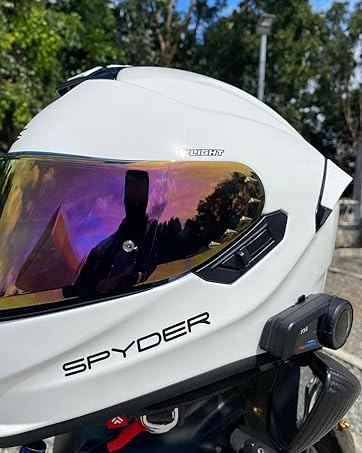
Image: A motorcyclist in a helmet, with a speech bubble indicating "Hey~ Siri, Call Alice!". A smartphone screen shows "Call in progress...", demonstrating the voice command feature for activating a voice assistant like Siri through the M1S-AIR unit.
- Үн Жардамчысын жандыруу: Briefly press the Voice Assistant button (refer to device layout).
5.8. Үндү башкаруу
- Көлөмүн жогорулатуу: Үнүн жогорулатуу баскычын басыңыз.
- Көлөмдү азайтуу: Үндү азайтуу баскычын басыңыз.
6. Техникалык тейлөө
- Тазалоо: жумшак колдонуу, damp Түзмөктү тазалоо үчүн чүпүрөк колдонуңуз. Катуу химиялык заттарды же абразивдүү тазалоочу каражаттарды колдонбоңуз.
- Суу каршылык: The M1S-AIR is IP65 waterproof. However, for optimal longevity, avoid prolonged exposure to heavy rain. After use in wet conditions, ensure speaker ports are facing down for 1-2 hours to allow drainage.
- Сактагыч: Аппаратты колдонбогондо салкын, кургак жерде сактаңыз.
- Батареяга кам көрүү: Батареянын иштөө мөөнөтүн сактоо үчүн, түзмөк көп колдонулбаса дагы, аны үзгүлтүксүз кубаттап туруңуз.
7. Кыйынчылыктарды
If you encounter issues with your M1S-AIR unit, refer to the following common problems and solutions:
| Көйгөй | Мүмкүн себеп | Чечим |
|---|---|---|
| Күйгүзүлбөйт | Батарея аз. | Аппаратты кеминде 3 саатка заряддаңыз. |
| Cannot Pair with Phone | Түзмөк жупташтыруу режиминде эмес; телефондо Bluetooth өчүк. | Ensure M1S-AIR is in pairing mode (red/blue flashing LED). Enable Bluetooth on your phone. |
| Домофонду туташтыруудагы көйгөйлөр | Units out of range; incorrect pairing procedure. | Ensure units are within 1000m. Re-initiate intercom pairing. |
| Music Sharing Not Working | Music not paused before sharing; unit occupied. | Pause music on the source unit before sharing. Ensure the unit is not in another mode (e.g., intercom call). |
| Low Volume at High Speed | External noise (wind); speaker placement. | Adjust speaker position closer to ears. Ensure helmet fit is snug to minimize wind noise. The CVC noise reduction helps, but extreme conditions may still affect audio. |
| Sound Effects Reset | Кадимки иштөө. | The selected music effect needs to be reset each time the M1S-AIR unit is powered on. This is by design. |

Image: A graphic illustrating the effect of CVC noise control. A motorcyclist is shown with sound waves around their helmet, depicting a reduction in echo and background noise, resulting in clearer audio.
8. Техникалык шарттар
Key technical specifications for the FODSPORTS M1S-AIR Bluetooth Motorcycle Intercom System:
| Өзгөчөлүк | Деталь |
|---|---|
| Модель аты | M1S-AIR Motorcycle Bluetooth Intercom |
| Bluetooth версиясы | 5.0 |
| Байланыш технологиясы | Bluetooth 5, зымсыз |
| Домофон аралык | 1000 метрге чейин (2 чабандес) |
| Батареянын иштөө мөөнөтү (домофон) | 15 саат |
| Battery Life (Music/Phone) | 15 саат |
| Күтүү убактысы | 300 саат |
| Заряддоо убактысы | 3 саат |
| Заряддоо интерфейси | USB-C |
| Сууга туруктуулук деңгээли | IP65 суу өткөрбөйт |
| Noise Control | Active Noise Cancellation, Wind Noise Reduction (CVC) |
| Башкаруу ыкмасы | Touch, Voice (Siri/Google Assistant) |
| Элемент Салмагы | 1.52 фунт (2 бирдик үчүн) |
| Өндүрүүчү | FODSPORTS |

Image: The underside of the M1S-AIR unit, displaying the FODSPORTS brand, model number (M1S-AIR), and various regulatory compliance logos such as CE, UKCA, FC, and RoHS.
9. Расмий продукт Video
Watch this introductory video for a visual guide to the FODSPORTS M1S-AIR Bluetooth Motorcycle Intercom System.
Video: An official introduction to the Fodsports M1S AIR Motorcycle Bluetooth Intercom, showcasing its features like Bluetooth 5.0, 3-rider intercom, USB-C charging, HiFi sound, and CVC noise reduction technology.
10. Кепилдик жана колдоо
FODSPORTS products are designed for reliability and performance. For warranty information, technical support, or service inquiries, please refer to the contact information provided on the product packaging or visit the official FODSPORTS webсайт.
Сатып алуу квитанциясын кепилдик дооматтары үчүн сатып алуунун далили катары сактаңыз.


