1. Киришүү
This manual provides instructions for the installation, configuration, and operation of the TP-Link TL-SX3206HPP 6-Port 10G L2+ Managed PoE Switch. This device is designed to provide high-speed network connectivity with Power over Ethernet (PoE++) capabilities, suitable for various network environments.
2. Коопсуздук маалыматы
Please read and follow all safety instructions carefully before operating the device.
- Do not expose this device to water or excessive humidity.
- Аппаратты ажыратууга, оңдоого же өзгөртүүгө аракет кылбаңыз.
- Ашыкча ысып кетүүнүн алдын алуу үчүн аппараттын айланасында туура желдетүүнү камсыз кылыңыз.
- Аппарат менен кошо берилген кубат адаптерин гана колдонуңуз.
- Install the device in a stable location, away from strong electromagnetic fields.
3. Пакеттин мазмуну
Пакетиңизде төмөнкү заттар бар экенин текшериңиз:
- TL-SX3206HPP Switch
- Электр кабели
- Орнотуу боюнча колдонмо
- Rackmount Kit
- Резина буттары
4. Физикалык бүтүрүүview
4.1 алдыңкы панели
The front panel of the TL-SX3206HPP features network ports, console ports, and LED indicators for status monitoring.

Сүрөттүн сүрөттөлүшү: This image displays the front panel of the TP-Link TL-SX3206HPP switch. It shows four RJ45 ports (1-4) supporting 100Mbps/1G/2.5G/5G/10G speeds with PoE++ capabilities, and two SFP+ slots (5-6) for 10G fiber connections. LED indicators for Power, PoE Max, System, and Fan status are visible, along with individual Speed, PoE, and Activity LEDs for each port. A console port (RJ45) and a Micro-USB console port are also present.
4.2 Арткы панель
Арткы панелде кубаттуулукту киргизүү жана жерге туташтыруу бурагы бар.

Сүрөттүн сүрөттөлүшү: This image shows the rear panel of the TP-Link TL-SX3206HPP switch. It features the AC power inlet (100-240V~ 50/60Hz 4.0A) and a grounding screw terminal. A Kensington lock slot is also visible on the left side.
4.3 Өлчөмдөрү жана порттун жайгашуусу
Understanding the physical layout and dimensions is crucial for proper installation.

Сүрөттүн сүрөттөлүшү: Бул сүрөт майда-чүйдөсүнө чейин камсыз кылат view of the TP-Link TL-SX3206HPP switch, highlighting its dimensions and port types. The switch measures 294 mm in width, 180 mm in depth, and 44 mm in height. It clearly labels the four 10GE RJ45 802.3bt PoE++ ports (auto-negotiating 5-speed: 100Mbps/1G/2.5G/5G/10G), one RJ45 Console Port, one Micro-USB Console Port, and two 10G SFP+ slots.
5. Орнотуу
5.1 Коммутаторлорду орнотуу
The TL-SX3206HPP can be placed on a desktop or mounted in a rack.
- Иш тактада жайгаштыруу: Attach the included rubber feet to the bottom of the switch to prevent scratching and ensure stability.
- Стойкага орнотуу: Use the provided rackmount kit to secure the switch in a standard 19-inch equipment rack.
5.2 Электр кубатын туташтыруу
Connect the provided power cord to the AC power inlet on the rear panel of the switch and then to a power outlet. Ensure the power source matches the voltagталаптар (100-240V~ 50/60Hz).
5.3 Тармактык байланыштар
- RJ45 порттору (1-4): Connect network devices such as computers, servers, or PoE-powered devices (e.g., Wi-Fi 6/6E/7 access points, IP cameras) using Ethernet cables. These ports support speeds up to 10 Gbps and provide PoE++ power (up to 60W per port, 200W total budget).
- SFP+ Slots (5-6): Insert compatible 10G SFP+ modules for fiber optic connections to other high-speed network devices or backbone infrastructure.
- Console Ports (RJ45/Micro-USB): Use these ports for command-line interface (CLI) management and initial configuration via a terminal emulator.
6. Иштөө нускамалары
6.1 LED көрсөткүчтөрү
Monitor the status of the switch using the front panel LEDs:
- PWR (кубат): Кубаттын абалын көрсөтөт.
- SYS (Система): Системанын иштөө абалын көрсөтөт.
- Күйөрман: Indicates fan status.
- PoE Макс: Жалпы PoE кубаттуулугу бюджетинин чегине жакындап калганын көрсөтөт.
- Speed/Activity (per port): Indicates link speed and data activity.
- PoE/PoE Fault (per port): Indicates PoE status or fault condition.
6.2 Башкаруу параметрлери
The TL-SX3206HPP offers flexible management:
- Webнегизделген GUI: Коммутатордун башкаруу интерфейсине а аркылуу кириңиз web browser for graphical configuration.
- Буйрук сабынын интерфейси (CLI): Use the console ports for advanced configuration via CLI.
- Omada SDN интеграциясы: The switch can be managed centrally through TP-Link's Omada Software Defined Networking (SDN) platform. This allows for unified management of switches, access points, and gateways via an Omada Hardware Controller, Software Controller, or Cloud-based Controller. Standalone mode is also supported.

Сүрөттүн сүрөттөлүшү: This diagram illustrates the Omada SDN platform, showing how JetStream Switches, Omada Access Points (Wi-Fi 6, Ceiling Mount, Wall Plate, Outdoor), and Omada Routers can be centrally managed. The management options include a Unified Management Interface, Controllers (hardware or software), and Cloud Access, providing flexible control over the entire network.
7. Өркүндөтүлгөн функциялар
The TL-SX3206HPP supports a range of L2+ features for enhanced network control and security:
- 802.1Q VLAN: Коопсуздукту жана иштин натыйжалуулугун жогорулатуу үчүн тармагыңызды кичинекей, обочолонгон берүү домендерине бөлүңүз.
- IP-MAC-портун байланыштыруу: Enhance security by binding specific IP addresses and MAC addresses to individual ports.
- Кирүүнү башкаруу тизмеси (ACL): Тармак трафигин ар кандай критерийлерге негиздеп чыпкалоо эрежелерин аныктаңыз.
- Порт коопсуздугу: Limit the number of MAC addresses allowed on a port to prevent unauthorized access.
- DoS коргоо: Protect the network from Denial of Service attacks.
- Бороонду көзөмөлдөө: Телерадиоберүү, мультикаст же белгисиз бир каналдуу бороондордон улам тармактын иштешинин начарлашынын алдын алыңыз.
- DHCP Snooping: Prevent unauthorized DHCP servers from providing IP addresses.
- 802.1X радиусун аутентификациялоо: Тармакка кирүү үчүн борборлоштурулган аутентификацияны камсыз кылыңыз.
- IPv6 & Static Routing: Support for modern network protocols and basic routing capabilities.
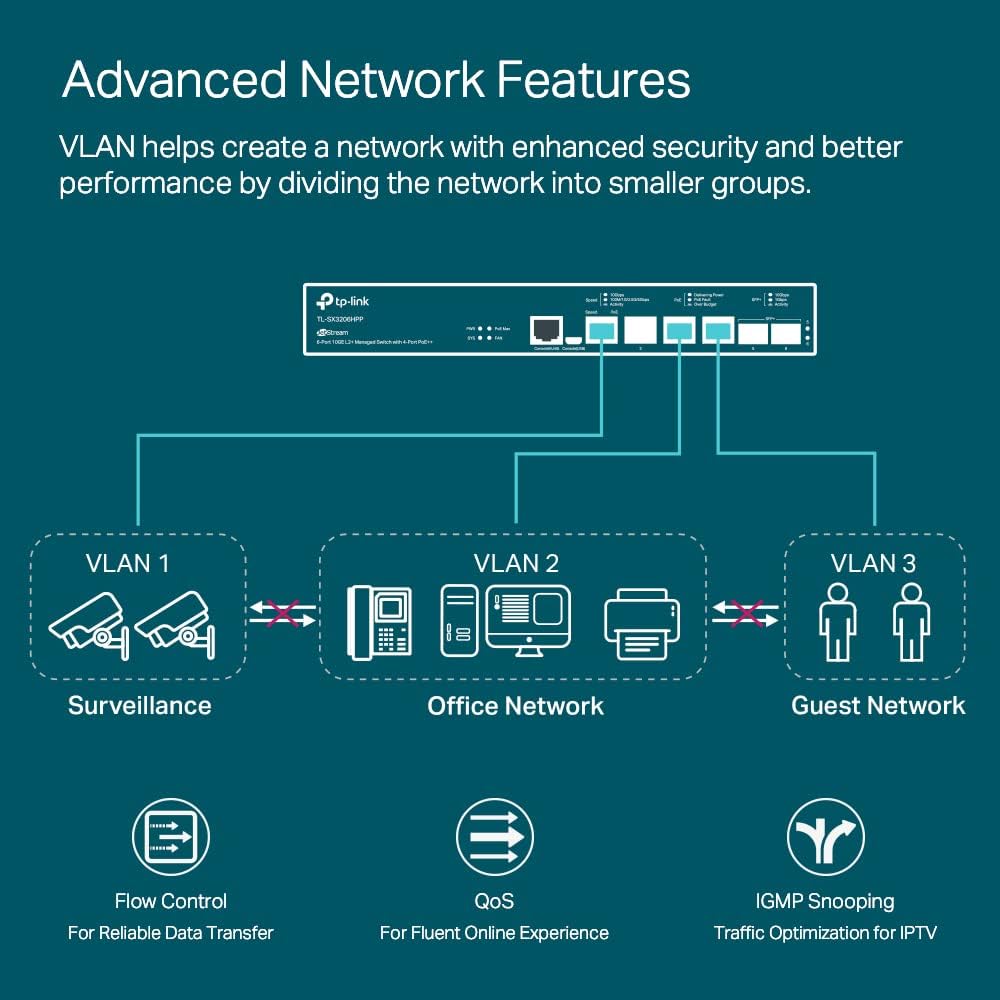
Сүрөттүн сүрөттөлүшү: This diagram illustrates advanced network features, specifically VLANs. It shows a network divided into three VLANs (VLAN 1 for Surveillance, VLAN 2 for Office Network, VLAN 3 for Guest Network), demonstrating how VLANs enhance security and performance by segmenting traffic. Additional icons represent Flow Control, QoS, and IGMP Snooping.
8. Техникалык тейлөө
- Тазалоо: Regularly clean the device with a dry, soft cloth. Do not use liquid or aerosol cleaners.
- Программалык камсыздоонун жаңыртуулары: TP-Link расмий сайтынан текшериңиз webоптималдуу иштөөнү жана коопсуздукту камсыз кылуу үчүн мезгил-мезгили менен микропрограммалык камсыздоону жаңыртып туруу үчүн сайтты текшерип туруңуз.
- Экологиялык шарттар: Ensure the operating environment stays within the specified temperature (0–45°C) and humidity ranges.
9. Кыйынчылыктарды
- Кубат жок: Ensure the power cord is securely connected to both the switch and a working power outlet. Verify the power outlet is active.
- Шилтеме жок/Аракет LED: Check the Ethernet cable connections. Ensure the connected device is powered on and functioning correctly. Verify port settings in the management interface.
- PoE түзмөгү күйбөй жатат: Confirm the connected device is PoE compatible and within the PoE++ power budget (60W per port, 200W total). Check the PoE LED for any fault indications.
- Желдетүүчү ызы-чуу: The switch may produce audible fan noise, especially during startup or under heavy load. This is normal operation. If fan noise is excessive or constant at idle, ensure proper ventilation and check for obstructions.
- Башкаруу интерфейсине кирүү: кире албаса web GUI, verify your computer's IP address is in the same subnet as the switch. Try clearing your browser's cache or using a different browser. For CLI access, ensure correct serial port settings.
10. Техникалык шарттар
| Өзгөчөлүк | Спецификация |
|---|---|
| Модель номери | TL-SX3206HPP |
| Порттардын саны | 6 (4x 10Gbps RJ45 PoE++, 2x 10G SFP+ Slots) |
| PoE стандарты | 802.3bt/at/af (PoE++) |
| Max PoE Power per Port | 60 Вт |
| Жалпы PoE бюджети | 200 Вт |
| Маалыматтарды өткөрүү ылдамдыгы | Секундасына 10 Гигабит |
| Interface Type | PoE, RJ45, SFP+ |
| Өлчөмдөрү (L x W x Y) | 11.57 x 7.09 x 1.73 дюйм (294 x 180 x 44 мм) |
| Элемент Салмагы | 4.07 фунт (1.85 килограмм) |
| Иштин материалы | Металл |
| Тtage | 100-240 вольт (AC) |
| Иштөө температурасы | 0–45 Degrees Celsius |
| UPC | 840030702570 |
11. Кепилдик жана колдоо
11.1 Өндүрүүчүнүн Кепилдиги
This TP-Link TL-SX3206HPP switch comes with a 5-year manufacturer warranty. Please refer to the official TP-Link webдеталдуу кепилдик шарттары жана шарттары үчүн сайт.
11.2 Техникалык колдоо
For technical assistance, product registration, or to download the latest firmware and user manuals, please visit the official TP-Link support webсайтка же алардын колдоо тобуна кайрылыңыз:
- Колдоо Webсайт: TP-Link колдоо
- Колдонуучунун колдонмосу (PDF): Колдонуучунун колдонмосун жүктөп алыңыз
- Орнотуу боюнча колдонмо (PDF): Орнотуу боюнча колдонмону жүктөп алыңыз


