1. Киришүү
This manual provides instructions for the Allimity BN59-01315N BN59-01483C replacement remote control. This remote is designed to function as a direct replacement for various Samsung Smart QLED TV models without requiring any programming.
Шайкеш келген телевизор моделдери:
- QN55S95B, QE65S95BATXXU, QN55S95BAFXZA, QN65S95BAFXZA
- QE55S95B, QN65S95B, QE65S95B, QE55S95BATXXU
- UE58U8000FK, UE60DU7100K, UE65CU7100K, UE65CU7110K, UE65CU71A0K
2. Орнотуу
2.1 Батареяны орнотуу
- Пульттун артындагы батарея отсегин табыңыз.
- Батареянын капкагын ылдый жылдырыңыз же ачкычты басып, көтөрүңүз.
- Insert two (2) 1.5V AAA alkaline batteries, ensuring the positive (+) and negative (-) terminals align correctly with the markings inside the compartment.
- Батареянын капкагын бекем чыккыча ордуна жылдырыңыз.
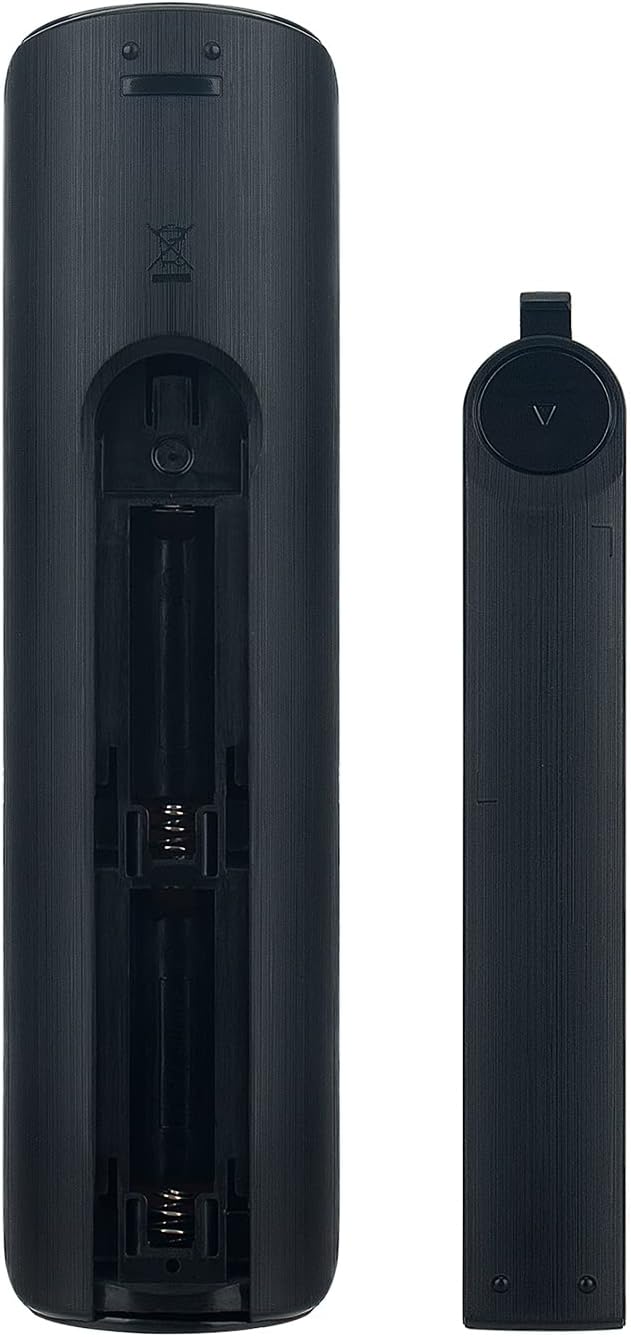
Image: Back of the remote control with the battery compartment open, illustrating the correct orientation for AAA battery insertion.
2.2 Алгачкы колдонуу
This remote control requires no programming. Once batteries are correctly installed, it is ready for immediate use with compatible Samsung Smart QLED TV models. Simply point the remote control towards your television and begin operation.
3. Иштөө нускамалары
The Allimity BN59-01315N BN59-01483C remote control features a standard layout for intuitive operation of your Samsung TV. Ensure a clear line of sight between the remote's infrared emitter and your TV's IR receiver for optimal performance.
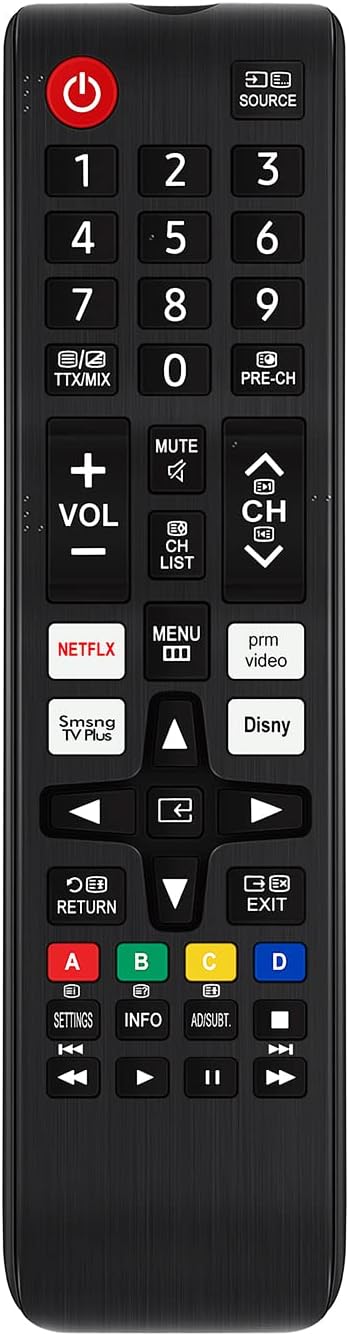
Сүрөт: алдыңкы view of the remote control, displaying the full button layout including power, number pad, volume, channel, navigation, and dedicated app buttons.
3.1 Негизги функциялар
- Кубат баскычы (U): Телевизорду күйгүзөт же өчүрөт.
- Сандык тактасы (0-9): Түз канал тандоо.
- БУЛАК: Киргизүү булагын өзгөртөт (HDMI, AV ж.б.).
- VOL (+/-): Үн деңгээлин тууралайт.
- CH (өйдө/төмөн): Телеканалдарды өзгөртөт.
- БАСУУ: Телевизордун аудиосун өчүрөт же кайра күйгүзөт.
- Navigation Pad (Up/Down/Left/Right/Enter): Менюларды карап чыгып, параметрлерди тандайт.
- КАЙТУУ: Мурунку экранга же менюга кайтарат.
- ЧЫГУУ: Учурдагы менюдан же колдонмодон чыгат.
- МЕНЮ: Телевизордун негизги менюсуна кирет.
- Dedicated App Buttons (NETFLIX, SmSng TV Plus, Disny, prm video): Provides quick access to streaming services.
- Түстүү баскычтар (A, B, C, D): Perform specific functions within certain applications or menus, as indicated on the TV screen.
4. Техникалык тейлөө
4.1 Тазалоо
Алыстан башкаруу пультун тазалоо үчүн жумшак, кургак чүпүрөктү колдонуңуз. Өтө кир болсо, бир азampкездемени суу же жумшак, абразивдүү эмес тазалоочу каражат менен сүртүңүз. Катуу химиялык заттарды же абразивдүү материалдарды колдонуудан алыс болуңуз, анткени алар пульттун бетине же ички компоненттерине зыян келтириши мүмкүн.
4.2 Батареяны алмаштыруу
Replace batteries when the remote's response becomes sluggish or stops working. Always replace both batteries simultaneously with new 1.5V AAA alkaline batteries. Do not mix old and new batteries, or different types of batteries.
4.3 Сактоо
When not in use for extended periods, it is recommended to remove the batteries to prevent leakage, which can damage the remote control.
5. Кыйынчылыктарды
- Пульт жооп бербей жатат:
- Батареялар туура полярдуулук менен туура салынганын текшериңиз.
- Эски батарейкаларды жаңысына алмаштырыңыз.
- Пульт менен телевизордун инфракызыл кабыл алгычынын ортосундагы тоскоолдуктарды текшериңиз.
- Натыйжалуу иштөө диапазонунда экениңизди жана пультту түздөн-түз сыналгыга багыттооңузду текшериңиз.
- Атайын баскычтар иштебейт:
- Clean the remote control, especially around the unresponsive buttons, to remove any dirt or debris that might be preventing proper contact.
- If only certain buttons are affected, and battery replacement does not resolve the issue, the remote may require replacement.
6. Техникалык шарттар
| Модель номери | BN59-01315N BN59-01483C |
| Бренд | АЛЛИМ |
| Продукциянын өлчөмдөрү | 5.5 x 1.8 x 0.6 дюйм |
| Элемент Салмагы | 2 унция |
| Электр камсыздоо | 2 x 1.5V AAA Alkaline Batteries (Not Included) |
| Байланыш технологиясы | Инфракызыл |
| Өзгөчө өзгөчөлүк | Программалоо талап кылынбайт |
| Шайкеш түзмөктөр | Телевидение |
7. Кепилдик жана колдоо
Specific warranty information for this product is not provided in this manual. Please refer to the product packaging, the seller's website, or contact the manufacturer directly for details regarding warranty coverage and customer support.


