Introduction
Thank you for choosing the ErGear L-Shaped Computer Desk. This manual provides detailed instructions for the safe and efficient assembly, operation, and maintenance of your new desk. Please read this manual thoroughly before beginning assembly or use, and retain it for future reference.
This L-shaped computer desk is designed to enhance your workspace with integrated features such as an electrical outlet, monitor stand, storage shelves, CPU holder, storage pocket, and storage hook.
Маанилүү коопсуздук маалыматы
- Эки адамдык жыйын: For safety and ease of assembly, it is highly recommended that two people assemble this desk.
- Салмак чеги: Do not exceed the maximum weight limit of 176 pounds (80 kg) on the desktop. Distribute weight evenly.
- Туруктуулук: Ensure the desk is stable on an even surface. Use the adjustable foot pads to level the desk if the floor is uneven.
- Электр коопсуздугу: The integrated power outlet features 3 AC outlets and 2 USB-A ports. While convenient, these are not surge protected. Consider using an external surge protector for sensitive electronics. Ensure the power cable is not pinched or damaged during assembly or use.
- Балдар жана үй жаныбарлары: Чогултуу учурунда муунуп калуу коркунучун алдын алуу үчүн майда бөлүктөр менен таңгактоочу материалдарды балдардан жана үй жаныбарларынан алыс кармаңыз.
- Куралды колдонуу: Use appropriate tools as specified in the assembly instructions. Do not overtighten screws, especially when attaching wooden components, to avoid stripping.
Пакеттин мазмуну
Before beginning assembly, verify that all parts listed in the included assembly guide are present and undamaged. If any parts are missing or damaged, please contact ErGear customer support.

Сүрөт: бүттүview of the ErGear L-Shaped Computer Desk, showcasing its various components including the L-shaped desktop, monitor stand, shelves, and power outlet.
Орнотуу жана чогултуу
This desk offers flexible configuration, allowing the side-section to be assembled on either the left or right side to suit your space and preference. Refer to the detailed assembly instructions provided in the product packaging for step-by-step guidance.
Ассамблеянын негизги ойлору:
- Two Assembly Options: The manual will illustrate both left and right-hand configurations. Choose your preferred layout before starting.
- Белгилөө: All pieces are clearly labeled. Ensure you match the labels to the corresponding steps in the instruction manual.
- Аппараттык камсыздоо: Hardware is also clearly labeled. Use the provided Allen key for assembly. An electric screwdriver with an appropriate Allen key bit can speed up the process, but avoid overtightening, especially on wooden parts.
- Жөнгө салынуучу бут тосмолор: Install the rubber foot pads on the bottom of the desk legs. These can be adjusted to level the desk on uneven floors.

Image: Illustration showing the two possible assembly configurations for the L-shaped desk, allowing for a left or right-hand setup.
Иштөө нускамалары
Интегралдык розетка:
The desk is equipped with a built-in power strip featuring 3 standard AC outlets and 2 USB-A charging ports. This allows for convenient power access for your devices directly on your desk.
- Байланыш: Plug the desk's 6.7ft power cable into a wall outlet.
- Колдонуу: Connect laptops, monitors, phone chargers, and other compatible devices to the AC outlets or USB ports.
- Эскертүү: These outlets are for power distribution and charging. They do not provide surge protection.

Image: Detail of the integrated power outlet, showing 3 AC sockets and 2 USB ports in use, charging various electronic devices.
Monitor Riser:
The elevated monitor stand helps improve your workplace posture by raising your monitors to eye level. This can reduce neck and eye strain during long periods of use.
- Жайгашкан жери: Position your monitors on the riser.
- Эргономика: Adjust your chair height and monitor angle for optimal viewсооронуч.

Image: A user working at the ErGear desk, demonstrating how the monitor riser elevates screens to eye level for better posture.
Сактоо өзгөчөлүктөрү:
The desk includes multiple storage solutions to keep your workspace organized:
- CPU Shelf: The dedicated CPU shelf is height-adjustable, allowing you to customize its position to accommodate different CPU sizes or other storage needs. Adjust by repositioning the shelf supports during assembly or by carefully loosening and re-securing the shelf.
- Book Shelf: Provides space for books, binders, or decorative items.
- Fabric Storage Pocket: Ideal for documents, magazines, or small accessories.
- Кубок ээси: Keeps your beverage secure and prevents spills on the desktop.
- Storage Hook: Convenient for hanging headphones, cables, or bags.
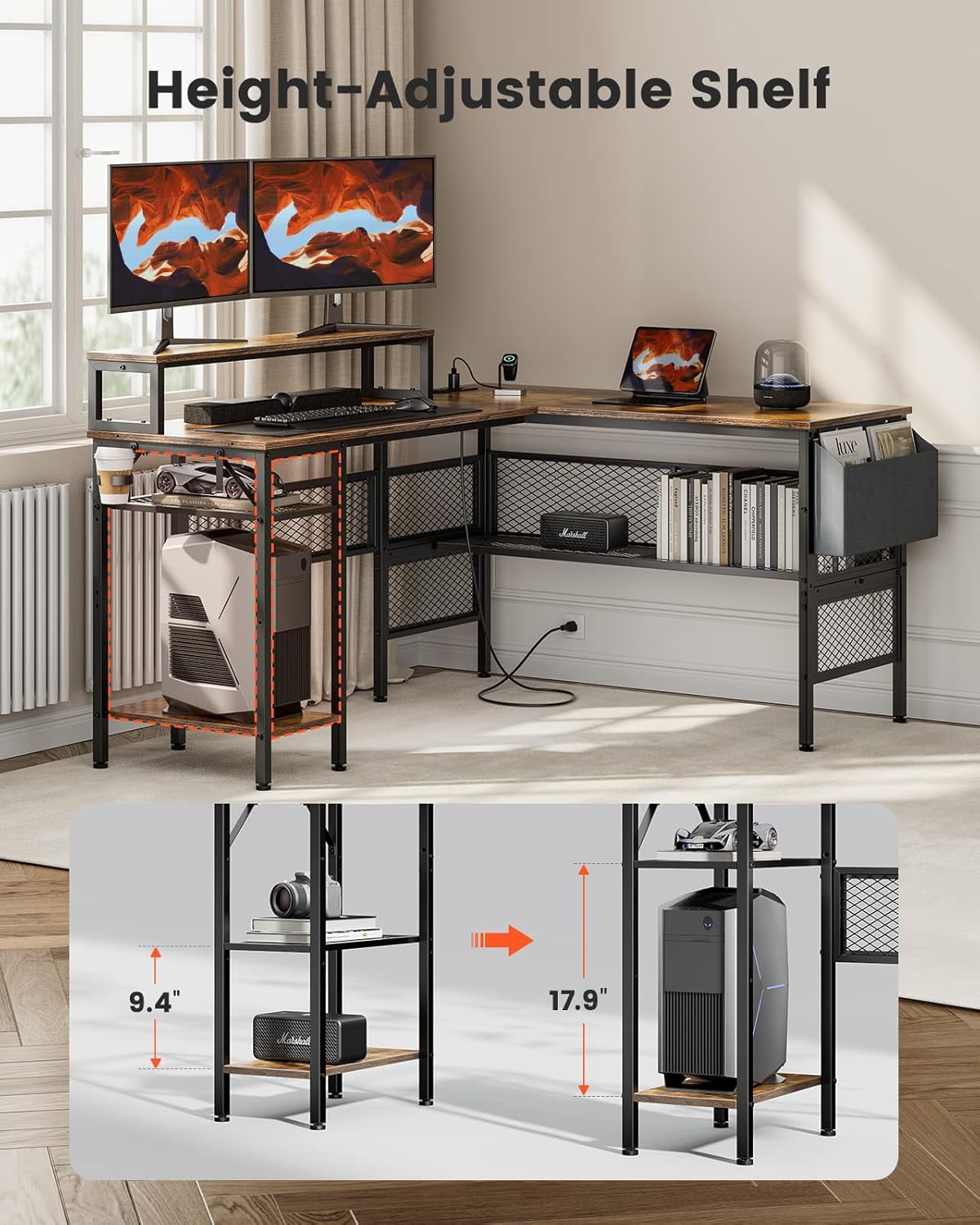
Image: The ErGear desk highlighting the height-adjustable CPU shelf, demonstrating its flexibility to accommodate different item heights.
Техникалык тейлөө жана кам көрүү
- Тазалоо: Үстөлдүн беттерин жумшак менен сүртүңүз, гamp кездеме. Катуу химиялык заттардан же абразивдүү тазалагычтардан алыс болуңуз, бул финишке зыян келтирет.
- Төгүлүүлөр: Так калбашы же жыгачтын бетине зыян келтирбеши үчүн төгүлгөн нерселерди дароо тазалаңыз.
- бекиткичтер: Бардык бурамаларды жана болттордун бекем бекитилгенин мезгил-мезгили менен текшерип туруңуз. Туруктуулукту сактоо үчүн зарыл болсо, кайра бекемдеңиз.
- Жылуулук жана нымдуулук: Avoid placing hot items directly on the desk surface. Use coasters for drinks to prevent moisture rings.
Проблемаларды чечүү
- Issue: Desk wobbles or is unstable.
- Чечим: Check that all assembly screws are securely tightened. Adjust the height-adjustable foot pads on the bottom of the legs to level the desk on uneven flooring.
- Көйгөй: Электр розеткалары иштебей жатат.
- Чечим: Ensure the desk's main power cable is securely plugged into a functional wall outlet. Check if the wall outlet itself is receiving power (e.g., by plugging in another device). If the issue persists, contact customer support.
- Көйгөй: Чогултуу учурундагы кыйынчылыктар.
- Чечим: Review the assembly instructions carefully, paying close attention to diagrams and part labels. Ensure you are using the correct screws for each step. If a part seems difficult to fit, double-check its orientation. Remember that two-person assembly is recommended.
Техникалык шарттар
| Өзгөчөлүк | Деталь |
|---|---|
| Бренд | ErGear |
| Модель номери | EGCD3V |
| Type | L формасындагы компьютердик стол |
| Түс | Rustic Brown |
| Продукциянын өлчөмдөрү | 49.78 x 139.7 x 73.91 см (D x W x Y) |
| Элемент Салмагы | 24.5 килограмм |
| Материал | Engineered Wood (Top), Steel (Base) |
| Максималдуу жүктөө сыйымдуулугу | 176 фунт (80 кг) |
| Электр розеткасы | 3 AC Outlets, 2 USB-A Ports |
| Электр кабелинин узундугу | 6.7 фут |
| Өзгөчөлүктөр | Monitor Riser, Height-Adjustable CPU Shelf, Storage Pocket, Cup Holder, Storage Hook, Adjustable Foot Pads |

Image: Detailed diagram illustrating the product dimensions of the ErGear L-Shaped Computer Desk, including length, width, and height measurements for various sections.
Кепилдик жана Кардарларды колдоо
For warranty information, missing parts, or any questions regarding your ErGear L-Shaped Computer Desk, please refer to the warranty card included in your product packaging or contact ErGear customer support directly. Contact details are typically available on the manufacturer's official webсайт же сатып алуу платформасы аркылуу.
When contacting support, please have your model number (EGCD3V) and purchase information readily available.


