1. Киришүү
Thank you for choosing the SEHMUA 2K Light Bulb Security Camera. This manual provides detailed instructions for the setup, operation, and maintenance of your new security camera. Please read this manual thoroughly before use to ensure proper functionality and safety.

Figure 1: SEHMUA 2K Light Bulb Security Camera and Mobile Application Interface.
2. Продукт бүтүп калдыview
2.1 Пакеттин мазмуну
- SEHMUA 2K Light Bulb Security Camera (Model L1)
- User Manual
- Mounting Accessories (if applicable, not specified in data but common)
2.2 Негизги өзгөчөлүктөрү
- 2K Full HD Resolution: Так жана деталдуу видео foo камсыз кылатtage.
- 360° Pan/Tilt/Zoom (PTZ) & Remote Control: Allows for comprehensive area coverage and remote adjustment via mobile app.
- Түнкү көрүнүш: Enhanced visibility in low-light conditions with integrated spotlight.
- Motion Detection & Siren Alert: Automatically detects movement and can trigger an audible siren for deterrence.
- Автоматтык көз салуу: Follows detected motion within its field of view.
- Эки тараптуу аудио: Enables communication through the camera's built-in microphone and speaker.
- SD Card & Cloud Storage: Supports local storage (SD card not included) and optional cloud storage for continuous recording.
- Оңой орнотуу: Designed for E26/E27 light bulb sockets.
- Wi-Fi туташуусу: Connects to your home 2.4GHz Wi-Fi network.
- Alexa шайкештиги: Integrates with Amazon Alexa for voice control.
3. Орнотуу
3.1 Колдонмону жүктөп алуу жана каттоо эсебин каттоо
- Scan the QR code provided on the product packaging or in the quick start guide to download the official SEHMUA security camera application from your device's app store (iOS or Android).
- Open the application and follow the on-screen prompts to register a new account or log in if you already have one.
3.2 Камераны орнотуу
The SEHMUA Light Bulb Security Camera is designed for easy installation into standard E26/E27 light bulb sockets. Ensure the power to the socket is turned off before installation.
- Locate a suitable E26/E27 light bulb socket where you wish to install the camera. This can be indoors or outdoors, provided the socket is protected from direct weather exposure if outdoors (IP65 rating means it's dust tight and protected against water jets, but not submersion).
- Carefully screw the camera into the light bulb socket until it is securely fastened. Do not overtighten.
- Turn on the power to the light bulb socket. The camera will power on and initiate its startup sequence.

Figure 2: Easy installation into an E27 socket.

Сүрөт 3: Орнотуу мисamples for indoor and outdoor use.
3.3 Тармактык туташуу
Once powered on, the camera will enter pairing mode (indicated by a specific light pattern or voice prompt). Follow these steps to connect it to your Wi-Fi network:
- In the SEHMUA app, tap "Add Device" or the "+" icon.
- Тизмеден камераңыздын моделин тандаңыз.
- Follow the in-app instructions to connect the camera to your 2.4GHz Wi-Fi network. This typically involves entering your Wi-Fi password and scanning a QR code generated by the app with the camera's lens.
- Once connected, the camera will confirm successful pairing, and you can begin viewтүз эфирди көрүү.
4. Иштөө нускамалары
4.1 Live View and Remote Control (PTZ)
Access the live video feed from your camera through the SEHMUA mobile application. The app allows you to remotely control the camera's pan (horizontal) and tilt (vertical) movements for a 360-degree viewбурч.
- Open the SEHMUA app and select your camera from the device list.
- The live feed will display. Use the directional controls within the app to pan the camera horizontally (350°) and tilt it vertically (90°).

Figure 4: Pan, Tilt, and Zoom (PTZ) functionality.

Figure 5: The camera provides 2K Full HD resolution for clearer details.
4.2 Жазуу жана сактоо
The camera supports 24/7 continuous recording and event-triggered recording. Footage can be stored locally on a microSD card (not included) or via optional cloud storage.
- MicroSD картасы: Insert a compatible microSD card (up to 128GB, Class 10 or higher recommended) into the camera's SD card slot. The camera will automatically begin recording.
- Булуттагы сактагыч: Subscribe to the cloud storage service through the SEHMUA app for secure, off-site storage of your video recordings.
- View foo жазылганtage by navigating to the "History" or "Cloud" sections within the app.

Figure 6: Storage options include Cloud and SD Card (not included).
4.3 Кыймылды аныктоо жана эскертүүлөр
The camera is equipped with motion detection capabilities to alert you to activity in its monitored area.
- Кыймылды аныктоону иштетүү: In the app settings for your camera, enable motion detection. You can adjust sensitivity levels to minimize false alerts.
- Иш зоналары: Камеранын ичинде белгилүү бир аймактарды аныктаңыз view where you want motion detection to be active, ignoring other areas.
- реалдуу убакыт эскертүүлөр: Receive push notifications on your smartphone when motion is detected.
- Автоматтык көз салуу: When enabled, the camera will automatically pan and tilt to follow detected motion.
- Сирена жана стробоскоп жарыгы: Configure the camera to activate an audible siren and/or a bright strobe light upon motion detection for deterrence.

Figure 7: Motion detection with real-time alerts and auto tracking.

Figure 8: Adjusting activity zones for precise motion detection.

Figure 9: Auto-tracking feature in action.

Figure 10: Deterrence with siren and strobe light.
4.4 Түнкү көрүнүш
The camera features color night vision, providing clear images even in very low light conditions, enhanced by an integrated spotlight.
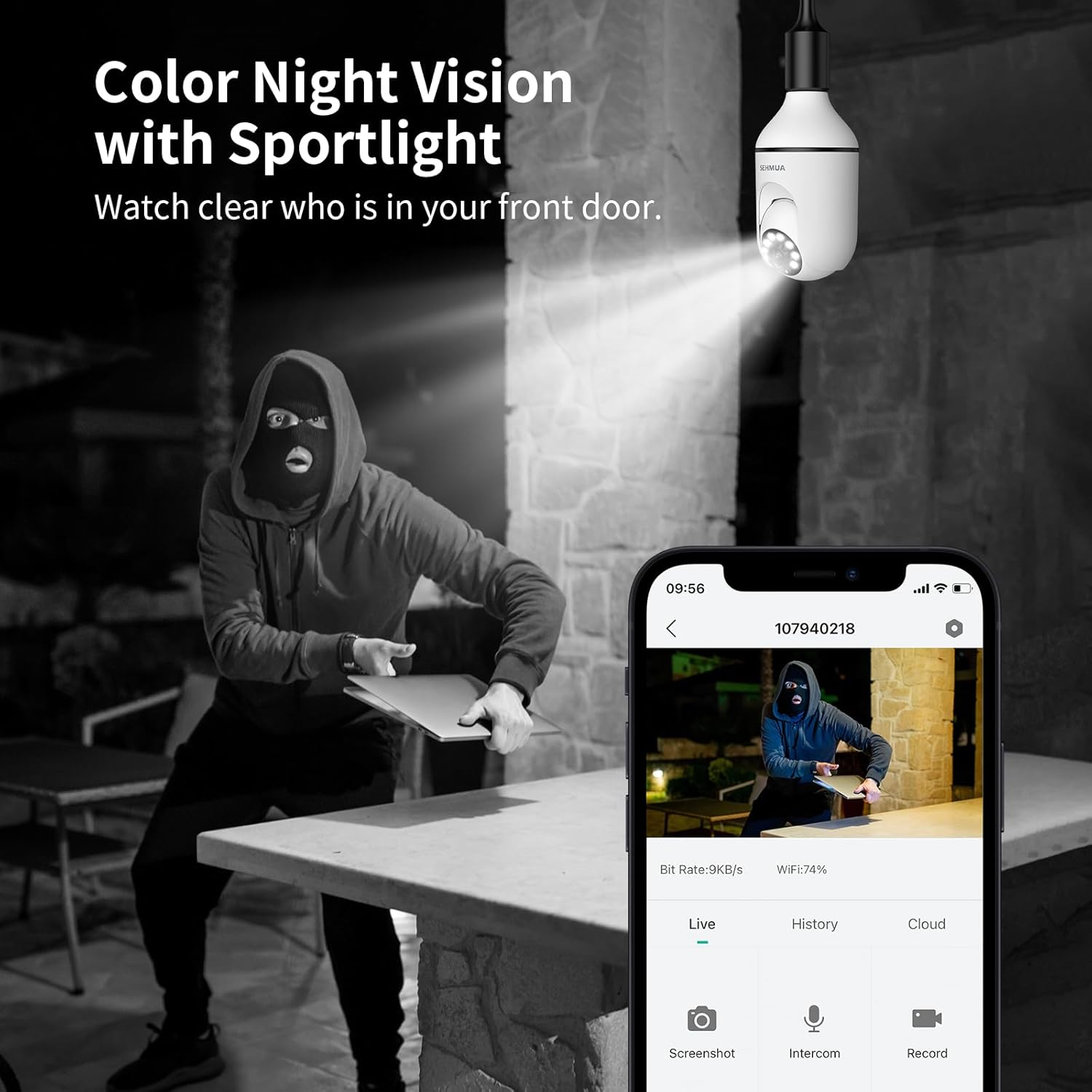
Figure 11: Color Night Vision with spotlight.
4.5 Эки тараптуу аудио
Камеранын эки тараптуу аудио функциясын колдонуп, коноктор менен байланышыңыз же баскынчыларды коркутуңуз.
- Түз эфирден view in the app, tap the microphone icon to speak through the camera's speaker.
- The camera's built-in microphone will capture audio from the camera's location, which you can hear through your phone.

Figure 12: Two-Way Audio communication.
4.6 Amazon Alexa интеграциясы
The SEHMUA camera can be integrated with Amazon Alexa for convenient voice control and viewing on compatible smart displays.
- Смартфонуңузда Alexa колдонмосун ачыңыз.
- Издөө and enable the "SEHMUA" skill.
- Link your SEHMUA account with your Alexa account.
- Discover devices. You can now use voice commands like "Alexa, show me the [camera name]" on your Echo Show or other compatible devices.
5. Техникалык тейлөө
- Тазалоо: Камера линзасын жана корпусун жумшак, кургак чүпүрөк менен акырын сүртүңүз. Катуу химиялык заттарды же абразивдүү тазалоочу каражаттарды колдонбоңуз.
- Программалык камсыздоонун жаңыртуулары: Regularly check the SEHMUA app for available firmware updates to ensure optimal performance and security.
- Экологиялык шарттар: While rated IP65 for outdoor use, avoid exposing the camera to extreme temperatures, direct water submersion, or high-pressure water jets.
6. Кыйынчылыктарды
| Көйгөй | Мүмкүн себеп | Чечим |
|---|---|---|
| Камера күйбөй жатат. | No power to the socket; camera not screwed in properly. | Ensure the light socket has power. Re-screw the camera firmly into the socket. |
| Wi-Fi'га туташпай жатат. | Туура эмес Wi-Fi сырсөзү; камера роутерден өтө алыс; 5 ГГц Wi-Fi тармагы. | Verify Wi-Fi password. Move camera closer to the router during setup. Ensure you are connecting to a 2.4GHz Wi-Fi network. |
| Кыймылды аныктоо боюнча эскертүүлөр жок. | Motion detection disabled; sensitivity too low; activity zones not set correctly. | Enable motion detection in the app. Adjust sensitivity. Check and configure activity zones. |
| Видеонун сапаты начар. | Weak Wi-Fi signal; dirty lens. | Improve Wi-Fi signal strength (e.g., use a Wi-Fi extender). Clean the camera lens. |
| Эки тараптуу аудио иштебей жатат. | Колдонмодо микрофон/динамик үнсүз кылынып турат; үн өтө төмөн. | Check audio settings in the app. Ensure microphone and speaker are not muted and volume is adequate. |
7. Техникалык шарттар
| Өзгөчөлүк | Деталь |
|---|---|
| Модель номери | L1 |
| Резолюция | 2K Full HD |
| Байланыш | 2.4 ГГц Wi-Fi |
| Power Source | Corded Electric (E26/E27 Socket) |
| Пан / жантайтуу бурчу | 350° Pan, 90° Tilt (360° Field of View) |
| Түнкү көрүнүш | Color Night Vision with Spotlight |
| Сактагыч параметрлери | MicroSD Card (up to 128GB, not included), Cloud Storage (optional) |
| Аудио | Эки тараптуу аудио |
| Alerts | Motion Detection, Siren, Strobe Light |
| Шайкештик | Amazon Alexa, Smartphone (iOS/Android) |
| Ички/тышкы колдонуу | Outdoor (IP65 Rated) |
| Элемент Салмагы | 10.5 унция |
| Пакеттин өлчөмдөрү | 6.89 x 3.31 x 3.23 дюйм |
8. Кепилдик жана колдоо
For detailed warranty information and technical support, please refer to the warranty card included with your product or visit the official SEHMUA website. You may also find additional resources and FAQs on the product support page.
For further assistance, please contact SEHMUA customer service through the contact information provided on their official webсайтында же мобилдик тиркемеде.
A PDF version of the Instructions for Use (IFU) is available for download бул жерде.


