1. Киришүү
This manual provides essential instructions for the safe and efficient operation, maintenance, and troubleshooting of your Cecotec Cumbia Power Matic-ccino 9000 S automatic coffee machine. Please read this manual thoroughly before first use and keep it for future reference.
The Cecotec Cumbia Power Matic-ccino 9000 S is a mega-automatic coffee machine featuring a Plug&Play system, designed to prepare a wide variety of coffees with a single touch. It offers 20 types of hot beverages, including espresso, ristretto, lungo, doppio, americano, latte, flat white, latte macchiato, cortado, hot milk, and cappuccino.
Key features include a Custom Coffee System for personalizing intensity, temperature, pressure, coffee quantity, milk, cream, and foam, as well as the pouring order. The machine can memorize your favorite coffee settings for quick access. It incorporates a rapid Thermoblock heating system for optimal temperature and a powerful 19-bar ForceAroma pressure pump for maximum cream and aroma. The All Cappuccino System automatically adds milk or foam for perfect lattes and cappuccinos.
The machine is equipped with a high-quality, interactive touch control panel, a 250g bean reservoir with an airtight lid, an integrated conical grinder with 5 grinding levels, and a removable 1.7L water tank. It also includes a 500ml Full Latte milk tank accessory and features an adjustable coffee spout (10.5 cm to 15 cm) and a cup warmer tray.

Сүрөт 1.1: Бүттүview of the Cecotec Cumbia Power Matic-ccino 9000 S coffee machine, showing two cups of coffee being dispensed and the milk tank.
2. Коопсуздук нускамалары
Өрт, электр шок жана жаракат алуу коркунучун азайтуу үчүн электр шаймандарын колдонууда ар дайым негизги коопсуздук чараларын сактаңыз.
- Колдонуудан мурун бардык нускамаларды окуп чыгыңыз.
- Шайманды, электр шнурун же сууга же башка суюктуктарды розеткага салбаңыз.
- VoltagШайманда көрсөтүлгөн e сиздин жергиликтүү электр тармагына дал келетtage.
- Шайманды балдар жетпеген жерде сактаңыз.
- Шайманды колдонбогондо жана тазалоодон мурун электр розеткасынан сууруп алыңыз.
- Шайманды шнур же сайгыч бузулуп иштетпеңиз.
- Өндүрүүчү сунуш кылбаган аксессуарларды колдонбоңуз.
- Шайманды турмуш-тиричилик максатында гана колдонуңуз.
- ысык беттерге тийбегиле.
3. Продукциянын компоненттери
Familiarize yourself with the main parts of your coffee machine:
- Control Panel / Touch Screen
- Coffee Bean Hopper with Airtight Lid
- Water Tank (Removable, 1.7L capacity)
- Coffee Spout (Adjustable height)
- Drip Tray and Grids
- Тартылган кофе контейнери
- Milk Tank (Full Latte, 500ml capacity)
- Чөйчөк жылыткычы
- Электр кабели

Image 3.1: Close-up of the interactive touch control panel, showing beverage selection options.
4. Орнотуу
4.1 Таңгактан чыгаруу жана алгачкы жайгаштыруу
- Бардык таңгактоочу материалдарды кылдаттык менен алып салыңыз.
- Place the machine on a stable, flat, heat-resistant surface, away from water sources and direct heat.
- Шаймандын айланасында жетиштүү желдетүүнү камсыз кылыңыз.
4.2 Алгачкы тазалоо
- Wash the removable water tank, milk tank, drip tray, and ground coffee container with warm, soapy water. Rinse thoroughly and dry.
- Жарнама менен машинанын сыртын сүртүңүзamp кездеме.
4.3 Суу резервуарын толтуруу
- Машинанын арткы жагынан 1.7 литрлик суу куюлган бакты алып салыңыз.
- Fill it with fresh, cold tap water up to the MAX level indicator.
- Суу куюлган идишти кайра ордуна бекем орнотуңуз.
4.4 Буурчак бункерин толтуруу
- Open the airtight lid of the coffee bean hopper located on top of the machine.
- Бункерге жаңы кофе дандарын куюңуз. Ашыкча толтурбаңыз.
- Close the lid firmly to preserve aroma.
4.5 Connecting the Milk Tank (Optional)
- If preparing milk-based beverages, fill the 500ml Full Latte milk tank with fresh milk.
- Connect the milk tank to the designated port on the coffee machine as per the diagram in the quick start guide.
4.6 First Use / Priming
- Машинаны жерге туташтырылган электр розеткасына сайыңыз.
- Follow the on-screen instructions for the initial priming cycle. This typically involves dispensing hot water to rinse the internal circuits.
5. Иштөө нускамалары
5.1 Күйгүзүү/өчүрүү
- Press the power button on the touch screen to turn the machine on. It will perform a brief self-cleaning cycle.
- To turn off, press the power button again. The machine will perform a final rinse before shutting down.
5.2 Selecting a Beverage
- On the touch screen, browse through the 20 available beverage options.
- Tap on your desired drink (e.g., Espresso, Latte, Cappuccino).
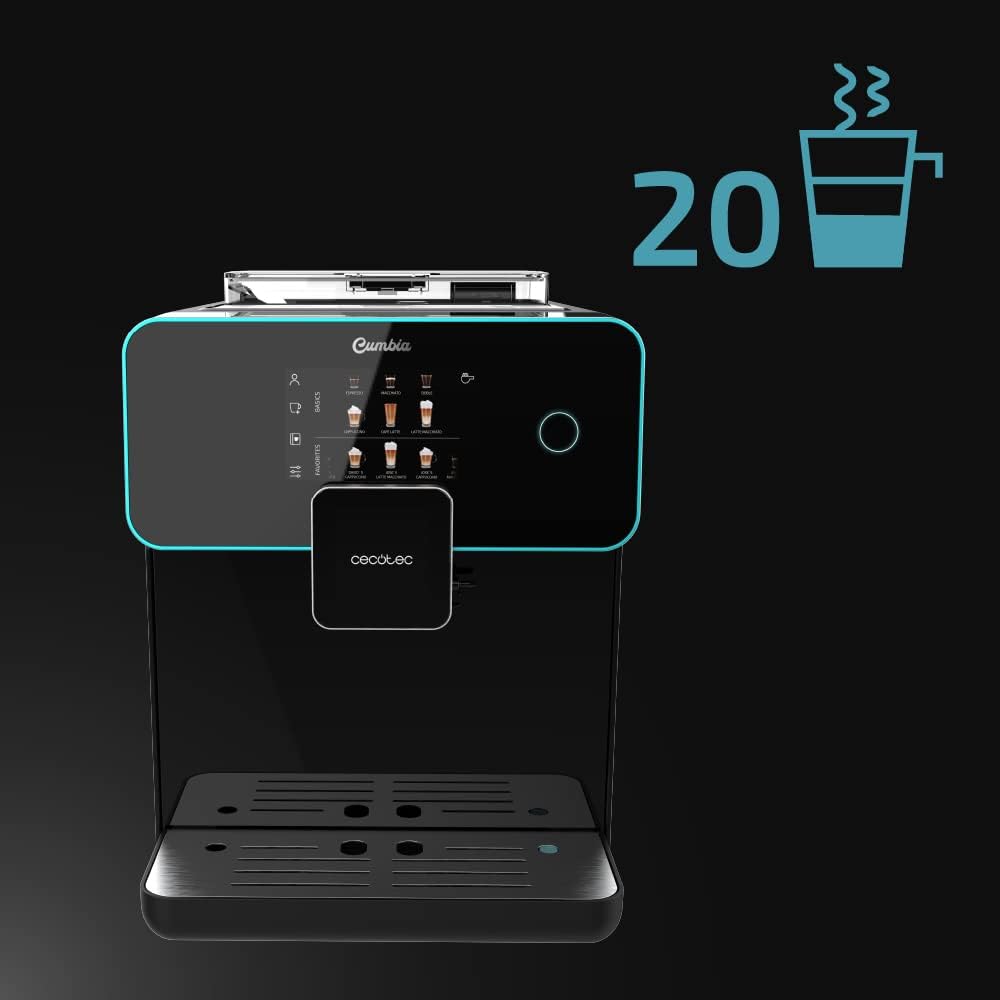
Image 5.1: The touch screen displaying the wide selection of 20 hot beverages available.
5.3 Customizing Beverages (Custom Coffee System)
- After selecting a drink, the Custom Coffee System interface will appear.
- Adjust parameters such as coffee intensity, temperature, pressure, coffee quantity, milk quantity, and foam level using the on-screen sliders.
- You can also customize the pouring order (e.g., milk first or coffee first).
- Confirm your selections to start brewing.

Image 5.2: The 'Custom Coffee' interface, allowing users to personalize various aspects of their drink.
5.4 Saving Favorite Coffees
- After customizing a beverage, you can save it as a favorite for quick access.
- Follow the on-screen prompt to name and save your personalized drink. It will appear on the main screen under your profile.

Image 5.3: Icon indicating the ability to save up to 10 user profiles or favorite drink settings.
5.5 Adjusting Spout Height
- The coffee spout can be adjusted vertically from 10.5 cm to 15 cm.
- Manually slide the spout up or down to fit your cup size, from small espresso cups to tall breakfast mugs.
5.6 Using the Cup Warmer Tray
- Place cups on the designated cup warmer tray on top of the machine.
- This feature helps maintain coffee temperature and enhances aroma and cream.
6. Техникалык тейлөө
Үзгүлтүксүз тазалоо жана тейлөө кофе машинаңыздын оптималдуу иштешин жана узак иштөөсүн камсыздайт.
6.1 Күнүмдүк тазалоо
- Тамчылатма табак: Тамчылатуучу табак менен торду күн сайын бошотуп, чайкаңыз.
- Майдаланган кофе кутусу: Empty the ground coffee container when prompted or daily to prevent mold growth.
- Сүт системасы: After each milk-based beverage, perform a quick rinse cycle for the milk system as prompted by the machine. For thorough cleaning, disassemble and wash the milk tank and frothing components with warm, soapy water.
6.2 Суу резервуарын тазалоо
- Суу куюлган бакты жума сайын жылуу, самындуу суу менен тазалап туруңуз. Самын калдыктарын кетирүү үчүн жакшылап чайкаңыз.
6.3 Bean Hopper and Grinder Maintenance
- Periodically empty the bean hopper and wipe it clean with a dry cloth. Ensure no coffee residue accumulates.
- The integrated conical grinder has 5 grinding levels. Adjust as needed for your preferred coffee strength. Refer to the on-screen menu for grinder adjustment options.
6.4 Тазалоо
- Машина качан какты тазалоо керек экенин көрсөтөт.
- Use a descaling solution recommended by Cecotec and follow the on-screen instructions for the descaling process.
- Regular descaling is crucial for maintaining machine performance and coffee quality, especially in areas with hard water.

Image 6.1: Icon representing the machine's 'Always Clean' feature, highlighting its automatic cleaning cycles.
7. Кыйынчылыктарды
Бул бөлүм сиз кабылышы мүмкүн болгон жалпы көйгөйлөрдү карайт. Бул жерде көрсөтүлбөгөн көйгөйлөр үчүн кардарларды колдоо бөлүмүнө кайрылыңыз.
| Көйгөй | Мүмкүн себеп | Чечим |
|---|---|---|
| Кофе берилбейт | Water tank empty; coffee beans empty; brewing unit clogged. | Refill water tank; refill bean hopper; clean the brewing unit as per maintenance instructions. |
| Кофе өтө алсыз | Grind setting too coarse; insufficient coffee quantity; old coffee beans. | Adjust grinder to a finer setting; increase coffee intensity in Custom Coffee settings; use fresh coffee beans. |
| Сүт туура көбүрбөйт | Milk tank or frothing components dirty; milk type unsuitable; milk temperature too high/low. | Clean milk tank and frothing system thoroughly; use cold, fresh milk (preferably semi-skimmed or full-fat); ensure milk is cold. |
| Экрандагы ката билдирүү | Specific machine fault; component not correctly inserted. | Refer to the specific error code in the full manual (if available) or contact customer support. Ensure all removable parts are correctly seated. |
8. Техникалык шарттар
| Өзгөчөлүк | Деталь |
|---|---|
| Бренд | Cecotec |
| Модель номери | 01644 |
| Түс | Serie Nera |
| Продукциянын өлчөмдөрү (L x W x Y) | 51.5 x 35.5 x 44 см |
| Элемент Салмагы | 11.1 килограмм |
| Суу резервуарынын сыйымдуулугу | 1.7 литр |
| Сүт цистернасынын сыйымдуулугу | 500 ml (Full Latte accessory) |
| Күч | 1500 Ватт |
| Басым насосу | 19 Bars (ForceAroma Technology) |
| Кофе буурчак бункеринин сыйымдуулугу | 250г |
| Жаргылчактын түрү | Integrated Conical Grinder (5 levels) |
| Coffee Spout Height Adjustment | 10.5 смден 15 смге чейин |
| Өзгөчөлүктөр | Milk Frother, Touch Control Panel, Thermoblock System, Custom Coffee System, Auto-off |
| Материал | Пластик |
| Запастык бөлүктөрдүн болушу | 10 жыл |
9. Кепилдик жана колдоо
9.1 Кепилдик маалыматы
Your Cecotec Cumbia Power Matic-ccino 9000 S coffee machine is covered by a manufacturer's warranty. Please refer to the warranty card included with your product or visit the official Cecotec webтолук шарттары жана шарттары үчүн сайт. Кепилдик дооматтар үчүн сатып алганыңыздын далилин сактаңыз.
9.2 Кардарларды колдоо
For technical assistance, spare parts, or any questions regarding your product, please contact Cecotec customer support. Contact details can typically be found on the official Cecotec webсайтында же продуктунун таңгагында.


