1. Киришүү
This manual provides essential information for the safe and efficient operation of your KLIM K9000 Portable Air Conditioner. Please read it thoroughly before use and retain it for future reference. The KLIM K9000 is a versatile 3-in-1 unit offering cooling, dehumidification, and fan functions.
2. Коопсуздук нускамалары
To reduce the risk of fire, electrical shock, or injury, always follow these basic precautions:
- Шайманды колдонуудан мурун бардык нускамаларды окуп чыгыңыз.
- кубат менен камсыз кылуу Voltage рейтинг белгисинде көрсөтүлгөн.
- Аппаратты бузулган шнур же сайгыч менен иштетпеңиз.
- Шайманды жылуулук булактарынан жана түз күн нурунан алыс кармаңыз.
- Аба кирүүчү же чыгуучу жерлерди жаап албаңыз.
- Тазалоодон же тейлөөдөн мурун дайыма розеткадан ажыратыңыз.
- Бул шайман физикалык, сезүү же акыл-эс жөндөмү начар же тажрыйбасы жана билими жок адамдар (анын ичинде балдар) үчүн, эгерде алардын коопсуздугуна жооптуу адам тарабынан көзөмөлсүз же шайманды колдонуу боюнча көрсөтмө болбосо, колдонууга арналбайт.
- Шайманды нымдуу чөйрөдө же сууга жакын жерде колдонбоңуз.
- Өндүрүүчүлөр сунуштаган аксессуарларды гана колдонуңуз.
3. Пакеттин мазмуну
Пакетте бардык буюмдар бар экенин текшериңиз:
- KLIM K9000 Air Conditioner Unit
- Алыстан башкаруу
- Чыгаруучу шланг
- Сормо порту
- Түтүн түтүгүнүн туташтыргычы
- Дренаждык шланг
- Window Seal Fixing Plate
- Window Cover Extension
- 2 AAA Alkaline Batteries (for remote control, if included)
4. Продукт бүтүп калдыview
The KLIM K9000 is a compact and efficient portable air conditioner designed to provide comfort in various environments. It integrates three primary functions: cooling, dehumidification, and fan operation.

4.1-сүрөт: KLIM K9000 Portable Air Conditioner unit with remote control, illustrating air circulation.
Its 3-in-1 functionality allows it to cool rooms, circulate air as a fan, and reduce humidity levels, making it suitable for various climate control needs.

4.2-сүрөт: The KLIM K9000 offers 3-in-1 comfort: cooling, dehumidifying, and fan functions, with a 9000 BTU cooling capacity.
5. Орнотуу жана орнотуу
Proper installation is crucial for optimal performance. Follow these steps for quick setup:
- Позициялоо: Place the unit on a flat, stable surface, ensuring at least 30 cm (12 inches) of space around it for proper airflow.
- Чыгаруучу түтүктү тиркөө: Connect the exhaust hose to the unit's exhaust port. Extend the hose and connect the window seal fixing plate or window cover extension.
- Терезе орнотуу: Secure the window seal fixing plate or extension in a compatible window opening (sliding windows). For tilt windows, a separate seal kit is required and sold separately. Ensure the hot air is expelled outdoors.
- Кубат туташуу: Электр шнурын жерге туташтырылган электр розеткасына сайыңыз.
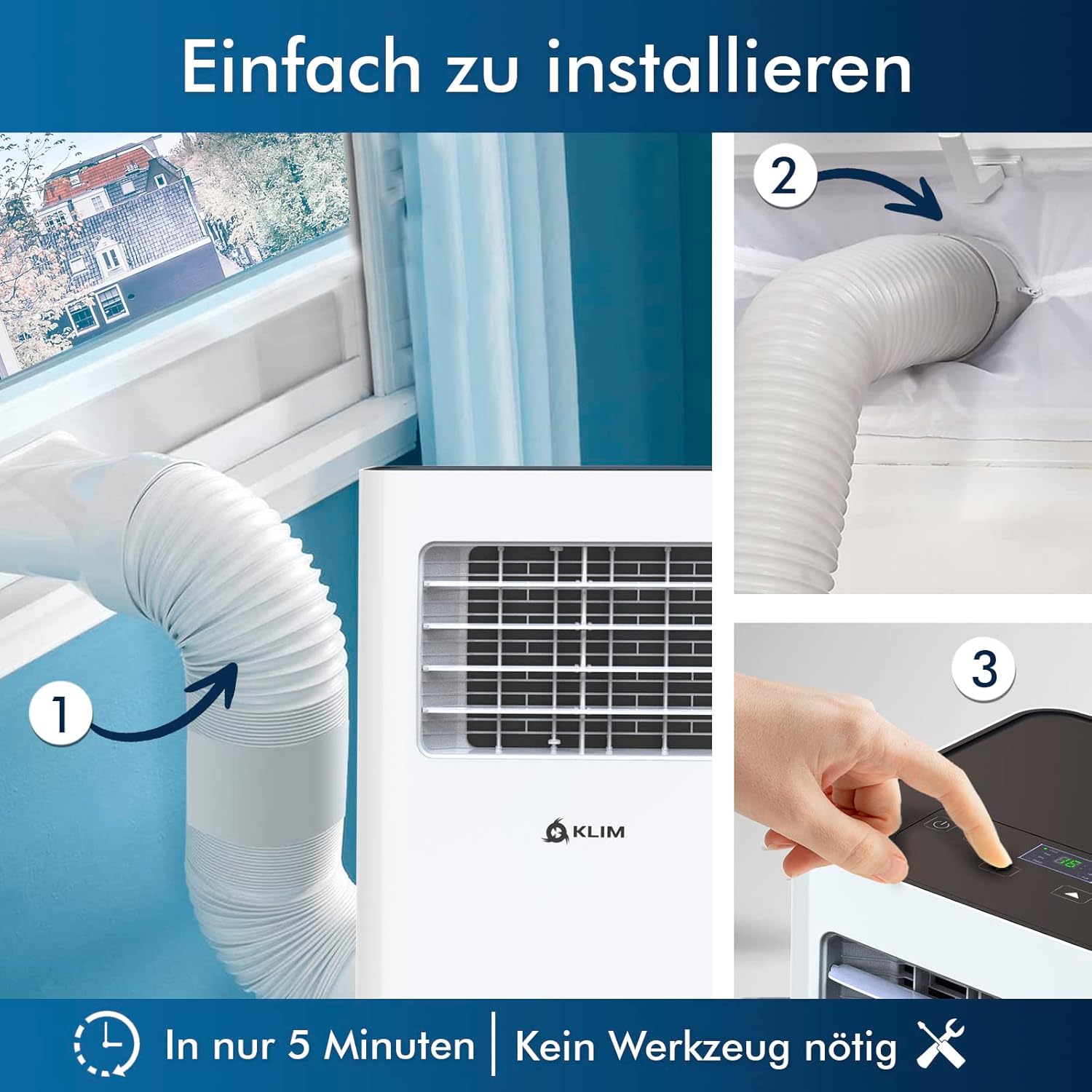
5.1-сүрөт: Visual guide for quick installation, typically completed in 5 minutes without special tools.

5.2-сүрөт: Illustration of window kit compatibility, showing options for sliding windows and mentioning a separate seal for tilt windows.
6. Иштөө нускамалары
The KLIM K9000 can be operated via the control panel on the unit or the included remote control.
6.1. Башкаруу панели жана пульт
The remote control allows convenient operation from a distance. Ensure AAA batteries are correctly inserted. The control panel on the unit provides direct access to all functions.
6.2. Иштөө режимдери
- Муздатуу режими: Activates the compressor to cool the room. Set your desired temperature (down to 16°C). This mode is effective for rooms up to 20 m² (80 m³).
- Күйөрман режими: Circulates air without cooling. Adjustable fan speeds are available.
- Кургаткыч режими: Removes excess moisture from the air. In this mode, the unit collects water, which will need to be drained.
- Уйку режими: Designed for quiet operation during rest. The unit operates at a reduced noise level (approx. 65 dB) and may adjust temperature settings automatically for comfort.

6.1-сүрөт: The sleep mode provides a cool and quiet environment for restful sleep, operating at approximately 65 dB.
To switch between modes, press the "Mode" button on the control panel or remote control.
7. Техникалык тейлөө
Regular maintenance ensures the longevity and efficiency of your KLIM K9000.
7.1. Аба чыпкасын тазалоо
The air filter should be cleaned every two weeks or more frequently depending on usage. A dirty filter can reduce cooling efficiency and airflow.
- Кондиционерди розеткадан сууруп алыңыз.
- Аба чыпкасын (адатта, блоктун арткы же каптал жагында) таап, алып салыңыз.
- Чыпканы жылуу, самындуу суу менен жууңуз. Кылдаттык менен жууп, кайра салаардан мурун аны толугу менен кургатуу керек.
- Кургак чыпканы кайра орнотуп, түзмөктү кайра сайыңыз.
7.2. Суу дренаж
The unit features an auto-evaporation system in cooling mode, reducing the need for frequent drainage. However, in high humidity or dehumidifier mode, water will accumulate and needs to be drained.
- Үзгүлтүксүз дренаж: For continuous dehumidification, attach the drainage hose to the drain outlet and direct it to a suitable container or floor drain.
- Кол менен кургатуучу дренаж: When the internal water tank is full, the unit may stop operating and display an indicator. To drain manually, unplug the unit, place a shallow pan or tray under the drain plug, and remove the plug. Be aware that the internal water container can be cumbersome to empty, and it may require two people to safely tilt the unit for complete drainage if using the bottom drain.
8. Кыйынчылыктарды
Жалпы маселелер жана алардын чечимдери үчүн бул бөлүмдү караңыз.
| Көйгөй | Мүмкүн себеп | Чечим |
|---|---|---|
| Түзмөк күйбөйт. | Электр жок, автоматтык өчүргүч иштебей калган, суу багы толуп калган. | Электр шнурун текшериңиз, өчүргүчтү кайра орнотуңуз, суу куюлган бактын түбүн төгүңүз. |
| Жетишсиз муздатуу. | Dirty air filter, blocked air intake/outlet, open windows/doors, room too large, exhaust hose not properly installed. | Clean filter, clear obstructions, close windows/doors, ensure proper exhaust hose installation. |
| Агрегат ызы-чуу. | Normal operation sound (compressor/fan), unit not on a level surface. | The unit operates at approximately 65 dB, which is normal. Ensure it is on a flat surface. |
| Суунун агып чыгышы. | Drain plug not securely closed, drainage hose improperly connected. | Check drain plug, ensure drainage hose is securely attached and not kinked. |
Бул чечимдерди колдонуу аракетинен кийин көйгөй чечилбесе, кардарларды колдоо кызматына кайрылыңыз.
9. Техникалык шарттар
| Бренд | KLIM |
| Модель номери | K9000WH |
| Муздатуу кубаттуулугу | 9000 BTU |
| Сунушталган бөлмө өлчөмү | Up to 20 m² (80 m³) |
| Функциялар | Муздатуу, нымдоочу, желдеткич |
| Энергия эффективдүүлүгү классы | A |
| Жылдык электр керектөө | 960 Ватт |
| Ызы-чуу деңгээли | 65 децибел |
| Муздаткыч | R-290 (Natural Refrigerant) |
| Өлчөмдөрү (L x W x Y) | 29.5 x 32.5 x 70.4 см |
| Салмагы | 25.58 кг |
| Материал | ABS |
| Power Source | Электр кабели |

9.1-сүрөт: The KLIM K9000's high energy efficiency (Class A) contributes to cost savings and environmental protection.
10. Кепилдик жана колдоо
The KLIM K9000 Portable Air Conditioner comes with a 5 жылдык кепилдик, анын сапаты жана аткарылышы боюнча жан тынчтыгын камсыз кылуу.
For technical assistance, warranty claims, or any questions not covered in this manual, please contact KLIM customer support through their official website or the retailer where the product was purchased. Please have your model number (K9000WH) and purchase date ready.


