1. Продукт бүтүп калдыview
The Dangbei DBX3 Pro is an infrared remote control designed for seamless interaction with compatible Dangbei devices, primarily televisions. It features an ergonomic design for comfortable handling and intuitive button placement for easy navigation and control.
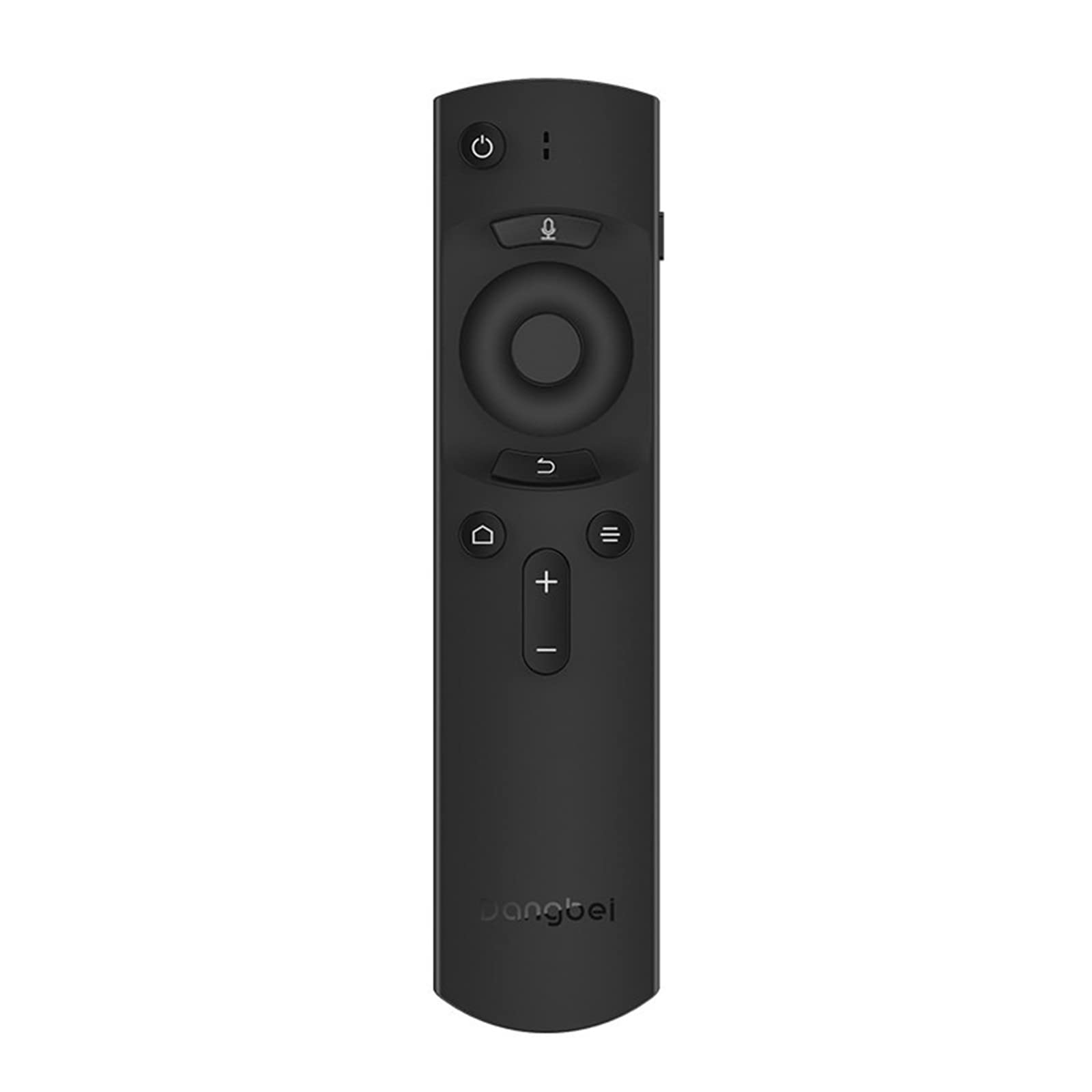
1-сүрөт: Dangbei DBX3 Pro Remote Control. This image displays the remote control from an angled perspective, highlighting its ergonomic shape and the layout of its primary control buttons, including power, navigation, volume, and home.
Баскыч функциялары:
- Кубат баскычы (⏻): Туташкан аппаратты күйгүзөт же өчүрөт.
- Microphone Button (🎙): Activates voice control or voice search features (if supported by the connected device).
- Навигация панели (өйдө, ылдый, солго, оңго): Менюларды карап чыгуу жана пункттарды тандоо үчүн колдонулат.
- OK баскычы: Тандоолорду ырастайт же менюга кирет.
- Арткы баскыч (↩): Мурунку экранга же менюга кайтат.
- Menu/Options Button (☰): Accesses additional options or context menus.
- Үй баскычы (🏠): Returns to the main home screen of the connected device.
- Үндү катуулатуу/акырындатуу баскычтары (+/-): Аудионун үнүн тууралайт.
2. Орнотуу
2.1. Батареяны орнотуу
- Пульттун артындагы батарея бөлүкчөсүнүн капкагын табыңыз.
- Капкакты ылдый жылдырыңыз же аны ачуу үчүн бекиткичти басыңыз.
- Эки AAA батарейкасын (кошулмага кирбейт) салып, оң (+) жана терс (-) терминалдары бөлүмдүн ичиндеги белгилер менен туура дал келгенин текшериңиз.
- Батарея бөлүкчөсүнүн капкагын бекем чыккыча ордуна коюңуз.
2.2. Алгачкы колдонуу
The Dangbei DBX3 Pro remote control operates using infrared (IR) technology. For the remote to function, ensure there is a clear line of sight between the remote's IR emitter (located at the front tip) and the IR receiver on your compatible Dangbei device. Point the remote directly at the device you wish to control.
3. Иштөө нускамалары
3.1. Негизги навигация
- колдонуу Навигация аянтчасы (Up, Down, Left, Right arrows) to move through menus, lists, and content on your screen.
- басыңыз OK баскычы to select a highlighted item, confirm an an action, or open an application.
- басыңыз Артка баскычы мурунку экранга кайтуу же менюдан чыгуу үчүн.
- басыңыз Башкы бет баскычы to quickly access the main interface of your device.
3.2. Power and Volume Control
- басыңыз Кубат баскычы once to turn your device on or off.
- колдонуу Үнүн жогорулатуу (+) жана Үнүн азайтуу (-) үн деңгээлин тууралоо үчүн баскычтар.
3.3. Voice Control (If Supported)
If your connected Dangbei device supports voice control, press and hold the Микрофон баскычы. Speak clearly into the remote control's microphone. Release the button when you have finished speaking. Refer to your device's manual for specific voice command capabilities.
4. Техникалык тейлөө
4.1. Тазалоо
Пультту тазалоо үчүн анын бетин жумшак, кургак чүпүрөк менен акырын сүртүңүз. өжөр кир үчүн, бир аз гampкездемени суу же жумшак, абразивдүү эмес тазалоочу каражат менен сүртүңүз. Катуу химиялык заттарды, эриткичтерди же абразивдүү материалдарды колдонуудан алыс болуңуз, анткени алар пульттун сырткы көрүнүшүнө же ички компоненттерине зыян келтириши мүмкүн.
4.2. Батареяны алмаштыруу
Replace batteries when the remote's response becomes sluggish or stops working. Always replace both batteries simultaneously with new AAA batteries. Do not mix old and new batteries, or different types of batteries, as this can lead to leakage or malfunction. Dispose of used batteries according to local regulations.
4.3. Сактоо
Store the remote control in a cool, dry place away from direct sunlight, extreme temperatures, and high humidity. If the remote will not be used for an extended period, it is recommended to remove the batteries to prevent potential leakage.
5. Кыйынчылыктарды
| Көйгөй | Мүмкүн себеп | Чечим |
|---|---|---|
| Пульт жооп бербей жатат. |
|
|
| Баскычтар жооп бербей же жабышчаак. |
|
|
| Кыска иштөө диапазону. |
|
|
6. Техникалык шарттар
- Модел: DBX3 Pro
- Бренд: Dangbei
- Байланыш технологиясы: Инфракызыл (IR)
- Шайкеш түзмөктөр: Television (specifically compatible Dangbei devices)
- Кубат булагы: 2 x AAA Батареялар (киргизилген эмес)
- Продукциянын өлчөмдөрү: 1.5 x 9.06 x 3.94 дюйм (болжол менен 3.8 x 23.0 x 10.0 см)
- Элемент Салмагы: 4.6 унция (болжол менен 130 грамм)
- Өзгөчө өзгөчөлүгү: Эргономикалык дизайн
7. Кепилдик жана колдоо
7.1. Кепилдик маалыматы
This Dangbei product is covered by a limited manufacturer's warranty. The specific terms and duration of the warranty may vary by region and purchase date. Please retain your proof of purchase for warranty claims. For detailed warranty information, refer to the documentation provided with your primary Dangbei device or visit the official Dangbei webсайт.
7.2. Кардарларды колдоо кызматы
For technical assistance, troubleshooting, or inquiries regarding your Dangbei DBX3 Pro remote control, please contact Dangbei customer support. Contact information can typically be found on the official Dangbei website or within the support section of your primary Dangbei device's user interface.
Официалдуу Webсайт: www.dangbei.com (Аймактык вариацияларды текшериңиз)


