1. Киришүү
Thank you for choosing the KONIX Folding Piano Keyboard. This portable 88-key electronic piano is designed for musicians of all levels, offering a full-size semi-weighted keyboard with innovative light-up keys to assist in learning. Its foldable design ensures maximum portability, allowing you to enjoy music anywhere.
Негизги өзгөчөлүктөр төмөнкүлөрдү камтыйт:
- Көчмө бүктөлүүчү дизайн: Folds 180 degrees for compact storage and easy transport.
- Full-Size Semi-Weighted Keys: Provides a realistic piano feel with adjustable touch response.
- Жарык ачкычтары: Guides users during learning and practice sessions.
- Ар тараптуу байланыш: Bluetooth for app integration and MIDI/USB for computer connection.
- Кеңири үн китепканасы: 128 tones, 128 rhythm patterns, and 20 built-in demo songs.
- Бир нече функциялар: Includes dual keyboard, split, teach mode, dual voice, record, playback, polyphonic metronome, and transpose.
- Батареянын узак иштөө мөөнөтү: Built-in rechargeable lithium battery for 6-8 hours of play time.
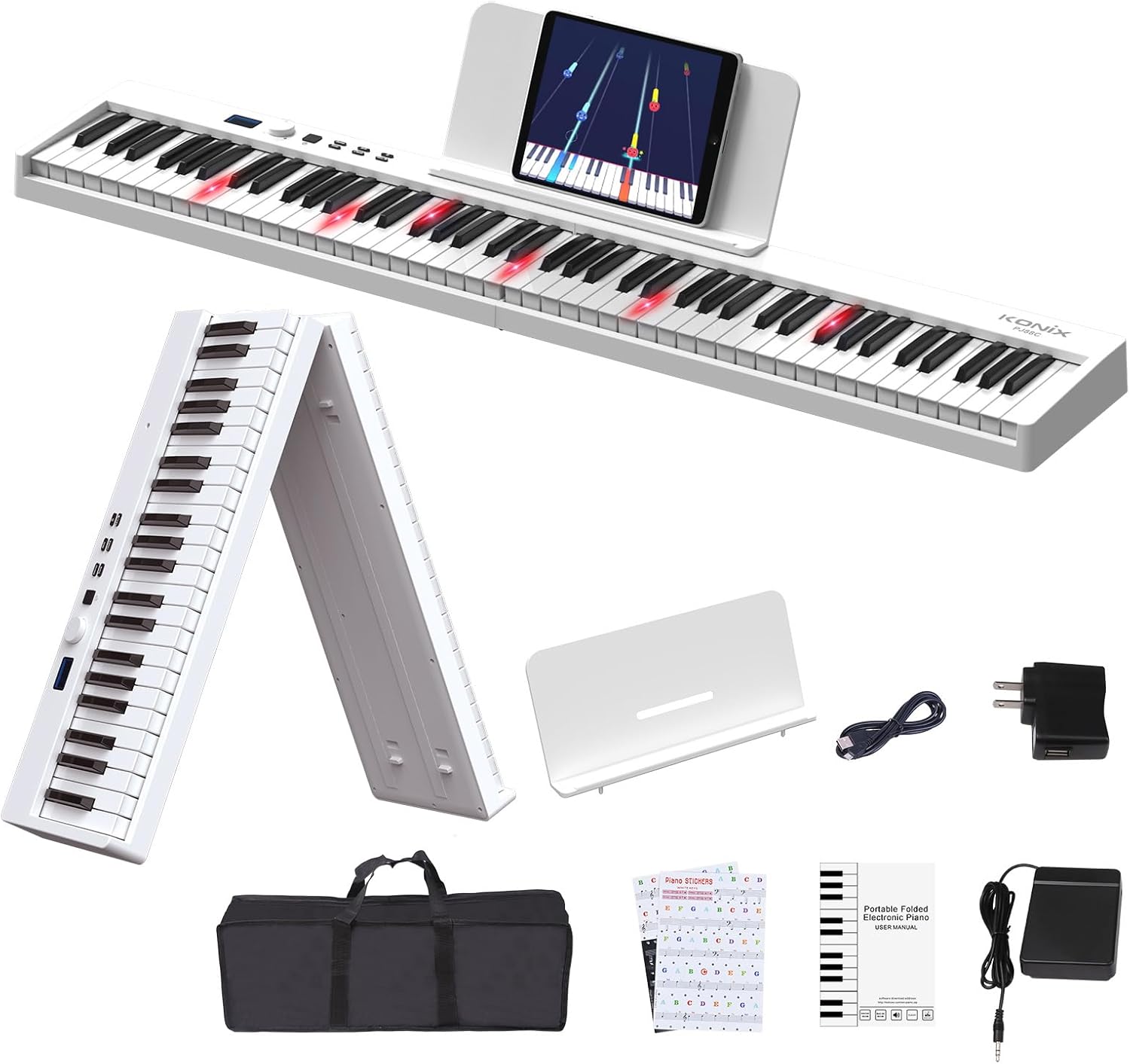
Figure 1.1: The KONIX Folding Piano Keyboard with all included accessories, showcasing анын компакттуу жана портативдик дизайны.
2. Пакеттин мазмуну
Пакетиңизде бардык буюмдар бар экенин текшериңиз:
- KONIX Folding Piano Keyboard (White)
- Sustain Pedal
- Баскычтоп чаптамалары
- Music Stand (for sheet music or tablet)
- Piano Bag (portable travel carry bag)
- USB заряддоо кабели
- Кубаттуу адаптер
- Колдонуучунун Колдонмосу (бул документ)
3. Орнотуу колдонмосу
3.1 Unfolding the Keyboard
The KONIX Folding Piano Keyboard is designed for easy setup. To unfold:
- Place the folded keyboard on a flat, stable surface.
- Gently pull the two halves apart until they fully extend and lock into place. Ensure the locking mechanism engages securely.

Figure 3.1: Illustration of the one-click folding mechanism, showing how the two halves of the keyboard separate and lock into place.
3.2 Күйгүзүү
The keyboard can be powered via the included power adapter or its built-in rechargeable battery.
- Кубат адаптерин колдонуу: Connect the USB charging cable to the keyboard's USB port and the power adapter, then plug into a wall outlet.
- Батареяны колдонуу: Ensure the built-in lithium battery is charged. The keyboard can play for 6-8 hours on a full charge.
3.3 Аксессуарларды туташтыруу
- Туруктуу педаль: Plug the sustain pedal into the 'SUS' port on the keyboard.
- Наушник/Динамиктер: Connect 3.5mm headphones or external speakers to the headphone jack for private practice or ampжандуу үн.
- Музыкалык стенд: Attach the included music stand to the designated slots on the keyboard for holding sheet music or a tablet.

Figure 3.2: ашыкview of the various connection ports on the keyboard, including headphone/speaker, MP3/PC/Phone/Tablet, Microphone, Sustain pedal, and Power/MIDI.
Video 3.1: This video demonstrates the folding and unfolding of the KONIX Piano Keyboard, showing its compact storage and quick setup. It also highlights the various connectivity options and the light-up key feature in action.
4. Иштөө нускамалары
4.1 Негизги операция
- Күйгүзүү/өчүрүү: Press and hold the power button to turn the keyboard on or off.
- Үндү көзөмөлдөө: Use the rotary knob to adjust the master volume.
- Тон тандоо: Rotate the knob to browse through 128 different tones displayed on the LCD screen. Press the 'Tone' button to confirm.
- Ритм тандоо: Rotate the knob to select from 128 rhythm patterns. Press the 'Rhythm' button to confirm.
- Демо ырлар: Rotate the knob to choose from 20 built-in demo songs. Press the 'Demo' button to play.

Сүрөт 4.1: Жакын пландан view of the full-size semi-weighted keys, illustrating the 1:1 ratio to traditional piano keys and the concept of adjustable touch response for dynamic playing.
4.2 Learning Features
- Жарык ачкычтары: The light-up keys illuminate to guide you on which notes to play, making learning easier, especially with demo songs or connected apps.
- Окутуу режими: Activate teach mode to follow along with built-in lessons or app-based tutorials.
- Keyboard Stickers: Apply the included keyboard stickers to help identify notes for beginners.
4.3 Өркүндөтүлгөн функциялар
- Bluetooth байланышы: Enable Bluetooth on the keyboard and your smart device (phone, tablet, computer). Pair with piano learning apps like Garage Band, Perfect Piano, or Pop Piano for interactive lessons and games.
- MIDI/USB Interface: Connect the keyboard to a computer via USB to use it as a MIDI controller. This allows you to edit music, compose, and use various music production software (e.g., Cakewalk, Sonar, Cubase, Nuendo, VST/VSTi).
- Жаздыруу жана ойнотуу: Use the record function to capture your performances and the playback function to listen to them.
- Dual Keyboard/Split: Divide the keyboard into two sections, allowing two players or different instrument sounds in each section.
- Кош үн: Layer two different instrument sounds to be played simultaneously with each key press.
- Polyphonic Metronome: Так убакытты эсептөө үчүн орнотулган метрономду колдонуңуз.
- Которуу: Adjust the pitch of the entire keyboard up or down to play in different keys without changing your finger positions.

Figure 4.2: The MIDI function allows connection to educational apps like Garageband, Perfect Piano, and Pop Piano, enhancing the learning experience.

Сүрөт 4.3: An overview of the various function options available on the keyboard, designed to assist users in their musical journey.
5. Техникалык тейлөө
5.1 Тазалоо
Клавиатураңыздын көрүнүшүн жана функционалдуулугун сактоо үчүн:
- Бетти жумшак, кургак чүпүрөк менен сүртүңүз.
- өжөр кир үчүн, бир аз гampкездемени суу жана жумшак самын эритмеси менен сүртүп, андан кийин дароо кургатыңыз.
- Абразивдүү тазалагычтарды, эриткичтерди же химиялык спрейлерди колдонуудан алыс болуңуз, анткени алар финишке зыян келтириши мүмкүн.
5.2 Сактоо
When not in use, store the keyboard in its included piano bag to protect it from dust and scratches. Store in a cool, dry place away from direct sunlight and extreme temperatures.
5.3 Батареяга кам көрүү
To prolong the life of the built-in lithium battery:
- Биринчи жолу колдонуудан мурун батарейканы толук кубаттаңыз.
- Батареяны бат-баттан толук түгөтүп коюудан алыс болуңуз.
- If storing for an extended period, charge the battery to about 50% every few months.

Figure 5.1: The keyboard supports USB/Power Bank/Lithium Battery power, offering ultra-long battery life for use anywhere.
6. Кыйынчылыктарды
If you encounter issues with your KONIX Folding Piano Keyboard, please refer to the following common problems and solutions:
| Көйгөй | Мүмкүн себеп | Чечим |
|---|---|---|
| Клавиатурадан үн чыкпайт. | Volume is too low; headphones are plugged in; power issue. | Increase volume. Unplug headphones if not needed. Ensure keyboard is powered on and charged. |
| Баскычтар күйбөй жатат. | Light-up feature is off; low battery. | Check keyboard settings to ensure light-up feature is enabled. Charge the battery. |
| Bluetooth байланышы ишке ашпай калды. | Keyboard not in pairing mode; device Bluetooth off; interference. | Ensure keyboard Bluetooth is active. Restart both keyboard and device. Move closer to the device. |
| Туруктуу педаль иштебей жатат. | Педаль толук орнотулган эмес; педаль бузук. | Ensure the sustain pedal is firmly plugged into the 'SUS' port. Test with another compatible pedal if available. |
If the problem persists, please contact KONIX customer support for further assistance.
7. Техникалык шарттар
| Өзгөчөлүк | Деталь |
|---|---|
| Модель аты | KONIX 88 Key Folding Electric Progressive Counterweight Keyboard Piano |
| Модель номери | PJ88CD-W |
| Ачкычтардын саны | 88 |
| Ачкыч түрү | Full Size Semi-Weighted, Light-Up Keys |
| Өлчөмү (Бүктөлгөн) | 24.8" x 8" x 4.7" (болжол менен) |
| Өлчөмдөрү (бүктөлбөгөн) | 50" x 8.5" x 4.5" (болжол менен) |
| Элемент Салмагы | 4.05 килограмм (8.91 фунт) |
| Power Source | Battery Powered (3.7V/1800mAh), Corded Electric (USB 5V/1A) |
| Батареянын иштөө мөөнөтү | 6-8 саат (толугу менен заряддалган) |
| Байланыш | Bluetooth, MIDI/USB |
| Наушник уясы | 3.5 мм Jack |
| Обондор | 128 |
| Ритм үлгүлөрү | 128 |
| Демо ырлар | 20 |
| Колдоого алынган OS | Win XP/Vista/7/8, Mac OSX |
| Колдоого алынган программалык камсыздоо | Cakewalk, Sonar, Cubase, Nuendo, VST/VSTi |
| Skill Level | Beginner |
| Аяктоо түрү | Glossy or Lacquered |
| Түс | Ак |

Figure 7.1: Detailed product information including weight, number of keys, and folded/unfolded dimensions.
8. Кепилдик жана колдоо
KONIX products are manufactured to high-quality standards. For specific warranty information, please refer to the warranty card included in your product packaging or visit the official KONIX webсайт.
If you require technical support, have questions about product operation, or need assistance with troubleshooting, please contact KONIX customer service. Contact details can typically be found on the product packaging, the official KONIX webсайты же сатуучу аркылуу.


