1. Продукт бүтүп калдыview
The Phomemo M08F is a lightweight and wireless thermal tattoo stencil printer designed for tattoo artists and beginners. It utilizes advanced thermal technology for inkless printing, ensuring clear and precise patterns. Its portable design and long-lasting battery make it ideal for on-the-go use.

Image: The Phomemo M08F printer actively printing a tattoo stencil, connected wirelessly to a smartphone displaying a design.
Негизги өзгөчөлүктөрү:
- Зымсыз жана портативдик: Lightweight design (approx. 1.58 lbs) for easy transport.
- Сыясыз термикалык басып чыгаруу: No ink cartridges required, reducing mess and maintenance.
- Жогорку шайкештик: Connects via Bluetooth to Android/iOS smartphones and tablets, and via USB to Windows, MacOS, and ChromeOS PCs.
- Батареянын узак иштөө мөөнөтү: Built-in 1200mAh rechargeable battery supports printing up to 140 pages on a single charge.
- Dedicated Phomemo App: Features one-click printing, scanning, and editing functions for tattoo designs.
2. Коопсуздук маалыматы
Please read and adhere to the following safety guidelines to ensure safe operation and prevent damage to the device:
- Заряддоо: Use a 5V2A charger. Do not use chargers with an output above 5V, as this may damage the printer or pose a safety risk.
- Курчап турган чөйрө: Operate the printer in a clean, dry environment. Avoid exposure to extreme temperatures, humidity, or direct sunlight.
- Тейлөө: Do not attempt to disassemble or repair the printer yourself. Refer to authorized service personnel for any repairs.
- Кагаз: Use only compatible thermal transfer paper designed for tattoo stencils to ensure optimal performance and prevent damage to the print head.
3. Баштоо (Орнотуу)
3.1 Пакеттин мазмуну
Баштоодон мурун, пакетте бардык элементтер бар экенин текшериңиз:
- Phomemo M08F Wireless Thermal Tattoo Printer
- USB-C заряддоо кабели
- 10 sheets of Tattoo Transfer Paper
- Колдонуучунун Колдонмосу (бул документ)
3.2 Принтерди заряддоо
For first-time use, fully charge the printer. A full charge typically allows for printing up to 140 pages.
- Connect the USB-C cable to the printer's charging port.
- Connect the other end of the cable to a 5V2A USB power adapter (not included) or a computer's USB port.
- The indicator light will show charging status (refer to printer's LED indicator guide for specific colors/patterns).

Image: Various charging methods for the Phomemo M08F printer, including power bank, wall outlet, computer, and car charger.
3.3 Түзмөктөргө туташуу
3.3.1 Мобилдик түзмөктү туташтыруу (Bluetooth)
The Phomemo M08F printer connects wirelessly to your smartphone or tablet via Bluetooth using the dedicated Phomemo App.
- Download the "Phomemo" App from the App Store (iOS) or Google Play Store (Android).
- Мобилдик түзмөгүңүздө Bluetooth иштетилгенин текшериңиз.
- Phomemo тиркемесин ачыңыз. Do not pair the printer directly through your phone's Bluetooth settings.
- Within the app, select your "M08F" printer from the device list to connect.

Image: A Phomemo M08F printer on a desk, wirelessly connected to a smartphone displaying the Phomemo app, ready for printing.
3.3.2 Компьютерге туташуу (USB)
For Windows, MacOS, and ChromeOS, connect the printer via USB cable and install the necessary drivers.
- Download the printer driver from tattoo.phomemo.com.
- Жүктөлгөн драйверди компьютериңизге орнотуңуз.
- Берилген USB-C кабелин колдонуп, принтерди компьютериңизге туташтырыңыз.
- The printer will be recognized as a printing device.
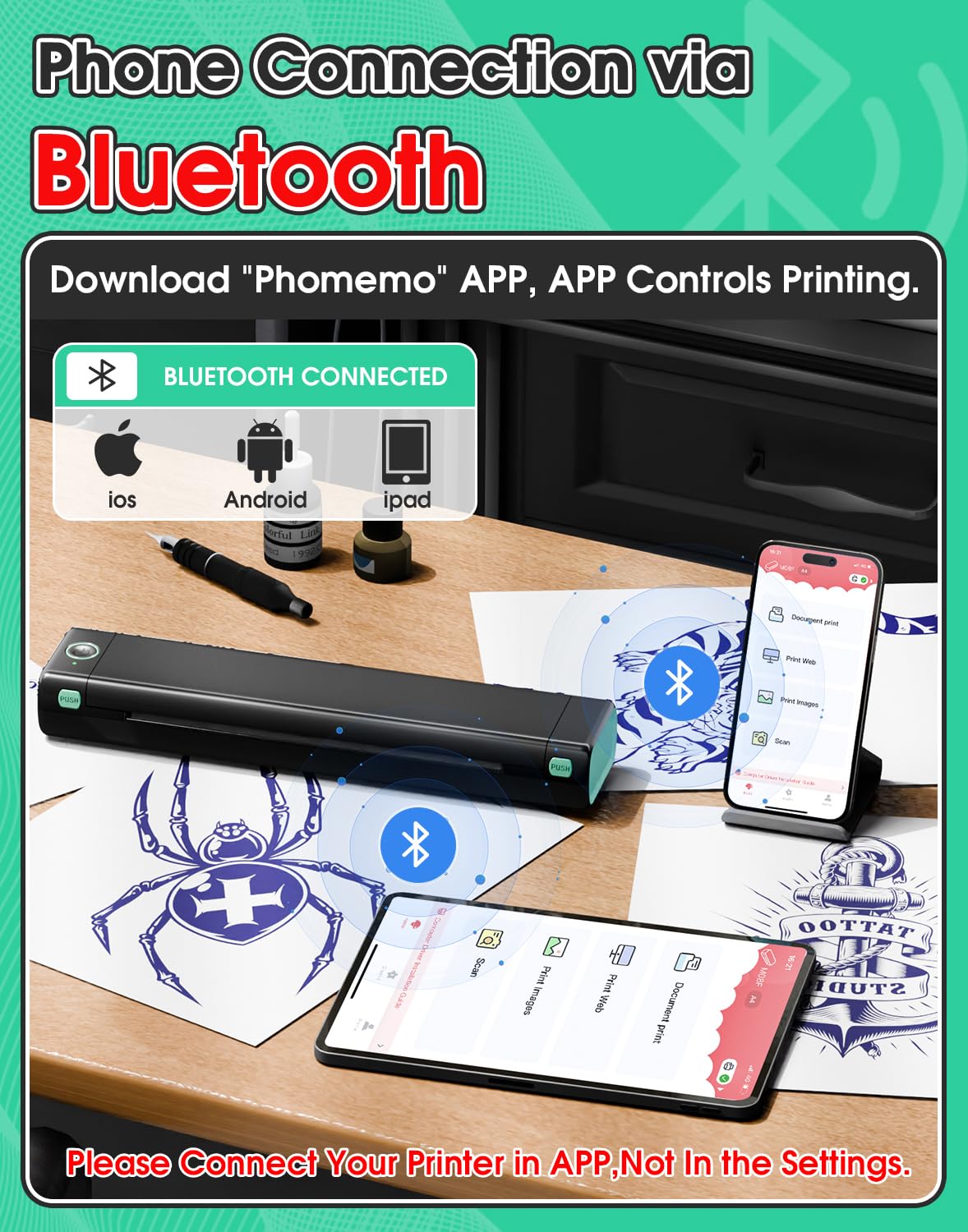
Image: A Phomemo M08F printer connected to a laptop via USB, with the laptop screen showing the Phomemo driver download page.
3.4 Которуу кагазын жүктөө
Properly loading the transfer paper is crucial for clear stencil prints.
- Prepare the Transfer Paper: Remove the transparent protective paper from the transfer sheet.
- Пил аркасы: Use a ruler or similar flat object to gently peel off the yellow backing paper from the transfer sheet.
- Turn On Printer: Press the power button to turn on the Phomemo M08F printer.
- Кагазды салыңыз: Carefully insert the prepared transfer paper into the printer's paper slot, ensuring it lies flat and is aligned. The printer will automatically feed the paper into position.

Image: A visual guide demonstrating the steps for preparing tattoo transfer paper and loading it correctly into the Phomemo M08F printer.
4. Операция
4.1 Printing Stencils
Once connected and paper is loaded, you can print your tattoo designs.
- Мобилдик тиркемеден: Use the Phomemo App to select images or documents, utilize the scanning function for tattoo designs, and initiate one-click printing. The app allows for editing, resizing, and applying filters to your designs before printing.
- Компьютерден: Open your desired image or document in a compatible program and select the Phomemo M08F printer from your print options. Adjust print settings as needed.

Image: The Phomemo mobile application interface, showcasing its various functions for scanning, image selection, and document printing.

Image: The Phomemo app's editing capabilities, including rotation, brightness and contrast adjustments, free resizing, and various filters for tattoo designs.
4.2 Optimizing Print Quality
For the best stencil results, consider the type of image you are printing. The M08F excels at clear lines and monochrome patterns.

Image: A visual guide illustrating the types of tattoo designs that print well (simple lines, monochrome, complex lines without shadow) versus those that may result in lower quality (shaded patterns, excessive color, black backgrounds).
Мыкты натыйжалар үчүн кеңештер:
- Use high-resolution images.
- Designs with clear lines and minimal shading work best.
- Avoid designs with excessive color or large black areas, as thermal printers are monochrome.
- Ensure the transfer paper is Phomemo Tattoo Transfer Paper for optimal results.

Image: A magnified comparison highlighting the high-definition print quality of the M08F Tattoo Printer compared to other printers, demonstrating superior line clarity.
4.3 Transferring Stencils to Skin
Follow these steps to successfully transfer your printed stencil onto the skin:
- Таза тери: Wipe off the skin area with wet wipes or alcohol to ensure it is clean and free of oils.
- Apply Transfer Cream: Apply a thin, even layer of tattoo transfer cream or gel to the cleaned skin area.
- Position Stencil: Carefully place the printed stencil onto the skin, design-side down, pressing firmly and evenly.
- Remove Stencil: Gently peel off the stencil paper after a few minutes, allowing the design to transfer completely.
- Кургак: Let the transferred stencil dry for several minutes before proceeding with tattooing.

Image: A step-by-step visual demonstration of the tattoo stencil transfer process, from skin preparation to drying the applied stencil.

Image: A guide on how to achieve clearer tattoo templates by correctly handling the carbon paper and transfer paper layers.
4.4 Видео көрсөтүү
Watch this official video for a visual guide on using the Phomemo M08F printer and transferring stencils.
Video: A demonstration of the Phomemo M08F Tattoo Stencil Printer in action, showing the printing process and stencil transfer.
5. Техникалык тейлөө
The Phomemo M08F printer requires minimal maintenance due to its inkless thermal technology.
- Тазалоо: Regularly wipe the exterior of the printer with a soft, dry, lint-free cloth. Do not use abrasive cleaners or solvents.
- Басма башчысы: Avoid touching the print head directly. If necessary, gently clean with a cotton swab lightly dampened with isopropyl alcohol, ensuring it is completely dry before use.
- Сактагыч: Store the printer in a cool, dry place away from direct sunlight and extreme temperatures when not in use for extended periods.
- Батареяга кам көрүү: To prolong battery life, avoid fully discharging the battery frequently. Charge the printer regularly, even if not in constant use.
6. Кыйынчылыктарды
If you encounter issues with your Phomemo M08F printer, refer to the following common problems and solutions:
| Көйгөй | Мүмкүн себеп | Чечим |
|---|---|---|
| Printer not connecting via Bluetooth. | Incorrect pairing method; Bluetooth off; App issue. | Ensure Bluetooth is on. Connect via the Phomemo App, not phone settings. Restart app/printer. |
| Басып чыгаруу сапатынын начардыгы (бүдөмүк/ачык). | Low battery; incorrect paper loading; low-resolution image; unsuitable design. | Charge printer. Re-load paper correctly. Use high-resolution, line-art designs. Use Phomemo transfer paper. |
| Кагаз тыгылышы. | Paper inserted incorrectly; damaged paper. | Turn off printer. Gently pull out jammed paper. Re-insert new paper correctly. |
| Printer not responding. | Аз батарея; системанын бузулушу. | Charge printer. Press and hold the power button for 10 seconds to reset. |
For further assistance, consult the Phomemo App's help section or contact customer support.
7. Техникалык шарттар
| Өзгөчөлүк | Деталь |
|---|---|
| Модель аты | M08F-WS |
| Бренд | Phomemo |
| Басма технологиясы | Термикалык |
| Принтердин чыгышы | Монохромдуу |
| Байланыш технологиясы | Bluetooth, USB |
| Макс басып чыгаруу ылдамдыгы (монохромдуу) | 12 промилле |
| Продукциянын өлчөмдөрү | 10.4" L x 2.3" W x 1.2" Ж (26.4см L x 5.8cm W x 3.0cm H) |
| Элемент Салмагы | 1.58 фунт (715 грамм) |
| Батареялар | 1 Литий Полимердик батарейка (кошулган) |
| Батарея сыйымдуулугу | 1200mAh |
| Түс | Кара жана жашыл |

Image: The physical dimensions of the Phomemo M08F printer, highlighting its compact size.
8. Кепилдик жана колдоо
For warranty information, product registration, or technical support, please contact Phomemo customer service through their official channels. You can also refer to the official user manual PDF for additional details.
- Расмий колдонуучу колдонмо (PDF): PDF жүктөп алуу
- Phomemo Brand Store: Дүкөнгө кириңиз


