1. Киришүү
Thank you for choosing the DELTACO Gaming PM80 Wireless Optical Gaming Mouse. This manual provides essential information for setting up, operating, and maintaining your new gaming mouse. Please read these instructions carefully before use to ensure optimal performance and longevity of your device.
2. Пакеттин мазмуну
- DELTACO Gaming PM80 Wireless Optical Gaming Mouse
- USB зымсыз кабыл алгыч
- USB заряддоо кабели
- User Manual
3. Продукт бүтүп калдыview
The DELTACO Gaming PM80 is a high-performance wireless optical gaming mouse designed for precision and comfort. It features 7 programmable buttons, adjustable DPI up to 4800, and customizable illumination. The mouse is rechargeable, ensuring uninterrupted gaming sessions.
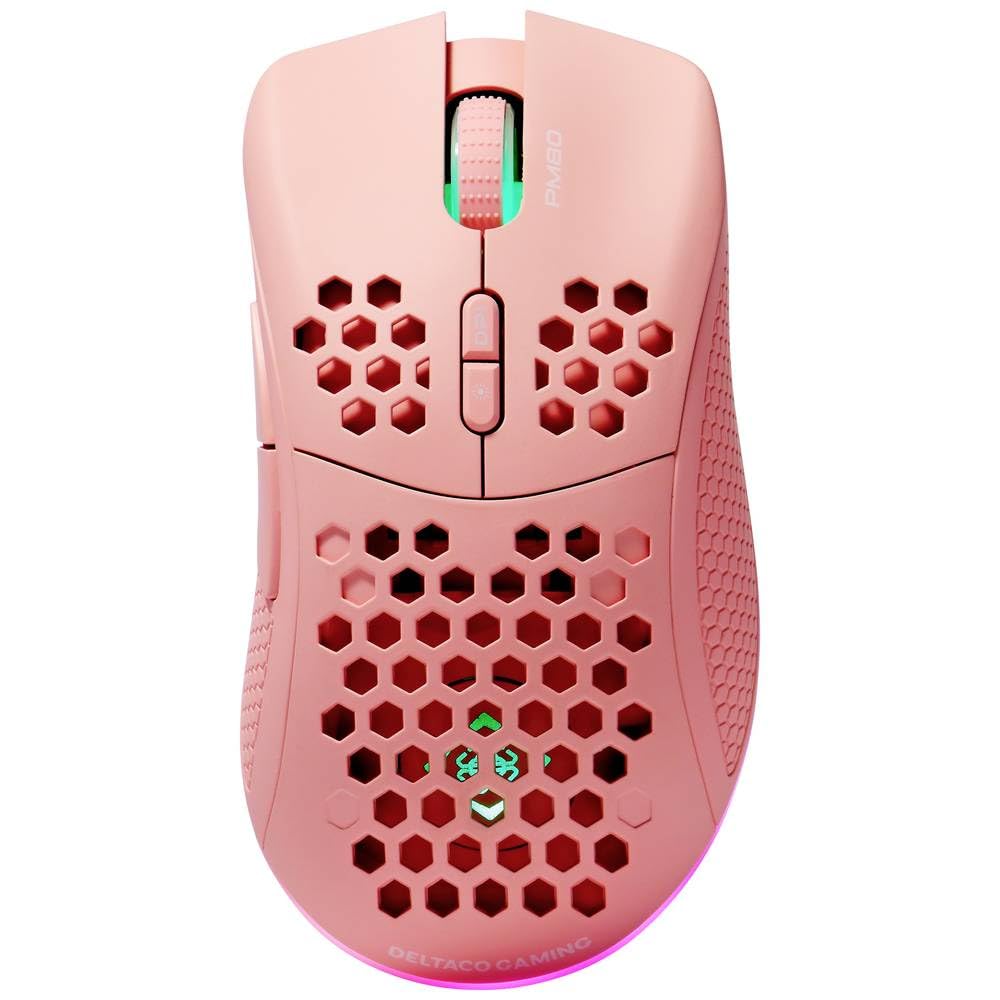
Image: DELTACO Gaming PM80 Wireless Optical Gaming Mouse. This image displays the mouse from a top-down perspective, highlighting its ergonomic design, the central scroll wheel, and the arrangement of its seven buttons.
Баскыч функциялары:
- Сол чыкылдатуу баскычы: Стандарттык негизги чыкылдатуу функциясы.
- Оң баскычты чыкылдатуу: Стандарттык кошумча чыкылдатуу функциясы.
- Жылдыруу дөңгөлөгү: Scrolls up/down, and acts as a middle click button.
- DPI Cycle баскычы: Changes the mouse's sensitivity (DPI).
- Алга баскычы: Алга карай жылдырат web браузерлер же file изилдөөчүлөр.
- Артка баскычы: Артка карай багыт алат web браузерлер же file изилдөөчүлөр.
- Illumination Mode Button: Cycles through different lighting effects or turns illumination on/off.
4. Орнотуу
4.1. Чычканды заряддоо
- Connect the small end of the USB charging cable to the charging port on the front of the mouse.
- Connect the larger end of the USB charging cable to an available USB port on your computer or a USB wall adapter.
- The mouse's illumination will indicate charging status (e.g., breathing effect, specific color). A full charge typically takes 2-3 hours.
- Once fully charged, the illumination may change or turn off. Disconnect the charging cable.
4.2. USB зымсыз кабыл алгычын туташтыруу
- Адатта чычкандын астыңкы жагындагы бөлүмдө сакталган USB зымсыз кабыл алгычын табыңыз.
- Ресиверди сактоо уясынан чыгарып алыңыз.
- USB зымсыз кабыл алгычын компьютериңиздеги жеткиликтүү USB портуна сайыңыз.
- Компьютериңиз керектүү драйверлерди автоматтык түрдө таап, орнотуп алышы керек. Бул бир нече мүнөткө созулушу мүмкүн.
4.3. Күйгүзүү / Өчүрүү
- Чычкандын астындагы кубат которгучту табыңыз.
- Slide the switch to the 'ON' position to power on the mouse. The illumination will light up.
- To conserve battery life, slide the switch to the 'OFF' position when the mouse is not in use for extended periods.
5. Иштөө нускамалары
5.1. Негизги колдонуу
Once connected and powered on, the mouse is ready for use. Move the mouse on a flat surface to control the cursor on your screen. Use the left and right click buttons for primary and secondary actions, and the scroll wheel for navigation.
5.2. DPI тууралоо
The DPI (Dots Per Inch) setting determines the sensitivity of your mouse. The DELTACO Gaming PM80 offers multiple DPI levels up to 4800 DPI. To adjust the DPI:
- басыңыз DPI цикл баскычы (typically located behind the scroll wheel).
- Each press will cycle through the available DPI settings. The mouse's illumination may change color or flash to indicate the current DPI level.
- Select the DPI setting that best suits your preference for gaming or general use.
5.3. Illumination Control
The DELTACO Gaming PM80 features customizable illumination. To change the lighting effects:
- басыңыз Illumination Mode Button (refer to Product Overview жайгашкан жери үчүн).
- Each press will cycle through different lighting modes, such as static colors, breathing effects, or off.
6. Техникалык тейлөө
6.1. Тазалоо
- Тазалоодон мурун, чычканды өчүрүп коюңуз.
- Чычкандын бетин сүртүү үчүн жумшак, кургак, түксүз чүпүрөктү колдонуңуз.
- өжөр кир үчүн, бир аз гampчүпүрөктү суу же жумшак, абразивдүү тазалагыч менен жууп салыңыз. Ашыкча нымдуулуктан сактаныңыз.
- Катуу химиялык заттарды, эриткичтерди же абразивдүү материалдарды колдонбоңуз, анткени алар чычканды бузуп коюшу мүмкүн.
- Жылдыруу дөңгөлөктүн жана баскычтардын жаракаларын тазалоо үчүн кебез тампонду же кысылган абаны колдонуңуз.
6.2. Сактоо
When not in use for extended periods, store the mouse in a cool, dry place away from direct sunlight and extreme temperatures. Ensure the power switch is in the 'OFF' position to preserve battery life.
7. Кыйынчылыктарды
- Чычкан жооп бербей жатат:
- Чычкан күйгүзүлгөнүн текшериңиз.
- Check if the USB wireless receiver is securely plugged into a working USB port.
- Verify the mouse battery is charged. Connect the charging cable and try again.
- Ресиверди башка USB портуна сайып көрүңүз.
- Компьютериңизди өчүрүп күйгүзүңүз.
- Кечигип же үзгүлтүктүү байланыш:
- Ensure the mouse is within close proximity to the USB receiver (ideally within 10 meters).
- Avoid placing the receiver near other wireless devices or sources of interference (e.g., Wi-Fi routers, cordless phones).
- Чычкан толук заряддалганын текшериңиз.
- Курсордун кыймылы туруксуз же так эмес:
- Чычкандын астыңкы жагындагы оптикалык сенсорду жумшак, кургак чүпүрөк менен тазалаңыз.
- Чычканды ылайыктуу жерде (мисалы, чычкан аянтчасында) колдонуп жатканыңызды текшериңиз. Өтө чагылдыруучу же тунук беттерден качыңыз.
- Эгерде курсор өтө тез болсо, DPI жөндөөсүн төмөнкү сезгичтикке тууралаңыз.
- Illumination not working:
- Чычкан күйгүзүлгөнүн текшериңиз.
- Press the Illumination Mode Button to cycle through modes, ensuring it's not set to 'off'.
- Check battery level; low battery might disable illumination.
8. Техникалык шарттар
| Өзгөчөлүк | Деталь |
|---|---|
| Бренд | DELTACO GAMING |
| Модель номери | ГАМ-120-П |
| Байланыш | Зымсыз (USB кабыл алгыч) |
| Сенсор түрү | Оптикалык |
| DPI | 4800 DPI чейин (Жөнгө салынуучу) |
| баскычтардын саны | 7 |
| Колдун багыты | Туура |
| Жарыктандыруу | Ооба |
| Зарядкалуу | Ооба |
| Батареялар талап кылынат | No (Internal Rechargeable) |
9. Кепилдик жана колдоо
For warranty information and technical support, please refer to the warranty card included with your product or visit the official DELTACO Gaming webсайт. Ар кандай кепилдик дооматтары үчүн сатып алганыңыздын далилин сактаңыз.


