Introduction
The Temtop M2000C Air Quality Meter is designed to provide essential insights into your indoor and outdoor air quality. This device accurately detects levels of CO2, PM2.5, and PM10, and also provides temperature and humidity readings. Equipped with an audio alarm, it notifies you when air quality levels exceed safe thresholds, helping you maintain a healthier living environment. Its user-friendly design and rechargeable battery make it a convenient tool for monitoring air quality in various settings.
Негизги өзгөчөлүктөрү
- Affordable Quality Monitoring: Delivers essential air quality data for cost-conscious homes and offices.
- Streamlined Air Quality Insights: Features a professional-grade laser sensor for precise PM2.5 and PM10 detection and a sensitive NDIR sensor for CO2 levels.
- Intuitive Alerts and Clear Display: Audio alarm for threshold breaches and a vibrant TFT display for real-time air quality overview.
- User-centered Design: Ergonomic construction and rechargeable battery for simple operation and portability.
- Robust Support & Assurance: Backed by Temtop's 12-month warranty and round-the-clock customer support.
Продукт бүттүview
Familiarize yourself with the components and interface of your Temtop M2000C Air Quality Meter.

Сүрөт: алдыңкы view of the Temtop M2000C Air Quality Meter with labels indicating its various parts, including the USB port, display, and control buttons.
Интерфейс компоненттери:
- USB порт: Аппаратты заряддоо үчүн.
- Баззердин абалы: Indicates if the audio alarm is active.
- Measuring Status: Shows current measurement activity.
- Дисплей: Vibrant TFT screen showing real-time readings and menu options.
- Меню баскычы: Негизги менюга кирет.
- Increase/Up Button: Менюларда өйдө карай багыт алат же маанилерди көбөйтөт.
- Артка баскычы: Мурунку экранга кайтат.
- Кубат / OK баскычы: Powers the device on/off or confirms selections.
- Decrease/Down/Switch (Start/Pause) Button: Navigates down in menus, decreases values, or starts/pauses measurements.
- Дата жана убакыт: Учурдагы дата менен убакытты көрсөтөт.
- Кубат деңгээли: Indicates battery charge.
Жайгашуу
- Кутудан чыгаруу: Carefully remove the Temtop M2000C from its packaging. Ensure all components listed in the "What's in the Box" section are present.
- Баштапкы төлөм: Before first use, fully charge the device using the provided USB charging cable. Connect the cable to the device's USB port and a compatible USB power adapter (not included) or computer USB port. The power level indicator on the display will show charging status.
- Күйгүзүү: Press and hold the Power/OK button to turn on the device.
- Initial Acclimation: For optimal accuracy, allow the device to acclimate to its environment for at least 8 hours before taking critical measurements. This allows the sensors to stabilize.
Иштөө нускамалары
The Temtop M2000C offers straightforward operation for monitoring various air quality parameters.
Менюда навигация:
- басыңыз Меню негизги менюга кирүү үчүн баскычты басыңыз.
- колдонуу Көбөйтүү/жогорулатуу жана Азайтуу/Төмөн buttons to scroll through options like PM2.5, CO2, HCHO, View all info, and Set.
- басыңыз Кубат / макул параметрди тандоо үчүн баскыч.
- басыңыз Артка мурунку экранга кайтуу үчүн баскычты басыңыз.
Өлчөөлөрдү алуу:
- From the main menu, select the desired parameter (e.g., PM2.5, CO2) using the navigation buttons and press OK.
- The device will immediately begin displaying real-time readings for the selected parameter.
- The display will show the current concentration, along with a status indicator (e.g., "Good", "Moderate").
- For PM2.5 and CO2, a bar graph feature is available to show concentration trends over time. Use the navigation buttons to switch to the graph view бар болсо.
Аудио Ойготкуч:
- The device features an audio alarm that activates when air quality levels exceed preset thresholds.
- Refer to the "Air Quality Parameter for Reference" table in the "Understanding Readings" section to understand these thresholds.
- The buzzer status icon on the display indicates if the alarm is active.
Видео: Бүттүview of the Temtop M2000C's functions, demonstrating how to navigate the menu, view particle counts, CO2 levels, and interpret the data using the on-screen charts and reference guide. It also highlights the device's portability and rechargeable battery.
Окууларды түшүнүү
The Temtop M2000C measures several key air quality parameters. Understanding these readings is crucial for assessing your environment.
PM2.5 жана PM10:
PM2.5 refers to fine inhalable particles, with diameters that are generally 2.5 micrometers and smaller. PM10 refers to inhalable particles, with diameters that are generally 10 micrometers and smaller. These particles can come from various sources like combustion (vehicles, fires), industrial processes, and dust. High levels can impact respiratory and cardiovascular health.
CO2 (көмүр кычкыл газы):
CO2 is a gas naturally present in the atmosphere. In indoor environments, elevated CO2 levels often indicate inadequate ventilation. While not directly toxic at typical indoor concentrations, high CO2 can lead to drowsiness, headaches, and reduced cognitive function.
Air Quality Parameter for Reference:
The following table provides a general guide for interpreting the air quality readings from your device. These values are based on common air quality standards.
| Булгоочу зат | Статус | Жакшы | Орто | Сезимтал топтор үчүн зыяндуу | Ден соолукка зыян | Абдан зыяндуу | Кооптуу |
|---|---|---|---|---|---|---|---|
| PM2.5 (µg/m³) | ≤12 | 12.1~35.4 | 35.5~55.4 | 55.5~150.4 | 150.5~250.4 | ≥250.5 | Жок |
| PM10 (µg/m³) | ≤54 | 55~154 | 155~254 | 255~354 | 355~424 | ≥425 | Жок |
| CO2 (ppm) | ≤700 | 701~1000 | 1001~1500 | 1501~2500 | 2501~5000 | ≥5001 | Жок |
| HCHO (мг/м³) | ≤0.1 | Жок | Жок | Жок | >0.1 | Жок | Жок |
Note: HCHO (Formaldehyde) detection is not available on the M2000C model. This table is for general reference across Temtop models.
For more detailed information on air quality and health impacts, please consult official environmental health resources.
Техникалык тейлөө
- Тазалоо: Аппараттын сыртын тазалоо үчүн жумшак, кургак чүпүрөктү колдонуңуз. Абразивдүү тазалагычтарды же эриткичтерди колдонбоңуз.
- Сактагыч: Узак мөөнөткө колдонулбаганда, аспапты салкын, кургак жерде, тике күн нурунан жана экстремалдык температурадан алыс сактаңыз.
- Батареяга кам көрүү: Батареянын иштөө мөөнөтүн узартуу үчүн, бат-баттан батарейканы толук зарядсыздандырбаңыз. Аппаратты дайыма колдонууда болбосо да, үзгүлтүксүз заряддаңыз.
- Сенсорго кам көрүү: Avoid exposing the sensor inlet to dust, water, or other contaminants. Do not attempt to clean the internal sensors.
- Калибрлөө: The device features a calibration function for CO2 readings. Refer to the device's settings menu for instructions on how to perform calibration to ensure accurate measurements.
Проблемаларды чечүү
If you encounter issues with your Temtop M2000C, try the following steps:
- Түзмөк күйбөй жатат: Ensure the battery is charged. Connect the device to a power source using the USB cable and try turning it on again.
- Туура эмес окуулар:
- Allow the device to acclimate to the environment for at least 8 hours.
- Perform a CO2 calibration if available in the settings menu.
- Ensure the sensor inlet is not obstructed.
- Audio Alarm Constantly On: Check the current air quality readings against the reference table. If levels are high, take appropriate action (e.g., improve ventilation). You can mute the buzzer through the device settings if needed.
- Дисплей маселелери: If the display is frozen or unresponsive, try restarting the device by holding the power button. If the issue persists, contact customer support.
Көбүрөөк жардам алуу үчүн, Кепилдик жана колдоо бөлүмүн караңыз.
Техникалык шарттар
| Атрибут | Деталь |
|---|---|
| Продукциянын өлчөмдөрү | 1.4"D x 2.8"W x 8.8"H (1.4x2.8x8.8 дюйм) |
| Элемент моделинин номери | M2000C |
| Батареялар | 1 литий-иондук батарейкалар талап кылынат (кошулган) |
| Дата биринчи жеткиликтүү | 2-июль, 2020-жыл |
| Өндүрүүчү | Элитех |
| Бренд | Темптоп |
| Стиль | CO2, PM2.5/10, Particle, T&H |
| Power Source | Батарея менен иштейт |
| Түс | M2000C |
| Элемент Салмагы | 14.4 унция |
| Ойготкуч | Укулган |
| Иштөө нымдуулугу | 90 пайыз |
| Жогорку температура рейтинги | 50 градус |
| Сенсор түрү | NDIR (for CO2) |
| Келип чыккан өлкө | Кытай |
Кутуда эмне бар
- Temtop Air Quality Monitor (M2000C)
- USB заряддоо кабели
- Колдонуучунун Колдонмосу (бул документ)
- Storage Box (for M2000 2nd, may vary for M2000C)

Image: The Temtop M2000C Air Quality Monitor, its USB charging cable, and the user manual, neatly packed within a protective storage box.
Кепилдик жана колдоо
Each Temtop M2000C purchase is backed by a 12 айлык кепилдик from the date of purchase. This warranty covers manufacturing defects and ensures reliable operation of your device.
For any questions, technical assistance, or warranty claims, Temtop provides round-the-clock customer support. Please visit the official Temtop website or refer to the contact information provided in your physical user manual for support details.
Сиз да зыярат кылсаңыз болот Amazon'догу Temtop дүкөнү көбүрөөк продукт маалымат жана колдоо ресурстар үчүн.
Additional Information: Important Considerations
To help you better understand air quality monitoring and the readings from your Temtop device, here are some important points:
PM2.5 деген эмне?
PM2.5, which are tiny particles that we can breathe in. They come from things like cars, factories, fires, homes and buildings. PM2.5 can harm our health and cause problems like heart disease, lung cancer, asthma, stroke, diabetes and COPD.
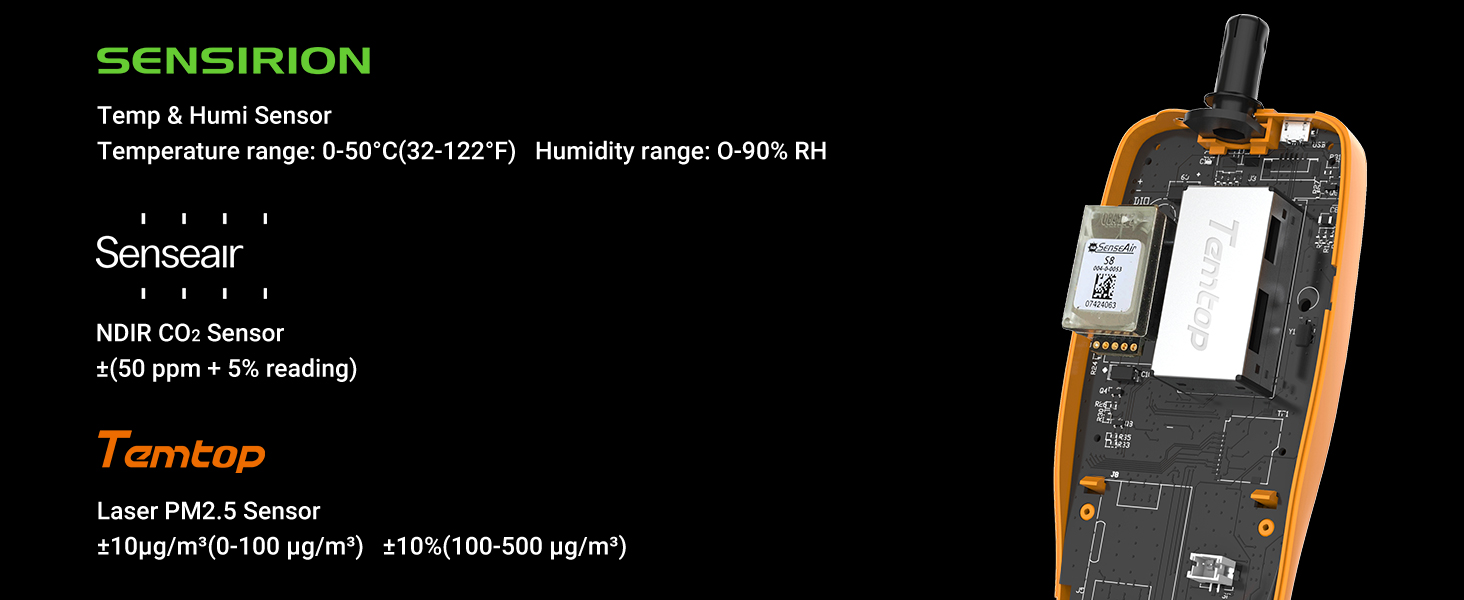
Image: An industrial scene with smoke stacks emitting plumes, illustrating common sources of PM2.5 particles in the air.
Why PM2.5 values vary in different locations of the same room?
PM2.5 in the air is not evenly distributed so the readings of PM2.5 monitors within the same room may also vary.

Image: A comfortable living room setting, demonstrating how PM2.5 levels can differ even within the same indoor space due to uneven distribution.
Why air quality monitor readings differ from official data?
Official data such as PurpleAir or Airnow reflect the average air quality of a region or city, while your air quality monitor reflects the specific air quality of your location, which may differ due to factors such as geography, weather, traffic, etc.

Image: An office environment, highlighting that personal air quality monitors provide localized readings, which can differ from broader official regional data due to various environmental factors.
How do I fix my PM2.5 problem?
To reduce the harmful effects of PM2.5, you can drive less or take public transport, use air purifiers or humidifiers at home, avoid outdoor activities or exercise when the air is polluted, wear masks or glasses to protect yourself, and eat more vitamin-rich foods to boost your immunity.

Image: A family relaxing at home, representing a healthy indoor environment and suggesting lifestyle adjustments to reduce PM2.5 exposure.
Tell me something about the history of air sensors.
In the 1900s, expensive air equipment was used in dangerous scenarios such as mining. In 2013-2016, the EPA first determined the accuracy of low-cost air sensors, and some sensors began popularizing in 2016. Now, Temtop has developed PM2.5 sensors since 2013 and is committed to providing professional-grade air testers at the best value.

Image: A laboratory setting featuring multiple air quality monitors, illustrating the historical development and increasing accessibility of air sensing technology.


