Introduction
This manual provides detailed instructions for the setup, operation, and maintenance of your BEITONG Asura 2NS Wireless Controller. Please read this manual carefully before using the product to ensure optimal performance and longevity.

Сүрөт: алдыңкы view of the BEITONG Asura 2NS Wireless Controller, showcasing анын эргономикалык дизайны жана баскычтардын жайгашуусу.
Орнотуу жана шайкештик
The BEITONG Asura 2NS Wireless Controller offers multi-platform compatibility and various connection methods.
Шайкештик:
- PC: Windows 7/8/10/11, Steam
- Nintendo Switch: Switch, Switch Lite, Switch OLED
- Android: Mobile & TV (supports native games only)
- Steam Deck
Туташуу ыкмалары:
- Зымдуу туташуу: Connect the controller directly to your PC or Steam Deck using a USB cable.
- Bluetooth байланыш:
- For PC/Steam Deck: Издөө Bluetooth device name "Xbox Wireless Controller".
- Android үчүн: Издөө Bluetooth device name "BEITONG 2585NS".
- Nintendo Switch үчүн: Connection will be automatic once pairing mode is initiated on the controller and console.
Эскертүү: The BEITONG Gamepad Assistant software is available for key testing and firmware upgrades if required. It is not mandatory for basic operation.

Сүрөт: бүттүview of key features for Nintendo Switch, including screenshot, Bluetooth, 6-axis gyro, 5 levels vibration, key layout adjust-free, key value switchable, and Turbo function.
Иштөө нускамалары
Motion Control (Nintendo Switch Only):
The controller features a 6-axis gyro sensor and BEITONG somatosensory mapping technology. This supports native Switch sensing games. You can adjust the somatosensory sensitivity to 3 different levels to suit various game requirements. This function is exclusively for Nintendo Switch games.

Image: Visual representation of the 6-axis gyro sensor and somatosensory mapping technology in action, with the controller shown above a Nintendo Switch console.
Джойстиктин тактыгы:
Equipped with ALPS joysticks from Japan, the controller provides pixel-high accurate positioning, ensuring high accuracy, fine tuning, and easy positioning in games.

Image: Close-up of the ALPS joystick, highlighting its precision and responsiveness for gaming.
Key Layout and HOME Key Function:
- Switch Original Key Layout: The controller maintains the original key layout for seamless integration with Nintendo Switch games.
- Үй ачкычы: Press the [HOME] key to return to the Switch home page. When connected to PC or Android, the [HOME] key can also be used to switch the function of the left stick and D-pad.
- Auto-Keyed Value: A&B keys automatically adapt to key values depending on the connected platform.

Image: Illustration of the Turbo function setup and the auto-keyed value feature for A&B buttons, adapting to different platforms.
Кош титирөө:
Built-in double vibrating motors provide immersive feedback. The vibration intensity is adjustable with 5 gears, allowing you to customize the experience according to different game scenes.
Турбо функциясы:
To set the Turbo function, simultaneously press the Турбо button and any of the ABXY, LB, RB, LT, RT keys. This allows for rapid input of commands.
Скриншот функциясы:
To take a screenshot on your Nintendo Switch, simultaneously press the Турбо баскычы жана R3 (right stick click) button. Note that this function is only available on the Nintendo Switch.

Image: Diagram showing the location of the dual vibrate motors within the controller and the function of the HOME key to exchange left stick and D-pad functions in PC mode.
LB/RB Mechanical Switches:
The LB/RB buttons utilize ALPS mechanical point-touch switches, providing a crisp and responsive feel similar to a gaming mouse click.
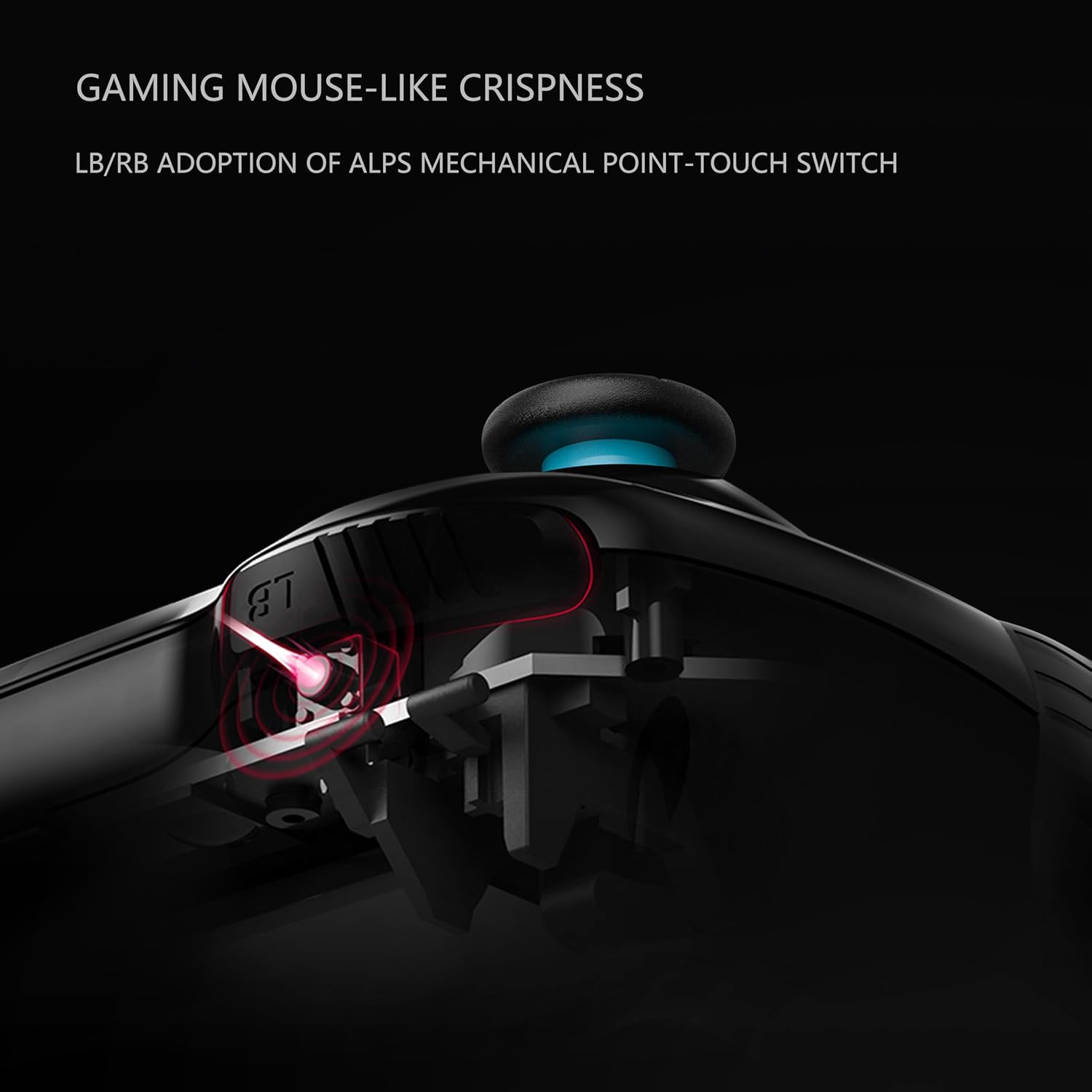
Сүрөт: кесилиши view illustrating the ALPS mechanical point-touch switch used in the LB/RB buttons, emphasizing their tactile feedback.
Техникалык тейлөө
Proper maintenance ensures the longevity and performance of your controller.
- Тазалоо: Башкаргычты тазалоо үчүн жумшак, кургак чүпүрөктү колдонуңуз. Өтө кир болсо, бир азamp кездемени колдонсо болот, бирок түзмөккө ным кирбешин текшериңиз. Катуу химиялык заттарды же абразивдүү тазалоочу каражаттарды колдонбоңуз.
- Сактагыч: Контроллерди түз күн нурунан жана экстремалдык температурадан алыс салкын, кургак жерде сактаңыз.
- Батареяга кам көрүү: If the controller will not be used for an extended period, ensure it is fully charged before storage. Avoid completely draining the battery frequently.
- Тамчылардан качуу: Protect the controller from physical impact and drops, which can damage internal components.
Проблемаларды чечүү
If you encounter issues with your BEITONG Asura 2NS Wireless Controller, refer to the following common solutions:
- Контроллер туташпай жатат:
- Контроллер заряддалганын текшериңиз.
- Verify Bluetooth is enabled on your device (PC, Android, Switch).
- Check that you are searching for the correct Bluetooth device name (e.g., "Xbox Wireless Controller" for PC/Steam Deck, "BEITONG 2585NS" for Android).
- Контроллерди да, хост түзмөгүн да өчүрүп-күйгүзүп көрүңүз.
- For wired connection, ensure the USB cable is securely connected.
- Баскычтар/джойстиктер жооп бербей жатат:
- Контроллер туура туташтырылганын текшериңиз.
- Контроллерди кайра иштетиңиз.
- Ensure no physical obstructions are preventing button presses or joystick movement.
- Вибрация иштебей жатат:
- Оюндун титирөө кайтарым байланышын колдой тургандыгын текшериңиз.
- Check the vibration intensity settings on the controller.
- Орнотулган программаны жаңыртуу: If issues persist, consider checking for and installing the latest firmware using the BEITONG Gamepad Assistant software.
Техникалык шарттар
| Өзгөчөлүк | Деталь |
|---|---|
| Модель номери | BTP-2585NS |
| Продукциянын өлчөмдөрү | 16.51 x 104.14 x 6.35 см |
| Салмагы | 540 г |
| Батарея түрү | 1 Литий Полимердик батарейка (кошулган) |
| Байланыш | Bluetooth 5.0, Wired USB |
| Motion Control | 6-Axis Gyro Sensor (Switch only) |
| Вибрация | Dual Motors, 5 adjustable levels |
Кепилдик жана колдоо
For warranty information and technical support, please refer to the official BEITONG webсайтка же сатуучуга кайрылыңыз. Кепилдик дооматтар үчүн сатып алганыңыздын далилин сактаңыз.


