1. Киришүү
This manual provides essential instructions for the installation, operation, and maintenance of the DEYE SUN-12K-SG04LP3-EU Three-Phase Hybrid Inverter. Please read this manual thoroughly before installation and operation to ensure proper use and to prevent damage to the device or injury to personnel. Keep this manual for future reference.

1-сүрөт: DEYE SUN-12K-SG04LP3-EU Hybrid Inverter and included accessories. This image displays the main inverter unit along with various cables, connectors, and current transformers that are part of the product package.
2. Коопсуздук нускамалары
Электр шок, өрт же жаракат алуу коркунучун азайтуу үчүн ар дайым төмөнкү коопсуздук чараларын сактаңыз:
- Орнотуу жана тейлөө квалификациялуу кызматкерлер тарабынан гана аткарылышы керек.
- Ensure the inverter is disconnected from all power sources (PV array, battery, grid) before performing any service or maintenance.
- Инвертор бузулган же иштебей жаткандай көрүнсө, иштетпеңиз.
- Do not attempt to repair the inverter yourself. Contact authorized service personnel.
- Балдарды инвертордон алыс кармаңыз.
- The inverter can reach high temperatures during operation. Avoid touching it directly.
- Ашыкча ысып кетүүнүн алдын алуу үчүн инвертордун айланасында туура желдетүүнү камсыз кылыңыз.
3. Продукт бүтүп калдыview
The DEYE SUN-12K-SG04LP3-EU is a three-phase hybrid inverter designed for solar energy systems. It features two Maximum Power Point Trackers (MPPTs), a WLAN module for monitoring, and an IP65 rating for outdoor installation. It supports low-voltage 48V batteries and offers flexible DC/AC coupling options.
3.1 Негизги өзгөчөлүктөрү
- 12 kW Three-Phase Hybrid Inverter
- 48 V Low Voltage Battery Compatibility (Lead-Acid or Lithium-Ion)
- Two MPPTs for optimized solar energy harvesting
- Integrated WLAN module for remote monitoring
- IP65 protection rating for outdoor use
- Supports three-phase unbalanced output
- Equipped with CAN (x2) and RS485 (x1) ports for BMS and parallel communication
- Smart Load application and Grid-Peak-Shave function
3.2 Жеткирүү чөйрөсү

2-сүрөт: Components included in the DEYE SUN-12K-SG04LP3-EU package. This image shows the various accessories such as communication cables, DC connectors, current transformers, and the user manual that come with the inverter.
Төмөндө көрсөтүлгөн бардык компоненттердин пакетте бар экендигин текшериңиз:
- DEYE SUN-12K-SG04LP3-EU Hybrid Inverter Unit
- WLAN модулу
- User Manual
- Кронштейн орнотуу
- Communication Cables (e.g., Ethernet, RS485)
- DC туташтыргычтар
- Ток трансформаторлору (КТ)
- Температура сенсору
4. Орнотуу жана орнотуу
Proper installation is crucial for the safe and efficient operation of the inverter. Follow these steps carefully.
4.1 Сайтты тандоо
- Install the inverter in a well-ventilated area, away from direct sunlight, rain, and dust.
- Ensure the ambient temperature is within the operating range (-40 °C to 60 °C).
- Maintain adequate clearance around the inverter for heat dissipation.
- The inverter is IP65 rated, allowing for outdoor installation, but protection from extreme weather is recommended.
4.2 Инверторду орнотуу
The inverter is designed for wall mounting.
- Дубалга бургулоо чекиттерин белгилөө үчүн берилген монтаждык кронштейнди үлгү катары колдонуңуз.
- Тешиктерди бургула жана тиешелүү дубал тыгындарын салгыла.
- Монтаж кронштейнин дубалга бекиткиле.
- Carefully lift the inverter and hang it onto the mounting bracket.
- Secure the inverter to the bracket using the provided screws.

3-сүрөт: Жогорку view of the inverter showing mounting points for wall installation. This image highlights the design features that facilitate easy and flexible installation of the unit on a wall.
4.3 Электр байланыштары
All electrical connections must comply with local electrical codes and standards.

4-сүрөт: Төмөнкү view of the DEYE inverter, illustrating all connection ports. This includes battery connections, communication ports (CAN, RS485), PV input, grid connection, load connection, and generator/smart load ports.
- Фотоэлектрдик киргизүү туташуусу: Connect the DC cables from the solar array to the PV input terminals (DC1, DC2). Ensure correct polarity. The inverter has 2 MPPTs.
- Батарея туташуу: Connect the battery cables to the BATTERY terminals. The inverter supports 48V low-voltage batteries (Lead-Acid or Lithium-Ion). Ensure correct polarity.
- AC тор байланышы: Connect the AC grid cables to the GRID terminals. This is a three-phase inverter.
- Туташуу жүктөө: Connect the load cables to the LOAD terminals.
- Generator/Smart Load Connection: If applicable, connect the generator or smart load to the GEN terminals.
- Байланыш порттору: Connect BMS (Battery Management System) via CAN (COM1, COM2) or RS485 (COM3) ports. An RS232 port is also available for remote control.
- WLAN модулу: Insert the WLAN module into its designated port for remote monitoring capabilities.
- Температура сенсору: Connect the external temperature sensor.
Эскертүү: The inverter supports parallel connection of up to 10 units for increased capacity.
5. Иштөө нускамалары
This section details the startup procedure and basic operation of the DEYE Hybrid Inverter.
5.1 Баштапкы баштоо
- After all electrical connections are securely made, switch on the DC switch located on the side of the inverter.
- Switch on the AC breaker from the grid side.
- Инвертор өзүн-өзү сыноодон өткөрүп, андан кийин иштей баштайт.
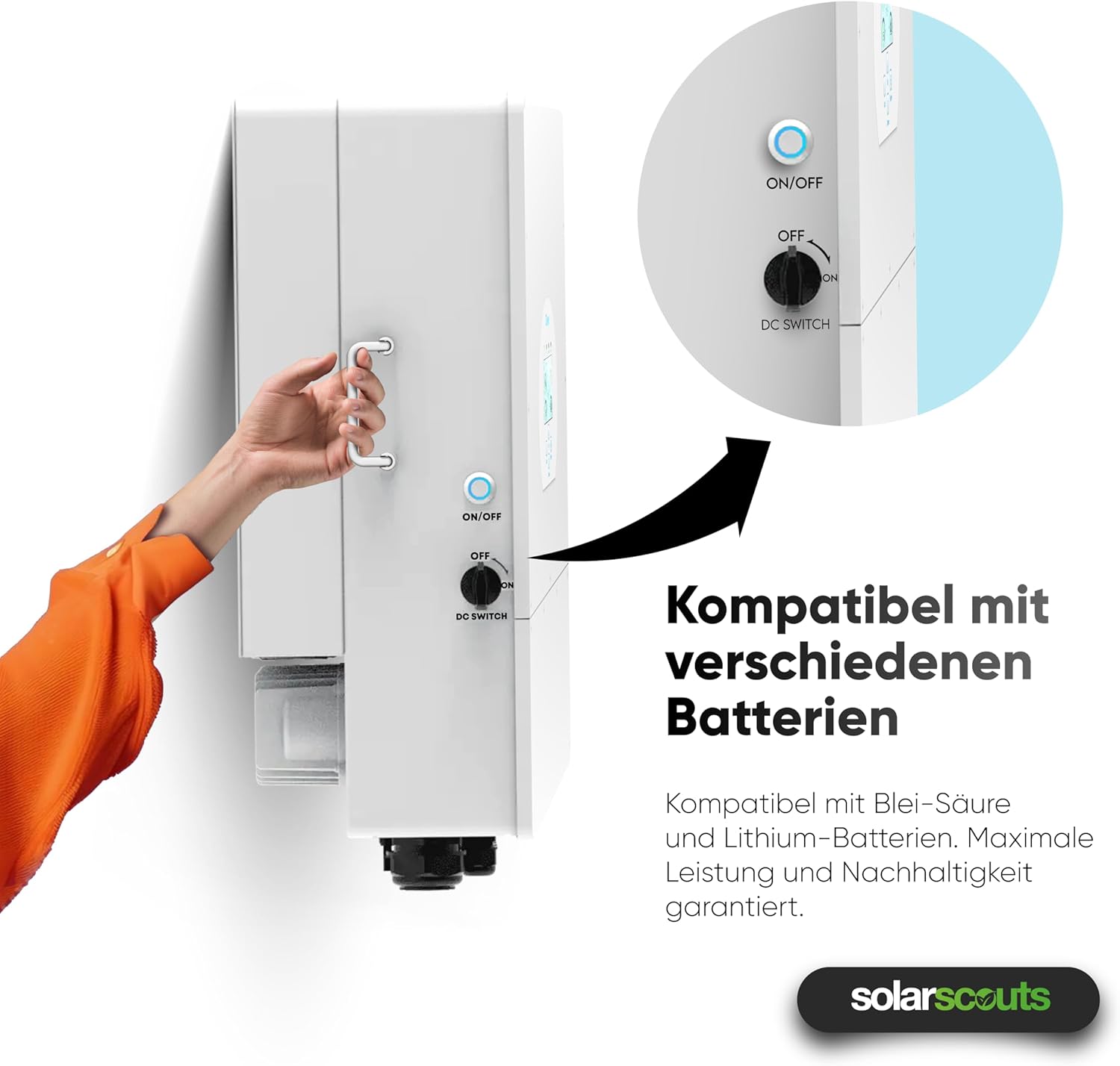
5-сүрөт: A hand operating the ON/OFF and DC switch on the side of the inverter. This switch controls the power flow and is essential for safe startup and shutdown procedures.
5.2 Дисплей жана интерфейс
The inverter features an intuitive touchscreen interface for monitoring and configuration.

6-сүрөт: Жакын план view of the inverter's touchscreen display. This interface provides real-time operational data, status indicators (AC, DC, Normal, Alarm), and navigation buttons (Up, Down, Esc, Enter) for system control and monitoring.
- Статус көрсөткүчтөрү: AC, DC, Normal, Alarm LEDs indicate the current operational status.
- Чабыттоо баскычтары: Use "Up", "Down", "Esc", and "Enter" buttons to navigate through menus and adjust settings.
- Реалдуу убакыттагы маалыматтар: The display shows real-time power flow, battery status, and grid interaction.
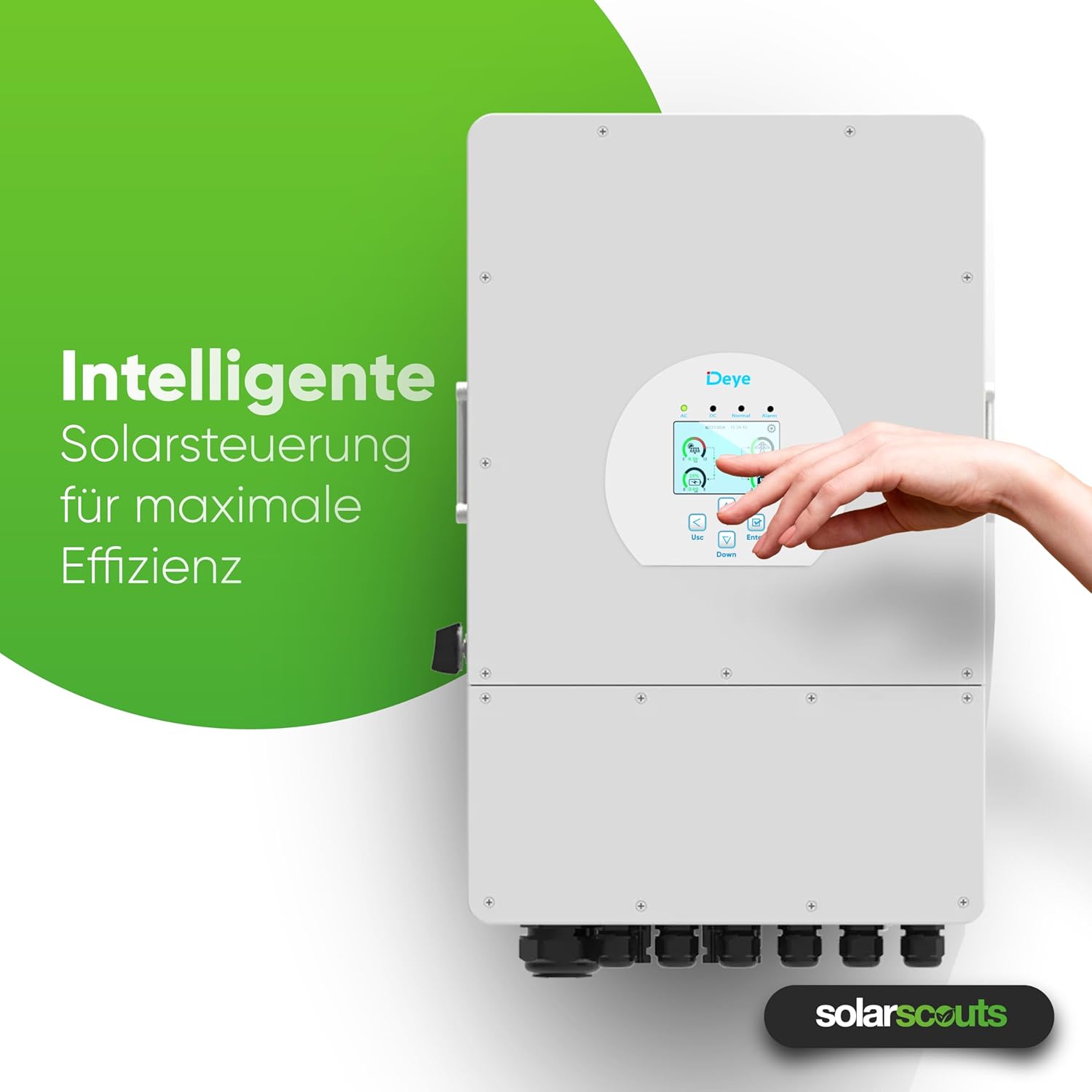
7-сүрөт: A hand interacting with the inverter's intelligent solar control display. This demonstrates the user-friendly interface for managing solar power and maximizing system efficiency.
5.3 Иштөө режимдери жана жөндөөлөрү
The inverter offers various operating modes and configurable settings, including:
- Battery Charge/Discharge: Configure up to 6 periods for charging and discharging the battery.
- Grid-Tie Mode: Injects excess solar power into the grid.
- Off-Grid режими: Provides power to loads from PV and battery during grid outages.
- Smart Load Function: Manages connected loads intelligently.
- Grid-Peak-Shave Function: Optimizes energy usage to reduce peak demand from the grid.
Refer to the detailed sections in the full user manual for specific parameter settings and advanced configurations.
5.4 Акылдуу мониторинг платформасы
The integrated WLAN module allows connection to the Deye intelligent monitoring platform. This platform enables:
- Remote shutdown in case of emergencies.
- Remote parameter adjustment.
- Remote firmware updates.
- Real-time performance monitoring of the PV system.
6. Техникалык тейлөө
Үзгүлтүксүз тейлөө сиздин инверторуңуздун узак иштөөсүн жана оптималдуу иштешин камсыздайт.
- Тазалоо: Periodically clean the inverter's exterior to remove dust and debris. Ensure ventilation openings are clear. Use a soft, dry cloth. Do not use liquid cleaners.
- Текшерүүлөр: Regularly check all electrical connections for tightness and signs of corrosion or damage. Inspect cables for wear and tear.
- Вентиляция: Ensure that the area around the inverter remains clear to allow for proper airflow and cooling.
- Программалык камсыздоонун жаңыртуулары: Keep the inverter's firmware updated through the smart monitoring platform to benefit from performance improvements and new features.
Эскертүү: Техникалык тейлөө же тазалоо иштерин жүргүзүүдөн мурун бардык кубат булактарын ажыратыңыз.
7. Кыйынчылыктарды
This section provides solutions for common issues you might encounter. For more complex problems, contact technical support.
| Көйгөй | Мүмкүн себеп | Чечим |
|---|---|---|
| Инвертор күйбөй жатат | DC switch off, AC breaker off, no PV input, battery disconnected/low voltage | Check DC switch, AC breaker, PV connections, and battery voltage. |
| Эч кандай кубаттуулук чыгаруу | Grid disconnected, overload, inverter fault | Check grid connection, reduce load, check display for error codes. |
| WLAN байланышындагы көйгөйлөр | Incorrect network settings, weak signal, module not inserted correctly | Verify WLAN settings, ensure strong signal, reinsert WLAN module. |
| Батарея заряддалбай жатат/заряддалбай жатат | Incorrect battery settings, BMS communication error, battery fault | Check battery type and settings, verify BMS connection, inspect battery. |
8. Техникалык шарттар
The following table provides detailed technical specifications for the DEYE SUN-12K-SG04LP3-EU Hybrid Inverter.

8-сүрөт: A detailed table outlining the technical specifications of the DEYE Hybrid Inverter. This includes data on battery input, PV input, AC output, efficiency, protection, and general characteristics.
| Параметр | Нарк |
|---|---|
| Модел | SUN-12K-SG04LP3-EU |
| Фазалар | Үч фазалуу |
| External AC Output Power | 12000 Вт |
| DC киргизүү күчү (макс.) | 15600 Вт |
| MPPTs | 2 |
| Батарея Voltage | 40 V - 60 V (48 V nominal) |
| Батарея түрү | Lead-Acid or Lithium-Ion |
| Макс. Заряддоо/разряд агымы | 240 А |
| Коргоо классы | IP65 |
| Иштөө температурасы | -40 °Cден 60 °Cге чейин |
| Өлчөмдөрү (L x W x Y) | 42.2 см х 69.9 см х 27.9 см |
| Салмагы | 33.6 кг |
| Параллель туташуу | Макс. 10 бирдик |
9. Кепилдик жана колдоо
DEYE provides a comprehensive warranty for its products.

9-сүрөт: The DEYE Hybrid Inverter displayed with a badge indicating a 10-year warranty, signifying product quality and reliability.
- Кепилдик мөөнөтү: The DEYE SUN-12K-SG04LP3-EU Hybrid Inverter comes with a 10-year warranty. Please refer to the official warranty document for detailed terms and conditions.
- Техникалык колдоо: For technical assistance, troubleshooting beyond this manual, or warranty claims, please contact your local DEYE distributor or visit the official DEYE webколдоо байланыш маалыматы үчүн сайт.
- Программалык камсыздоо жаңыртуулары: Guaranteed software updates are available for the product.


