1. Киришүү
The Acer SB242Y EBI is a 23.8-inch Full HD (1920 x 1080) IPS monitor designed for both gaming and office use. It features an ultra-thin, zero-frame design, providing an expansive viewing experience. Equipped with AMD FreeSync technology, it synchronizes the monitor's refresh rate with your graphics card for tear-free visuals. A rapid 1ms Visual Response Boost (VRB) and 100Hz refresh rate ensure smooth motion clarity. The monitor also incorporates Acer VisionCare technology for reduced eye strain and offers versatile connectivity with HDMI and VGA ports.
2. Кутуда эмне бар
Upon unboxing your Acer SB242Y EBI monitor, please ensure all the following components are present:
- Acer SB242Y EBI Monitor
- Монитор стенд (негизги жана моюн)
- Электр кабели
- HDMI кабели
Видео: Продукт бүттүview. This video demonstrates the unboxing and initial setup of the Acer monitor, showing the components included in the box and how to assemble the stand.
3. Орнотуу
3.1 Стендди чогултуу
- Мониторду жана стенд компоненттерин таңгактан этияттык менен алып салыңыз.
- Attach the stand neck to the monitor panel by aligning the clips and pushing until it clicks into place.
- Secure the stand base to the stand neck by aligning the screw and tightening it from the bottom of the base.
- Чогулган мониторду туруктуу, жалпак бетке коюңуз.
3.2 Түзмөккө туташуу
The monitor supports both HDMI and VGA connections. Use the provided HDMI cable for optimal performance.
- HDMI туташуу: Connect one end of the HDMI cable to the HDMI port on the monitor and the other end to the HDMI output port on your computer or device.
- VGA туташуу: Connect one end of the VGA cable (not included) to the VGA port on the monitor and the other end to the VGA output port on your computer or device.
- Кубат туташуу: Connect the power adapter to the monitor's DC input port, then plug the power cord into an electrical outlet.

Сүрөт: Арткы view of the Acer monitor highlighting the HDMI, VGA, and power input ports for easy connectivity.
4. Мониторду иштетүү
4.1 Күйгүзүү/өчүрүү
Мониторду күйгүзүү же өчүрүү үчүн анын төмөнкү оң жагында жайгашкан кубат баскычын басыңыз.
4.2 Экрандагы дисплей (OSD) менюсу
The OSD menu allows you to adjust various monitor settings. Use the buttons located on the bottom right of the monitor to navigate the menu:
- Меню баскычы: OSD менюсун ачуу үчүн басыңыз.
- Чабыттоо баскычтары: Use the arrow buttons to move through menu options.
- Тандоо баскычы: Тандоону ырастоо же кошумча менюга кирүү үчүн басыңыз.
- Чыгуу баскычы: Press to exit the current menu or OSD.
4.3 Көрсөтүү режимдери
The monitor offers several preset display modes optimized for different content types:
- Стандарт: Жалпы колдонуу.
- Графика: Enhanced color and clarity for graphic design.
- Эхо: Энергияны үнөмдөө режими.
- Окуу: Optimized for text, reducing eye strain.
- Караңгы бөлмө: Adjusts for low-light environments.
- Тасма: Enhanced contrast and color for video content.
- Колдонуучу: Ыңгайлаштырылган орнотуулар.
5. Өзгөчөлүктөрү
5.1 Full HD (1920x1080) Resolution
Experience sharp details and accurate colors with Full HD resolution, bringing your favorite shows and games to life.

Сүрөт: A visual comparison demonstrating the clarity of 1080p Full HD resolution versus 720p.
5.2 AMD FreeSync технологиясы
AMD FreeSync technology eliminates screen tearing and stuttering by synchronizing the monitor's refresh rate with your graphics card's frame rate, providing a smooth and fluid visual experience, especially in fast-paced games.

Сүрөт: A visual representation showing the difference between a display with screen tearing (FreeSync off) and a smooth display (FreeSync on).
5.3 1ms Visual Response Boost (VRB)
With a rapid 1ms VRB response time, motion blur is significantly reduced, keeping fast-moving images sharp and clear. This is particularly beneficial for gaming and action-packed video content.

Сүрөт: A visual comparison illustrating reduced motion blur with 1ms VRB technology.
5.4 100Гц жаңыртуу жыштыгы
A 100Hz refresh rate provides smoother imagery and reduces flicker, contributing to a more comfortable viewing experience and lowering eye strain during prolonged use.

Сүрөт: A visual comparison showing the difference in smoothness between 100Hz and 60Hz refresh rates.
5.5 IPS Panel & Wide Viewбурч
The In-Plane Switching (IPS) panel technology ensures consistent and accurate colors from angles up to 178 degrees, allowing for clear viewing from almost any position.
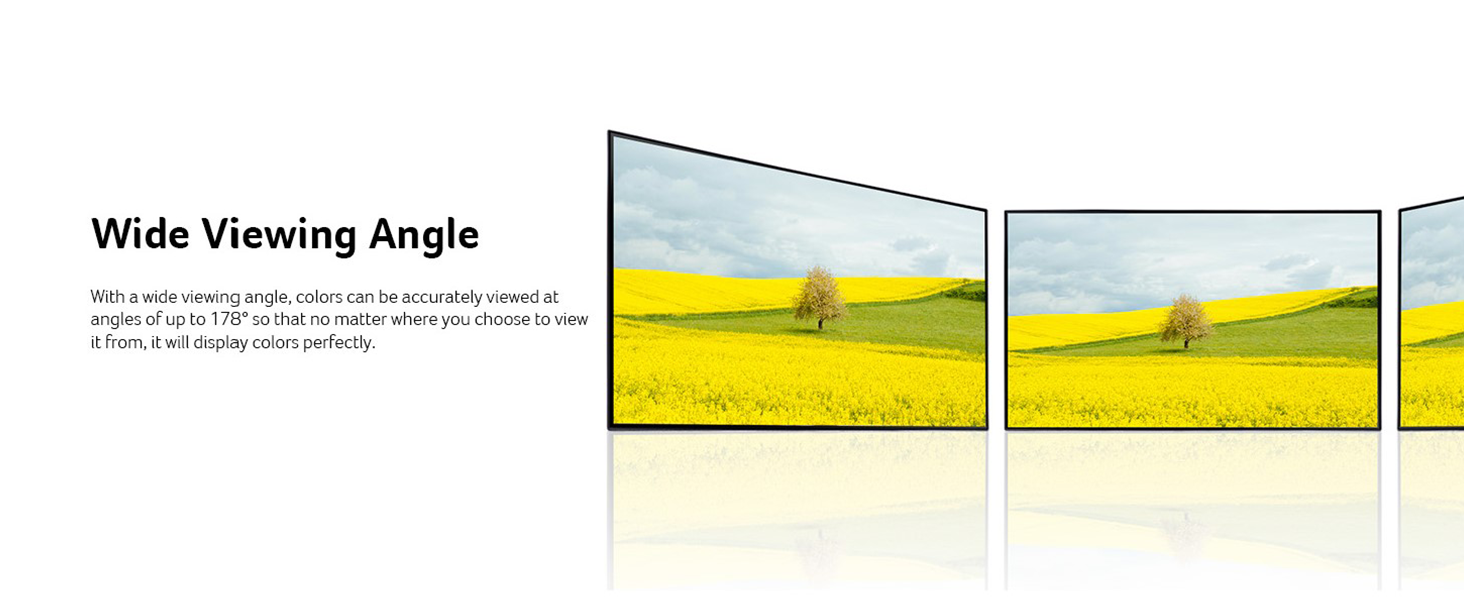
Сүрөт: A visual showing how an IPS panel maintains color accuracy and clarity across wide viewбурчтар.
5.6 Ultra-Thin Zero-Frame Design
The monitor features an ultra-thin profile (only 7.2mm) and a zero-frame bezel, maximizing screen space and making it ideal for multi-monitor setups. This sleek design also saves desk space.

Сүрөт: Жакын пландоо жагы view illustrating the ultra-thin design of the Acer monitor.
5.7 Acer VisionCare Technology
Acer VisionCare incorporates several features, including Blue Light Shield and Flicker-less technology, to reduce eye strain during prolonged usage. This is beneficial for users such as programmers, writers, and graphic designers.

Сүрөт: A user demonstrating the comfortable viewing experience provided by Acer VisionCare technology.
Видео: Acer 24-inch PC Monitor 100Hz with AMD FreeSync and Blue Light Filter. This video highlights the monitor's features, including its refresh rate, FreeSync, and eye-care technologies.
6. Техникалык тейлөө
Acer мониторуңуздун узак мөөнөттүү жана оптималдуу иштешин камсыз кылуу үчүн, төмөнкү тейлөө көрсөтмөлөрүн аткарыңыз:
- Экранды тазалоо: Экранды жумшак, түксүз чүпүрөк менен акырын сүртүңүз. өжөр тактар үчүн, жеңил гampчүпүрөктү суу же экранга арналган тазалоо эритмеси менен сүртүңүз. Катуу химиялык заттарды же абразивдүү материалдарды колдонуудан алыс болуңуз.
- Тазалоо Casing: Мониторду тазалоо үчүн жумшак, кургак чүпүрөктү колдонуңуз casing.
- Вентиляция: Ашыкча ысып кетүүнүн алдын алуу үчүн монитордун желдетүү тешиктери жабылбагандыгын текшериңиз.
- Өчүрүү: Мониторду тазалоодон мурун же узак убакыт бою колдонулбай турган болсо, аны дайыма өчүрүп, розеткадан сууруп алыңыз.
7. Кыйынчылыктарды
Эгерде сиз мониторуңузда көйгөйлөргө туш болсоңуз, төмөнкү жалпы көйгөйлөрдү чечүү кадамдарын караңыз:
- Кубат жок: Ensure the power cord is securely connected to both the monitor and the electrical outlet. Check if the power adapter is functioning correctly.
- Сигнал жок: Verify that the video cable (HDMI or VGA) is correctly connected to both the monitor and your computer/device. Ensure the correct input source is selected in the OSD menu.
- Жаркылдаган экран: Check the video cable for damage. Ensure your graphics card drivers are up to date. Adjust the refresh rate settings on your computer.
- Сүрөттүн сапаты начар: Adjust brightness, contrast, and color settings in the OSD menu. Ensure the display resolution on your computer matches the monitor's native resolution (1920x1080).
- Баскычтар жооп бербейт: Unplug the monitor's power cord, wait for a few seconds, and then plug it back in to reset the monitor.
If the issue persists after trying these steps, please contact Acer customer support.
8. Техникалык шарттар
| Өзгөчөлүк | Спецификация |
|---|---|
| Туруктуу экранды көрсөтүү өлчөмү | 23.8 дюйм |
| Screen Resolution | 1920x1080 (Full HD) |
| Max Screen Resolution | 1920 x 1080 пиксел |
| Бренд | Acer |
| Сериялар | SB242Y Ebi |
| Элементтин моделинин номери | SB242Y Ebi |
| Элемент Салмагы | 5.72 фунт |
| Продукциянын өлчөмдөрү | 7.44 x 21.22 x 15.67 дюйм |
| Түс | Кара |
| Тtage | 220 вольт |
| Screen Size | 23.8 дюйм |
| Аспект катышы | 16:9 |
| Screen Surface Description | Жылтырак |
| Жооп убактысы | 1мс VRB |
| Жаңыртуу ылдамдыгы | 100Hz (Using HDMI Port) |
| Жарыктык | 250 нит |
| Pixel Pitch | 0.274мм |
| Эргономикалык кыйшаюу | -5°тан 15°ка чейин |
| VESA Монтаждоо | Compliant (75 x 75mm) |
| Порттар | 1 x HDMI 1.4 Port & 1 x VGA Port |
9. Кепилдик жана колдоо
Кепилдик маалыматы жана техникалык колдоо үчүн продуктуңузга кошулган документтерди караңыз же расмий Acer колдоо бөлүмүнө баш багыңыз webсайт. Сатып алуу квитанциясын кепилдик дооматтары үчүн сатып алуунун далили катары сактаңыз.