Introduction
This manual provides comprehensive instructions for the Meliconi Gumbody Personal 2+ Remote Control, designed as a dedicated replacement for LG brand TV remote controls. It is ready to use without programming and offers all original infrared functions. The remote features an ergonomic design with an anti-shock rubber body for enhanced durability.

Image: The Meliconi Gumbody Personal 2+ Remote Control, black with various function buttons.
Жайгашуу
The Meliconi Gumbody Personal 2+ Remote Control is designed for immediate use with LG brand televisions. No complex programming or setup is required.
- Батареяларды салыңыз: Open the battery compartment cover on the back of the remote control. Insert two AAA batteries, ensuring correct polarity (+/-).
- Колдонууга даяр: Close the battery compartment. The remote control is now ready to operate your LG TV.

Image: The Meliconi Gumbody Personal 2+ Remote Control shown in its packaging, highlighting its "Ready to Use" feature.
Иштөө нускамалары
This remote control replicates all essential infrared functions of your original LG TV remote. Refer to the button layout below for specific functions.
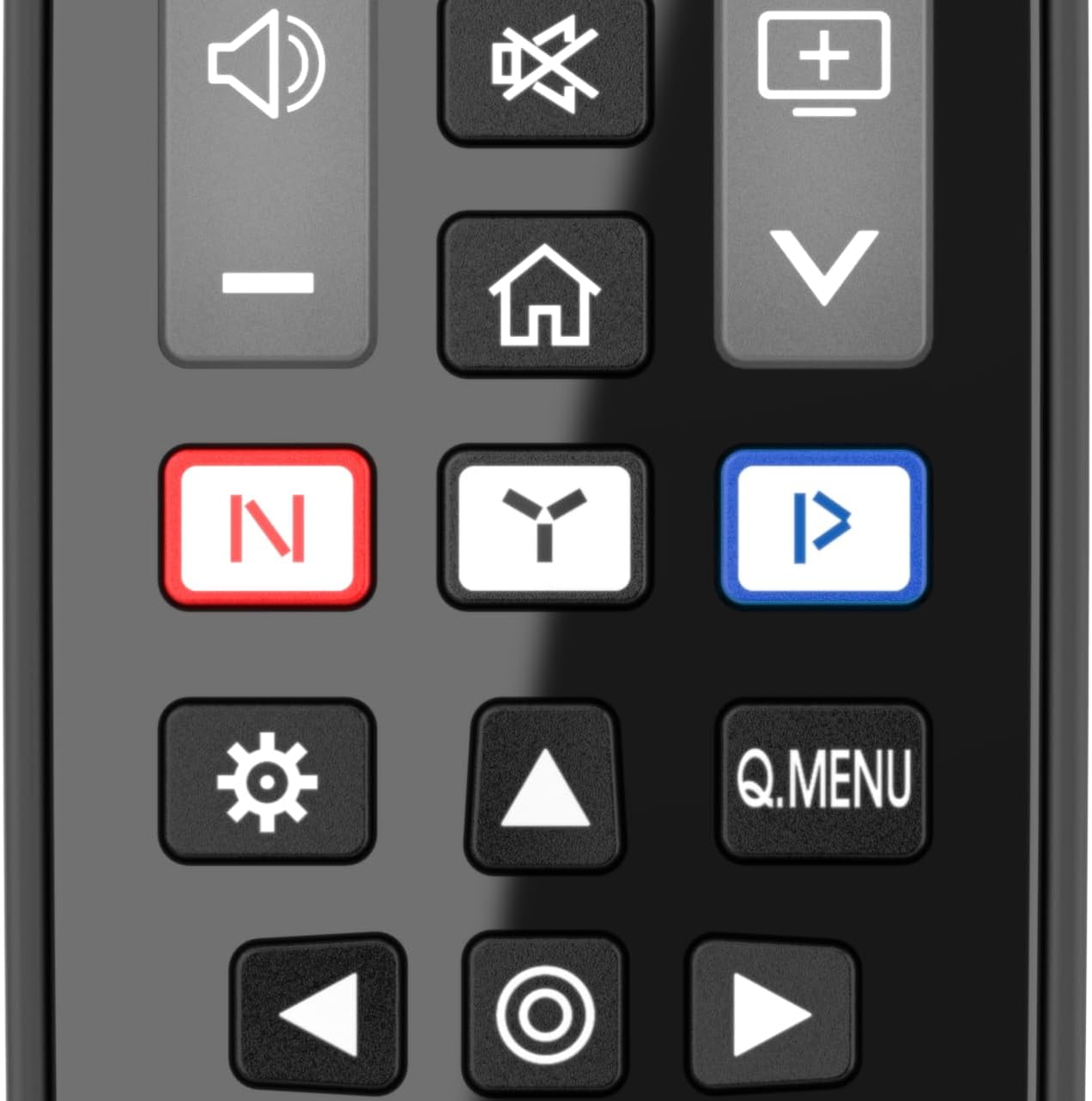
Сүрөт: жакын план view of the central buttons on the Meliconi Gumbody Personal 2+ Remote Control, showing navigation, volume, and channel controls.
Негизги функциялары:
- Кубат баскычы: Located at the top right, used to turn the TV on or off.
- Сан баскычтары (0-9): Түз канал тандоо үчүн.
- Үндү башкаруу (+/-): Телевизордун үнүн тууралайт.
- Канал өйдө/төмөн: Телеканалдарды ырааттуу түрдө алмаштырат.
- Навигация тактасы (өйдө/төмөн/сол/оң/ОК): Менюда навигация жана тандоо үчүн колдонулат.
- Артка/Чыгуу: Мурунку экранга кайтат же менюдан чыгат.
- Smart TV/Streaming Buttons: Dedicated buttons for quick access to major streaming platforms (e.g., Netflix, YouTube, Prime Video, Rakuten TV).
- LEARN Function: This remote can capture signals from other remote controls. This is particularly useful for controlling the volume of external audio devices like soundbars or home audio systems connected to your TV. Refer to the detailed user manual on the Meliconi website for specific instructions on using the LEARN function.
For a complete list of button functions and their corresponding original functions, please consult the specific tables available on the Meliconi webсайт.

Image: The Meliconi Gumbody Personal 2+ Remote Control resting on a couch next to a person using a game controller, demonstrating its use in a home entertainment setting.
Техникалык тейлөө
Туура кам көрүү алыстан башкаруу пультуңуздун узак мөөнөттүү иштешин жана оптималдуу иштешин камсыздайт.
- Тазалоо: Алыстан башкаруу пультун тазалоо үчүн жумшак, кургак чүпүрөктү колдонуңуз. Өтө кир болсо, бир азampen the cloth with water or a mild, non-abrasive cleaner. Avoid harsh chemicals or solvents.
- Батареяны алмаштыруу: Replace batteries when the remote's response becomes sluggish or stops working. Always replace both batteries simultaneously with new AAA batteries.
- Коргоо: The remote's ergonomic shape and soft rubber body are designed to protect it from minor bumps and falls. However, avoid dropping it from significant heights or exposing it to extreme temperatures or moisture.
- Сактагыч: Узак убакыт бою колдонулбаган учурда, агып кетүүнүн жана алыстан башкаруу пультуна зыян келтирилиши мүмкүн болгон нерселердин алдын алуу үчүн батарейкаларды алып салыңыз.

Image: The Meliconi Gumbody Personal 2+ Remote Control resting on a clean kitchen counter, illustrating its durable design suitable for various home environments.
Проблемаларды чечүү
Эгер сиз пультуңузда көйгөйлөргө туш болсоңуз, төмөнкү кадамдарды жасап көрүңүз:
- Алыстан жооп бербейт:
- Батареялар туура полярдуулук менен туура салынганын текшериңиз.
- Эски батареяларды жаңы AAA батареялары менен алмаштырыңыз.
- Алыстан башкаруу пульту менен телевизордун инфракызыл кабыл алгычынын ортосунда эч кандай тоскоолдуктар жок экенин текшериңиз.
- Confirm you are pointing the remote directly at the TV.
- Атайын баскычтар иштебейт:
- Verify that the button function is supported by your specific LG TV model.
- If using the LEARN function, re-perform the learning process for the problematic button.
- Интерференция:
- Bright sunlight or certain types of lighting can interfere with infrared signals. Try operating the remote in different lighting conditions.
If problems persist, please refer to the Meliconi website for further assistance or contact technical support.
Техникалык шарттар
| Өзгөчөлүк | Деталь |
|---|---|
| Модель номери | 806073 |
| Бренд | Meliconi |
| Шайкештик | Dedicated for LG brand Televisions |
| Өзгөчө өзгөчөлүк | No Programming Required, LEARN Function, Anti-Shock Rubber Body |
| Power Source | 2 x AAA Батареялар (киргизилген эмес) |
| Түс | Кара |
| Продукциянын өлчөмдөрү | 9.09 x 2.05 x 0.79 дюйм (23.09 x 5.21 x 2.01 см) |
| Элемент Салмагы | 4.2 унция (119 грамм) |
Кепилдик маалымат
For detailed warranty information regarding your Meliconi Gumbody Personal 2+ Remote Control, please refer to the documentation included with your purchase or visit the official Meliconi webсайт. Кепилдиктин шарттары аймакка жана сатуучуга жараша өзгөрүшү мүмкүн.
Колдоо
Meliconi provides comprehensive support resources for its products:
- Webсайтты колдоо: Visit the official Meliconi website for specific support resources, including key/function matching tables, the full user manual, video guides, and frequently asked questions (FAQs).
- Telephone Technical Assistance: Specialized telephone technical assistance is available. Please refer to the Meliconi website or product packaging for contact details relevant to your region.
For the most up-to-date support information, always consult the official Meliconi channels.


