1. Киришүү
This manual provides comprehensive instructions for the Upoty 4-in-1 Fiber OTDR & Power Meter, a portable fiber optic testing device. This versatile instrument integrates an Optical Time Domain Reflectometer (OTDR), Visual Fault Locator (VFL), Optical Power Meter (OPM), and Optical Light Source (OLS) into a single unit, designed for efficient fiber network construction, fault identification, length measurement, and power loss calculation.
Негизги өзгөчөлүктөр төмөнкүлөрдү камтыйт:
- Wide application for network construction, optical fiber breakpoint identification, optical cable length measurement, and relative optical power loss calculation.
- Durable ABS plastic housing for various environments.
- Optical power meter with 800-1650nm wavelength range, supporting 6 calibration wavelengths and a measurement range of -50~+26dBm.
- Equipped with a USB data interface, built-in 4400mAh lithium battery, and a 3.97-inch 800x480 IPS color touchable screen for easy operation.
- Portable design for practical multiple usages.
2. Орнотуу жана алгачкы колдонуу
2.1 Кутудан чыгаруу жана компоненттер
Кутучадан бардык компоненттерди этияттык менен чыгарыңыз. Төмөндө көрсөтүлгөн бардык нерселердин бар экенин текшериңиз:
- Upoty 4-in-1 Fiber OTDR & Power Meter Mainframe
- Заряддагыч
- Аспаптар үчүн баштык
- Артка кайыш
- OTDR SC адаптери
- OPM SC Adapter
- Көрсөтмө (бул документ)
- CD-ROM
- USB маалымат кабели
- Cleaning Cotton Swabs

Figure 2.1: ашыкview of the Upoty 4-in-1 Fiber OTDR & Power Meter and its included accessories.
Кутудан чыгаруу жана баштапкы орнотуу боюнча визуалдык колдонмо үчүн төмөнкү видеону караңыз:
Видео 2.1: кутудан чыгаруу жана андан ашыкview of the Upoty 4-in-1 Fiber OTDR & Power Meter components. This segment demonstrates the contents of the product packaging, including the main unit, charger, and various accessories.
2.2 Аппаратты заряддоо
The device is equipped with a built-in 4400mAh lithium battery. Before first use, ensure the device is fully charged. Connect the provided charger to the device's charging port and plug it into a 100-240V AC power outlet. The charging indicator will illuminate during charging and turn off when fully charged.
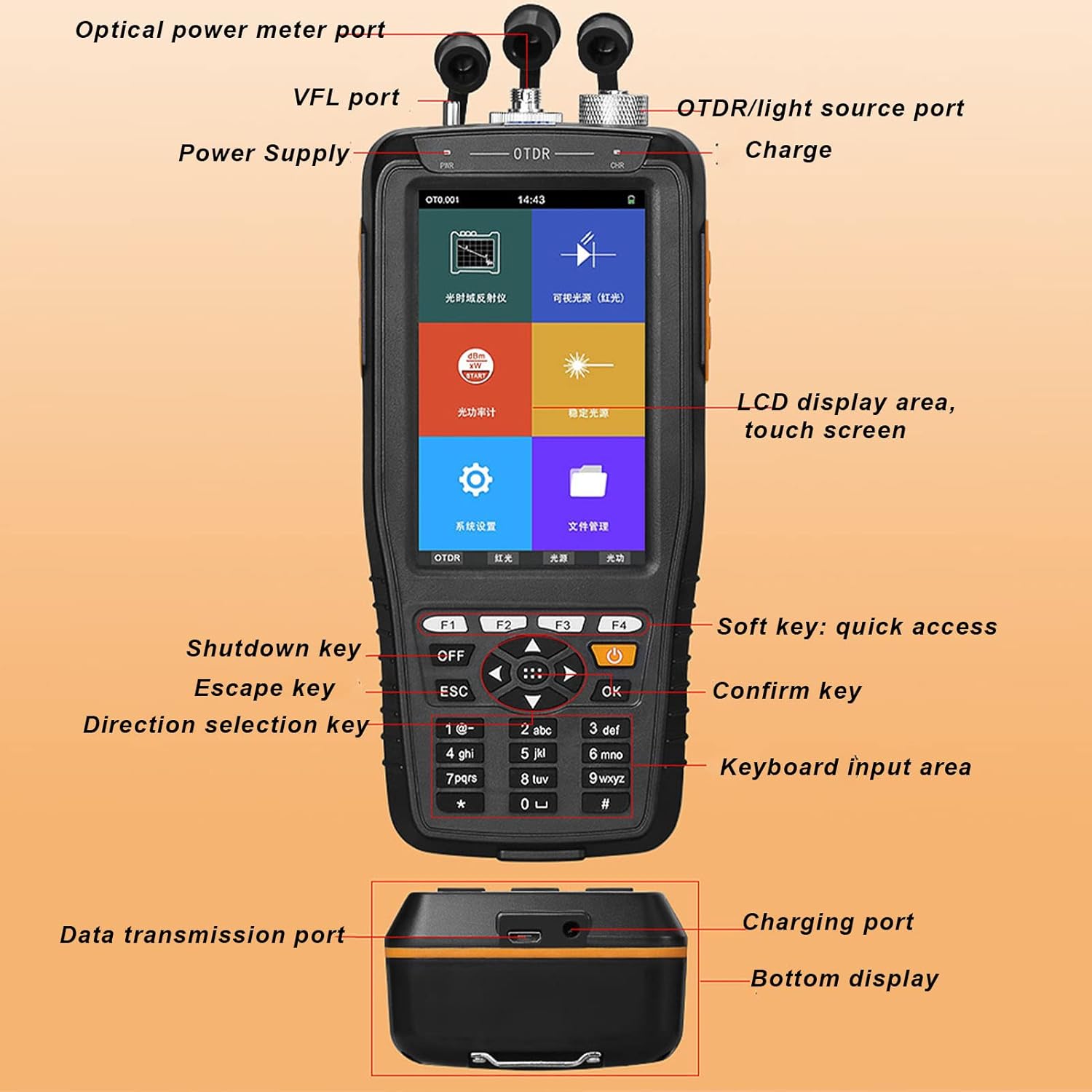
Figure 2.2: The device's battery compartment, highlighting the 4400mAh lithium battery.
2.3 Connecting Adapters
The OTDR and OPM ports support SC/FC adapters. Ensure the correct adapter is securely connected for accurate measurements. The VFL port is compatible with a 2.5mm interface.
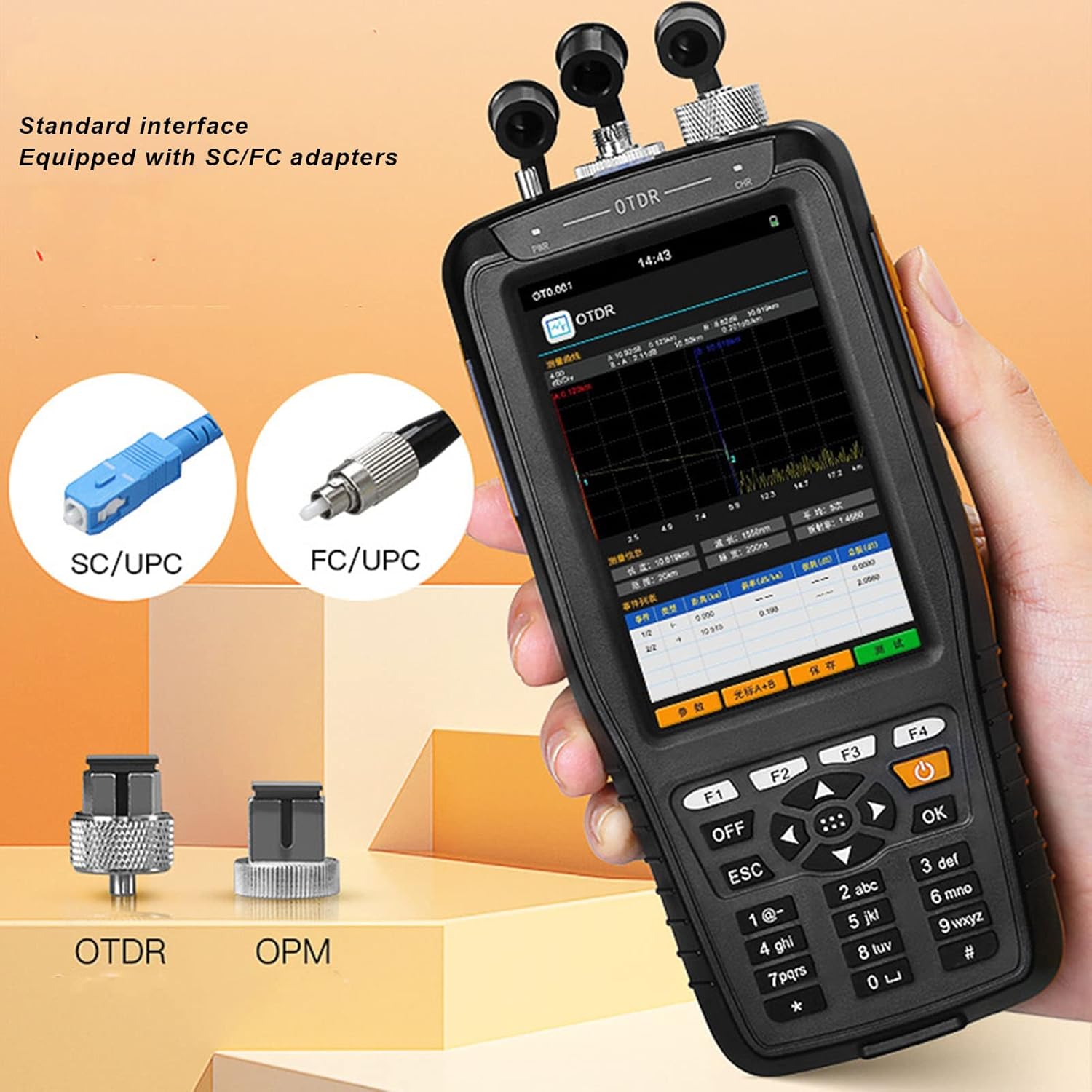
Figure 2.3: Standard interface adapters for the OTDR and OPM ports, showing SC/UPC and FC/UPC types.
3. Иштөө нускамалары
3.1 Түзмөк бүттүview жана Навигация
The device features a 3.97-inch 800x480 IPS color touchable screen and a physical keypad for navigation. You can interact with the device using either the touch screen or the physical buttons.
3.1-сүрөт: Детальдуу view of the device's interface and ports.
3.2 OTDR Function
The OTDR (Optical Time Domain Reflectometer) function is used to characterize optical fibers, measure fiber length, and locate faults. To use the OTDR function, select "OTDR" from the main menu. Ensure the fiber is properly connected to the OTDR port. The device will display a trace of the fiber, showing events like splices, connectors, and breaks.

Figure 3.2: Main menu of the device, showing access to various functions.
Watch the video below for a demonstration of the OTDR function:
Video 3.1: Demonstration of the OTDR test function, showing how to initiate a test and interpret the fiber trace.
3.3 Visual Fault Locator (VFL) функциясы
The VFL function emits a visible red laser light into the fiber, allowing for quick identification of breaks, bends, or poor connections over short distances. Select "VFL" from the main menu and connect the fiber to the VFL port. The red light will be visible at the fault location.

Figure 3.3: Multi-function display highlighting the VFL (Red Light) capability.
See the VFL function in action:
Video 3.2: Demonstration of the Visual Fault Locator (VFL) function, showing how the red light helps identify fiber faults.
3.4 Optical Power Meter (OPM) Function
The OPM measures the optical power of a fiber optic signal. Select "OPM" from the main menu. The device supports 6 calibration wavelengths (850nm, 1300nm, 1310nm, 1490nm, 1550nm, 1625nm) and has a measurement range of -50~+26dBm. Ensure the correct wavelength is selected for accurate readings.
Observe the OPM function demonstration:
Video 3.3: Demonstration of the Optical Power Meter (OPM) function, showing how to select wavelengths and read power measurements.
3.5 Optical Light Source (OLS) Function
The OLS provides a stable light source for testing fiber optic cables, often used in conjunction with an OPM for attenuation measurements. Select "OLS" from the main menu. The light source offers optional 1550nm wavelength.
See the OLS function in operation:
Video 3.4: Demonstration of the Stable Light Source (OLS) function, showing wavelength selection.
3.6 Маалыматтарды башкаруу
The device supports data saving in SOR format and allows for keyboard input to edit file names and line numbers. You can access saved data through the "File" menu. The USB data interface allows for data transmission to a computer.

3.4-сүрөт: Жогорку view of the device showing the various ports for fiber connections.
4. Техникалык тейлөө
4.1 Тазалоо
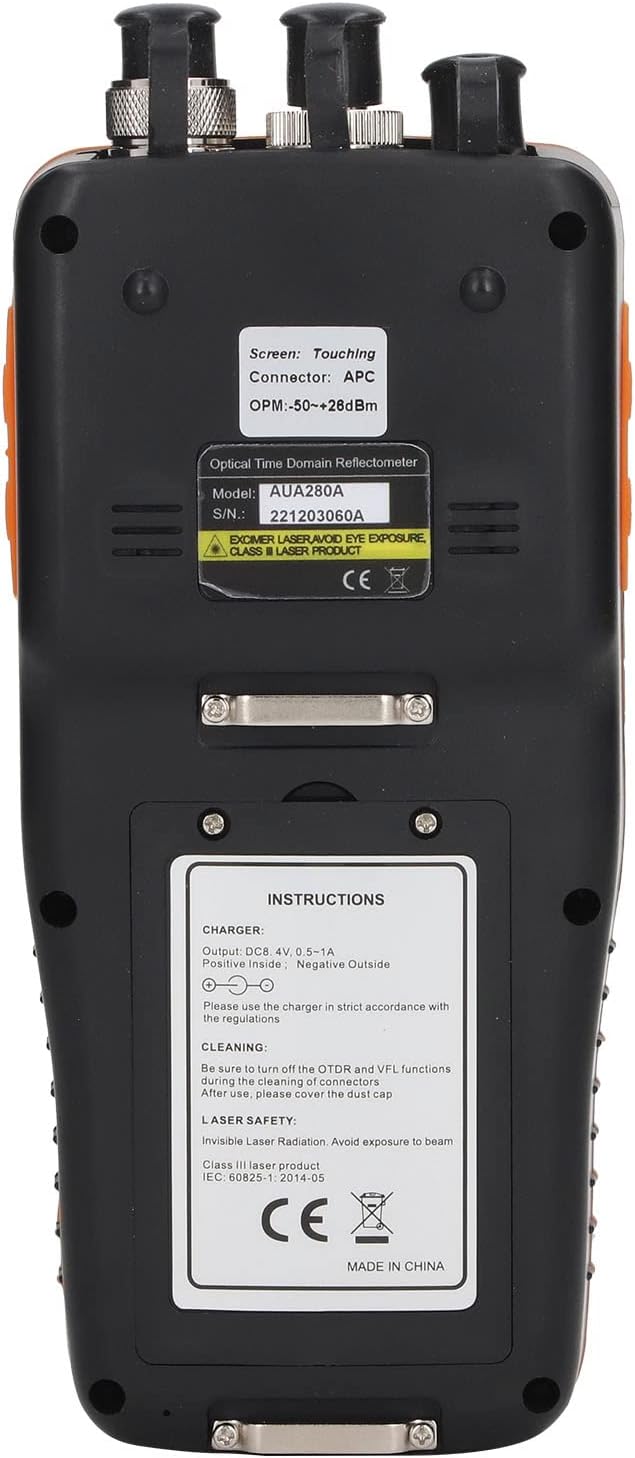
Regular cleaning of the optical ports and connectors is crucial for accurate measurements and device longevity. Use the provided cleaning cotton swabs or other approved fiber optic cleaning tools. Always turn off the OTDR and VFL functions before cleaning to prevent eye exposure to laser radiation. After cleaning, ensure to cover the dust caps on all ports.

Figure 4.1: Back panel of the device with important instructions, including cleaning guidelines.
4.2 Батареяга кам көрүү
To maximize battery life, avoid fully discharging the battery frequently. Recharge the device when the battery level is low. If the device will not be used for an extended period, charge it to approximately 50% and store it in a cool, dry place.
4.3 Жалпы кам көрүү
Store the device in its instrument bag when not in use to protect it from dust and physical damage. Avoid exposing the device to extreme temperatures or humidity.
5. Кыйынчылыктарды
This section provides solutions to common issues you might encounter with your Upoty 4-in-1 Fiber OTDR & Power Meter.
| Көйгөй | Мүмкүн себеп | Чечим |
|---|---|---|
| Түзмөк күйбөйт. | Батареянын аздыгы; Кубат баскычы туура басылган жок. | Charge the device fully. Press and hold the power button for a few seconds. |
| Inaccurate OPM/OTDR readings. | Dirty optical connectors; Incorrect wavelength selected; Damaged fiber. | Clean all optical connectors. Ensure the correct wavelength is selected for OPM. Inspect the fiber for damage. |
| VFL жарыгы күңүрт же көрүнбөйт. | Dirty VFL port; Fiber not properly connected; VFL function not activated. | Clean the VFL port. Ensure the fiber is securely connected. Activate the VFL function from the menu. |
| Сенсордук экран жооп бербейт. | Temporary software glitch; Screen protector interference. | Restart the device. If a screen protector is installed, ensure it is properly applied or try removing it temporarily. Use physical buttons if touch is completely unresponsive. |
Эгер бул чечимдерди колдонууга аракет кылгандан кийин көйгөй чечилбесе, кошумча жардам алуу үчүн кардарларды колдоо бөлүмүнө кайрылыңыз.
6. Техникалык шарттар
| Өзгөчөлүк | Деталь |
|---|---|
| Модель номери | WALFRONTnvmfsr1ioe |
| Power Source | Battery Powered (Built-in 4400mAh Lithium Battery) |
| Мин. Operating Voltage | 100 вольт (AC) |
| Жогорку температура рейтинги | 85 градус |
| Өлчөө түрү | Optical Power Meter, OTDR, VFL, OLS |
| Экран | 3.97-inch 800x480 IPS Color Touchable Screen |
| Wavelength Range (OPM) | 800-1650нм |
| Measurement Range (OPM) | -50~+26дБм |
| OTDR Test Distance | Up to 60km (as per product images) |
| VFL чыгаруу күчү | 10mW (as per product images) |
| Жарык булагы толкун узундугу | 1550nm (optional) |
| Продукциянын өлчөмдөрү | 8.62 x 7.36 x 3.9 дюйм (Пакеттин өлчөмдөрү) |
| Элемент Салмагы | 1.85 фунт |
| Келип чыккан өлкө | Кытай |
6.1-сүрөт: Түзмөктүн өлчөмдөрү.
7. Кепилдик жана колдоо
For information regarding warranty coverage, technical support, or service, please refer to the official Walfront website or contact their customer service directly. Contact details are typically provided on the product packaging or the manufacturer's official online channels.
