Introduction
The Edifier CX7 is an active 2.1 home entertainment system designed to deliver high-quality audio for various devices, including televisions, personal computers, and notebooks. This system features Bluetooth V5.0 connectivity, an 8-inch subwoofer, and an infrared remote control for convenient operation. This manual provides essential information for setting up, operating, and maintaining your CX7 system.
Пакеттин мазмуну
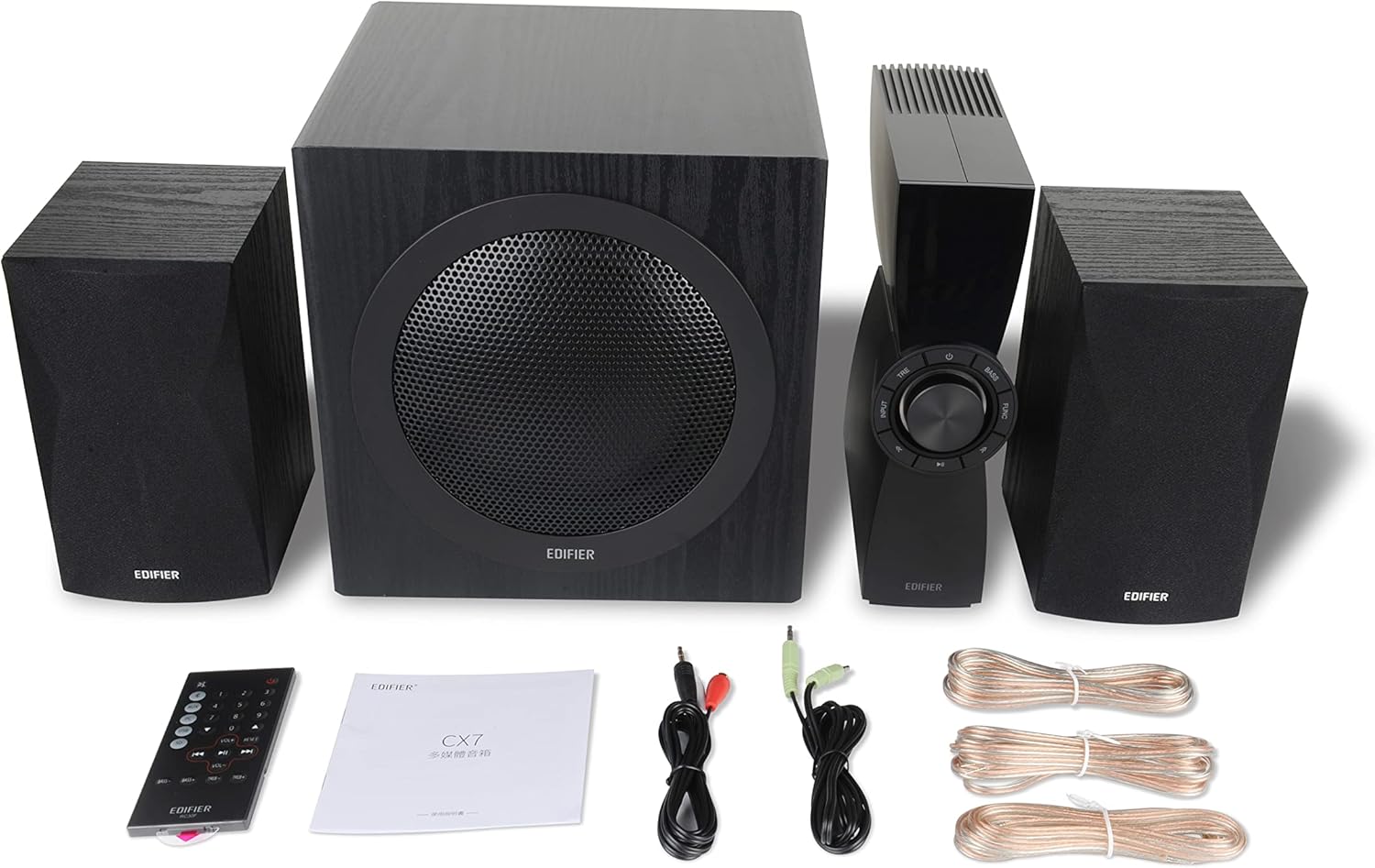
Figure 1: Edifier CX7 System Components
Төмөндө тизмеленген нерселердин баары пакетиңизге камтылганын текшериңиз:
- Сабвуфер (1)
- Satellite Speakers (2)
- Control Unit (1)
- Infrared Remote Control (1)
- 3.5mm to RCA Audio Cable (1)
- RCA to RCA Audio Cable (1)
- Speaker Connection Cables (2)
- Колдонуучунун колдонмосу (1)
Орнотуу колдонмосу
1. Жайгаштыруу
Position the subwoofer on the floor, preferably in a corner or near a wall for optimal bass response. Place the satellite speakers on either side of your listening area, equidistant from the listener, and at ear level if possible. Ensure the control unit is easily accessible.

Figure 2: Recommended System Placement
2. Динамиктерди бириктирүү
Connect the satellite speakers to the speaker output terminals on the rear of the control unit using the provided speaker cables. Ensure correct polarity (red to red, black to black) for each speaker.
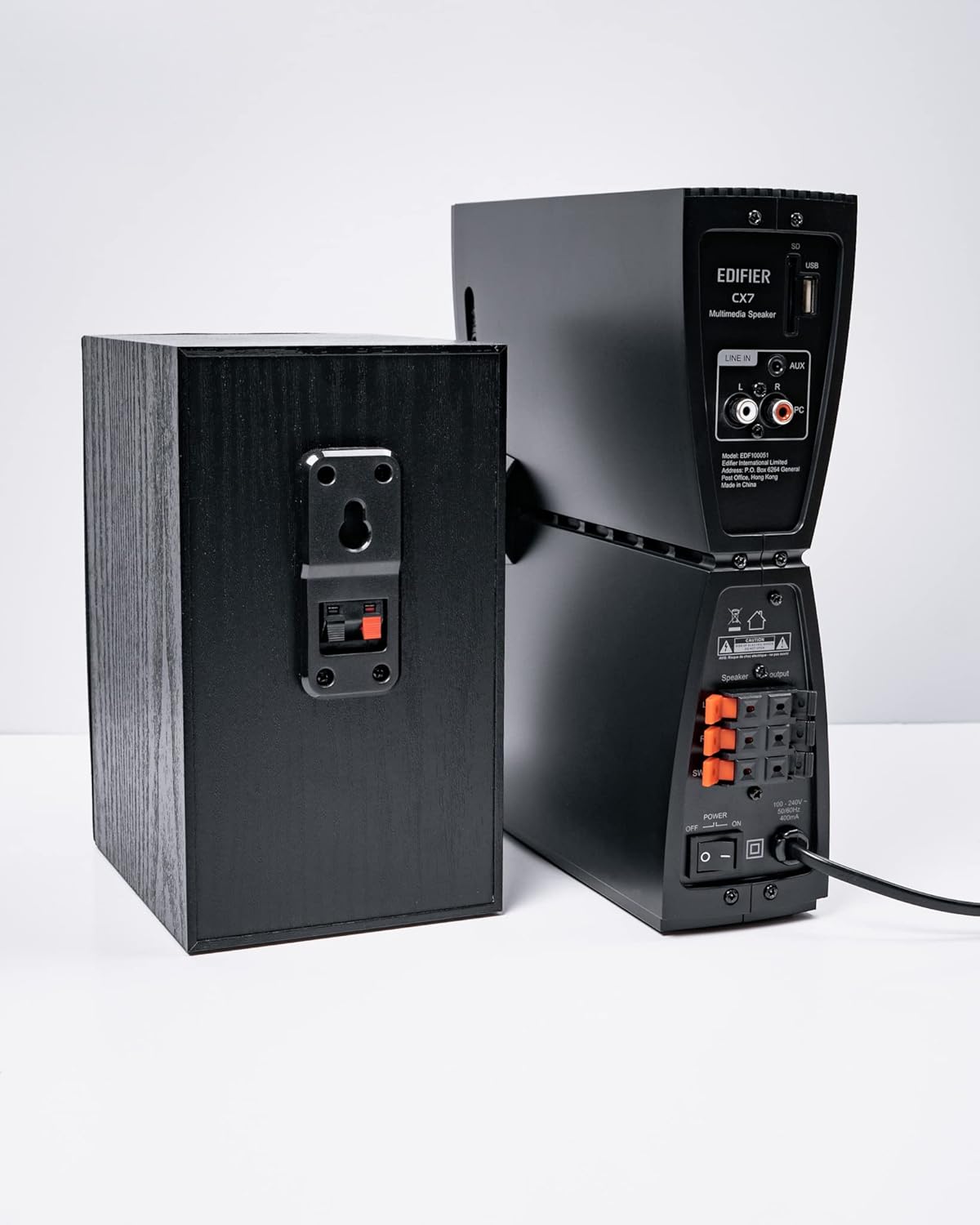
3-сүрөт: Динамиктин байланыштары
3. Аудио булактарын туташтыруу
The CX7 system supports multiple audio input options:
- AUX киргизүү: Use the 3.5mm to RCA audio cable to connect devices like smartphones, tablets, or computers to the AUX input on the control unit.
- PC киргизүү: Use the RCA to RCA audio cable to connect your PC's audio output to the PC input on the control unit.
- Bluetooth: Зымсыз туташуу үчүн, Иштетүү нускамаларынын астындагы "Bluetooth жупташтыруу" бөлүмүнө кайрылыңыз.
4. Power Connection
Connect the power cable to the control unit and then plug it into a standard wall outlet. Turn on the power switch located on the rear of the control unit.
Иштөө нускамалары
1. Күйгүзүү/өчүрүү
After connecting the power, press the power button on the control unit or the remote control to turn the system on or off. The display on the control unit will illuminate when powered on.

Figure 4: Control Unit Display
2. Киргизүүнү тандоо
Press the "INPUT" button on the control unit or the remote control to cycle through available audio sources: AUX, PC, and Bluetooth. The selected input will be displayed on the control unit's screen.

Figure 5: Control Knob and Input Buttons
3. Үндү башкаруу
Rotate the large knob on the control unit clockwise to increase volume and counter-clockwise to decrease it. Alternatively, use the "VOL+" and "VOL-" buttons on the remote control.
4. Бас жана жогорку жыштыктарды жөндөө
Press the "BASS" or "TRE" (Treble) buttons on the control unit or remote control, then rotate the main knob to adjust the respective levels. The display will show the current bass/treble setting.
5. Bluetooth Жупташтыруу
- Select the Bluetooth input on the CX7 system. The display will show "BT" and flash, indicating it's in pairing mode.
- Түзмөгүңүздө (смартфон, планшет ж.б.) Bluetooth иштетиңиз жана жеткиликтүү түзмөктөрдү издеңиз.
- Select "EDIFIER CX7" from the list of found devices.
- Once paired, the "BT" indicator on the CX7 display will stop flashing and remain solid.
To disconnect a Bluetooth device, press and hold the "FUNC" button on the control unit or the Bluetooth button on the remote control for a few seconds.
6. Алыстан башкаруу функциялары

6-сүрөт: Инфракызыл алыстан башкаруу
The remote control provides convenient access to all major functions:
- Күч: Системаны күйгүзөт/өчүрөт.
- Киргизүүнү тандоо: Cycles through AUX, PC, Bluetooth.
- Көлөмү: Башкы үнүн тууралайт.
- Бас/жогорку: Бас жана жогорку деңгээлдерди тууралайт.
- Үнсүз: Аудионун үнүн басуу/ачуу.
- Ойнотуу башкаруулары: Play/Pause, Previous/Next track (for Bluetooth mode).
Техникалык тейлөө
- Тазалоо: Use a soft, dry cloth to clean the surfaces of the speakers and control unit. Do not use liquid cleaners or abrasive materials.
- Вентиляция: Ensure adequate ventilation around the control unit and subwoofer to prevent overheating. Do not block ventilation openings.
- Курчап турган чөйрө: Системаны өтө жогорку температурага, нымдуулукка, чаңга же түз күн нуруна дуушар кылбаңыз.
- Өчүрүү: If the system will not be used for an extended period, disconnect it from the power outlet.
Проблемаларды чечүү
| Көйгөй | Мүмкүн себеп | Чечим |
|---|---|---|
| Үн жок |
|
|
| Bluetooth байланышы ишке ашпай калды |
|
|
| Бурмаланган үн |
|
|
Техникалык шарттар
| Өзгөчөлүк | Деталь |
|---|---|
| Модель аты | CX7 |
| Динамик түрү | 2.1 Динамик системасы |
| Байланыш технологиясы | Bluetooth |
| Зымсыз байланыш технологиясы | Bluetooth V5.0 |
| Bluetooth диапазону | 10 метр |
| Аудио чыгаруу режими | Курчап |
| Динамиктин максималдуу чыгаруу күчү | 69 Ватт |
| Сабвуфердин туташуу технологиясы | Зымсыз |
| Вуфердин диаметри | 8 дюйм |
| Материал | Полипропилен |
| Түс | Кара |
| Продукциянын өлчөмдөрү | 16.93"D x 17.72"W x 13.39"H |
| Элемент Салмагы | 29 фунт (13.2 килограмм) |
| Power Source | Электр зымдары |
| Controller Type | Алыстан башкаруу |
| Сунушталган Колдонуулар | Телевизорлор үчүн, компьютерлер үчүн, смартфондор же планшеттер үчүн |
Кепилдик жана колдоо
For warranty information and technical support, please refer to the warranty card included with your product or visit the official Edifier webсайт. Сатып алуу квитанциясын кепилдик дооматтары үчүн сатып алуунун далили катары сактаңыз.
Edifier расмий Webсайт: www.edifier.com


