1. Киришүү
Welcome to the instruction manual for your Zenwire USB-C Hub Adapter EB7. This guide provides essential information for setting up, operating, and maintaining your device to ensure optimal performance.
The Zenwire EB7 is a versatile 8-in-1 USB-C hub designed to expand the connectivity of your USB-C enabled devices. It offers a comprehensive range of ports for display output, high-speed data transfer, stable wired networking, and efficient power delivery.

1-сүрөт: The Zenwire USB-C Hub Adapter EB7, shown alongside its packaging, highlighting its compact design and multiple connectivity options.
2. Продукциянын өзгөчөлүктөрү
The Zenwire EB7 USB-C Hub Adapter offers a robust set of features to enhance your device's connectivity:
- Advanced Display Output: Supports Display Port resolutions up to 8K at 60Hz, 4K at 144Hz, 2K WQHD at 144Hz, and Full HD at 240Hz.
- Fast Ethernet: Туруктуу зымдуу тармак байланышын камсыз кылат.
- Power Delivery 3.0: Supports up to 100W for efficient charging of your host device.
- Бир нече USB порттору: Includes 2x USB 3.0 and 1x USB 2.0 ports for various peripherals.
- Интеграцияланган карта окугуч: Features dedicated slots for SD and Micro SD memory cards.
- Компакт жана көчмө: Lightweight design (approximately 61 grams) for easy transport.
- Туруктуу курулуш: Housed in a robust aluminum casing.
- Кеңири шайкештик: Works with Windows, macOS (including Macbook M1/M2), Linux, iOS, and Android devices.

2-сүрөт: Жакын план view of the Zenwire USB-C Hub Adapter EB7, demonstrating its various ports in use with connected USB drives and an HDMI adapter, along with SD and Micro SD cards.
3. Пакеттин мазмуну
Пакетиңизде бардык буюмдар бар экенин текшериңиз:
- Zenwire USB-C Hub Adapter EB7
- Көрсөтмө (бул документ)
4. Түзмөк бүттүview жана порттор
The Zenwire EB7 hub integrates the following ports:
- 1x Display Port: Supports high-resolution video output up to 8K@60Hz, 5K@120Hz, 4K@144Hz, 2K WQHD@144Hz, and Full HD@240Hz.
- 2 USB 3.0 порттору: For connecting high-speed USB peripherals and data transfer.
- 1x USB 2.0 порту: Ideal for connecting standard USB devices such as keyboards, mice, or webкамералар.
- 1x USB-C Power Delivery (PD) порту: Allows charging of your host device with up to 100W power input.
- 1x SD Card Slot: For standard Secure Digital memory cards.
- 1x Micro SD Card Slot: For smaller Micro Secure Digital memory cards.
- 1x Fast Ethernet (RJ45) Port: Provides a stable wired network connection at speeds up to 100 Mbps.

3-сүрөт: Zenwire USB-C Hub Adapter EB7 with all its ports clearly labeled for identification.
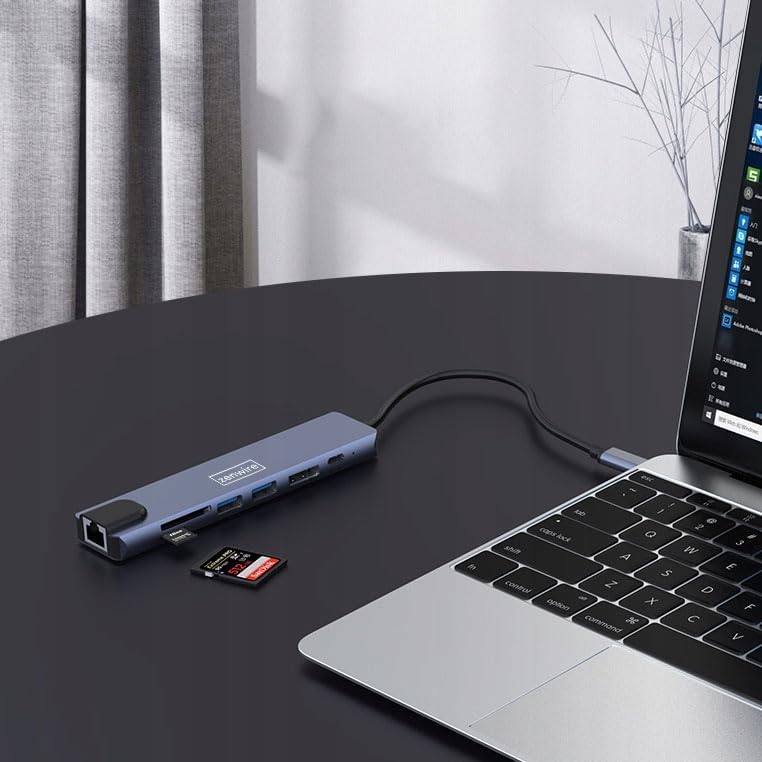
4-сүрөт: The Zenwire USB-C Hub Adapter EB7 connected to a laptop, with an SD card clearly inserted into its slot, demonstrating the card reader function.
5. Орнотуу колдонмосу
Follow these steps to set up your Zenwire EB7 hub:
- Хабды туташтыруу: Plug the USB-C connector of the Zenwire EB7 hub firmly into an available USB-C port on your laptop, tablet, or smartphone. Ensure the USB-C port on your host device supports DisplayPort Alternate Mode for video output.
- Перифериялык түзүлүштөрдү туташтыруу:
- Дисплей: Connect a Display Port cable from the hub's Display Port to your external monitor or TV.
- USB түзмөктөрү: Plug your USB devices (e.g., mouse, keyboard, USB drive) into the USB 3.0 or USB 2.0 ports.
- Эстутум карталары: Insert your SD or Micro SD card into the corresponding slot.
- Тармак: Connect an Ethernet cable to the RJ45 port for a stable wired internet connection.
- Кубат жеткирүү: If your host device requires charging, connect your USB-C power adapter to the hub's USB-C PD port. This allows your device to charge while using the hub.
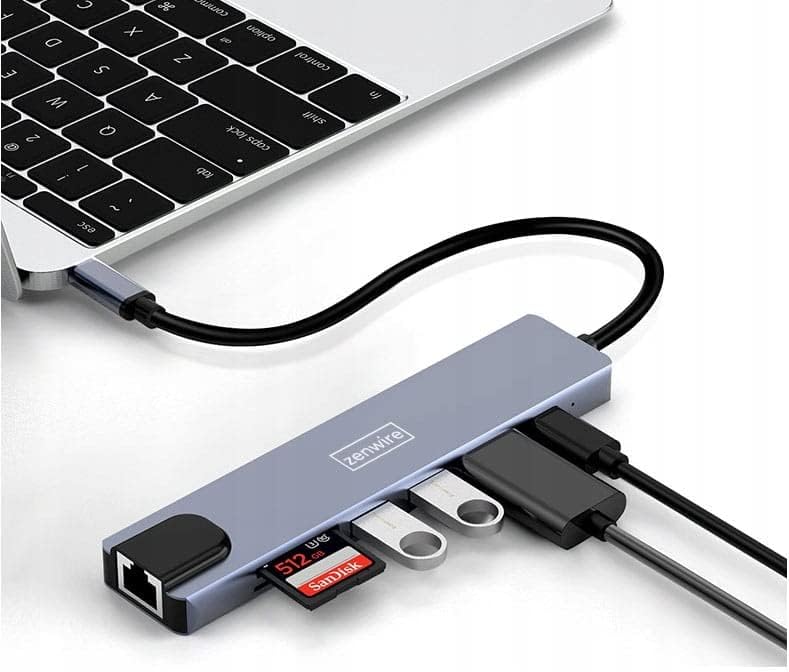
5-сүрөт: The Zenwire USB-C Hub Adapter EB7 connected to a laptop, showcasing its functionality with multiple USB flash drives and an SD card inserted into its respective slots.

6-сүрөт: The Zenwire USB-C Hub Adapter EB7 connected to a laptop, with a power adapter plugged into the hub's Power Delivery port and a power strip, illustrating its charging capability.
6. Иштөө нускамалары
6.1 Display Output
The Display Port allows you to connect an external monitor or projector. The hub supports various resolutions and refresh rates. Ensure your display and Display Port cable support the desired resolution and refresh rate for optimal performance.
- MirrorMode: Duplicate your host device's screen onto the external display.
- Кеңейтилген режим: Extend your desktop across multiple screens, allowing for more workspace.
To configure display settings (e.g., resolution, refresh rate, mirror/extend), refer to your operating system's display preferences (e.g., Windows Display Settings, macOS System Preferences).

7-сүрөт: A laptop connected to a large external monitor via the Zenwire USB-C Hub Adapter EB7, illustrating its display output capability for an extended or mirrored desktop.
6.2 Маалыматтарды өткөрүү
Utilize the USB 3.0 ports for high-speed data transfer with compatible devices such as external hard drives or high-speed flash drives. The USB 2.0 port is suitable for standard peripherals that do not require high bandwidth.
6.3 Card Reader Functionality
Insert your SD or Micro SD cards into their respective slots. The cards will appear as removable drives on your host device, allowing you to access, transfer, and manage files.
6.4 Тармактык туташуу
The Fast Ethernet port provides a stable wired network connection. Once an Ethernet cable is connected, your host device should automatically detect the network and establish an internet connection.
6.5 Электр энергиясын жеткирүү
The USB-C PD port allows you to charge your host device while simultaneously using the hub's other functions. Connect your original USB-C power adapter to this port. The hub supports up to 100W power delivery, ensuring efficient charging for most compatible devices.
7. Шайкештик
The Zenwire EB7 USB-C Hub Adapter is designed for broad compatibility with various devices and operating systems:
- Операциялык системалар: Windows, macOS (including Macbook M1/M2), Linux, iOS (for compatible iPad models), Android (for compatible smartphones and tablets, including Samsung DEX).
- Түзмөктөр: Laptops, tablets, and smartphones equipped with a full-featured USB-C port that supports DisplayPort Alternate Mode and Power Delivery.

8-сүрөт: The Zenwire USB-C Hub Adapter EB7 connected to both a smartphone and a tablet, highlighting its compatibility with mobile devices for expanded connectivity.
8. Техникалык шарттар
| Өзгөчөлүк | Деталь |
|---|---|
| Display Port Resolution | 8K@60Hz, 5K@120Hz, 4K@144Hz, 2K WQHD@144Hz, Full HD@240Hz |
| USB порттору | 2x USB 3.0, 1x USB 2.0 |
| Card Reader | SD карта уячасы, Micro SD карта уячасы |
| Ethernet | Fast Ethernet (100 Mbps) |
| Power Delivery | USB-C PD 3.0, up to 100W |
| Өлчөмдөрү (L x W x Y) | Болжол менен 142мм x 32.4мм x 11мм |
| Кабелдин узундугу | Болжол менен 150 мм |
| Салмагы | Болжол менен 61 грамм |
| Материал | Алюминий |
| Түс | Space Gray |
| Колдоого алынган операциялык системалар | Windows, macOS, Linux, iOS, Android |

9-сүрөт: A technical diagram illustrating the precise dimensions of the Zenwire USB-C Hub Adapter EB7, including its length, width, height, and cable length.
9. Техникалык тейлөө
To ensure the longevity and optimal performance of your Zenwire EB7 hub, please follow these maintenance guidelines:
- Тазалоо: Keep the hub clean and free from dust. Use a soft, dry, lint-free cloth for cleaning. Avoid using liquid cleaners or abrasive materials.
- Экологиялык шарттар: Аппаратты экстремалдык температурага, жогорку нымдуулукка же тике күн нуруна тийгизүүдөн сактаңыз.
- Колдонуу: Handle the hub with care. Do not drop it or subject it to strong impacts.
- Демонтаж: Do not attempt to disassemble or repair the hub yourself. This may void your warranty and could cause damage.
- Сактагыч: Disconnect the hub from your devices and store it in a cool, dry place when not in use for extended periods.
10. Кыйынчылыктарды
If you encounter issues with your Zenwire EB7 hub, please refer to the following troubleshooting tips:
10.1 Display Output жок
- Туташуу текшерүү: Ensure the USB-C connection to your host device is secure and fully inserted.
- Кабелдик текшерүү: Verify that the Display Port cable is correctly connected to both the hub and the external monitor. Try a different cable if available.
- Host Device Support: Confirm that your host device's USB-C port supports video output (DisplayPort Alternate Mode). Not all USB-C ports have this capability.
- Монитор киргизүү: Ensure your monitor is set to the correct input source (e.g., Display Port).
- Драйвер жаңыртуу: Update your graphics drivers on your host device to the latest version.
10.2 USB түзмөктөрү таанылган жок
- Туура киргизүү: USB түзмөктөрү хабдын портторуна туура салынганын текшериңиз.
- Direct Connection Test: Try connecting the USB device directly to your host device to confirm its functionality.
- Энергияга талаптар: Some high-power USB devices may require external power. Ensure the hub's Power Delivery port is connected to a power source if needed.
10.3 Тармактын ылдамдыгы жай
- Ылдамдыкты чектөө: The Fast Ethernet port supports speeds up to 100 Mbps. If you require Gigabit Ethernet speeds, this hub may not meet that requirement.
- Кабель жана туташуу: Check your Ethernet cable for damage and ensure a secure connection to both the hub and your router/modem.
- Драйвер жаңыртуу: Ensure network drivers are up to date on your host device.
10.4 Host Device Not Charging
- Кубат адаптерин туташтыруу: USB-C кубат адаптериңиз хабдын USB-C PD портуна туташып турганын текшериңиз.
- Power Adapter Functionality: Verify that your power adapter is functional and provides sufficient wattage (up to 100W supported by the hub).
- Host Device Support: Check if your host device supports charging via its USB-C port.
11. Кепилдик жана колдоо
For detailed warranty information and technical support, please refer to the official Zenwire website or contact your retailer. It is recommended to retain your proof of purchase for any warranty claims.


