1. Киришүү
This manual provides essential information for the safe and efficient operation of your Strong 32HF2003 32-inch HD LED TV. Please read it thoroughly before using the product and retain it for future reference.
The Strong 32HF2003 is a 32-inch HD LED television featuring USB media playback and Electronic Program Guide (EPG) functionality. It is designed for home entertainment and offers various connectivity options.
2. Коопсуздук нускамалары
Өрт, электр шок жана жаракат алуу коркунучун азайтуу үчүн бул телевизорду колдонууда ар дайым негизги коопсуздук чараларын сактаңыз.
- Телевизорду жамгырга же нымга тийгизбеңиз.
- Желдетүүчү тешиктерди жаппаңыз.
- Электр шнурунун туура жерге туташтырылышын камсыз кылыңыз.
- Чагылган бороондо же көпкө чейин пайдаланылбай турганда сыналгыны розеткадан ажыратыңыз.
- Бардык тейлөөлөрдү квалификациялуу тейлөө кызматкерлерине тапшырыңыз.
3. Кутуда эмне бар
Upon unpacking, ensure all items are present and undamaged:
- Strong 32HF2003 32-inch HD LED TV
- Алыстан башкаруу (2 AAA батарейка талап кылынат, камтылган эмес)
- Stand (for tabletop placement)
- Электр кабели
- Колдонуучунун Колдонмосу (бул документ)

Image: The Strong 32HF2003 television displayed with its remote control, illustrating the main components included.
4. Орнотуу
4.1 Стендди бекитүү
- Сыналгынын экранын кылдаттык менен ылдый каратып жумшак, таза бетке коюңуз.
- Стенддин тетиктерин телевизордун астындагы монтаждоо тешиктери менен тууралаңыз.
- Берилген бурамалар менен стендди бекитиңиз. Ашыкча кысып албаңыз.
- Сыналгыны этияттык менен тик абалына туруктуу, түз жерде көтөрүңүз.

Image: The Strong 32HF2003 television with its stand attached, ready for placement.
4.2 Тышкы түзмөктөрдү туташтыруу
Сыналгы тышкы түзмөктөр үчүн ар кандай туташуу портторун сунуштайт:
- HDMI: For high-definition audio and video from devices like Blu-ray players, game consoles, or set-top boxes. The TV has 2 HDMI 2.0 ports.
- USB: Медияны ойнотуу үчүн USB сактагыч түзмөктөрдү туташтыруу үчүн files. The TV has 1 USB 2.0 port.
- AV ичинде: For standard definition video and stereo audio from older devices.
- ANT: For connecting an antenna for terrestrial broadcast reception.
- SAT In: For connecting a satellite dish for satellite broadcast reception.
- CI Slot: Шифрленген каналдардын шифрин ачуу үчүн шарттуу мүмкүндүк алуу модулдары (CAM) үчүн.
- S/PDIF: Тышкы аудио системасына санариптик аудио чыгаруу үчүн.
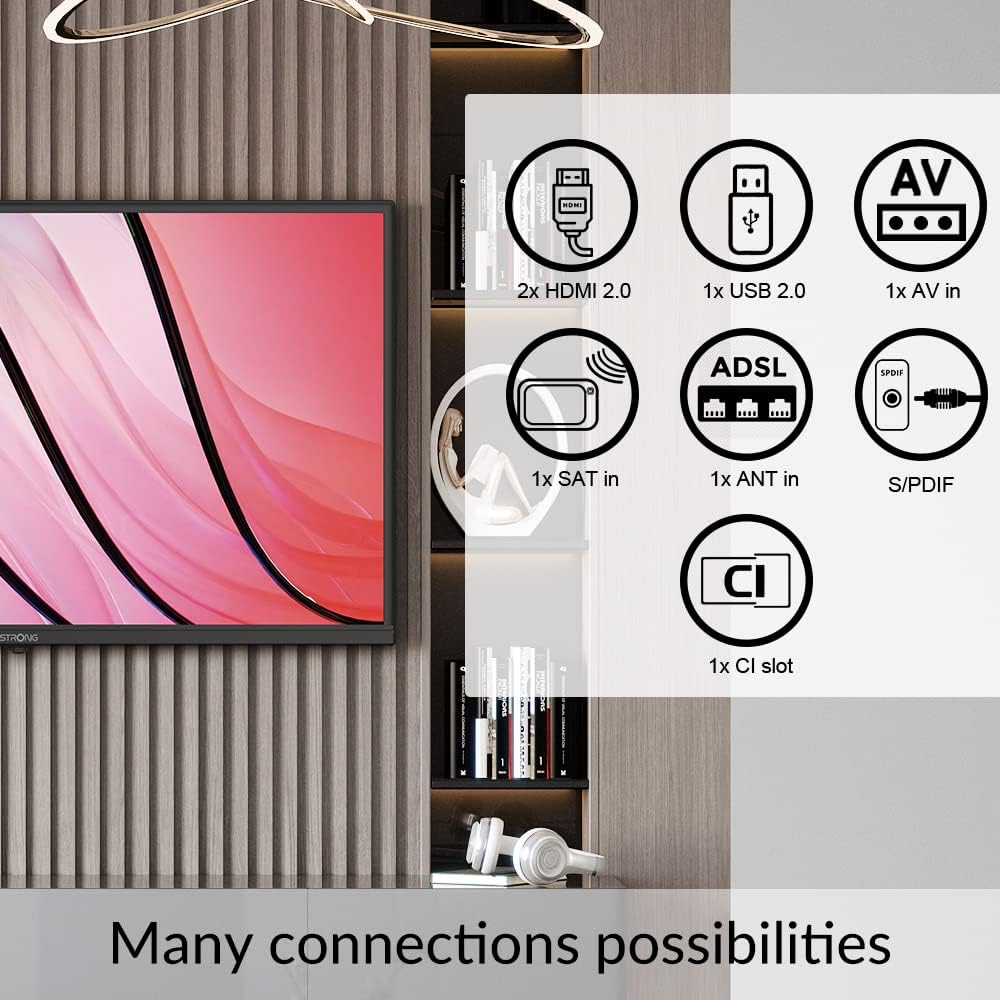
Image: A diagram illustrating the various connectivity options available on the Strong 32HF2003 television, including HDMI, USB, AV In, ANT In, SAT In, CI Slot, and S/PDIF.
USB аппаратты туташтыруу үчүн:

Сүрөт: жакын план view of the USB port on the television, demonstrating how to insert a USB drive for media playback.
4.3 Кубат туташтыруу
After all external devices are connected, plug the power cord into the TV's power inlet and then into a suitable wall outlet.
5. Иштөө нускамалары
5.1 Күйгүзүү/өчүрүү
- басыңыз КҮЧ телевизорду күйгүзүү же өчүрүү үчүн пульттагы же телевизордогу баскычты басыңыз.
- The TV will enter standby mode when turned off.
5.2 Баштапкы орнотуу устасы
The first time you turn on the TV, an initial setup wizard will guide you through language selection, country, time zone, and channel scanning. Follow the on-screen prompts.
5.3 Channel Selection and Volume Control
- колдонуу CH +/- buttons to change channels sequentially.
- Use the number buttons to directly enter a channel number.
- колдонуу VOL +/- үн баскычын жөндөө үчүн баскычтар.
- басыңыз БАСУУ аудиону убактылуу басуу үчүн баскыч.
5.4 Киргизүү булагын тандоо
To switch between connected devices (e.g., HDMI, AV, USB):
- басыңыз БУЛАК or INPUT алыстан башкаруудагы баскыч.
- Use the arrow buttons to navigate through the list of available input sources.
- Басыңыз OK or ENTER каалаган булагын тандоо үчүн.
5.5 USB медиа ойнотуу
Insert a USB storage device into the USB port. The TV will typically detect the device and prompt you to open the media browser. You can then navigate and play supported video, audio, or image files.
5.6 Электрондук программалык колдонмо (EPG)
The EPG provides a schedule of current and upcoming programs for digital channels. Press the EPG button on your remote control to access it. You can view program details and set reminders.
5.7 Мейманкана режими
This TV features a Hotel Mode, which allows for customization of settings suitable for hospitality environments. This mode typically restricts certain user adjustments and can be configured by authorized personnel.

Image: The Strong 32HF2003 television displayed in a hotel room environment, highlighting its Hotel Mode feature.
6. Техникалык тейлөө
6.1 Экранды тазалоо
- Тазалоодон мурун сыналгыдан ажыратыңыз.
- Экранды акырын сүртүү үчүн жумшак, түксүз чүпүрөктү колдонуңуз.
- өжөр белгилери үчүн, жеңил гampчүпүрөккө суу же атайын экран тазалагыч (экранга түздөн-түз чачпаңыз).
- Avoid using abrasive cleaners, alcohol, or benzene.
6.2 Кабинетти тазалоо
Wipe the TV cabinet with a soft, dry cloth. If necessary, use a slightly damp кездеме, андан кийин дароо кургатыңыз.
6.3 Battery Replacement (Remote Control)
When the remote control's range decreases, replace the two AAA batteries with new ones, ensuring correct polarity.
7. Кыйынчылыктарды
| Көйгөй | Мүмкүн себеп | Чечим |
|---|---|---|
| Күч жок | Power cord not connected; no power from outlet. | Электр шнурунун туташуусун текшерүү; розетка башка аспап менен сыноо. |
| Сүрөт жок, бирок үн бар | Incorrect input source selected; faulty cable connection. | Select correct input source; check cable connections. |
| Үн жок, бирок сүрөт бар | Үндүн үнү өчүрүлгөн же өтө төмөн; тышкы аудио системасынын маселеси. | Unmute or increase volume; check external audio connections. |
| Пульт иштебей жатат | Батареялар түгөнгөн же туура эмес салынган; тоскоолдук. | Replace batteries; ensure clear path to TV's IR sensor. |
| "Сигнал жок" билдирүүсү | Antenna/cable not connected; incorrect input source. | Check antenna/cable connection; select correct input. |
Бул чечимдерди колдонуп көргөндөн кийин көйгөй чечилбесе, кардарларды колдоо менен байланышыңыз.
8. Техникалык шарттар
| Өзгөчөлүк | Деталь |
|---|---|
| Бренд | Күчтүү |
| Модель номери | SRT32HF2003 |
| Screen Size | 32 дюйм |
| Дисплей технологиясы | LCD |
| Резолюция | 720p (HD) |
| Жаңыртуу ылдамдыгы | 60 Гц |
| Аспект катышы | 16:9 |
| Байланыш технологиясы | USB |
| Өзгөчө өзгөчөлүк | Flat, EPG, Hotel Mode |
| Камтылган компоненттер | Тур |
| Продукциянын өлчөмдөрү (стенд менен) | Approx. 28.84"W x 17.11"H x 3.17"D (732.5mm W x 480.2mm H x 19.69mm D - based on images and specs) |
| Элемент Салмагы | 3.7 килограмм (8.14 фунт) |
| Тtage | 230 вольт (AC) |
| Чыгуу Wattage (Audio) | 5 Ватт |
| Батареялар талап кылынат (Алыстан) | 2 AAA батарейка |

Image: A technical diagram illustrating the physical dimensions of the Strong 32HF2003 television in millimeters.

Image: The Dolby Audio logo superimposed on a television screen, indicating the audio technology supported by the device.
9. Кепилдик жана колдоо
Your Strong 32HF2003 television is covered by a standard manufacturer's warranty. Please refer to the warranty card included with your product or visit the official Strong webдеталдуу кепилдик шарттары жана шарттары үчүн сайт.
For technical support, troubleshooting assistance beyond this manual, or service inquiries, please contact Strong customer support through their official webсайт же продукт таңгагында көрсөтүлгөн байланыш маалыматы.
Эскертүү: Сатып алуу квитанциясын кепилдик дооматтары үчүн сатып алуунун далили катары сактаңыз.


