1. Киришүү
This manual provides detailed instructions for the setup, operation, and maintenance of your Adler AD 1196B Digital Alarm Clock. Please read this manual thoroughly before using the device to ensure proper function and longevity.
2. Продукт бүтүп калдыview
2.1 Негизги өзгөчөлүктөрү
- Digital time display with 12/24 hour format.
- Оңой үчүн арткы жарык дисплей viewing, automatically turns off after 4 seconds.
- Three independent alarm time settings.
- Three alarm activation settings: 5 days (weekday), 6 days (weekday + Saturday), 7 days (every day).
- Displays current time, date, indoor temperature, and humidity.
- Battery-powered for portability and backup during power outages.
2.2 Пакеттин мазмуну
- Adler AD 1196B Digital Alarm Clock Unit
- User Manual
Note: 2x AA batteries are required and not included in the package.

Сүрөт 1: Алдыңкы view of the Adler AD 1196B Digital Alarm Clock, displaying 12:00, 26°C, 56% humidity, and the current date.
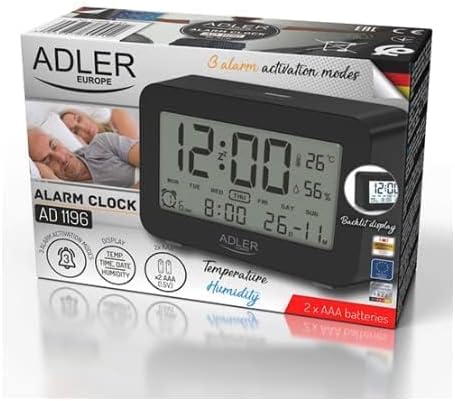
Figure 2: The Adler AD 1196B Digital Alarm Clock shown in its retail packaging, highlighting key features.
3. Орнотуу
3.1 Батареяны орнотуу
- Ойготкуч сааттын артындагы батарея бөлүкчөсүнүн капкагын табыңыз.
- Бөлүмдү ачуу үчүн капкакты жылдырыңыз же көтөрүңүз.
- Бөлүмдүн ичинде көрсөтүлгөндөй туура полярдуулукту (+ жана -) камсыз кылып, эки (2) AA батарейкасын салыңыз.
- Батарея бөлүкчөсүнүн капкагын бекем орнотуңуз.
The clock will power on automatically once batteries are inserted. The display will show default settings or begin flashing.
3.2 Баштапкы күйгүзүү
Upon successful battery installation, the display will illuminate. You may need to press a button (e.g., "MODE" or "SET") to activate the display if it remains blank after battery insertion. The backlight will activate briefly and then turn off.
4. Иштөө нускамалары
Familiarize yourself with the control buttons, typically located on the back or top of the device. Common buttons include: MODE, SET, UP/+, DOWN/-, ALARM.
4.1 Убакытты коюу
- басып, кармап туруңуз SET баскычы (же РЕЖИМ button, depending on model) until the hour digits begin to flash.
- колдонуу UP/+ or ТӨМЕН/- саатты тууралоо үчүн баскычтар.
- Басыңыз SET (же РЕЖИМ) again to move to the minute setting.
- колдонуу UP/+ or ТӨМЕН/- мүнөттөрдү тууралоо үчүн баскычтар.
- Басууну улантыңыз SET (же РЕЖИМ) to cycle through 12/24 hour format, and then to exit time setting mode.
4.2 Күндү коюу
- Кадимки убакыт дисплейинен баскычын басыңыз РЕЖИМ button repeatedly until the date display starts flashing or you enter date setting mode.
- The year digits may flash first. Use UP/+ or ТӨМЕН/- жылды тууралоо.
- Басыңыз РЕЖИМ to move to the month setting, then adjust with UP/+ or ТӨМЕН/-.
- Басыңыз РЕЖИМ to move to the day setting, then adjust with UP/+ or ТӨМЕН/-.
- Басыңыз РЕЖИМ again to confirm and exit date setting.
4.3 Setting Alarms (Alarm 1, Alarm 2, Alarm 3)
The AD 1196B features three independent alarms. The process is similar for each.
- басыңыз АЛАРМ үчүн бир жолу басыңыз view Alarm 1. Press again for Alarm 2, and a third time for Alarm 3.
- Ал эми viewing the desired alarm (e.g., AL1), press and hold the SET ойготкуч сааттын цифралары жарк этмейинче басыңыз.
- Колдонуу UP/+ or ТӨМЕН/- ойготкуч саатын коюуга.
- Басыңыз SET to move to the alarm minute setting.
- Колдонуу UP/+ or ТӨМЕН/- ойготкуч мүнөттөрдү коюуга.
- Басыңыз SET again to confirm the alarm time.
- Ойготкучту жандыруу/өчүрүү үчүн басыңыз АЛАРМ button repeatedly until the alarm icon (e.g., bell symbol) appears or disappears next to the corresponding alarm number (AL1, AL2, AL3).
4.4 Alarm Activation Modes (5, 6, 7 Days)
After setting an alarm time, you can choose its activation frequency:
- While in alarm setting mode (after setting minutes for an alarm), press SET one more time. The display will show a day indicator (e.g., "5 DAY", "6 DAY", "7 DAY").
- Колдонуу UP/+ or ТӨМЕН/- to cycle through the options:
- 5 КҮН: Alarm sounds Monday to Friday.
- 6 КҮН: Alarm sounds Monday to Saturday.
- 7 КҮН: Alarm sounds every day of the week.
- Басыңыз SET to confirm your selection and exit alarm setting for that specific alarm.
4.5 Арткы жарык функциясы
The display features a backlight for improved visibility in low light conditions. The backlight automatically activates when a button is pressed and turns off after approximately 4 seconds to conserve battery power.
4.6 Температура жана нымдуулук дисплейи
The alarm clock continuously displays the current indoor temperature (in Celsius) and relative humidity percentage. No specific action is required to view these readings; they are shown on the main display.
5. Техникалык тейлөө
5.1 Тазалоо
To clean the alarm clock, gently wipe the surface with a soft, dry cloth. Do not use abrasive cleaners, solvents, or chemical sprays, as these may damage the display or casing.
5.2 Батареяны алмаштыруу
When the display becomes dim or the clock functions erratically, it is time to replace the batteries. Follow the battery installation steps in Section 3.1. Always replace both batteries with new AA batteries of the same type. Dispose of old batteries responsibly according to local regulations.
6. Кыйынчылыктарды
| Көйгөй | Мүмкүн себеп | Чечим |
|---|---|---|
| Дисплей бош же күңүрт. | Батареялар аз же туура эмес орнотулган. | Туура полярдуулукту камсыз кылуу менен батарейкаларды жаңы AA батарейкалары менен алмаштырыңыз. |
| Ойготкуч угулбайт. | Ойготкуч иштетилген эмес же туура эмес орнотулган. | Ensure the alarm icon is visible on the display. Verify the alarm time and activation mode (5, 6, or 7 days) are set correctly. |
| Убакыт/дата туура эмес. | Time/Date was not set or reset after battery change. | Follow instructions in Section 4.1 and 4.2 to set the correct time and date. |
| Температура/нымдуулук көрсөткүчтөрү так эмес окшойт. | Clock is placed near a heat source, vent, or in direct sunlight. | Relocate the clock to a stable environment away from extreme temperature or humidity fluctuations. Allow time for readings to stabilize. |
7. Техникалык шарттар
- Модел: AD 1196B
- Кубат булагы: 2 x AA батарейкалар (киргизилген эмес)
- Дисплей түрү: Арткы жарыгы бар санариптик LCD
- Функциялары: Time, Date, Day of Week, Temperature (°C), Humidity (%), 3 Alarms with 3 Activation Modes
- Арткы жарыктын узактыгы: Болжол менен 4 секунд
- Материал: Пластик
- Өлчөмдөрү (W x D x H): 11 см х 3.81 см х 5 см
- Салмагы: 1.6 кг
8. Кепилдик жана колдоо
For warranty information or technical support, please refer to the warranty card included with your product or contact the manufacturer directly. Keep your purchase receipt as proof of purchase.
Manufacturer: Adler


