1. Киришүү
This manual provides essential information for the installation, operation, and maintenance of your Lorex 4K 8MP IP Bullet PoE Wired Security Camera, Model E842CAB. This camera is designed for outdoor surveillance, offering 4K Ultra HD resolution, Color Night Vision, Smart Motion Detection, and Listen-in Audio capabilities. It features Power over Ethernet (PoE) for simplified installation and an IP67 weatherproof rating for reliable performance in various environmental conditions.
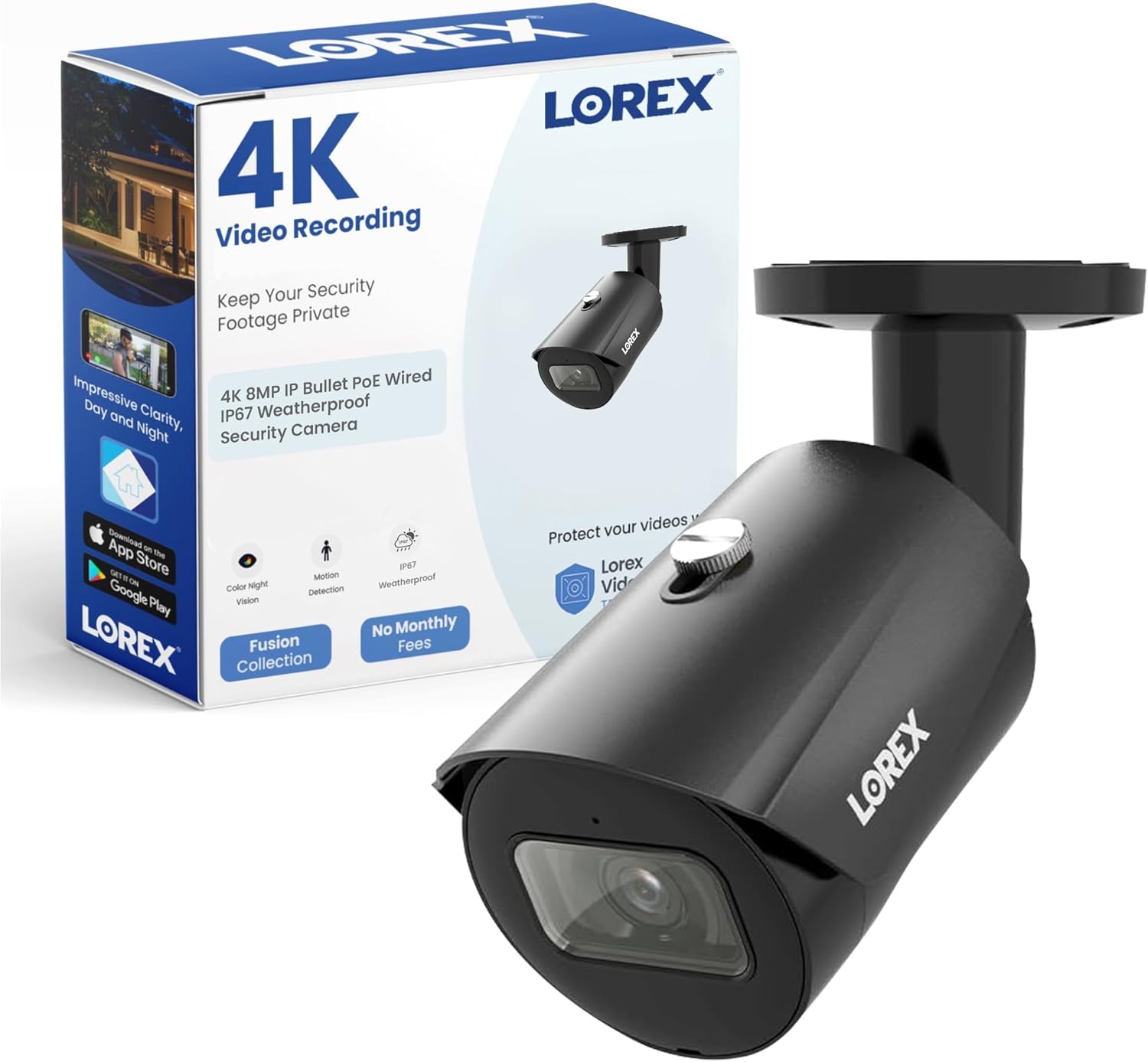
Image 1.1: Lorex 4K 8MP IP Bullet PoE Wired Security Camera (Model E842CAB) and its retail packaging.
2. Пакеттин мазмуну
Сиздин пакетте бардык компоненттер бар экенин текшериңиз:
- 1x 4K Ultra HD Bullet Camera (Model E842CAB)
- 1x Cat5 Ethernet Extension Cable
- 1x Mounting Bracket & Kit (screws and wall plugs)
3. Орнотуу жана орнотуу
3.1 Сайтты тандоо
Choose a suitable location for your camera. The Lorex E842CAB is rated IP67 weatherproof, making it ideal for outdoor use. Consider areas that provide a clear view of the surveillance zone and are within reach of your network video recorder (NVR) or PoE switch.
3.2 Камераны орнотуу
The camera supports both ceiling and wall mounting. Use the provided mounting bracket and hardware for secure installation.
- Position the mounting bracket at the desired location and mark the drill holes.
- Drill pilot holes and insert the wall plugs if mounting on masonry or drywall.
- Берилген бурамалар аркылуу монтаждык кронштейнди бетке бекитиңиз.
- Камераны орнотуучу кронштейнге бекитип, оптималдуу камтуу үчүн анын бурчун тууралаңыз.

Image 3.1: The camera's IP67 weatherproof design ensures functionality in various weather conditions, including rain.
3.3 Камераны туташтыруу
This camera utilizes Power over Ethernet (PoE), meaning a single Ethernet cable provides both power and data connection to your NVR or PoE switch.
- Connect one end of the Cat5 Ethernet cable to the camera's Ethernet port.
- Connect the other end of the Ethernet cable to an available PoE port on your NVR or PoE switch.
- Ensure the NVR or PoE switch is powered on. The camera should automatically power up and connect to the network.

Image 3.2: Wired Ethernet connection provides reliable power and data for the security camera.
4. Иштөө нускамалары
4.1 4K Ultra HD Video Recording
The camera features an 8MP image sensor, providing 4K (3840 x 2160) resolution video. This high resolution allows for exceptional detail and clarity, which is beneficial for identifying subjects and for digital zooming during post-recording analysis.

Image 4.1: 4K Ultra HD resolution captures fine details, enhancing digital zoom capabilities.
4.2 Color Night Vision (CNV)
The camera's Color Night Vision technology provides full-color video in low-light conditions. In environments with sufficient ambient light, the camera will maintain color imaging. In complete darkness, it automatically switches to infrared (IR) LEDs for clear black and white footage.

Image 4.2: Comparison of Infrared Night Vision (left) and Color Night Vision (right) in a backyard setting.
4.3 Smart Motion Detection
This feature allows the camera to differentiate between general motion and the movement of people or vehicles. When enabled, you will receive push notifications only when a person or vehicle is detected, significantly reducing false alerts from other movements like animals or swaying branches.

Image 4.3: Smart Motion Detection provides accurate alerts, reducing unnecessary notifications.
4.4 Listen-in Audio
The integrated microphone enables listen-in audio recording, capturing sounds from the camera's vicinity. This provides an additional layer of information for surveillance, such as voices, which can be crucial for evidence or context.

Image 4.4: Listen-in Audio captures sound, adding valuable context to video recordings.
4.5 Lorex App Control
Manage and monitor your camera using the Lorex Home app, available for Android devices. The app allows you to view жандуу тоюттар, реview recordings, configure motion detection settings, and receive alerts remotely.
5. Техникалык тейлөө
Үзгүлтүксүз техникалык тейлөө камераңыздын оптималдуу иштешин жана узак мөөнөттүү иштешин камсыз кылат.
- Линзаны тазалоо: Мезгил-мезгили менен камеранын линзасын жумшак, гamp cloth to remove dust, dirt, or water spots that may affect image clarity. Avoid abrasive cleaners.
- Кабелдик текшерүү: Check all cable connections for wear, damage, or loose fittings, especially for outdoor installations. Ensure waterproof connections are sealed properly.
- Программалык камсыздоонун жаңыртуулары: Regularly check for and install firmware updates through your NVR or the Lorex app to ensure your camera has the latest features and security enhancements.
- Физикалык текшерүү: Inspect the camera housing and mounting bracket for any signs of damage or loosening due to weather or tampring.
6. Кыйынчылыктарды
If you encounter issues with your Lorex security camera, refer to the following common troubleshooting steps:
| Көйгөй | Мүмкүн себеп | Чечим |
|---|---|---|
| Сүрөт/видео түрмөгү жок | No power, loose Ethernet cable, NVR/PoE switch issue | Check PoE connection, ensure NVR/PoE switch is powered, try a different Ethernet port or cable. |
| Сүрөттүн сапаты начар | Dirty lens, low light, network bandwidth issues | Clean the camera lens. Ensure adequate lighting for Color Night Vision. Check network connection speed. |
| Кыймылды аныктоо эскертүүлөрү жок | Motion detection disabled, incorrect sensitivity settings, network issues | Verify motion detection is enabled in the Lorex app/NVR. Adjust sensitivity and detection zones. Check network connectivity. |
| Аудио жаздыруу жок | Audio recording disabled, microphone obstruction | Ensure audio recording is enabled in settings. Check for any physical obstruction of the microphone. |
7. Техникалык шарттар
Detailed technical specifications for the Lorex 4K 8MP IP Bullet PoE Wired Security Camera (Model E842CAB):
- Модель аты: E842CAB
- Натыйжалуу дагы эле чечим: 8 депутат
- Видео тартуу токтому: 4K (3840 x 2160)
- Кадр ылдамдыгы: секундасына 30 кадр
- Байланыш технологиясы: Зымдуу (PoE)
- Ички/тышкы колдонуу: Сыртта
- Эл аралык коргоо рейтинги: IP67 (Аба ырайына чыдамдуу)
- Түнкү көрүү диапазону: 30 метр
- Төмөн жарык технологиясы: Түнкү көрүнүш
- Viewбурч: 125 градус
- Audio Visual Recording Capabilities: Video, Listen-in Audio
- Эскертүү түрү: Motion Only (Person/Vehicle Detection)
- Монтаж түрү: Шыпка орнотуу, дубалга орнотуу
- Кубат булагы: Зымдуу электр (PoE аркылуу)
- Продукциянын өлчөмдөрү: 11.5 x 6 x 5 дюйм
- Элемент Салмагы: 1.06 фунт
- UPC: 695529051444
8. Кепилдик жана колдоо
For warranty information, technical support, or further assistance with your Lorex 4K 8MP IP Bullet PoE Wired Security Camera, please visit the official Lorex website or contact Lorex customer service directly. Keep your purchase receipt for warranty claims.
Lorex Support: www.lorex.com/support


